
Buying Guide
The Best Thunderbolt 5 Docks with DisplayPort: Our Picks
We looked at 4 thunderbolt 5 docks with DisplayPort side by side, with the trade-offs that separate them and who each one suits.
By Jamie Cole, Lead Product Researcher
9 min read4 products evaluated
We may earn a commission from purchases made through links in this guide. Learn more.
1 signal paths, but whether the actual DisplayPort cable ships in the box or needs to be purchased separately varies more than most listings make obvious.
1 cable alongside its dock rather than requiring a separate purchase.
Quick Picks
Our 4 recommendations at a glance. Tap a pick for the full verdict.

Best Overall
Dell Pro Thunderbolt 5 Smart Dock SD25TB5 Bundle
Buyers who want a complete out-of-box kit with every display cable included
Our take Check price for Dell Pro Thunderbolt 5 Smart Dock SD25TB5 Bundle (opens in a new tab)

Best for MacBook Pro
Kensington EQ Pro Thunderbolt 5 Dock
MacBook Pro owners who want DisplayPort output alongside lockable SSD storage
Our take Check price for Kensington EQ Pro Thunderbolt 5 Dock (opens in a new tab)

Best Cross-Platform
StarTech Thunderbolt 5 USB4 Dock
Buyers who want flexible independent DisplayPort, HDMI, and USB-C outputs at the lowest price
Our take Check price for StarTech Thunderbolt 5 USB4 Dock (opens in a new tab)
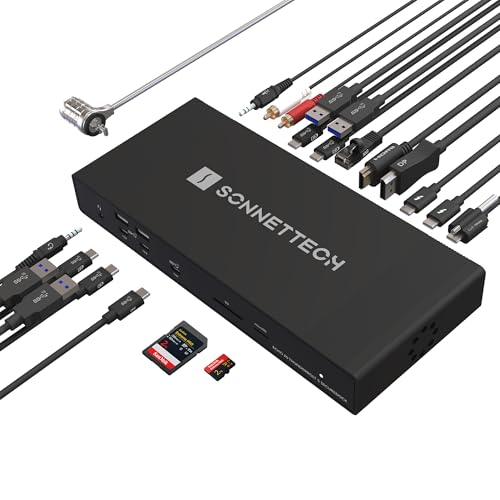
Best for 10GbE Networking
Sonnet Echo 20 Thunderbolt 5 SecureDock
Professionals who want native DisplayPort output paired with genuine 10GbE networking
Our take Check price for Sonnet Echo 20 Thunderbolt 5 SecureDock (opens in a new tab)
| Pick | Best for | Key spec | Price |
|---|---|---|---|
| Buyers who want a complete out-of-box kit with every display cable included | HDMI 2.1 and DisplayPort 2.1 outputs, cables included | Check price for Dell Pro Thunderbolt 5 Smart Dock SD25TB5 Bundle (opens in a new tab) |
| MacBook Pro owners who want DisplayPort output alongside lockable SSD storage | Single 8K or dual 6K@60Hz (MacBook Pro/Max/M4) | Check price for Kensington EQ Pro Thunderbolt 5 Dock (opens in a new tab) |
| Buyers who want flexible independent DisplayPort, HDMI, and USB-C outputs at the lowest price | DisplayPort, HDMI, and USB-C outputs (independent) | Check price for StarTech Thunderbolt 5 USB4 Dock (opens in a new tab) |
| Professionals who want native DisplayPort output paired with genuine 10GbE networking | Native DisplayPort output, up to 4K DisplayPort monitors | Check price for Sonnet Echo 20 Thunderbolt 5 SecureDock (opens in a new tab) |
Our Picks
Best Overall1 of 4
Dell Pro Thunderbolt 5 Smart Dock SD25TB5 Bundle on Amazon (opens in a new tab)
This dock's listing specifically states the bundle includes a premium HDMI cable, a USB-C data/video cable, and a DisplayPort cable, meaning you get everything needed out of the box rather than discovering after purchase that the DisplayPort cable is sold separately.
Best for
- Buyers who want a complete out-of-box kit with every display cable included
Why we like it
Its 300W power delivery specifically supports a single-cable workspace transformation with power, displays, peripherals, and networking through one connection.
Compared to the Kensington and StarTech picks below, this one's complete connectivity kit removes a common gotcha where buyers assume a DisplayPort-equipped dock ships with the actual DisplayPort cable, only to find it's an additional purchase.
Best for buyers who want a complete out-of-box kit with HDMI, USB-C, and DisplayPort cables all included.
Key dimensions & specs
- HDMI 2.1 and DisplayPort 2.1 outputs, cables included
- 300W power delivery, single-cable workspace
- Multiple USB-A, USB-C, and Thunderbolt ports
Pros
- DisplayPort cable is included, not a separate purchase
- 300W power delivery supports a full single-cable workspace
- Complete connectivity kit with HDMI, USB-C, and DisplayPort all included
Cons
- Higher price than the Kensington or StarTech picks in this comparison
- Bundle-specific SKU may vary in availability compared to the base dock
Best for MacBook Pro2 of 4
Kensington EQ Pro Thunderbolt 5 Dock on Amazon (opens in a new tab)
This dock's listing specifically states it's optimized for MacBook M-Series Pro, Max, and M4 chipsets, delivering up to single 8K or dual 6K displays at 60Hz through its DisplayPort and Thunderbolt 5 outputs.
Best for
- MacBook Pro owners who want DisplayPort output alongside lockable SSD storage
Why we like it
Compared to the Dell pick above, this one's Kensington Konnect software lets you assign dock buttons to specific functions like backing up iPhone photos directly to your MacBook or SSD, or activating a Do Not Disturb focus mode, a distinct software feature.
Best for MacBook Pro owners who want DisplayPort output alongside lockable SSD storage and custom dock button functions.
Key dimensions & specs
- Single 8K or dual 6K@60Hz (MacBook Pro/Max/M4)
- Built-in lockable PCIe M.2 SSD slot (SSD not included)
- 140W dynamic PD, KonstantCharge, 19-in-1 ports
Pros
- Lockable PCIe M.2 SSD slot adds secure storage expansion
- Kensington Konnect software enables custom dock button functions
- KonstantCharge keeps devices charging even when undocked
Cons
- Optimized specifically for MacBook, not a general cross-platform dock
- SSD is sold separately and must be purchased and installed independently
Best Cross-Platform3 of 4
StarTech Thunderbolt 5 USB4 Dock on Amazon (opens in a new tab)
This dock's listing specifically states triple 4K@144Hz display support on Windows comes through HDMI, DisplayPort, and USB-C simultaneously and independently, giving flexible output options rather than forcing every monitor through the same port type.
Best for
- Buyers who want flexible independent DisplayPort, HDMI, and USB-C outputs at the lowest price
Why we like it
Its driverless plug-and-play design works consistently across Windows 11 and macOS 15/26 without requiring separate software installation.
Compared to the Dell and Kensington picks above, this one's lower price makes it the most low-cost option in this comparison while still delivering a real DisplayPort output alongside HDMI and USB-C.
Best for buyers who want flexible independent DisplayPort, HDMI, and USB-C outputs at the lowest price in this comparison.
Key dimensions & specs
- DisplayPort, HDMI, and USB-C outputs (independent)
- Driverless across Windows 11 and macOS 15/26
- 140W PD, 2.5GbE, SD 4.0 card slots
Pros
- Lowest price in this comparison at $282.99
- DisplayPort, HDMI, and USB-C outputs work independently and simultaneously
- Driverless design works across Windows and macOS without extra software
Cons
- Quad display support on Mac requires daisy-chaining two monitors specifically
- No built-in storage expansion unlike the Kensington pick above
Best for 10GbE Networking4 of 4
Sonnet Echo 20 Thunderbolt 5 SecureDock on Amazon (opens in a new tab)
This dock's listing specifically states built-in HDMI and DisplayPort outputs support up to 8K HDMI or 4K DisplayPort monitors, plus additional displays through Thunderbolt ports, and its 10GbE networking uses standard Cat6 or Cat6A cabling for ultra-fast connections to NAS systems.
Best for
- Professionals who want native DisplayPort output paired with genuine 10GbE networking
Why we like it
Its 20 total interfaces include three Thunderbolt 5 ports and nine 10Gbps USB ports.
Compared to the StarTech and Kensington picks above, this one pairs its native DisplayPort output with genuine 10 Gigabit Ethernet networking, a combination aimed specifically at professional workflows that need both high-resolution displays and fast wired networking simultaneously.
Best for professionals who want native DisplayPort output paired with genuine 10GbE networking.
Key dimensions & specs
- Native DisplayPort output, up to 4K DisplayPort monitors
- 10GbE via standard Cat6/Cat6A cabling
- 20 total interfaces, 3x Thunderbolt 5 ports, 140W charging
Pros
- Native DisplayPort output alongside genuine 10 Gigabit Ethernet networking
- Works with standard Cat6/Cat6A cabling most offices already have
- 20 total interfaces cover extensive peripheral needs
Cons
- Highest price in this comparison tied with the Dell bundle
- DisplayPort resolution ceiling is lower than the dock's HDMI output
How We Chose These Thunderbolt 5 Docks with DisplayPort
Each pick was assessed across 5 criteria weighted for real-world use.
- Whether the DisplayPort Cable Is Actually Included
- Compared whether each listing bundles a DisplayPort cable or requires a separate purchase.
- Compared documented DisplayPort-specific resolution and refresh rate limits versus the dock's HDMI output.
- Compared Mac-optimized versus cross-platform DisplayPort support.
- Additional Storage and Networking Features
- Compared built-in SSD expansion and Ethernet speed alongside DisplayPort output.
- Independent vs Shared Port Bandwidth
- Compared whether DisplayPort, HDMI, and USB-C outputs function independently and simultaneously.
What to Look for in a Thunderbolt 5 Dock with DisplayPort
Key buying criteria so you get the right fit the first time.
A DisplayPort-Equipped Dock Doesn't Always Include the Actual DisplayPort Cable in the Box
The Dell Pro Bundle specifically advertises that its package includes a DisplayPort cable alongside HDMI and USB-C cables, an explicit inclusion that isn't guaranteed on every dock with a DisplayPort output, since many listings only confirm the port exists without confirming a matching cable ships with it. This matters if you don't already own a DisplayPort cable rated for the resolution and refresh rate you need, since discovering after purchase that you need to buy one separately adds real unplanned cost and delay. Check a dock's included-accessories list specifically for a named DisplayPort cable, rather than assuming the presence of a DisplayPort output means a cable is automatically included.
A DisplayPort Output's Resolution Ceiling Can Differ From the Same Dock's HDMI Output
The Sonnet Echo 20 pick specifically states its built-in outputs support up to 8K through HDMI but only up to 4K through DisplayPort, a real difference in maximum resolution between the two port types on the identical physical dock. This matters if you're specifically relying on the DisplayPort output for your primary monitor and assumed it would match the dock's headline 8K claim, since that claim may only apply to a different port on the same device. Check a dock's resolution specs broken down by exact port type, not just its single best-case headline resolution figure, if your monitor specifically connects via DisplayPort.
A Mac-Optimized DisplayPort Dock May Not Deliver the Same Performance on a Windows Machine
The Kensington EQ Pro pick is specifically optimized for MacBook M-Series Pro, Max, and M4 chipsets, meaning its documented display specs and feature set are built around and tested for that specific platform rather than as a general cross-platform claim. This matters if you specifically use a MacBook Pro with a qualifying chip and want a dock tuned for that exact use case, and matters less or could even be a mismatch if you regularly switch to or also use a Windows machine. Check whether a dock's DisplayPort specs are stated for your specific platform, or whether the listing is Mac-optimized in a way that may not carry over identically to Windows.
Independent Port Bandwidth Matters More When Running Multiple Different Display Connection Types Simultaneously
The StarTech pick specifically supports DisplayPort, HDMI, and USB-C outputs independently and simultaneously, meaning connecting a monitor to each port type doesn't force a tradeoff or bandwidth-sharing compromise between them. This matters if you're running a mixed-monitor setup with different connection types (one DisplayPort monitor, one HDMI monitor), since a dock where these outputs aren't independent could force you to choose between them or accept reduced performance on one. Check whether a dock's multiple video output types are documented as working independently and simultaneously, rather than assuming any combination of ports will work together without compromise.
A Built-In Lockable Storage Slot Adds a Real Security Layer Beyond Just Storage Expansion
2 SSD slot adds a physical security layer that a standard, non-lockable SSD slot doesn't provide, meaning sensitive data on an installed drive is harder to physically remove without authorization. This matters if you're storing sensitive data on the dock's expansion storage in a shared or semi-public workspace, and matters less for a private home office where physical theft of an installed component isn't a real concern. Check whether a dock's storage expansion slot is specifically described as lockable if physical data security is a real consideration for your workspace.
How to Choose a Thunderbolt 5 Dock with DisplayPort
| A complete kit with every cable included | Dell Pro Thunderbolt 5 Smart Dock SD25TB5 Bundle |
|---|---|
| DisplayPort output with lockable SSD storage for Mac | Kensington EQ Pro Thunderbolt 5 Dock |
| Flexible independent outputs at the lowest price | StarTech Thunderbolt 5 USB4 Dock |
| DisplayPort output paired with 10GbE networking | Sonnet Echo 20 Thunderbolt 5 SecureDock |
Cables Included vs Cables Purchased Separately
- Cables included (Dell Pro Bundle)
- This bundle specifically includes HDMI, USB-C, and DisplayPort cables, avoiding a common surprise where the DisplayPort cable turns out to be a separate purchase.
- Cables typically separate (Kensington, StarTech, Sonnet)
- 1 cable purchase is worth planning for.
If you want to avoid any additional cable-buying step, the Dell bundle's complete kit is the most straightforward. If you already own a compatible DisplayPort cable, the other picks may offer better core value for the same budget.
| MacBook Pro with Pro or Max chip | Kensington EQ Pro Thunderbolt 5 Dock |
|---|---|
| Mixed Mac and Windows household | StarTech Thunderbolt 5 USB4 Dock |
| Dell Pro Bundle or Sonnet Echo 20 |
For a Monitor With DisplayPort-Only Input Specifically
- A dock with an independent DisplayPort output rather than one that shares bandwidth or requires switching away from other connected displays.
- The StarTech pick specifically supports DisplayPort, HDMI, and USB-C outputs independently and simultaneously, making it a strong fit if one of your monitors is DisplayPort-only.
- 95 price removes any additional cable-shopping step.
- 99, the lowest price in this comparison.
Frequently Asked Questions
Do all Thunderbolt 5 docks with a DisplayPort output include the actual DisplayPort cable?
No, the Dell Pro Bundle specifically confirms an included DisplayPort cable, but other docks in this comparison don't make the same explicit inclusion claim, so checking the included-accessories list before assuming a cable ships in the box is worth doing.
What's the most common mistake buyers make when choosing a Thunderbolt 5 dock for DisplayPort output?
Assuming a dock's headline resolution figure applies equally across every port type, when DisplayPort and HDMI outputs on the same dock can have different resolution ceilings, as documented on the Sonnet Echo 20 pick.
Is the Kensington EQ Pro worth it if I use a Windows laptop instead of a MacBook?
The Kensington EQ Pro is specifically optimized for MacBook M-Series Pro, Max, and M4 chipsets, so a Windows-focused buyer would likely get better documented cross-platform support from the StarTech or Dell picks in this comparison instead.
Can I connect a DisplayPort monitor and an HDMI monitor to the same dock at the same time?
The StarTech pick specifically supports DisplayPort, HDMI, and USB-C outputs independently and simultaneously, making it a strong choice for exactly this kind of mixed-monitor setup.
Does the Sonnet Echo 20's DisplayPort output support the same 8K resolution as its HDMI output?
No, the Sonnet Echo 20 listing specifically states its DisplayPort output supports up to 4K monitors while its HDMI output can reach up to 8K, a real difference worth checking if your monitor connects via DisplayPort specifically.
Do I need to buy an SSD separately for the Kensington EQ Pro's storage slot?
2 SSD slot is sold without the SSD itself, so you'll need to purchase a compatible drive separately to use that storage expansion feature.
Bottom Line
Best overall: Dell Pro Thunderbolt 5 Smart Dock SD25TB5 Bundle — best overall pick in this roundup. See the full verdicts above for every pick, with pros, cons and who each one suits.
Browse all thunderbolt 5 docks with displayport on Amazon — Prime-eligible options with current pricing.