
Buying Guide
The Best Thunderbolt 5 Docks for Everyday Desk Work
We looked at 4 thunderbolt 5 docks side by side, with the trade-offs that separate them and who each one suits.
By Jamie Cole, Lead Product Researcher
9 min read4 products evaluated
We may earn a commission from purchases made through links in this guide. Learn more.
Thunderbolt 5 delivers up to 80Gbps bi-directional bandwidth with a Bandwidth Boost feature that can allocate up to 120Gbps toward demanding displays, doubling Thunderbolt 4's core throughput, but the practical differences between docks come down to display support by exact chip, warranty coverage, and daisy-chain flexibility.
We compared this lineup on per-chip Apple Silicon display documentation, warranty length and coverage amount, and total port count, since one listing specifically backs its dock with 3-year coverage up to $2,500 in protection, a concrete figure worth comparing against competitors' standard warranty terms.
Quick Picks
Our 4 recommendations at a glance. Tap a pick for the full verdict.

Best Overall
CalDigit TS5 Thunderbolt 5 Dock, 15 Port
Buyers who want the most comprehensive port count with sustained full-power delivery
Our take Check price for CalDigit TS5 Thunderbolt 5 Dock, 15 Port (opens in a new tab)
Best Warranty Coverage
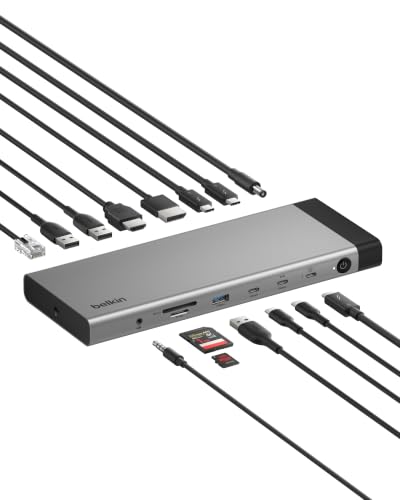
Belkin 140W Thunderbolt 5 Dock, 14-in-1
Buyers who want the strongest disclosed warranty coverage with comprehensive electrical safety protection
Our take Check price for Belkin 140W Thunderbolt 5 Dock, 14-in-1 (opens in a new tab)

Best for Apple Silicon Documentation
StarTech Thunderbolt 5 Universal Docking Station, Quad Monitor
Buyers who want the most detailed per-chip Apple Silicon display documentation
Our take Check price for StarTech Thunderbolt 5 Universal Docking Station, Quad Monitor (opens in a new tab)

Best Fast File Transfer
Anker Prime TB5 Docking Station, 14-in-1
Buyers who want a concrete, relatable large-file transfer speed benchmark with dual 8K support
Our take Check price for Anker Prime TB5 Docking Station, 14-in-1 (opens in a new tab)
Our Picks
Best Overall1 of 4
CalDigit TS5 Thunderbolt 5 Dock, 15 Port on Amazon (opens in a new tab)
This dock's 4 Thunderbolt 5 ports (1 host, 3 downstream) each support up to 80Gb/s bandwidth with Bandwidth Boost allocating up to 120Gb/s to connected displays when needed, backed by a 240W power supply that sustains power delivery across all 15 ports simultaneously.
Best for
- Buyers who want the most comprehensive port count with sustained full-power delivery
Why we like it
Its dual 8K@60Hz display support and UHS-II SD and microSD card readers round out a comprehensive professional workstation solution.
Compared to the Belkin and StarTech picks below, this one's aluminum heat sink chassis is specifically engineered as an external heat sink to dissipate the heat generated by its substantial power delivery, meticulously tested for safety and sustained performance. Its 140W host charging specifically covers power-hungry 16-inch M3/M4/M5 Pro and Max series MacBook Pro models.
Best for buyers who want the most comprehensive port count with sustained full-power delivery across every connected device.
Key dimensions & specs
- 4x Thunderbolt 5 ports, 15 total ports
- Dual 8K@60Hz displays, 140W host charging
- 240W sustained power supply, aluminum heat sink chassis
Pros
- Comprehensive 15-port design covers nearly every peripheral need
- 240W power supply sustains full power across all ports simultaneously
- 140W charging specifically covers demanding 16-inch MacBook Pro Max models
Cons
- Highest price in this comparison at $399.95
- Full performance requires a genuine Thunderbolt 5 or USB4 v2 host
Best Warranty Coverage2 of 4
Belkin 140W Thunderbolt 5 Dock, 14-in-1 on Amazon (opens in a new tab)
This dock's 3-year coverage specifically protects up to $2,500 in connected device damage, a concrete monetary figure that gives real assurance beyond a standard hardware replacement warranty.
Best for
- Buyers who want the strongest disclosed warranty coverage with comprehensive electrical safety protection
Why we like it
Its Belkin Smart Safety System includes a 6-point protection system covering over-voltage, overload, over-current, over-temperature, short-circuit protection, and fire-resistant materials.
Compared to the CalDigit pick above, this one's packaging is specifically 100% plastic-free, a concrete sustainability disclosure rather than vague eco-marketing language. Its triple 4K monitor support at 144Hz or 8K@60Hz, combined with daisy-chaining up to 6 Thunderbolt devices, delivers flexible multi-display and expansion capability.
Best for buyers who want the strongest disclosed warranty coverage with a 6-point electrical safety system.
Key dimensions & specs
- 3-year coverage up to $2,500 in connected device protection
- 6-point Belkin Smart Safety System
- Triple 4K@144Hz or 8K@60Hz, 100% plastic-free packaging
Pros
- 3-year coverage with a concrete $2,500 protection figure
- 6-point electrical safety system protects connected devices
- 100% plastic-free packaging is a concrete sustainability disclosure
Cons
- Fewer total ports (14) than the CalDigit pick's 15
- 140W charging is slightly lower than some competing docks' peak wattage
Best for Apple Silicon Documentation3 of 4
StarTech Thunderbolt 5 Universal Docking Station, Quad Monitor on Amazon (opens in a new tab)
This dock's listing specifically breaks down Apple Silicon display support by exact chip: dual 6K on MacBook Pro/Max models, up to triple 4K at 120Hz on M5 Pro chips, and quad 4K displays when daisy-chaining two Thunderbolt monitors on M5 Max chips, a granular level of documentation.
Best for
- Buyers who want the most detailed per-chip Apple Silicon display documentation
Why we like it
Its quad 4K@60Hz display support on Windows via HDMI and DisplayPort delivers a high-performance multi-monitor workspace.
Compared to the CalDigit and Belkin picks above, this one's driverless plug-and-play design works consistently across macOS and Windows specifically to reduce OS-specific workarounds and help desk tickets in shared and hot-desking environments. Its integration in StarTech's Innovation Lab testing across more than 100 monitors and major laptop brands backs its cross-platform reliability claims.
Best for buyers who want the most detailed per-chip Apple Silicon display documentation with driverless cross-platform reliability.
Key dimensions & specs
- Quad 4K@60Hz (Windows) or per-chip Mac documentation
- Driverless across macOS and Windows
- K-slot and Nano lock slots, 140W PD
Pros
- Most detailed per-chip Apple Silicon display documentation in this comparison
- Driverless design reduces OS-specific setup friction
- Tested across 100+ monitors and major laptop brands in StarTech's Innovation Lab
Cons
- Quad display support on Mac requires daisy-chaining two monitors specifically
- No stated built-in storage expansion like some competing docks
Best Fast File Transfer4 of 4
Anker Prime TB5 Docking Station, 14-in-1 on Amazon (opens in a new tab)
This dock's listing specifically states a 150GB file transfers in just 25 seconds through its Thunderbolt 5 port, a concrete, easy-to-understand real-world speed benchmark rather than a raw Gbps figure requiring more technical interpretation.
Best for
- Buyers who want a concrete, relatable large-file transfer speed benchmark with dual 8K support
Why we like it
Its advanced active cooling system is specifically engineered for optimal performance even under full load, preventing overheating during sustained heavy use.
1 output and two Thunderbolt 5 downstream video ports. 1 protocol alongside front-facing dual USB-C ports sharing 45W for accessories.
Best for buyers who want a concrete, relatable large-file transfer speed benchmark with dual 8K display support.
Key dimensions & specs
- 150GB file transfer in 25 seconds (stated)
- Dual 8K@60Hz for Thunderbolt 5 Windows laptops
- 140W upstream charging, active cooling under full load
Pros
- Concrete real-world transfer speed benchmark, not just a Gbps figure
- Dual 8K@60Hz display support on Thunderbolt 5 Windows laptops
- Active cooling specifically engineered to prevent overheating under full load
Cons
- Front-facing USB-C ports share a combined 45W rather than independent allocations
- Same price as the CalDigit pick with fewer total ports
How We Chose These Thunderbolt 5 Docks
Each pick was assessed across 5 criteria weighted for real-world use.
- Real Bandwidth and Display Allocation
- Compared stated Gbps figures for data versus dynamically allocated display bandwidth via Bandwidth Boost.
- Compared how specifically each listing documents display support by exact Mac chip tier.
- Compared warranty length, monetary protection figures, and disclosed electrical safety systems.
- Compared comprehensive connectivity beyond just Thunderbolt ports.
- Compared driverless deployment and testing scope across monitors and laptop brands.
What to Look for in a Thunderbolt 5 Dock
Key buying criteria so you get the right fit the first time.
Thunderbolt 5's Bandwidth Boost Dynamically Reallocates Between Data and Display Needs
The CalDigit TS5 specifically states its 80Gb/s base bandwidth can shift to allocate up to 120Gb/s toward displays through Bandwidth Boost when high-refresh monitors are connected, illustrating that a dock's total bandwidth is a dynamically managed pool rather than two separate fixed allocations for data and video. This matters if you're running demanding, high-refresh displays alongside fast storage transfers simultaneously, where this dynamic reallocation helps maximize real-world performance, and matters less if your use case involves only modest display or data transfer needs. Understand that Thunderbolt 5's headline bandwidth figures represent a dynamically shared pool, not fixed simultaneous allocations, when evaluating a dock's real-world multitasking performance.
A Warranty's Disclosed Monetary Protection Figure Provides More Concrete Assurance Than a Vague Coverage Claim
The Belkin pick specifically states its 3-year coverage protects up to $2,500 in connected device damage, a concrete monetary figure that quantifies exactly what the warranty protects beyond simply replacing the dock itself if it fails, a meaningfully more specific commitment than competitors' standard hardware-only warranty terms. This matters if you're connecting expensive peripherals (external displays, storage devices) to the dock and want assurance against damage those devices might sustain from a dock malfunction, and matters less if you only connect low-value or already-insured peripherals. Look for a warranty that specifically states a monetary protection figure for connected devices, not just coverage for the dock's own hardware replacement, if protecting your broader peripheral investment matters to you.
Apple Silicon Display Support Varies by Exact Chip Tier, Making Granular Documentation Valuable
The StarTech pick specifically documents dual 6K support on Pro/Max models, triple 4K at 120Hz on M5 Pro chips specifically, and quad 4K displays only when daisy-chaining two monitors on M5 Max chips, a level of chip-specific detail that reveals real, meaningful differences in display capability across Apple's current lineup that a generic 'Mac compatible' claim doesn't convey. This matters significantly if you're choosing a dock specifically to maximize your exact Mac chip's display potential, and matters less if any single external display comfortably meets your needs. Look for a dock listing that specifically names your exact Mac chip tier's display limits rather than accepting a generic Mac compatibility claim that doesn't specify which chip generation it actually tested.
A Concrete Real-World Transfer Benchmark Is More Intuitive to Evaluate Than Raw Bandwidth Alone
The Anker Prime pick's specifically stated 150GB file transfer in 25 seconds gives a concrete, relatable performance benchmark that's easier to evaluate practically than comparing abstract Gbps figures across competing docks, which requires more technical interpretation to translate into real-world impact. This matters if you want an intuitive sense of actual performance for large-file workflows like video editing or backup transfers, and matters less if you're comfortable directly comparing technical bandwidth specifications. Look for a dock listing that provides a concrete real-world transfer time example alongside raw bandwidth figures, since this gives a more intuitive sense of actual performance for typical large-file tasks you'll actually perform.
Disclosed Electrical Safety Systems Protect Both the Dock and Every Connected Device From Real Failure Modes
The Belkin pick's specifically named 6-point Smart Safety System covers over-voltage, overload, over-current, over-temperature, short-circuit protection, and fire-resistant materials, a comprehensive and specifically enumerated safety approach that goes beyond a generic 'built-in protection' claim without naming the actual failure modes addressed. This matters if you're connecting valuable or sensitive electronic devices to the dock where electrical faults could cause real damage, and matters less if you're only connecting low-value, easily replaceable peripherals. Check whether a dock specifically names its electrical safety protections and the exact failure modes covered, rather than accepting vague 'safety features included' language without specifics.
How to Choose a Thunderbolt 5 Dock
| The most comprehensive port count with sustained full power | CalDigit TS5 Thunderbolt 5 Dock |
|---|---|
| The strongest disclosed warranty with electrical safety protection | Belkin 140W Thunderbolt 5 Dock |
| The most detailed per-chip Apple Silicon display documentation | StarTech Thunderbolt 5 Universal Docking Station |
| A concrete, relatable large-file transfer speed benchmark | Anker Prime TB5 Docking Station |
| CalDigit TS5 or Anker Prime TB5 (both around $400) |
Maximum Port Count vs Strongest Warranty Protection
- Maximum port count (CalDigit TS5)
- Delivers 15 total ports and sustained full-power delivery, ideal for a permanent, fully-loaded workstation setup.
- Backs its 14-in-1 dock with 3-year coverage up to $2,500 in connected device protection, a concrete assurance figure.
If you're building a maximally connected permanent desk setup, the CalDigit TS5's port count and sustained power delivery are worth the investment. If long-term protection assurance matters more, the Belkin's concrete warranty terms stand out.
| M5 Max (quad display via daisy-chain) | StarTech Thunderbolt 5 Universal Docking Station |
|---|---|
| M3/M4/M5 Pro or Max (dual/triple display) | Any of the four picks support this tier well |
For IT-Managed Shared Workspaces Specifically
- A dock with driverless plug-and-play operation across both macOS and Windows, plus physical security lock slots, to minimize setup friction and theft risk in shared or hot-desking environments.
- The StarTech pick specifically emphasizes driverless cross-platform consistency and includes both K-slot and Nano lock slots for secured deployment.
- 97, the lowest price in this comparison.
Frequently Asked Questions
What's the real difference between Thunderbolt 5 and Thunderbolt 4 for everyday use?
Thunderbolt 5 delivers up to 80Gb/s bi-directional bandwidth, double Thunderbolt 4's core throughput, plus a Bandwidth Boost feature that can allocate up to 120Gb/s toward demanding displays, noticeable for large file transfers and high-refresh multi-monitor setups, though the difference is less noticeable for basic charging and single-display use.
What's the most common mistake buyers make when choosing a Thunderbolt 5 dock?
Assuming all Thunderbolt 5 docks deliver identical real-world performance based on similar headline bandwidth branding, when warranty terms, per-chip Mac display support, and total port count vary meaningfully between specific models even at similar prices.
Is the CalDigit TS5 worth the price over the Belkin dock if I don't need 15 ports?
If you don't need the CalDigit's maximum port count, the Belkin's stronger disclosed warranty terms and lower price make it a compelling alternative, but if you want the most comprehensive connectivity with sustained full-port power delivery, the CalDigit's extra ports and power capacity justify its price.
Do I need a Thunderbolt 5 laptop to use any of these docks, or will Thunderbolt 4 work?
These docks generally work with Thunderbolt 4 hosts at reduced functionality, but achieving their full rated 80Gb/s bandwidth and maximum display combinations specifically requires a genuine Thunderbolt 5 host connection.
How do I know which dock gives my exact MacBook Pro chip the most display support?
Checking a dock's specifically stated per-chip display documentation, like the StarTech pick's breakdown by exact M-series chip tier, against your own Mac's specific chip generation is the most reliable way to confirm actual achievable display support.
Can I daisy-chain additional devices through any of these docks?
Yes, the Belkin pick specifically supports daisy-chaining up to 6 Thunderbolt devices, and the other picks in this comparison generally support some level of Thunderbolt daisy-chaining, though checking each specific listing's stated maximum daisy-chain device count is worth doing before planning an extensive multi-device setup.
Bottom Line
Best overall: CalDigit TS5 Thunderbolt 5 Dock, 15 Port — best overall pick in this roundup. See the full verdicts above for every pick, with pros, cons and who each one suits.
Browse all thunderbolt 5 docks on Amazon — Prime-eligible options with current pricing.