
Buying Guide
The Best Thunderbolt 5 Docks for 8K Displays: Picks and Trade-offs
We looked at 4 thunderbolt 5 docks for 8K displays side by side, with the trade-offs that separate them and who each one suits.
By Jamie Cole, Lead Product Researcher
9 min read4 products evaluated
We may earn a commission from purchases made through links in this guide. Learn more.
1 output reaches 8K without adapters, while some USB-C-only designs need additional hardware to get there.
We compared this lineup on real port type, single versus dual 8K support, and documented compatibility restrictions, since one listing specifically excludes Thunderbolt 3, USB-C-only, and Windows ARM hosts entirely from its 8K display support.
Quick Picks
Our 4 recommendations at a glance. Tap a pick for the full verdict.

Best Overall
Plugable Thunderbolt 5 Dock (TBT-UDH2)
Buyers who want native adapter-free 8K HDMI output with clear compatibility disclosures
Our take Check price for Plugable Thunderbolt 5 Dock (TBT-UDH2) (opens in a new tab)

Best for Windows 8K
CalDigit TS5 Plus Thunderbolt 5 Docking Station
Windows buyers who want dual 8K display support with the most comprehensive port count
Our take Check price for CalDigit TS5 Plus Thunderbolt 5 Docking Station (opens in a new tab)

Best with Built-In Storage
Sonnet Echo 21 Thunderbolt 5 SuperDock
Buyers who want built-in NVMe storage expansion alongside genuine 8K display support
Our take Check price for Sonnet Echo 21 Thunderbolt 5 SuperDock (opens in a new tab)
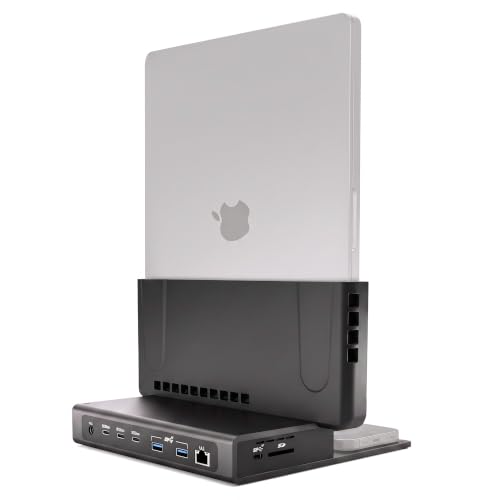
Best for MacBook Pro
Brydge ProDock Trio TB5 MacBook Docking Station
MacBook Pro owners who want dual 8K support in a vertical, desk-saving design
Our take Check price for Brydge ProDock Trio TB5 MacBook Docking Station (opens in a new tab)
| Pick | Best for | Key spec | Price |
|---|---|---|---|
| Buyers who want native adapter-free 8K HDMI output with clear compatibility disclosures | Native Dual HDMI 2.1, 8K@60Hz or 4K@144Hz (no adapters) | Check price for Plugable Thunderbolt 5 Dock (TBT-UDH2) (opens in a new tab) |
| Windows buyers who want dual 8K display support with the most comprehensive port count | Dual 8K@60Hz (Windows TB5), dual 6K@60Hz (TB4) | Check price for CalDigit TS5 Plus Thunderbolt 5 Docking Station (opens in a new tab) |
| Buyers who want built-in NVMe storage expansion alongside genuine 8K display support | Up to 2x 8K displays (device-dependent), built-in 8K HDMI | Check price for Sonnet Echo 21 Thunderbolt 5 SuperDock (opens in a new tab) |
| MacBook Pro owners who want dual 8K support in a vertical, desk-saving design | Dual 8K@60Hz or triple 4K@144Hz (chip-dependent) | Check price for Brydge ProDock Trio TB5 MacBook Docking Station (opens in a new tab) |
Our Picks
Best Overall1 of 4
Plugable Thunderbolt 5 Dock (TBT-UDH2) on Amazon (opens in a new tab)
1 ports delivering up to 8K@60Hz or 4K@144Hz with no adapters needed on Thunderbolt 5 hosts, a cleaner setup than relying on a USB-C to HDMI adapter that could bottleneck bandwidth.
Best for
- Buyers who want native adapter-free 8K HDMI output with clear compatibility disclosures
Why we like it
Its 16-in-1 design includes 6 USB-C ports, two of which are front-facing 30W charging ports for quick access.
Compared to the CalDigit and Sonnet picks below, this one's listing is unusually specific about exclusions: Thunderbolt 3, USB-C-only, and Windows ARM hosts are explicitly not supported, and gaming laptops with a DisplayPort MUX are also excluded, an honest disclosure that helps avoid a mismatched purchase.
Best for buyers who want native adapter-free 8K HDMI output with clear compatibility disclosures.
Key dimensions & specs
- Native Dual HDMI 2.1, 8K@60Hz or 4K@144Hz (no adapters)
- 16-in-1 ports, 140W laptop charging
- TAA-compliant, driverless, lifetime support
Pros
- Native HDMI 2.1 reaches 8K without any adapter required
- Unusually specific compatibility disclosures prevent mismatched purchases
- Front-facing 30W charging ports for quick device access
Cons
- Explicitly excludes Thunderbolt 3, USB-C-only, and Windows ARM hosts
- Base M1/M2/M3 Mac chips support only a single external display
Best for Windows 8K2 of 4
CalDigit TS5 Plus Thunderbolt 5 Docking Station on Amazon (opens in a new tab)
This dock's listing specifically states Windows Thunderbolt 5 hosts can reach up to Dual 8K@60Hz, while Thunderbolt 4 Windows hosts are limited to dual 6K@60Hz, a clear generational distinction that helps set correct expectations before buying.
Best for
- Windows buyers who want dual 8K display support with the most comprehensive port count
Why we like it
On macOS, it supports dual 6K@60Hz or dual 8K@60Hz specifically on Macs that support those resolutions.
Compared to the Plugable pick above, this one's 20 total ports and dual USB controller architecture, giving front and rear ports independent 10Gb/s controllers, deliver more comprehensive connectivity for a workstation that also needs extensive peripheral support alongside its 8K displays.
Best for Windows buyers who want dual 8K display support with the most comprehensive total port count.
Key dimensions & specs
- Dual 8K@60Hz (Windows TB5), dual 6K@60Hz (TB4)
- 20 total ports, dual USB controllers
- 140W host charging, 330W power supply
Pros
- Dual 8K@60Hz support specifically on Windows Thunderbolt 5 hosts
- Most comprehensive total port count in this comparison
- Clear generational distinction between Thunderbolt 5 and 4 display limits
Cons
- Highest price in this comparison at $499.99
- Dual 8K on Mac requires a Mac that specifically supports that resolution
Best with Built-In Storage3 of 4
Sonnet Echo 21 Thunderbolt 5 SuperDock on Amazon (opens in a new tab)
This dock's listing specifically states built-in outputs support one up to 8K HDMI or one 4K DisplayPort monitor directly, plus additional displays through Thunderbolt peripheral ports, and depending on your computer, up to two 8K displays total.
Best for
- Buyers who want built-in NVMe storage expansion alongside genuine 8K display support
Why we like it
2 NVMe SSD slot supports a user-installed drive up to 8TB, adding fast internal storage alongside its 8K display capability.
Compared to the Plugable and CalDigit picks above, this one's single-cable 140W charging supports Mac, Windows, Chromebook, and iPad Pro with Thunderbolt or USB4, a broader stated device compatibility list for buyers with a mixed-device household.
Best for buyers who want built-in NVMe storage expansion alongside genuine 8K display support.
Key dimensions & specs
- Up to 2x 8K displays (device-dependent), built-in 8K HDMI
- Built-in M.2 NVMe slot (up to 8TB)
- 140W charging, Mac/Windows/Chromebook/iPad Pro compatible
Pros
- Built-in NVMe SSD slot eliminates the need for a separate storage enclosure
- Broad stated compatibility across Mac, Windows, Chromebook, and iPad Pro
- Direct 8K HDMI output without requiring Thunderbolt-based external adapters
Cons
- NVMe drive is sold separately and must be user-installed
- Actual dual 8K support depends on your specific connected computer
Best for MacBook Pro4 of 4
Brydge ProDock Trio TB5 MacBook Docking Station on Amazon (opens in a new tab)
This dock's listing specifically states the dock drives up to two 8K displays at 60Hz or three 4K monitors at 144Hz on a Thunderbolt 5 MacBook, with the honest caveat that display count and refresh rate depend on your exact MacBook chip and Apple's own display limits.
Best for
- MacBook Pro owners who want dual 8K support in a vertical, desk-saving design
Why we like it
Its vertical aluminum stand holds a MacBook Pro upright in a space black finish, reducing desk footprint.
Compared to the Plugable, CalDigit, and Sonnet picks above, this one is purpose-built specifically for MacBook Pro 16-inch models with M1 Max through M5 Max chips, shipping with a precision-fit sleeve, a vertical stand, and a Thunderbolt 5 cable included in the box.
Best for MacBook Pro owners who want dual 8K support in a vertical, desk-saving design with included accessories.
Key dimensions & specs
- Dual 8K@60Hz or triple 4K@144Hz (chip-dependent)
- 140W PD, vertical aluminum stand design
- 11 ports, precision-fit MacBook sleeve included
Pros
- Vertical design saves real desk footprint versus a flat dock
- Honest disclosure that 8K specs depend on exact MacBook chip
- Ships complete with sleeve, stand, and Thunderbolt 5 cable included
Cons
- Purpose-built only for MacBook Pro 16-inch, not a general-purpose dock
- Reduced bandwidth and display support on Thunderbolt 4 Macs
How We Chose These Thunderbolt 5 Docks for 8K Displays
Each pick was assessed across 5 criteria weighted for real-world use.
- Native Port Type for 8K Output
- Compared whether 8K output comes through native HDMI/DisplayPort or requires a separate adapter.
- Single vs Dual 8K Support
- Compared whether each dock supports one or two simultaneous 8K displays.
- Compared how specifically each listing discloses supported and excluded host types.
- Compared Windows versus macOS 8K display support on the same dock.
- Additional Storage and Port Features
- Compared built-in NVMe expansion and total port count alongside 8K display capability.
What to Look for in a Thunderbolt 5 Dock for 8K Displays
Key buying criteria so you get the right fit the first time.
1 Output Reaches 8K Without the Adapter Some USB-C-Only Docks Require
1 ports deliver up to 8K@60Hz with no adapters needed, distinct from a dock that only outputs 8K through a USB-C or DisplayPort connection requiring a separate adapter to reach an HDMI-only monitor. 1 input, since a native port avoids the extra cost, potential bandwidth bottleneck, and possible compatibility issues of relying on an adapter. Check whether a dock's 8K output comes through a native port matching your monitor's actual input type, or whether you'll need to budget for and troubleshoot an additional adapter.
A Dock's 8K Support May Explicitly Exclude Certain Host Types Rather Than Working Universally
The Plugable pick specifically excludes Thunderbolt 3, USB-C-only, and Windows ARM hosts entirely from its documented compatibility, along with gaming laptops that use a DisplayPort MUX, a level of specific exclusion detail that helps prevent a real compatibility mismatch after purchase. This matters significantly if your laptop falls into any of these excluded categories, since no amount of correct cabling or settings will make an explicitly unsupported host work with the dock's 8K feature. Read a dock's full compatibility disclosure for specifically excluded host types, not just its list of supported ones, before assuming your exact laptop will work.
Windows and macOS Frequently Reach Different Real 8K Display Counts on the Identical Dock Hardware
The CalDigit TS5 Plus pick specifically states Windows Thunderbolt 5 hosts can reach dual 8K@60Hz, while Thunderbolt 4 Windows hosts on the same dock drop to dual 6K@60Hz, and Mac support depends on whether your specific Mac model supports those resolutions at all. This matters if you're specifically buying a dock to maximize 8K display support and use either an older Thunderbolt 4 host or a Mac model that doesn't natively support 8K output. Check a dock's platform-specific and generation-specific display specs for your actual host device, not just its single best-case headline 8K claim.
Built-In Storage Expansion Alongside 8K Display Support Can Consolidate a Color-Critical Workflow
2 NVMe SSD slot, supporting drives up to 8TB, sits alongside its 8K HDMI output in a single device, letting a video editing or photography workflow run both a high-resolution display and fast local storage without a separate external enclosure taking up another port or desk space. This matters if you're running a color-critical or media-heavy workflow that benefits from both features simultaneously, and matters less if you don't need onboard storage expansion at all. Check whether a dock combines the specific features your actual workflow needs (8K output, fast storage, extensive I/O) rather than assembling multiple single-purpose devices separately.
A Purpose-Built Laptop-Specific Dock Trades General Flexibility for a More Complete Out-of-Box 8K Package
The Brydge ProDock Trio pick is specifically built only for MacBook Pro 16-inch models, shipping with a precision-fit sleeve, a vertical stand, and a Thunderbolt 5 cable included in the box, a more complete package than a standalone universal dock that ships with just the dock itself and requires you to source your own cable and stand. This matters if you own the exact laptop model a dock is purpose-built for and want the extras included, and matters less if you might switch laptop brands or need a dock that works across different devices. Weigh a purpose-built dock's included accessories and tailored 8K compatibility against a universal dock's broader future flexibility before deciding.
How to Choose a Thunderbolt 5 Dock for 8K Displays
| Native adapter-free 8K HDMI output | Plugable Thunderbolt 5 Dock (TBT-UDH2) |
|---|---|
| Dual 8K on Windows with maximum port count | CalDigit TS5 Plus Thunderbolt 5 Docking Station |
| Built-in NVMe storage alongside 8K display support | Sonnet Echo 21 Thunderbolt 5 SuperDock |
| Dual 8K support specifically for MacBook Pro | Brydge ProDock Trio TB5 MacBook Docking Station |
Native HDMI 8K vs Thunderbolt-Routed 8K
- 8K output is achieved through the dock's Thunderbolt connection and depends more heavily on the specific host chip and operating system supporting that resolution.
1 input, the Plugable pick's adapter-free path is the most straightforward. If you need 8K through Thunderbolt-based connections tied to your exact Mac chip or Windows host, check the CalDigit, Sonnet, or Brydge picks' specific documented requirements first.
| Windows Thunderbolt 5 desktop or laptop | CalDigit TS5 Plus Thunderbolt 5 Docking Station |
|---|---|
| MacBook Pro 16-inch with Max-tier chip | Brydge ProDock Trio TB5 MacBook Docking Station |
| Mixed Mac, Windows, Chromebook, and iPad Pro household | Sonnet Echo 21 Thunderbolt 5 SuperDock |
For a Video Editing or Color-Critical Workstation Specifically
- A dock with native, adapter-free high-refresh 8K output and enough additional ports to support fast external storage alongside the display, since color-critical work often runs both simultaneously.
- The Sonnet Echo 21's built-in NVMe slot alongside its 8K HDMI output specifically supports this combined workflow without extra external boxes.
- 99 price is justified by its 20-port design.
- 95, the lowest price in this comparison.
Frequently Asked Questions
Do I need a special HDMI cable to get 8K output from these docks?
1 bandwidth, since an older or lower-spec cable can bottleneck 8K signal even with a compatible port.
What's the most common mistake buyers make when shopping for an 8K Thunderbolt 5 dock?
Assuming any Thunderbolt 5 dock will output 8K on any host device, when several docks specifically exclude certain host types (like Thunderbolt 3, USB-C-only, or Windows ARM) or require a specific Mac chip generation to reach that resolution at all.
Is the CalDigit TS5 Plus worth the price over the Plugable dock if I only need single 8K support?
1 output likely deliver better value, but if you want dual 8K on Windows with maximum ports, the CalDigit's higher price is justified.
Will my Thunderbolt 4 laptop still get 8K output through these docks?
Support varies significantly by dock; the CalDigit TS5 Plus specifically states Thunderbolt 4 Windows hosts are limited to dual 6K@60Hz rather than the full 8K available on Thunderbolt 5, so checking each dock's Thunderbolt-generation-specific display limits is worth doing.
Can I run 8K and fast external storage from the same dock without extra boxes?
2 NVMe SSD slot with 8K HDMI output in one device, letting you run both without a separate external storage enclosure.
How do I know if my exact MacBook Pro chip supports dual 8K on the Brydge dock?
The Brydge listing specifically states display count and refresh rate depend on your exact MacBook chip and Apple's own display limits, so checking your chip generation against Apple's published display specifications before buying is the reliable way to confirm real support.
Bottom Line
Best overall: Plugable Thunderbolt 5 Dock (TBT-UDH2) — best overall pick in this roundup. See the full verdicts above for every pick, with pros, cons and who each one suits.
Browse all thunderbolt 5 docks for 8k displays on Amazon — Prime-eligible options with current pricing.