
Buying Guide
The Best USB4 Docks with 2.5GbE: Picks and Trade-offs
We looked at 4 USB4 docks with 2.5GbE side by side, with the trade-offs that separate them and who each one suits.
By Jamie Cole, Lead Product Researcher
8 min read4 products evaluated
We may earn a commission from purchases made through links in this guide. Learn more.
5GbE-capable router or switch on the other end.
5GbE requires Thunderbolt specifically or works over standard USB-C, built-in storage or display capability, and price, since a dock's Ethernet speed is only as fast as the weakest link in your entire network chain.
Quick Picks
Our 4 recommendations at a glance. Tap a pick for the full verdict.
Best Overall
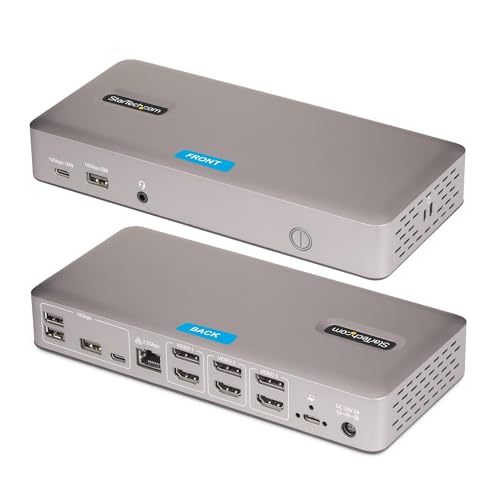
StarTech USB4 Driverless Dock, Triple 4K 60Hz with 2.5GbE
5GbE for Windows or ChromeOS deployments
Our take Check price for StarTech USB4 Driverless Dock, Triple 4K 60Hz with 2.5GbE (opens in a new tab)
Best for Mac Users
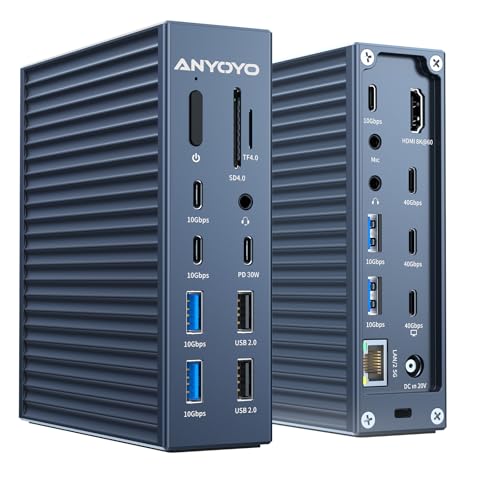
40Gbps MacBook Docking Station, 21-in-1 with 2.5GbE
buyers who specifically want confirmed Mac compatibility with genuine 2.5GbE networking
Our take Check price for 40Gbps MacBook Docking Station, 21-in-1 with 2.5GbE (opens in a new tab)
Best Compact & Budget-Friendly
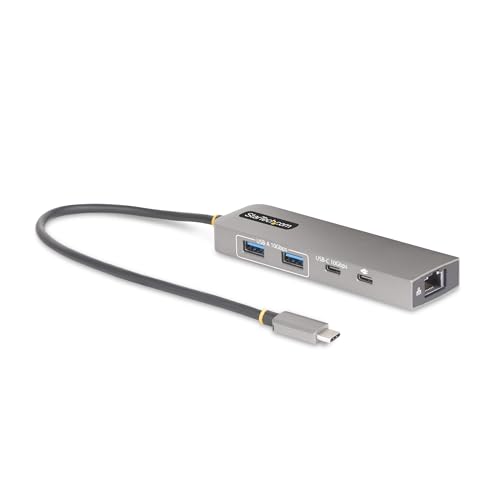
StarTech 3-Port USB-C Hub with 2.5GbE
5GbE hub with IT support tooling
Our take Check price for StarTech 3-Port USB-C Hub with 2.5GbE (opens in a new tab)

Best with Built-in Storage
Sonnet Echo 13 Thunderbolt 5 SSD Dock
buyers who want built-in ultra-fast NVMe storage combined with 2.5GbE and premium displays
Our take Check price for Sonnet Echo 13 Thunderbolt 5 SSD Dock (opens in a new tab)
Our Picks
Best Overall1 of 4
StarTech USB4 Driverless Dock, Triple 4K 60Hz with 2.5GbE on Amazon (opens in a new tab)
5GbE connection for transferring large files or working directly from cloud environments.
Best for
- 5GbE for Windows or ChromeOS deployments
Why we like it
Its listing explicitly states driverless plug-and-play deployment on Windows and ChromeOS, engineered for scalable zero-touch rollouts across shared workspaces and corporate environments.
Compared to the other picks in this comparison, this one's built-in lock slots and Surface/VESA mounting compatibility support secured, organized shared-desk deployments, while PXE Boot and Wake-on-LAN support specifically target IT-managed environments. Its listing transparently states it is not compatible with macOS, positioning it specifically for Windows and ChromeOS fleets.
5GbE networking specifically for Windows or ChromeOS IT deployments.
Key dimensions & specs
- Triple 4K@60Hz native uncompressed video
- 2.5GbE with PXE Boot and Wake-on-LAN
- Driverless, Windows/ChromeOS only (not macOS)
Pros
- Native uncompressed triple 4K video for genuine high fidelity
- 2.5GbE specifically supports IT-managed deployment features
- Built-in lock slots and VESA mounting for secure shared setups
Cons
- Explicitly not compatible with macOS
- Highest price in this comparison at $179.99
Best for Mac Users2 of 4
40Gbps MacBook Docking Station, 21-in-1 with 2.5GbE on Amazon (opens in a new tab)
This dock's 21-in-1 design specifically confirms compatibility with Thunderbolt 5/4/3 devices and M3/M4 MacBooks alongside Dell, HP, Lenovo, and ThinkPad laptops, a broad cross-platform compatibility claim.
Best for
- buyers who specifically want confirmed Mac compatibility with genuine 2.5GbE networking
Why we like it
5GbE-compatible device or higher on the other end of the connection.
Compared to the StarTech pick above, this one supports single 8K or dual 4K display output through 2 dedicated 40Gbps interfaces plus an HDMI port, and its 90W charging works with any Thunderbolt or USB-C host device including larger power-hungry laptops. 0 card slot supports UHS-3 transmission at up to 150MB/s for fast media file access.
Key dimensions & specs
- Single 8K or dual 4K display via 2x 40Gbps + HDMI
- 2.5GbE (requires USB-C host + compatible network device)
- 90W charging, TF/SD 4.0 at up to 150MB/s
Pros
- Confirmed compatibility with Mac M3/M4 chips alongside Windows laptops
- Transparently discloses 2.5GbE's host and network requirements
- Fast TF/SD 4.0 card slot at up to 150MB/s
Cons
- Lower price reflects fewer premium features than the pricier picks
- Single 8K display support requires a capable host and monitor
Best Compact & Budget-Friendly3 of 4
StarTech 3-Port USB-C Hub with 2.5GbE on Amazon (opens in a new tab)
5GBASE-T controller specifically delivers speeds of 10/100/1000/2500Mbps, designed for laptops and devices without a built-in USB-A port or Ethernet, such as MacBooks or iPad Air/Pro, while still providing USB-C charging pass-through.
Best for
- 5GbE hub with IT support tooling
Why we like it
0 pass-through reserves 15W specifically for the hub itself, a transparent power allocation designed to avoid device dropouts common in other hubs.
Compared to the pricier picks above, this one's extra-long 1ft attached cable with a TPE jacket is specifically designed to reduce port strain on 2-in-1 convertible laptops or laptops mounted on riser stands. Its included IT tools, USB Event Monitoring, MAC Address Cloning, and WIFI Auto Switch utilities, specifically target IT help-desk support teams despite the hub's compact, low-cost size.
5GbE hub with genuine IT support tooling included.
Key dimensions & specs
- 2.5GBASE-T, 10/100/1000/2500Mbps
- 100W PD pass-through, 15W reserved for hub stability
- USB Event Monitoring, MAC Address Cloning tools included
Pros
- Lowest price in this comparison by a significant margin
- Transparent power allocation avoids common hub dropout issues
- Includes genuine IT support tooling despite the compact size
Cons
- Only 3 total ports beyond Ethernet, fewer than the larger docks
- No display output ports included, purely a networking and USB hub
Best with Built-in Storage4 of 4
Sonnet Echo 13 Thunderbolt 5 SSD Dock on Amazon (opens in a new tab)
Its 4 Thunderbolt 5 ports support connecting three additional Thunderbolt 5, 4, or 3 peripherals for genuine expansion.
Best for
- buyers who want built-in ultra-fast NVMe storage combined with 2.5GbE and premium displays
Why we like it
Compared to the other picks in this comparison, this one's display support scales up to 8K at 240Hz, with combinations including up to three 4K displays, two 6K or 8K displays, or a single display up to 8K depending on your computer's own capabilities. Its 140W charging through the included Thunderbolt 5 cable covers even the most demanding laptops.
5GbE and premium multi-display support.
Key dimensions & specs
- Built-in Kingston PCIe 4.0 NVMe SSD, up to 6600 MB/s
- 4x Thunderbolt 5 ports, 2.5Gb Ethernet
- Up to 8K@240Hz display support
Pros
- Built-in ultra-fast NVMe storage up to 6600 MB/s with Thunderbolt 5
- 4 Thunderbolt 5 ports for genuine peripheral expansion
- Display support scales up to 8K at 240Hz
Cons
- Highest price in this comparison by a significant margin
- Full storage and display performance requires genuine Thunderbolt 5
How We Chose These USB4 Docks with 2.5GbE
Each pick was assessed across 5 criteria weighted for real-world use.
- 5GbE requires Thunderbolt specifically or works over standard USB-C.
- Compared confirmed Mac compatibility against Windows/ChromeOS-only designs.
- Built-in Storage or Display Capability
- Compared docks offering integrated NVMe storage or premium multi-display support.
- Compared how clearly each listing discloses actual power allocation and reserved wattage.
- Price Relative to Feature Set
- Compared price against genuine networking, storage, and display capabilities.
What to Look for in a USB4 Dock with 2.5GbE
Key buying criteria so you get the right fit the first time.
5Gbps for the full speed to actually materialize, not just the dock itself. 5GbE capability, and matters less if you've already upgraded your networking hardware to support multi-gig speeds.
Confirmed Mac Chip Compatibility Should Be Checked Explicitly, Not Assumed From General USB4 Branding
5GbE, high display resolution) can have completely opposite Mac compatibility. This matters significantly if you're a Mac user shopping based on general specs without checking the specific stated OS compatibility, where you could end up with a dock that simply doesn't work with your computer, and matters less if you're exclusively on Windows or ChromeOS where this distinction doesn't apply. Check a dock's specific stated macOS compatibility (or explicit exclusion) before assuming any dock with impressive specs works with your particular operating system.
Reserved Wattage for the Hub Itself Prevents Common Power Dropout Issues on Budget Hubs
The StarTech 3-Port Hub specifically reserves 15W of its 100W Power Delivery pass-through for the hub's own operation, a transparent power allocation design specifically intended to avoid device dropouts or overdrawing power, a common issue the listing states occurs with other, less carefully engineered hubs. This matters if you've previously experienced random disconnections or power issues with budget USB-C hubs, where this kind of transparent power reservation indicates more careful engineering, and matters less if you've never encountered such issues with your current setup. Look for a listing that specifically discloses how it allocates power between the hub's own operation and pass-through charging, since this transparency often indicates a more reliably engineered product.
5GbE Serves a Different Workflow Than Networking Alone
5GbE networked resources, a combined capability the pure networking-focused StarTech 3-Port Hub doesn't offer at all. This matters if your workflow benefits from both fast local storage and fast networking simultaneously, such as video editing while backing up to a NAS, and matters less if you only need one of these two capabilities. Consider whether your specific workflow requires both fast local storage and fast networking together before paying a premium for a combined solution over separate, more specialized devices.
An Extra-Long Attached Cable Reduces Physical Port Strain on Specific Laptop Form Factors
The StarTech 3-Port Hub's attached 1ft cable with a TPE jacket is specifically designed to provide long reach and reduce port strain on 2-in-1 convertible laptops or laptops mounted on riser stands, a detail that matters for specific physical laptop configurations where a shorter, more rigid connection could stress the port over time. This matters if you use a convertible laptop or a laptop riser stand where cable flexibility affects physical stability, and matters less if your laptop sits flat on a standard desk where a shorter cable poses no practical issue. Consider your specific laptop's physical setup (convertible, riser-mounted, or flat desk use) before assuming any hub's cable length is equally suitable for your configuration.
How to Choose a USB4 Dock with 2.5GbE
| 40Gbps MacBook Docking Station, 21-in-1 | |
| 5GbE hub with IT tools | |
| Sonnet Echo 13 Thunderbolt 5 SSD Dock |
Compact Networking Hub vs Full-Featured Dock
- Compact networking hub (StarTech 3-Port)
- 5GbE and basic USB-C connectivity in a small, affordable package without display or storage features.
- Full-featured dock (StarTech Triple 4K, MacBook Dock, Sonnet Echo 13)
- 5GbE with substantial display support and, in some cases, built-in storage for a complete workstation solution.
If you just need to add fast Ethernet to a MacBook or tablet without display needs, the compact StarTech hub covers that efficiently. If you're building a complete multi-display workstation, one of the full-featured docks is worth the investment.
| Mac (M3/M4) or mixed Mac/Windows | 40Gbps MacBook Docking Station or Sonnet Echo 13 |
|---|
For NAS-Connected Home or Studio Networks Specifically
- 5GbE-compatible device on the network side.
Frequently Asked Questions
5Gbps speeds from these docks on my home network?
5GbE performance requires a compatible device on both ends of the connection, not just the dock itself.
5GbE-capable, resulting in speeds no faster than standard Gigabit Ethernet despite the dock's own capability.
Is the Sonnet Echo 13 worth its significant price premium over the StarTech 3-Port Hub for basic networking needs?
If you only need to add fast Ethernet to a laptop without display or storage needs, the StarTech 3-Port Hub's much lower price covers that efficiently, but if you want built-in ultra-fast NVMe storage alongside premium multi-display support, the Sonnet Echo 13's price reflects that substantially more capable feature set.
Will the StarTech USB4 Driverless Dock work with my MacBook?
5GbE should choose the MacBook Docking Station or Sonnet Echo 13 pick instead.
Can I use the StarTech 3-Port Hub with an iPad Pro?
5GbE networking and charging pass-through for these tablets.
Do I need a separate power adapter for the MacBook Docking Station's full charging capability?
The listing specifically states the docking station supports 90W charging compatible with Thunderbolt or USB-C host devices, so checking whether a compatible power adapter is included in the specific package you purchase is worth doing before assuming full charging capability out of the box.
Bottom Line
Best overall: StarTech USB4 Driverless Dock, Triple 4K 60Hz with 2.5GbE — best overall pick in this roundup. See the full verdicts above for every pick, with pros, cons and who each one suits.
Browse all usb4 docks with 2.5gbe on Amazon — Prime-eligible options with current pricing.