
Buying Guide
The Best USB4 Docks with NVMe Storage: Picks and Trade-offs
We looked at 4 USB4 docks with NVMe storage side by side, with the trade-offs that separate them and who each one suits.
By Jamie Cole, Lead Product Researcher
8 min read4 products evaluated
We may earn a commission from purchases made through links in this guide. Learn more.
2 NVMe enclosure lets you add fast internal-feeling storage directly into your docking setup without a separate external drive cluttering your desk, but the enclosure's actual interface speed varies meaningfully across products.
We compared this lineup on enclosure speed, active versus passive cooling, and total port count beyond just the storage slot, since a fast NVMe enclosure paired with a slow overall dock still bottlenecks your real-world file transfer experience.
Quick Picks
Our 4 recommendations at a glance. Tap a pick for the full verdict.

Best Overall
Satechi Thunderbolt 5 CubeDock with Built-in NVMe SSD Enclosure
Buyers who want the fastest NVMe enclosure speed with high-end multi-display support
Our take Check price for Satechi Thunderbolt 5 CubeDock with Built-in NVMe SSD Enclosure (opens in a new tab)

Best Value
UGREEN Revodok NVMe 10-in-1 Docking Station
Buyers who want NVMe expansion with broad compatibility at a low price
Our take Check price for UGREEN Revodok NVMe 10-in-1 Docking Station (opens in a new tab)
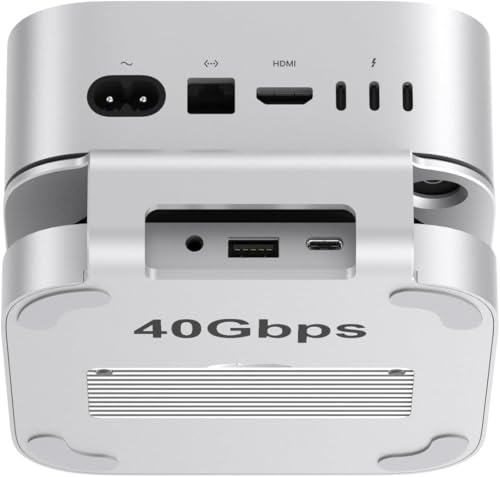
Best for Mac Mini M4
Qwiizlab Mac mini USB Hub & Stand with 40Gbps NVMe SSD Enclosure
Buyers who specifically own a 2024 Mac mini M4 or M4 Pro
Our take Check price for Qwiizlab Mac mini USB Hub & Stand with 40Gbps NVMe SSD Enclosure (opens in a new tab)
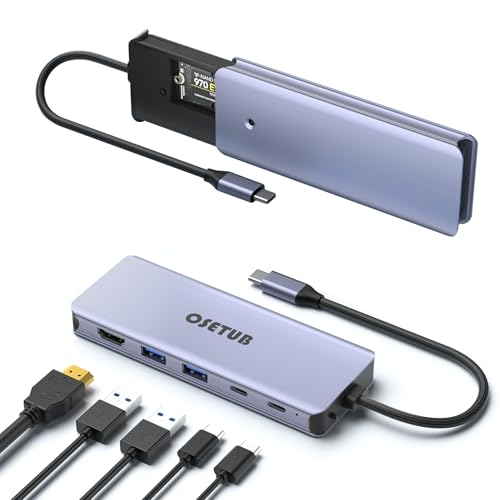
Best Ultra-Budget Option
USB C Hub 6-in-1 with M.2 NVMe SSD Enclosure
Buyers who want basic NVMe storage expansion at the lowest possible price
Our take Check price for USB C Hub 6-in-1 with M.2 NVMe SSD Enclosure (opens in a new tab)
Our Picks
Best Overall1 of 4
Satechi Thunderbolt 5 CubeDock with Built-in NVMe SSD Enclosure on Amazon (opens in a new tab)
2 NVMe enclosure supports up to 8TB of PCIe 4x4 storage working at up to 6000MB/s, a fast interface speed that lets you work directly from the dock without needing a separate external drive.
Best for
- Buyers who want the fastest NVMe enclosure speed with high-end multi-display support
Why we like it
Its adaptive cooling system and vented aluminum design specifically maintain performance during long renders, backups, or gaming marathons while operating at a stated 20-40 DB(A) fan noise level.
Compared to the other picks in this comparison, this one's single Thunderbolt 5 connection also powers multi-display output up to triple 8K 60Hz on Windows, combining storage and display expansion in one elegant aluminum cube. Its 140W host charging and 2-year limited warranty round out a premium, all-in-one desk solution.
Best for buyers who want the fastest NVMe enclosure speed combined with high-end multi-display support in one unit.
Key dimensions & specs
- Up to 8TB M.2 NVMe PCIe 4x4, up to 6000MB/s
- Adaptive cooling, 20-40 DB(A) fan noise
- 140W charging, triple 8K@60Hz display support
Pros
- Fastest stated NVMe enclosure speed in this comparison at 6000MB/s
- Adaptive cooling specifically engineered for sustained heavy workloads
- Combines storage and premium multi-display support in one unit
Cons
- Highest price in this comparison by a wide margin
- SSD not included, adding to the total cost
Best Value2 of 4
UGREEN Revodok NVMe 10-in-1 Docking Station on Amazon (opens in a new tab)
2 NVMe slot with essential connectivity including 4K@60Hz HDMI, Gigabit Ethernet, and an SD/TF card reader, all at a fraction of the Satechi CubeDock's price.
Best for
- Buyers who want NVMe expansion with broad compatibility at a low price
Why we like it
Its listing specifically confirms plug-and-play compatibility across MacBook, Windows laptops, Mac Mini M6/M4, iPad Pro, Steam Deck, and ROG Ally.
Compared to the Satechi pick above, this one trades the highest-end multi-display and enclosure speed for genuine value and broad device compatibility, appealing to buyers who want NVMe expansion without paying a premium price. Its 100W PD charging keeps your laptop powered while the dock handles storage and peripheral connectivity.
Best for buyers who want NVMe storage expansion with broad device compatibility at a low price.
Key dimensions & specs
- Built-in M.2 NVMe slot, 10-in-1 port design
- 4K@60Hz HDMI, USB 3.2 Gen2 up to 10Gbps
- 100W PD charging, no drivers needed
Pros
- Lowest price among genuine multi-port NVMe docks in this comparison
- Broad confirmed compatibility across laptops, Mac Mini, and gaming handhelds
- 10 total ports cover storage, display, network, and charging
Cons
- SSD not included, adding to the total cost
- Lower enclosure speed than the Satechi CubeDock's stated 6000MB/s
Best for Mac Mini M43 of 4
Qwiizlab Mac mini USB Hub & Stand with 40Gbps NVMe SSD Enclosure on Amazon (opens in a new tab)
6cm, creating more ventilation space for cooling while also leaving a small hole to access the power button without lifting the Mac mini every time.
Best for
- Buyers who specifically own a 2024 Mac mini M4 or M4 Pro
Why we like it
2 NVMe enclosure supports up to 8TB at 40Gbps speed specifically via the Mac mini's Thunderbolt 5 port, while remaining compatible with Thunderbolt 4 and USB4 ports.
Compared to the more universal UGREEN pick above, this one's listing is specifically explicit that it is only compatible with the 2024 Mac mini M4 and M4 Pro chips and does not support older Mac mini models, a narrower but more purpose-built compatibility scope. 5mm audio jack round out basic peripheral connectivity.
Best for buyers who specifically own a 2024 Mac mini M4 or M4 Pro and want a purpose-built storage and cooling stand.
Key dimensions & specs
- Up to 8TB M.2 NVMe at 40Gbps
- Raises Mac mini 3.6cm for improved cooling
- Only compatible with 2024 Mac mini M4/M4 Pro
Pros
- Purpose-built stand improves Mac mini M4 ventilation and cooling
- Convenient power button access hole
- 40Gbps enclosure speed matches genuine USB4 bandwidth
Cons
- Explicitly not compatible with older Mac mini models
- SSD not included, adding to the total cost
Best Ultra-Budget Option4 of 4
USB C Hub 6-in-1 with M.2 NVMe SSD Enclosure on Amazon (opens in a new tab)
This hub's premium aluminum alloy construction is specifically designed to dissipate heat without needing a cooling fan, keeping the compact 6-in-1 design slim, lightweight, and portable for use on the go.
Best for
- Buyers who want basic NVMe storage expansion at the lowest possible price
Why we like it
1 Gen2 interface delivering up to 1000MB/s, transferring a 1GB file in about 1 second according to the listing.
Compared to the other three picks in this comparison, this one is the lowest price by a significant margin while still combining 4K@60Hz HDMI, 100W PD charging, and dual 10Gbps USB ports alongside the NVMe enclosure. Its broad compatibility spans MacBook, various Type-C laptops, and several Samsung and Huawei phone models with video-output-capable USB-C ports.
Best for buyers who want basic NVMe storage expansion and display output at the lowest possible price.
Key dimensions & specs
- M.2 NVMe enclosure, up to 1000MB/s via USB 3.1 Gen2
- 4K@60Hz HDMI, 100W PD charging
- Fanless aluminum design
Pros
- Lowest price in this comparison by a significant margin
- Fanless aluminum design dissipates heat without added noise
- Broad compatibility including some Android phone models
Cons
- Lowest enclosure speed in this comparison at up to 1000MB/s
- Only 6 total ports versus the higher port counts of the pricier picks
How We Chose These USB4 Docks with NVMe Storage
Each pick was assessed across 5 criteria weighted for real-world use.
- 2 NVMe enclosures in each dock.
- Compared active fan cooling against fanless passive aluminum heat dissipation.
- Compared connectivity beyond the storage slot, including display, network, and charging ports.
- Compared broad multi-device compatibility against narrow single-model compatibility.
- Price Relative to Storage Speed
- Compared price against actual delivered enclosure throughput.
What to Look for in a USB4 Dock with NVMe Storage
Key buying criteria so you get the right fit the first time.
An NVMe Enclosure's Actual Interface Speed Varies Dramatically Even Among Similarly Marketed Docks
This matters significantly if you're working directly off the dock's storage for large file editing or transfers, where the speed difference is immediately noticeable, and matters much less for occasional file backup or storage of less frequently accessed data. Check the specifically stated MB/s throughput figure for a dock's NVMe enclosure, not just whether it has an 'NVMe slot,' since this single spec varies enormously across products.
The SSD Itself Is Sold Separately in Every Pick in This Comparison, Adding to Your Real Total Cost
2 NVMe SSD is not included, meaning the dock's listed price only covers the enclosure and connectivity hardware, not a complete working storage solution, a cost that applies equally whether you choose the premium Satechi pick or the budget USB C Hub. 2 NVMe SSD to install. Factor in the cost of a separately purchased SSD compatible with your chosen enclosure's supported sizes before comparing dock prices as if they were complete solutions.
Active Cooling Becomes More Important as Enclosure Speed and Sustained Workload Increase
The Satechi CubeDock's adaptive cooling system is specifically engineered to maintain its high-speed 6000MB/s performance during long renders, backups, or gaming marathons, while the fanless USB C Hub pick relies purely on passive aluminum heat dissipation, adequate for its lower 1000MB/s speed but less suited to sustained maximum-throughput workloads. This matters if you regularly push your storage to its performance limits for extended periods, where inadequate cooling can cause thermal throttling that reduces real-world speed, and matters less for occasional, brief file access where heat buildup rarely becomes an issue. Match a dock's cooling design (active fan versus passive) against how demanding and sustained your actual typical storage workload is.
A Purpose-Built Single-Model Dock Trades Broad Compatibility for Tighter Physical and Thermal Integration
The Qwiizlab pick specifically states it is only compatible with the 2024 Mac mini M4 and M4 Pro chips and explicitly does not support older Mac mini models, a narrow compatibility scope that in exchange delivers a stand specifically engineered to raise that exact device by a precise height for optimal cooling and power button access. This matters if you own the exact supported device, where the purpose-built fit is better integrated than a universal dock, and matters a great deal if you own a different or older device, where this specific pick simply won't work. Confirm your exact device model and generation against a dock's specifically stated compatibility list, especially for purpose-built single-model docks that explicitly exclude other generations.
Combined Display and Storage Docks Solve Two Needs at Once, But at a Meaningful Price Premium
The Satechi CubeDock combines its fast NVMe enclosure with premium multi-display support up to triple 8K 60Hz in one unit, letting a single Thunderbolt 5 connection handle both storage expansion and demanding display output, while the more affordable picks in this comparison offer more modest single-display support alongside their storage slot. This matters if you need both high-end storage speed and demanding multi-display capability simultaneously, where consolidating into one premium dock avoids needing two separate devices, and matters less if you only need one of these two capabilities. Consider whether you actually need both fast storage and premium multi-display support simultaneously before paying for a combined solution over two more affordable, single-purpose devices.
How to Choose a USB4 Dock with NVMe Storage
| The fastest NVMe enclosure with premium multi-display support | |
|---|---|
| NVMe expansion with broad compatibility at a low price | UGREEN Revodok NVMe 10-in-1 Docking Station |
| A purpose-built stand for a 2024 Mac mini M4/M4 Pro | Qwiizlab Mac mini USB Hub & Stand |
| The lowest possible price for basic NVMe expansion |
Premium All-in-One vs Budget Storage Expansion
- Combines the fastest NVMe speed with high-end multi-display support in one unit, at a significant price premium.
- Budget storage expansion (UGREEN, USB C Hub)
- Covers the core need of adding NVMe storage plus basic connectivity at a fraction of the premium option's cost.
If you need fast storage alongside demanding multi-monitor work, the Satechi CubeDock is worth the investment. If you just want to add fast storage to your existing setup affordably, either budget pick covers that well.
| 2024 Mac mini M4 or M4 Pro specifically | Qwiizlab Mac mini USB Hub & Stand |
|---|---|
| Any modern MacBook, Windows laptop, or older Mac mini |
For Video Editors Working Directly Off the Dock's Storage Specifically
- A high stated MB/s enclosure speed and active cooling, so sustained large file access during editing doesn't bottleneck or thermal-throttle.
- The Satechi CubeDock specifically states up to 6000MB/s with an adaptive cooling system engineered for sustained heavy workloads like long renders.
Frequently Asked Questions
2 NVMe SSD into these dock enclosures, or are there specific size requirements?
Checking each specific listing's supported SSD form factor sizes (commonly 2230, 2242, 2260, and 2280) against your chosen SSD's exact size is worth doing before purchase, since not every enclosure supports every physical SSD size.
What's the most common mistake buyers make when choosing a USB4 dock with NVMe storage?
Assuming any dock with an 'NVMe slot' delivers similarly fast storage performance, without checking the specifically stated MB/s throughput figure, which can vary by a factor of six or more between different enclosure interface standards.
Is the Satechi CubeDock worth the significant price premium over the UGREEN Revodok for general use?
If you specifically need the fastest possible storage speed combined with premium multi-display support, the Satechi's premium price is justified, but for general storage expansion and basic display needs, the UGREEN Revodok delivers solid value at a much lower price.
Will the Qwiizlab dock work with my older Mac mini M2 or M1?
No, the listing explicitly states this dock is only compatible with the 2024 Mac mini M4 and M4 Pro chips and does not support older Mac mini generations, so M1 or M2 Mac mini owners should choose a different pick from this comparison.
How long does it take to install an SSD into these dock enclosures?
Most of these enclosures include screws and a screwdriver for a straightforward installation process typically taking just a few minutes, though checking each specific listing's included installation hardware and instructions is worth doing before purchase.
Do I need special drivers to use the NVMe storage on these docks?
The picks in this comparison generally state plug-and-play compatibility without requiring special drivers for the storage function itself, though checking your specific operating system's compatibility notes in each listing is worth doing for the smoothest setup experience.
Bottom Line
Best overall: Satechi Thunderbolt 5 CubeDock with Built-in NVMe SSD Enclosure — best overall pick in this roundup. See the full verdicts above for every pick, with pros, cons and who each one suits.
Browse all usb4 docks with nvme storage on Amazon — Prime-eligible options with current pricing.