
Buying Guide
The Best Ubiquiti Network Switches for a Cleaner, More Useful Desk
We looked at 6 ubiquiti network switches side by side, with the trade-offs that separate them and who each one suits.
By Jamie Cole, Lead Product Researcher
8 min read6 products evaluated
We may earn a commission from purchases made through links in this guide. Learn more.
Ubiquiti's UniFi switch line spans from a basic 8-port PoE switch through full Layer 3 48-port units, unified by centralized management through the UniFi controller app across your entire network, not just one switch at a time.
We compared the current lineup by port count, PoE budget, and whether each model offers true Layer 3 routing versus Layer 2 switching, since that distinction matters more for UniFi buyers than for most other brands in this category.
Quick Picks
Our 6 recommendations at a glance. Tap a pick for the full verdict.

Best Entry 8-Port
Ubiquiti UniFi US-8-60W Managed PoE Switch
buyers prioritizing 8 ports, 4x poe (802.3af)
Our take Check price for Ubiquiti UniFi US-8-60W Managed PoE Switch (opens in a new tab)

Best 2.5G Compact
Ubiquiti UniFi Switch Flex 2.5G-5
buyers prioritizing 5x 2.5gbe ports
Our take Check price for Ubiquiti UniFi Switch Flex 2.5G-5 (opens in a new tab)

Best 16-Port
Ubiquiti UniFi USW-Lite-16-PoE Switch
Buyers prioritizing 16 ports, 8x poe+ @45w total
Our take Check price for Ubiquiti UniFi USW-Lite-16-PoE Switch (opens in a new tab)

Best Layer 3 24-Port
Ubiquiti UniFi USW-Pro-24-PoE Layer 3 Switch
Buyers prioritizing 24-port layer 3 managed
Our take Check price for Ubiquiti UniFi USW-Pro-24-PoE Layer 3 Switch (opens in a new tab)

Best Layer 3 48-Port
Ubiquiti UniFi USW-Pro-48-PoE Layer 3 Switch
Buyers prioritizing 48-port layer 3 managed, poe
Our take Check price for Ubiquiti UniFi USW-Pro-48-PoE Layer 3 Switch (opens in a new tab)
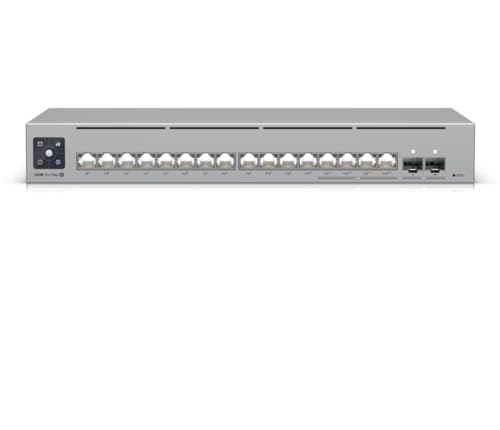
Best Multi-Gig PoE
Ubiquiti USW-Pro-Max-16-PoE Switch
5gbe poe++ + gbe poe+ mix
Our take Check price for Ubiquiti USW-Pro-Max-16-PoE Switch (opens in a new tab)
Our Picks
Best Entry 8-Port1 of 6
Ubiquiti UniFi US-8-60W Managed PoE Switch on Amazon (opens in a new tab)
3af PoE ports and 8Gbps of non-blocking switching capacity, managed entirely through the UniFi application alongside your other UniFi gear.
Best for
- buyers prioritizing 8 ports, 4x poe (802.3af)
Why we like it
It includes a 60W AC/DC power adapter and integrates cleanly with UniFi access points for a unified network dashboard, making it a natural starting point for a first UniFi deployment.
Key dimensions & specs
- 8 ports, 4x PoE (802.3af)
- 8Gbps non-blocking switching
- UniFi app managed
Pros
- Unified management with other UniFi hardware
- Non-blocking switch fabric at this port count
- Included 60W power adapter
Cons
- PoE limited to older 802.3af standard, not PoE+
- Requires UniFi controller for full management
Best 2.5G Compact2 of 6
Ubiquiti UniFi Switch Flex 2.5G-5 on Amazon (opens in a new tab)
Like the rest of the UniFi Flex series it's designed for flexible mounting and integrates into the UniFi controller ecosystem for unified network management alongside APs and other switches.
Best for
- buyers prioritizing 5x 2.5gbe ports
Key dimensions & specs
- 5x 2.5GbE ports
- Compact Flex form factor
- UniFi controller managed
Pros
- True 2.5GbE across all 5 ports
- Compact enough for flexible mounting
- Fits into existing UniFi deployments
Cons
- Small port count limits standalone use
- Best value only inside a UniFi ecosystem
Best 16-Port3 of 6
Ubiquiti UniFi USW-Lite-16-PoE Switch on Amazon (opens in a new tab)
3at PoE+ sensing for up to 45W total PoE power, wall-mountable with an included mounting kit for out-of-the-way installs.
Best for
- Buyers prioritizing 16 ports, 8x poe+ @45w total
Why we like it
Configuration and monitoring happen through the UniFi network controller and mobile app, giving a graphical view of every switch feature rather than a command-line-only interface.
Key dimensions & specs
- 16 ports, 8x PoE+ @45W total
- Wall-mount kit included
- UniFi controller/app managed
Pros
- Wall-mount kit included out of the box
- Graphical UniFi app management, no CLI required
- Layer 2 managed features at a mid-tier price
Cons
- 45W PoE budget modest for 8 PoE ports
- Requires UniFi controller for configuration
Best Layer 3 24-Port4 of 6
Ubiquiti UniFi USW-Pro-24-PoE Layer 3 Switch on Amazon (opens in a new tab)
The USW-Pro-24-PoE is a full Layer 3 managed switch with 24 Gigabit PoE ports and a substantial PoE budget, built to integrate with Ubiquiti's UniFi controller ecosystem for centralized management across an entire network.
Best for
- Buyers prioritizing 24-port layer 3 managed
Why we like it
As a Layer 3 switch it supports inter-VLAN routing and advanced traffic management well beyond what unmanaged or even basic smart-managed switches offer, positioning it for homelab and small-business deployments running a full UniFi stack.
Key dimensions & specs
- 24-port Layer 3 managed
- UniFi controller integration
- PoE-capable
Pros
- True Layer 3 routing, not just VLAN tagging
- Deep UniFi ecosystem integration
- Strong PoE budget for camera/AP fleets
Cons
- Requires UniFi controller for full feature set
- Steeper learning curve than smart-managed switches
Best Layer 3 48-Port5 of 6
Ubiquiti UniFi USW-Pro-48-PoE Layer 3 Switch on Amazon (opens in a new tab)
Ubiquiti's 48-port Layer 3 PoE switch scales the Pro series up for larger deployments, in a rack-mount chassis weighing in at over 17 pounds, a genuine enterprise-density unit rather than a desktop switch stretched to 48 ports.
Best for
- Buyers prioritizing 48-port layer 3 managed, poe
Why we like it
Like its 24-port sibling, it integrates with the UniFi controller for centralized VLAN, routing, and PoE management across a full site, making it a natural fit for growing offices or ambitious homelabs already on the UniFi platform.
Key dimensions & specs
- 48-port Layer 3 managed, PoE
- UniFi controller integration
- Rack-mount, ~17lb
Pros
- Enterprise port density in one unit
- Full Layer 3 routing support
- Unified management alongside other UniFi gear
Cons
- Significant weight and rack space commitment
- Best value only within an existing UniFi setup
Best Multi-Gig PoE6 of 6
Ubiquiti USW-Pro-Max-16-PoE Switch on Amazon (opens in a new tab)
5GbE PoE++ ports at 64W and 12 x GbE PoE+ ports at 32W, backed by 2 x 10G SFP+ uplinks and 84Gbps of switching capacity for serious homelab or small-business fiber backbones.
Best for
- 5gbe poe++ + gbe poe+ mix
Why we like it
3-inch touchscreen shows real-time port and VLAN status without opening a laptop, and DHCP, inter-VLAN routing, and static routing round out genuine Layer 3 capability rather than just VLAN tagging.
Key dimensions & specs
- 16 ports, 2.5GbE PoE++ + GbE PoE+ mix
- 2x 10G SFP+ uplinks
- Built-in touchscreen display
Pros
- Multi-gig PoE++ ports are rare at this tier
- Touchscreen adds real-time diagnostics without a laptop
- Full Layer 2/3 routing feature set
Cons
- Premium price for the port count
- 180W PoE budget still finite for a mixed high-draw fleet
How We Chose These Ubiquiti Network Switches
Each pick was assessed across 5 criteria weighted for real-world use.
- Port Count & Speed Tier
- Verified the actual port count, Gigabit vs multi-gig speed rating, and whether every port runs at the advertised speed or only some do, since several switches mix full-speed and lower-speed ports.
- Checked the total PoE wattage budget against realistic device counts, not just the per-port maximum, since a switch's total power pool is what actually limits how many cameras or access points it can run.
- Classified each switch as unmanaged, smart/easy-managed, or fully managed Layer 2/3, since this determines what troubleshooting and segmentation options are available after installation, not just at setup.
- Weighed fanless vs active cooling, metal vs plastic housing, and desktop/wall/rack mounting options against the switch's likely install environment.
- Favored listings that clearly state cabling requirements, host port requirements, and speed caveats over ones that only advertise the theoretical maximum.
What to Look for in an Ubiquiti Network Switch
Key buying criteria so you get the right fit the first time.
Port count is a headroom decision, not a current-need one
Buy for what you'll plug in over the next 2-3 years, not just today. An 8-port switch that's already full the day it arrives means buying a second switch and daisy-chaining, which adds a hop of latency and another point of failure.
PoE budget is a shared pool, not per-port
A switch rated for 8 PoE+ ports at 120W total does not mean every port gets 30W simultaneously. Add up the real draw of every camera, AP, and phone you'll connect, and make sure the total budget clears it with room to spare.
Managed vs unmanaged changes what you can diagnose later
An unmanaged switch is zero-configuration but gives you no visibility when something goes wrong. A smart-managed switch adds VLANs, port mirroring, and traffic monitoring for a modest price increase, worth it the first time you need to isolate a misbehaving device.
Fanless does not always mean silent under load
Most desktop switches are fanless and silent, but high-port-count PoE switches sometimes add active cooling once the power budget climbs past 200-300W. Check for a fan explicitly if a quiet office or bedroom install matters.
Multi-gig speed needs matching cable and network gear
5G or 10G switch only delivers those speeds if your cabling is Cat5e or better (Cat6a for 10G) and the devices on both ends actually support that speed. Mixing a multi-gig switch into an all-Gigabit network gets you nothing extra.
Renewed enterprise gear needs a licensing check first
Cisco Meraki, Juniper, and some Aruba/HPE switches on Amazon are frequently sold as renewed hardware without an active license or support contract. Confirm what functions before assuming a discounted enterprise switch works like a new one out of the box.
How to Choose an Ubiquiti Network Switch
Layer 2 vs Layer 3
Layer 3 UniFi switches (Pro series) handle inter-VLAN routing themselves; Layer 2 switches (Lite/Flex series) need your router or gateway to handle routing between VLANs.
| Single flat network or basic VLANs | |
|---|---|
| Multiple VLANs needing local routing |
Frequently Asked Questions
Do I need a UniFi controller to use a UniFi switch?
Yes, for full feature access. UniFi switches are designed around the UniFi Network application, either self-hosted or via a Cloud Key/Dream Machine, for VLAN configuration, monitoring, and firmware updates.
Can I mix UniFi switches with non-UniFi access points?
Yes, UniFi switches work as standard PoE Ethernet switches with any brand of AP. You lose the unified single-dashboard view, but basic PoE and switching functions work regardless of what's connected.
Bottom Line
Best overall: Ubiquiti UniFi US-8-60W Managed PoE Switch — best entry 8-port pick in this roundup. See the full verdicts above for every pick, with pros, cons and who each one suits.
Browse all ubiquiti network switches on Amazon — Prime-eligible options with current pricing.