
Buying Guide
The Best Travel Routers for Phone and USB Tethering: Our Picks
We looked at 4 travel routers for phone and USB tethering side by side, with the trade-offs that separate them and who each one suits.
By Jamie Cole, Lead Product Researcher
9 min read4 products evaluated
We may earn a commission from purchases made through links in this guide. Learn more.
USB phone tethering lets a travel router draw internet directly from your phone's cellular data plan through a USB cable, then share that connection as a private Wi-Fi network for your other devices, useful anywhere Wi-Fi and Ethernet simply aren't available.
We compared this lineup on real, explicitly stated USB tethering mode support, since this specific connection method isn't universal across every travel router and matters significantly if your primary internet source while traveling is your phone's cellular data.
Quick Picks
Our 4 recommendations at a glance. Tap a pick for the full verdict.

Best Overall
TP-Link Roam 7 BE3600
Buyers who want Wi-Fi 7 speed alongside explicit USB tethering for the highest device count
Our take Check price for TP-Link Roam 7 BE3600 (opens in a new tab)

Best Value
TP-Link Roam 6 AX3000 (TL-WR3002X)
Buyers who want explicit USB tethering support and fast wired ports without paying for Wi-Fi 7
Our take Check price for TP-Link Roam 6 AX3000 (TL-WR3002X) (opens in a new tab)

Best Budget
TP-Link Roam 6 AX1500 (TL-WR1502X)
Buyers who want reliable USB tethering at the lowest price among the TP-Link Roam lineup
Our take Check price for TP-Link Roam 6 AX1500 (TL-WR1502X) (opens in a new tab)
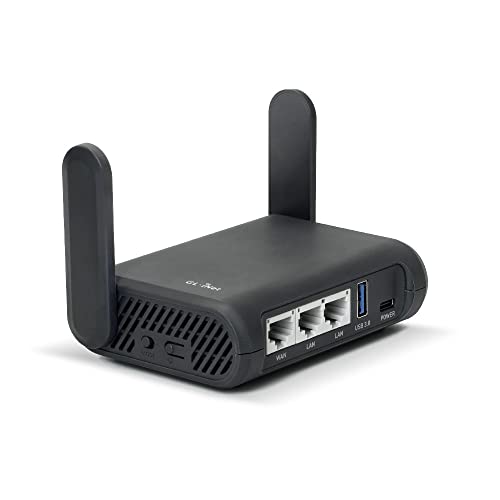
Best for OpenWrt Tethering
GL.iNet GL-A1300 Pocket VPN Travel Router (Slate Plus)
Buyers who want USB tethering combined with OpenWrt customization and advanced VPN policy control
Our take Check price for GL.iNet GL-A1300 Pocket VPN Travel Router (Slate Plus) (opens in a new tab)
| Pick | Best for | Key spec | Price |
|---|---|---|---|
| Buyers who want Wi-Fi 7 speed alongside explicit USB tethering for the highest device count | USB phone tethering, Router/Hotspot/AP modes | Check price for TP-Link Roam 7 BE3600 (opens in a new tab) |
| Buyers who want explicit USB tethering support and fast wired ports without paying for Wi-Fi 7 | USB phone tethering, Router/Hotspot/AP modes | Check price for TP-Link Roam 6 AX3000 (TL-WR3002X) (opens in a new tab) |
| Buyers who want reliable USB tethering at the lowest price among the TP-Link Roam lineup | USB phone tethering, Router/Hotspot/AP modes | Check price for TP-Link Roam 6 AX1500 (TL-WR1502X) (opens in a new tab) |
| Buyers who want USB tethering combined with OpenWrt customization and advanced VPN policy control | Tethering compatible, OpenWrt 21.02 | Check price for GL.iNet GL-A1300 Pocket VPN Travel Router (Slate Plus) (opens in a new tab) |
Our Picks
Best Overall1 of 4
TP-Link Roam 7 BE3600 on Amazon (opens in a new tab)
This router's listing specifically states Router Mode for Ethernet or USB phone tethering connections as one of three named operating modes, alongside Wi-Fi 7 speeds up to 2882 Mbps on 5GHz supporting up to 90 simultaneously connected devices.
Best for
- Buyers who want Wi-Fi 7 speed alongside explicit USB tethering for the highest device count
Why we like it
Its Multi-Link Operation combines frequency bands for enhanced throughput and lower latency, a genuine Wi-Fi 7 feature that benefits a tethered connection shared across multiple devices.
Compared to the Roam 6 AX3000 below, this one adds Wi-Fi 7 speed and Multi-Link Operation, at a higher price justified by supporting nearly double the simultaneous device count.
Best for buyers who want the newest Wi-Fi 7 standard alongside explicit USB tethering support for the highest simultaneous device count.
Key dimensions & specs
- USB phone tethering, Router/Hotspot/AP modes
- Wi-Fi 7, up to 90 devices
- 2.5G WAN port, VPN client/server
Pros
- Explicit USB phone tethering mode named in the listing
- Supports up to 90 simultaneous connected devices
- Wi-Fi 7 Multi-Link Operation improves tethered connection stability
Cons
- Highest price in this comparison
- No OpenWrt support per the listing
Best Value2 of 4
TP-Link Roam 6 AX3000 (TL-WR3002X) on Amazon (opens in a new tab)
This router's listing specifically states Router Mode for Ethernet or USB phone tethering as a named mode, matching the Roam 7's tethering capability at a meaningfully lower price.
Best for
- Buyers who want explicit USB tethering support and fast wired ports without paying for Wi-Fi 7
Why we like it
5G WAN/LAN port deliver strong performance for a tethered connection shared across your devices.
Best for buyers who want explicit USB tethering support and fast wired ports without paying for Wi-Fi 7.
Key dimensions & specs
- USB phone tethering, Router/Hotspot/AP modes
- Wi-Fi 6, 2402Mbps (5GHz)
- 2.5G WAN/LAN port, VPN client/server
Pros
- Explicit USB phone tethering mode named in the listing
- 2.5G port speed at a meaningfully lower price than the Roam 7
- OpenVPN and WireGuard support for client and server
Cons
- Wi-Fi 6 rather than the newer Wi-Fi 7 standard
- No OpenWrt support per the listing
Best Budget3 of 4
TP-Link Roam 6 AX1500 (TL-WR1502X) on Amazon (opens in a new tab)
This router's listing specifically states the same Router Mode for Ethernet or USB phone tethering connections as its pricier Roam 6 and Roam 7 siblings, at a notably lower price.
Best for
- Buyers who want reliable USB tethering at the lowest price among the TP-Link Roam lineup
Why we like it
Its Wi-Fi 6 speeds of 1201 Mbps on 5GHz are lower than the AX3000's ceiling but still comfortably handle a typical tethered cellular connection's actual bandwidth.
5G port and higher Wi-Fi speed ceiling for a lower price, a reasonable tradeoff since a tethered phone's cellular data speed rarely approaches either router's maximum wireless capability anyway.
Best for buyers who want reliable USB tethering support at the lowest price among the TP-Link Roam lineup.
Key dimensions & specs
- USB phone tethering, Router/Hotspot/AP modes
- Wi-Fi 6, 1201Mbps (5GHz)
- Gigabit ports, VPN client/server
Pros
- Same explicit USB tethering mode as the pricier Roam models
- Lowest price among the TP-Link Roam lineup
- Sufficient Wi-Fi speed for typical cellular tethering bandwidth
Cons
- Lower Wi-Fi speed ceiling than the AX3000 or Roam 7
- Gigabit ports only, not the 2.5G speed of the AX3000
Best for OpenWrt Tethering4 of 4
GL.iNet GL-A1300 Pocket VPN Travel Router (Slate Plus) on Amazon (opens in a new tab)
02 for buyers who want tethering support combined with deeper customization than the TP-Link picks offer.
Best for
- Buyers who want USB tethering combined with OpenWrt customization and advanced VPN policy control
Why we like it
Its VPN client and server with kill switch and per-site routing policies add security depth not available on the simpler TP-Link Roam lineup.
Compared to the three TP-Link picks above, this one adds OpenWrt customization and advanced VPN policy features to tethering support, at a price between the Roam 6 AX3000 and Roam 7.
Best for buyers who want USB tethering support combined with OpenWrt customization and advanced VPN policy control.
Key dimensions & specs
- Tethering compatible, OpenWrt 21.02
- Dual-band AC, VPN kill switch
- NAS via USB drive, VPN routing policies
Pros
- Tethering compatibility combined with full OpenWrt customization
- VPN kill switch and per-site routing policies
- NAS file sharing capability from a USB drive
Cons
- Older AC Wi-Fi standard, not Wi-Fi 6 or 7
- No explicit 3-mode naming like the TP-Link Roam lineup
How We Chose These Travel Routers for Phone and USB Tethering
Each pick was assessed across 5 criteria weighted for real-world use.
- Confirmed each listing explicitly names USB phone tethering as a supported connection method.
- Wi-Fi Speed Relative to Cellular Bandwidth
- Compared Wi-Fi speed ceilings against typical real-world cellular tethering bandwidth needs.
- Compared the maximum number of devices each router supports connecting simultaneously.
- Compared VPN client/server support, kill switch, and routing policy features across listings.
- Compared tethering capability retained across the price range from budget to flagship.
What to Look for in a Travel Router for Phone and USB Tethering
Key buying criteria so you get the right fit the first time.
USB Phone Tethering Support Is Not Universal Across Every Travel Router and Should Be Explicitly Confirmed
Some travel routers focus primarily on converting existing Wi-Fi or Ethernet connections into a private network without clearly stating USB tethering capability, while others, like every pick in this comparison, explicitly name USB phone tethering as one of their supported connection modes. This matters significantly if your primary or backup internet source while traveling is your phone's cellular data plan rather than hotel Wi-Fi or Ethernet, and matters less if you always have access to an existing network to connect to instead. Check a travel router's listing specifically for the words 'USB tethering' or 'phone tethering' rather than assuming any router marketed for travel automatically supports this connection method.
Your Phone's Actual Cellular Data Speed, Not the Router's Wi-Fi Ceiling, Determines Real Tethered Connection Performance
A router's stated Wi-Fi 6 or Wi-Fi 7 speed ceiling reflects the maximum wireless speed it can broadcast to your other devices, but when tethering from a phone's cellular connection, your actual internet speed is capped by your phone's cellular signal and data plan, meaning a lower-tier router like the Roam 6 AX1500 delivers essentially the same real-world tethered performance as the pricier Roam 7 in most cases. This matters for avoiding overspending on Wi-Fi speed capability your cellular connection can't actually take advantage of, and matters less if you also plan to use the same router with faster Wi-Fi or Ethernet sources at other times. Consider your phone's typical cellular data speed realistically before assuming a higher-tier router's Wi-Fi ceiling translates to a faster tethered connection.
Confirm Your Cellular Carrier's Data Plan Actually Permits Tethering Without Additional Fees or Data Caps
Many cellular data plans either charge an additional fee for tethering, cap tethered data usage separately from regular phone data usage, or throttle tethered data speeds after a certain threshold, meaning the router's own capability isn't the only factor determining whether tethering works well for your travel needs. This matters significantly before relying on tethering as your primary connectivity method for an extended trip, and matters less for occasional, light tethering use where any plan-level restrictions are unlikely to matter. Check your specific cellular plan's tethering terms and any associated data caps before planning around USB tethering as your main travel internet source.
Simultaneous Device Count Matters More for Group Travel Than for Solo Tethering Use
A router supporting up to 90 devices, like the Roam 7, provides real headroom if you're tethering internet for a group, like a family or travel team sharing one phone's cellular connection across multiple laptops and phones, while a lower device-count router is perfectly sufficient for a single traveler tethering for just their own devices. This matters significantly for group travel scenarios pooling one cellular connection, and matters much less for solo travel where you're the only one connecting. Match a router's stated maximum device count to your actual expected number of simultaneous connections rather than assuming a higher number always matters.
OpenWrt Customization Adds Real Value to Tethering Specifically if You Want VPN Routing Control Over Cellular Traffic
INet pick offers, lets you apply the same granular traffic control to a tethered cellular connection as you would to a Wi-Fi or Ethernet connection, ensuring sensitive traffic always routes through the VPN even over an improvised phone-tethered setup. This matters more for business travelers handling sensitive data over an ad hoc tethered connection, and matters less for casual tethering used only occasionally as a backup connectivity option. Consider an OpenWrt-based option specifically if you want the same VPN routing control over tethered traffic as you'd apply to a standard network connection.
How to Choose a Travel Router for Phone and USB Tethering
| Highest device count, newest Wi-Fi | |
|---|---|
| 5G port at a lower price | |
| Lowest price with tethering support | |
- A straightforward 3-mode setup (Router, Hotspot, AP/RE) that's quick to configure for tethering without OpenWrt's added complexity.
- Adds OpenWrt customization, a VPN kill switch, and per-site routing policies for buyers who want tethering plus deeper network control.
INet pick specifically if OpenWrt customization or advanced VPN policies matter to you too.
By Wi-Fi Generation Needed for Tethering
| Standard 4G/5G speeds, budget priority | |
|---|---|
| Faster 5G speeds, multiple devices | TP-Link Roam 6 AX3000 or Roam 7 |
For Working Remotely From a Phone's Cellular Connection Specifically
- Explicit USB tethering mode support named in the listing, since not every travel router clearly documents this capability, and confirm your phone's data plan allows tethering without additional carrier fees.
- All four picks specifically name tethering or router mode compatibility, removing uncertainty about whether the connection method actually works before purchase.
- You need the highest device count and newest Wi-Fi standard, or want OpenWrt customization alongside tethering, where the Roam 7 or GL-A1300 justify their price with those specific capabilities.
- 99 covers that need at the lowest price in this comparison.
Frequently Asked Questions
Does every travel router support USB phone tethering?
No, this capability varies by model, so check the listing specifically for stated tethering support rather than assuming any travel router automatically works this way.
Will tethering through a travel router drain my phone's battery faster?
USB tethering typically charges your phone while transferring data since it's connected via a USB cable, unlike Bluetooth or Wi-Fi hotspot tethering which draws down your phone's battery without a physical connection.
Does my cellular carrier need to approve tethering for it to work?
Some carriers restrict or charge extra for tethering under their specific data plan terms, so check your plan's tethering allowance and any associated data caps before relying on it while traveling.
Is a Wi-Fi 7 travel router necessary for phone tethering?
No, since your phone's cellular data speed, not the router's Wi-Fi ceiling, determines your real tethered connection speed, a lower-tier Wi-Fi 6 router often performs just as well for tethering specifically.
Can multiple people share one phone's tethered connection through a travel router?
Yes, a travel router broadcasts the tethered connection as its own Wi-Fi network, letting multiple nearby devices connect simultaneously, though your phone's actual cellular data plan still governs total usage and speed.
What's the advantage of OpenWrt for phone tethering specifically?
OpenWrt lets you apply the same VPN routing policies and kill switch protections to tethered cellular traffic as you would to a standard Wi-Fi or Ethernet connection, useful for business travelers handling sensitive data over an improvised tethered setup.
Bottom Line
Best overall: TP-Link Roam 7 BE3600 — best overall pick in this roundup. See the full verdicts above for every pick, with pros, cons and who each one suits.
Browse all travel routers for phone and usb tethering on Amazon — Prime-eligible options with current pricing.