
Buying Guide
The Best Thunderbolt SSD Enclosures for Mac, Compared
We looked at 6 thunderbolt SSD enclosures for mac side by side, with the trade-offs that separate them and who each one suits.
By Jamie Cole, Lead Product Researcher
8 min read6 products evaluated
We may earn a commission from purchases made through links in this guide. Learn more.
Thunderbolt external storage has long been a Mac-associated workflow, but current Macs span Thunderbolt 3, 4, and 5 generations, and a Thunderbolt logo alone doesn't tell you which generation a given enclosure actually needs to perform at its rated speed.
We prioritized products with explicit Mac compatibility documentation (ACASIS names M1/M2/M3 specifically; UGREEN's Maxidok flags exact SSD heatsink width limits for Mac use) over enclosures that only claim generic Mac support.
Quick Picks
Our 6 recommendations at a glance. Tap a pick for the full verdict.
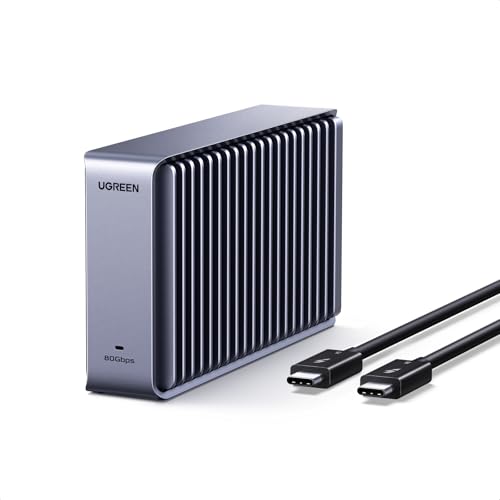
Best Overall
UGREEN 80Gbps NVMe Enclosure
Buyers prioritizing up to 7,000mb/s, dual-chip jhl9480 + jms583
Our take Check price for UGREEN 80Gbps NVMe Enclosure (opens in a new tab)

Runner-Up
ACASIS TBU405 Pro 40Gbps NVMe Enclosure
Buyers prioritizing 40gbps via intel jhl7440, usb4/tb3/tb4
Our take Check price for ACASIS TBU405 Pro 40Gbps NVMe Enclosure (opens in a new tab)

Also Great
UGREEN 40Gbps M.2 NVMe Enclosure
Buyers prioritizing 40gbps via asm2464pd, usb4/tb3/tb4
Our take Check price for UGREEN 40Gbps M.2 NVMe Enclosure (opens in a new tab)

Strong Alternative
Sabrent EC-U4TN USB4 NVMe Enclosure
Buyers prioritizing up to 3,900mb/s usb4 / 2,700mb/s tb3-4
Our take Check price for Sabrent EC-U4TN USB4 NVMe Enclosure (opens in a new tab)

Worth Considering
MOKiN 80Gbps NVMe Enclosure with LCD Display
Buyers prioritizing up to 80gbps via jhl9480+rtl9210b, pcie gen5
Our take Check price for MOKiN 80Gbps NVMe Enclosure with LCD Display (opens in a new tab)

Budget Pick
ACASIS 80Gbps Thunderbolt 5 Enclosure
buyers prioritizing up to 6,000mb/s via jhl9480, usb4 v2.0/80gbps
Our take Check price for ACASIS 80Gbps Thunderbolt 5 Enclosure (opens in a new tab)
Our Picks
Best Overall1 of 6
UGREEN 80Gbps NVMe Enclosure on Amazon (opens in a new tab)
A dual-chip design combining the Intel JHL9480 Thunderbolt controller with a JMicron JMS583 bridge controller, rated up to 7,000MB/s, moving a 6GB file in about one second.
Best for
- Buyers prioritizing up to 7,000mb/s, dual-chip jhl9480 + jms583
Why we like it
Dual-sided aluminum alloy biomimetic fins increase heat dissipation by a claimed 91% versus standard designs.
Supports 2230/2242/2260/2280 SSDs up to 8TB, but not SATA/MSATA drives or SSDs with a pre-installed heatsink. UGREEN notes some thicker SSDs may need a thinner thermal pad substituted in to fit.
Key dimensions & specs
- Up to 7,000MB/s, dual-chip JHL9480 + JMS583
- 2230/2242/2260/2280, up to 8TB
- 91% claimed heat dissipation improvement via 3D fin design
Pros
- Dual-chip design (Thunderbolt controller + separate bridge) is more sophisticated than single-chip competitors
- Highest rated throughput (7,000MB/s) among UGREEN's lineup
- 3D biomimetic fin design claims a 91% heat dissipation improvement
- Compact, travel-friendly aluminum body
Cons
- Requires an 80Gbps-capable host to realize full speed
- Some thicker SSDs need a thermal pad swap to fit
Runner-Up2 of 6
ACASIS TBU405 Pro 40Gbps NVMe Enclosure on Amazon (opens in a new tab)
Built around the Intel JHL7440 certified chip for true USB4/Thunderbolt 4/3 compatibility with a dual-chip design, plus an integrated cooling fan and precision heat-dissipation holes to prevent thermal throttling under sustained load.
Best for
- Buyers prioritizing 40gbps via intel jhl7440, usb4/tb3/tb4
Why we like it
ACASIS tested read/write speeds up to 2,805/2,734 MB/s using a Samsung 980 Pro on a MacBook, and it supports 2230/2242/2260/2280 sizes for M1/M2/M3 Mac and PC hosts. Its compact, travel-friendly form factor targets pro users needing a genuine Thunderbolt-certified enclosure, not just a compatible one.
Key dimensions & specs
- 40Gbps via Intel JHL7440, USB4/TB3/TB4
- Tested 2,805/2,734 MB/s read/write
- Active cooling fan
Pros
- Intel JHL7440 is a certified Thunderbolt chip, not just compatible hardware
- Tested real-world speeds published (2,805/2,734 MB/s), not just theoretical link rate
- Active cooling fan with precision heat-dissipation holes
- Compact, travel-friendly form factor for pro use
Cons
- Requires Thunderbolt 4/3 or USB4 host for full speed
- Fan adds some operating noise
Also Great3 of 6
UGREEN 40Gbps M.2 NVMe Enclosure on Amazon (opens in a new tab)
Built around the ASM2464PD chip for up to 3600MB/s over USB4/Thunderbolt 3/4 (Thunderbolt 4 cable and device required to hit the full speed), with a double-sided fin design plus a three-dimensional cooling system that UGREEN says delivers several times the heat dissipation of standard enclosures, entirely fanless.
Best for
- Buyers prioritizing 40gbps via asm2464pd, usb4/tb3/tb4
Why we like it
Supports 2230/2242/2260/2280 NVMe SSDs up to 8TB, but not SSDs with a pre-installed heatsink or SATA NGFF/MSATA drives. UGREEN notes some thicker SSDs may need a thinner thermal pad swapped in to fit properly.
Key dimensions & specs
- 40Gbps via ASM2464PD, USB4/TB3/TB4
- 2230/2242/2260/2280 NVMe, up to 8TB
- Fanless double-sided fin cooling
Pros
- Fanless double-sided fin design avoids fan noise entirely
- ASM2464PD chip is a proven, widely-used 40Gbps bridge
- Compatible across USB4, Thunderbolt 3, and Thunderbolt 4 hosts
- Ultra-slim aluminum body for portability
Cons
- Requires a genuine Thunderbolt 4 cable/host to hit full 3600MB/s
- Some thicker SSDs need a thinner thermal pad swap to fit
Strong Alternative4 of 6
Sabrent EC-U4TN USB4 NVMe Enclosure on Amazon (opens in a new tab)
Rated up to 3,900MB/s over USB4 or 2,700MB/s over Thunderbolt 3/4, with backward compatibility down to USB-C 20/10/5Gbps ports.
Best for
- Buyers prioritizing up to 3,900mb/s usb4 / 2,700mb/s tb3-4
Why we like it
Unlike Sabrent's fanless 10Gbps model, this one adds an integrated active cooling fan to sustain performance during large transfers. Optimized for PCIe Gen4 x4 SSDs like Sabrent's own Rocket 4 Plus line, works on both Windows and macOS with no drivers.
Key dimensions & specs
- Up to 3,900MB/s USB4 / 2,700MB/s TB3-4
- 2230/2242/2260/2280, NVMe only
- Active cooling fan
Pros
- Highest USB4 throughput (3,900MB/s) among 40Gbps picks in this cluster
- Active cooling fan sustains speed during large transfers
- Backward compatible down to 5Gbps USB-C ports
- Optimized for high-performance PCIe Gen4 SSDs
Cons
- NVMe only, no SATA M.2 support
- Fan adds some operating noise versus fanless competitors
Worth Considering5 of 6
MOKiN 80Gbps NVMe Enclosure with LCD Display on Amazon (opens in a new tab)
Combines the Intel JHL9480 and RTL9210B chipset for PCIe Gen5 SSD support at up to 80Gbps, transferring 100GB in about 15 seconds, which MOKiN says is 6-7x faster than a 10Gbps reader.
Best for
- Buyers prioritizing up to 80gbps via jhl9480+rtl9210b, pcie gen5
Why we like it
A unique LCD screen shows real-time temperature status (Normal/Medium/High) and fan speed.
The active fan starts at 40°C across three speed levels (Low/Medium/High) to prevent thermal throttling. 0, though 80Gbps specifically requires a Thunderbolt 5 port and cable.
Key dimensions & specs
- Up to 80Gbps via JHL9480+RTL9210B, PCIe Gen5
- LCD display shows temp status + fan speed
- 3-speed active fan (40°C trigger)
Pros
- Only enclosure in this cluster with an LCD status display, not just LEDs
- Dual-chip design supports PCIe Gen5 SSDs
- 3-speed fan control gives finer thermal management than auto-only designs
- Works across Thunderbolt 5/4/3 and USB4 for broad host compatibility
Cons
- Full 80Gbps requires a genuine Thunderbolt 5 port and cable
- Higher price than single-chip 40Gbps alternatives
Budget Pick6 of 6
ACASIS 80Gbps Thunderbolt 5 Enclosure on Amazon (opens in a new tab)
4-or-higher SSD is needed to exceed 3,000MB/s).
Best for
- buyers prioritizing up to 6,000mb/s via jhl9480, usb4 v2.0/80gbps
Why we like it
The smart cooling fan auto-starts at 55°C and stops at 40°C, with a manual override via a 1-second button hold.
0, but ACASIS explicitly states it is NOT compatible with Thunderbolt 3 devices. Ships with the 80Gbps cable, silicone stoppers, an SSD size adapter, and thermal pads.
Key dimensions & specs
- Up to 6,000MB/s via JHL9480, USB4 V2.0/80Gbps
- Smart auto fan (55°C on, 40°C off)
- Not compatible with Thunderbolt 3
Pros
- Smart auto-cooling fan with a manual override switch
- Ships with a complete accessory kit (cable, stoppers, SSD adapter, thermal pads)
- Supports PCIe 5.0 SSDs for future-proofing
- 6,000MB/s rated throughput
Cons
- Explicitly incompatible with Thunderbolt 3 hosts
- Needs a PCIe 4.0 x4 NVMe 1.4+ SSD to exceed 3,000MB/s
How We Chose These Thunderbolt SSD Enclosures for Mac
Each pick was assessed across 5 criteria weighted for real-world use.
- Interface Protocol & Link Rate
- Verified the exact USB/Thunderbolt protocol and rated speed from each listing rather than assuming USB-C connector shape implies a specific bandwidth tier.
- Bridge Controller & Host Compatibility
- Checked which bridge chip each enclosure uses where published, and cross-referenced explicit host compatibility statements (Mac generation, Thunderbolt version, USB4 V1 vs V2) against real-world limitations sellers disclosed.
- 2 Size, Keying & SSD Compatibility
- 2 lengths (2230/2242/2260/2280), keying (M-Key vs B+M Key), and NVMe-versus-SATA protocol support rather than assuming universal compatibility.
- Thermal Design & Sustained Performance
- Weighed published tested throughput figures, fan trigger temperatures, and passive-versus-active cooling design over marketing language that repeats across nearly identical products.
- Prioritized genuine differentiators, RAID mode support, write-lock switches, health-monitoring displays, magnetic attachment systems, over generic "fast and durable" claims with nothing behind them.
What to Look for in a Thunderbolt SSD Enclosure for Mac
Key buying criteria so you get the right fit the first time.
USB-C is a connector, not a speed
A USB-C port can carry 10, 20, 40, or 80Gbps depending on the underlying protocol. Require the exact USB/Thunderbolt protocol and link rate from the listing, not USB-C wording alone, before assuming an enclosure matches your host's real speed.
Check the bridge controller, not just the interface label
Two enclosures with the same 40Gbps label can behave differently depending on the bridge chip (ASM2464PD, JHL7440, RTL9210, and others each have different real-world characteristics). Where a listing names its controller, treat that as a real signal of build quality.
Verify NVMe-only versus NVMe+SATA support
Some enclosures in this category support only NVMe M-Key SSDs, others add SATA/NGFF support via M+B Key. Confirm which protocol your specific SSD uses before buying, since a mismatch means the drive simply won't work.
Separate peak benchmark speed from sustained performance
A short benchmark can hit peak speed even on a design that throttles heavily during long transfers. Favor listings that publish tested read/write numbers with a named SSD and host over theoretical link-rate claims alone.
2 size and keying before buying
2230, 2242, 2260, and 2280 SSDs are not interchangeable in every enclosure, and M-Key versus B+M Key compatibility varies by product.
Cable and host requirements can silently cap speed
A USB-C cable rated below the enclosure's maximum speed, or a host port that doesn't support the exact protocol claimed, will cap real throughput well below the advertised number. Check both before assuming full speed.
How to Choose a Thunderbolt SSD Enclosure for Mac
Match the Interface to Your Host
Before buying, check your computer's exact port protocol, not just whether it has a USB-C connector.
| Any 10Gbps-rated pick above works at full speed | |
| Confirm the enclosure specifically states Gen 2x2 support, not just USB-C | |
| Thunderbolt / USB4 40Gbps or higher | Check for genuine Thunderbolt/USB4 certification, not just a compatible claim |
Interface speed, bridge controller sophistication, and cooling design all scale price in this category.
- A 10Gbps pick from this list covers most casual thunderbolt ssd enclosures for mac needs without paying for bandwidth you won't use.
- Video editing or large sustained transfers
- Step up to a 40Gbps USB4/Thunderbolt pick with active cooling to avoid thermal throttling mid-transfer.
- An 80Gbps Thunderbolt 5 enclosure or a RAID-capable multi-bay design is worth the premium if downtime or data loss has real cost.
Frequently Asked Questions
Does a faster enclosure automatically mean faster real-world transfers?
Real throughput depends on the SSD's own generation and speed, the bridge controller inside the enclosure, cable quality, and whether the host port actually supports the claimed protocol. A 40Gbps enclosure with a slow SSD won't outperform a 10Gbps enclosure with a fast one by much.
2 NVMe SSD in any enclosure in this list?
Why does my enclosure run slower than its advertised speed?
2 Gen 2x2 at 10Gbps, for example), an underrated USB-C cable, or sustained thermal throttling on a fanless design during a long transfer.
Bottom Line
Best overall: UGREEN 80Gbps NVMe Enclosure — best overall pick in this roundup. See the full verdicts above for every pick, with pros, cons and who each one suits.
Browse all thunderbolt ssd enclosures for mac on Amazon — Prime-eligible options with current pricing.