
Buying Guide
The Best Split Ergonomic Keyboards, from First Split to Fully Programmable
Eight split keyboards compared on split type, tenting, layout and connection, from a curved one-piece board to a programmable separable design.
By Jamie Cole, Lead Product Researcher
11 min read8 products evaluated
We may earn a commission from purchases made through links in this guide. Learn more.
A split keyboard divides the keys so your hands can sit further apart and straighter than on a standard board. How much it changes depends on the design: fixed or hinged splits keep one body; fully separable halves let you set the distance; tenting raises the middle.
Layout matters for the learning curve. Row-staggered splits keep standard key positions; column-staggered designs like the Kinesis Advantage360 take longer to adapt to. If you have pain or a medical condition, speak to a clinician; this guide compares features, not health outcomes.
Our comparison is based on published specifications, not hands-on testing.
Quick Picks
Our 8 recommendations at a glance. Tap a pick for the full verdict.

Best One-Piece Split Keyboard
Logitech Ergo K860 Wireless Ergonomic Split Keyboard with Wrist Rest
Logitech's wireless curved split-layout keyboard with negative tilt and an attached palm rest.
Best for: First-time split users who want wireless convenience.
Our take Check price for Logitech Ergo K860 Wireless Ergonomic Split Keyboard with Wrist Rest (opens in a new tab)

Best Fully Programmable Split
KINESIS Advantage360 Professional Split Ergonomic Keyboard
Kinesis's fully separable, column-staggered keyboard with contoured key wells, tenting and open-source firmware.
Best for: Heavy typists ready to relearn for a fully ergonomic layout.
Our take Check price for KINESIS Advantage360 Professional Split Ergonomic Keyboard (opens in a new tab)

Best Entry-Level True Split
KINESIS Freestyle2 Ergonomic Keyboard for PC (9" Separation)
Kinesis's cable-connected split keyboard with up to 9 inches between halves, wired, no software needed.
Best for: Trying a true split without a big spend.
Our take Check price for KINESIS Freestyle2 Ergonomic Keyboard for PC (9" Separation) (opens in a new tab)

Gentlest Starting Point (Not Split)
Logitech Wave Keys Wireless Ergonomic Keyboard with Cushioned Palm - Sand
A one-piece wave-layout wireless keyboard with cushioned palm rest, not a split.
Best for: A modest step up from a flat keyboard.
Our take Check price for Logitech Wave Keys Wireless Ergonomic Keyboard with Cushioned Palm - Sand (opens in a new tab)

Best Budget Wireless Split
Nulea Wireless Ergonomic Keyboard, Split Keyboard with Cushioned Wrist Rest
A hinged split keyboard with cushioned wrist rest, Bluetooth and rechargeable USB-C.
Best for: Trying a split layout wirelessly on a small budget.
Our take Check price for Nulea Wireless Ergonomic Keyboard, Split Keyboard with Cushioned Wrist Rest (opens in a new tab)

Best Budget Split with Tenting
Arteck Split Ergonomic Keyboard with Cushioned Wrist and Palm Rest
A hinged split keyboard with adjustable tenting and a cushioned wrist and palm rest.
Best for: Budget buyers who want tenting.
Our take Check price for Arteck Split Ergonomic Keyboard with Cushioned Wrist and Palm Rest (opens in a new tab)
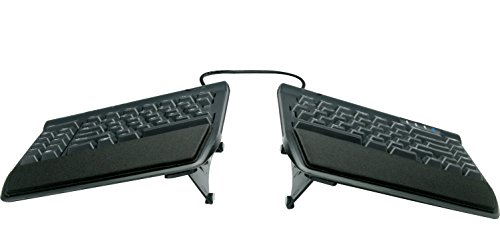
Best Split with Tenting Kit
KINESIS Freestyle2 USB-A Ergonomic Keyboard w/ VIP3 Lifters
The Kinesis Freestyle2 split with VIP3 lifters for adjustable tenting.
Best for: Freestyle2 buyers who want tenting from the start.
Our take Check price for KINESIS Freestyle2 USB-A Ergonomic Keyboard w/ VIP3 Lifters (opens in a new tab)

Best Mechanical Split
KINESIS Freestyle Edge RGB Plus Split Mechanical Keyboard
Kinesis's split mechanical keyboard with hot-swappable linear switches, RGB and programmability.
Best for: Mechanical keyboard users who want a split.
Our take Check price for KINESIS Freestyle Edge RGB Plus Split Mechanical Keyboard (opens in a new tab)
Our Picks
Best One-Piece Split Keyboard1 of 8
Logitech Ergo K860 Wireless Ergonomic Split Keyboard with Wrist Rest on Amazon (opens in a new tab)
The Logitech Ergo K860 is the easiest step into a split layout: the keys are divided and angled on one curved, domed body, with negative tilt available and a cushioned palm rest attached.
Best for
- First-time split users who want wireless convenience.
Skip if
- You want adjustable separation; the Kinesis Freestyle2 splits fully.
Why we like it
It connects over Bluetooth or a USB receiver and pairs with multiple devices.
The halves don't separate, so you can't adjust the distance between them, and it has a large footprint.
Key dimensions & specs
- Layout: fixed split, row-staggered
- Shape: domed, negative tilt option
- Palm rest: attached, cushioned
- Connection: Bluetooth + USB receiver
- Multi-device
Pros
- Familiar row-staggered layout
- Negative tilt
- Wireless multi-device
Cons
- Halves don't separate
- Large footprint
- Not mechanical
Best Fully Programmable Split2 of 8
KINESIS Advantage360 Professional Split Ergonomic Keyboard on Amazon (opens in a new tab)
The Kinesis Advantage360 Professional is the most thoroughly ergonomic design here: fully separate halves, column-staggered keys in contoured wells, adjustable tenting, quiet mechanical switches and fully programmable open-source firmware, over Bluetooth.
Best for
- Heavy typists ready to relearn for a fully ergonomic layout.
Skip if
- You want a familiar layout; the Freestyle2 keeps standard key positions.
Why we like it
It was by far the most expensive keyboard here at the time of writing, and the column-staggered, key-well layout takes time to learn.
Key dimensions & specs
- Layout: fully split, column-staggered
- Keys: contoured wells, quiet mechanical
- Tenting: adjustable
- Firmware: programmable, open-source
- Connection: Bluetooth
Pros
- Most adjustable here
- Fully programmable
- Contoured key wells
Cons
- Most expensive here
- Steep learning curve
- Large
Best Entry-Level True Split3 of 8
KINESIS Freestyle2 Ergonomic Keyboard for PC (9" Separation) on Amazon (opens in a new tab)
The Kinesis Freestyle2 is the affordable fully split keyboard: two low-profile halves joined by a cable that allows up to 9 inches of separation, with a standard row-staggered layout, wired USB and no software required.
Best for
- Trying a true split without a big spend.
Skip if
- You want tenting included; the Freestyle2 with VIP3 lifters adds it.
Why we like it
It lies flat out of the box; tenting needs an accessory kit such as the VIP3 lifters.
Key dimensions & specs
- Layout: split, row-staggered
- Separation: up to 9"
- Connection: wired USB
- Software: none required
- Profile: low
Pros
- Adjustable separation
- Familiar layout
- No software
Cons
- Flat without accessories
- Wired
- No palm rest included
Gentlest Starting Point (Not Split)4 of 8
Logitech Wave Keys Wireless Ergonomic Keyboard with Cushioned Palm - Sand on Amazon (opens in a new tab)
The Logitech Wave Keys is included as a gentler starting point: a one-piece keyboard with a wave-shaped key layout and cushioned palm rest, compact, powered by AAA batteries, over Bluetooth or USB receiver.
Best for
- A modest step up from a flat keyboard.
Skip if
- You want a real split; the Nulea or Freestyle2 separates the keys.
Why we like it
It isn't a split keyboard, so it doesn't separate or angle the halves, but it may suit someone who wants a small change from a standard board.
Key dimensions & specs
- Layout: one-piece wave
- Palm rest: built in
- Power: AAA batteries
- Connection: Bluetooth or USB receiver
Pros
- Little adjustment needed
- Compact
- Low price
Cons
- Not a split
- No separation or tenting
- Battery-powered
Best Budget Wireless Split5 of 8
Nulea Wireless Ergonomic Keyboard, Split Keyboard with Cushioned Wrist Rest on Amazon (opens in a new tab)
The Nulea is the lowest-cost split here: a row-staggered layout on a hinged body, so the halves angle apart, with a cushioned wrist rest, Bluetooth and USB-C wireless, and a rechargeable battery.
Best for
- Trying a split layout wirelessly on a small budget.
Skip if
- You want tenting; the Arteck adjusts it.
Why we like it
It works with Windows and Mac.
A hinge limits how far apart the halves can go compared with a fully separable design.
Key dimensions & specs
- Layout: hinged split, row-staggered
- Wrist rest: cushioned
- Connection: Bluetooth + USB-C wireless
- Battery: rechargeable USB-C
Pros
- Lowest price here
- Wireless and rechargeable
- Wrist rest
Cons
- Limited separation
- Less established brand
- No tenting listed
Best Budget Split with Tenting6 of 8
Arteck Split Ergonomic Keyboard with Cushioned Wrist and Palm Rest on Amazon (opens in a new tab)
The Arteck adds adjustable tenting to a low-cost hinged split, raising the middle of the keyboard, with a cushioned wrist and palm rest and a 2.4GHz USB receiver.
Best for
- Budget buyers who want tenting.
Skip if
- You use a Mac; the Nulea lists Mac compatibility.
Why we like it
Arteck lists Windows desktop and laptop compatibility; Bluetooth isn't mentioned.
Key dimensions & specs
- Layout: hinged split, row-staggered
- Tenting: adjustable
- Rest: cushioned wrist/palm
- Connection: 2.4GHz USB receiver
- OS: Windows
Pros
- Tenting at a low price
- Wrist rest
- Familiar layout
Cons
- No Bluetooth listed
- Windows-focused
- Limited separation
Best Split with Tenting Kit7 of 8
KINESIS Freestyle2 USB-A Ergonomic Keyboard w/ VIP3 Lifters on Amazon (opens in a new tab)
This bundle pairs the Freestyle2 split keyboard with Kinesis's VIP3 lifters, which add adjustable tenting to the otherwise flat halves.
Best for
- Freestyle2 buyers who want tenting from the start.
Skip if
- You don't want tenting; the base Freestyle2 is cheaper.
Why we like it
It's wired USB-A with no software required.
It costs about $45 more than the Freestyle2 alone at the time of writing.
Key dimensions & specs
- Layout: split, row-staggered
- Tenting: VIP3 lifters (adjustable)
- Connection: wired USB-A
- Software: none required
Pros
- Tenting included
- Adjustable separation
- Familiar layout
Cons
- Wired
- Costs more than the base Freestyle2
- No palm rest listed
Best Mechanical Split8 of 8
KINESIS Freestyle Edge RGB Plus Split Mechanical Keyboard on Amazon (opens in a new tab)
The Freestyle Edge RGB is a split mechanical keyboard for typing and gaming: cable-connected halves, hot-swappable linear switches, RGB lighting, full programmability and a detachable palm support.
Best for
- Mechanical keyboard users who want a split.
Skip if
- You want quiet switches; the Advantage360 lists quiet mechanical switches.
Why we like it
It includes Mac keycaps and a lift kit.
Linear switches suit some typists more than others, and it costs more than the Freestyle2.
Key dimensions & specs
- Layout: split, row-staggered
- Switches: hot-swappable linear mechanical
- Lighting: RGB
- Programmable
- Included: palm support, Mac keycaps, lift kit
Pros
- Mechanical and hot-swappable
- Programmable
- Lift kit included
Cons
- Costs more than the Freestyle2
- Linear switches aren't for everyone
- Wired
How We Chose These Split Ergonomic Keyboards
Each pick was assessed across 4 criteria weighted for real-world use.
- Split design
- We compared fixed, hinged and separable designs.
- Adjustment
- We noted tenting, tilt and separation.
- Layout and switches
- We compared stagger and switch type.
- Connection and price
- We compared connectivity and prices at the time of writing.
What to Look for in a Split Ergonomic Keyboard
Key buying criteria so you get the right fit the first time.
Choose a split type
Fixed (K860), hinged (Nulea, Arteck) or fully separable (Freestyle2, Advantage360).
Decide on tenting
Built-in or add-on tenting (Arteck, Advantage360, VIP3 kit) raises the middle.
Consider layout
Row-staggered is familiar; column-staggered takes time to learn.
Wired or wireless
The Freestyle2 models are wired; Logitech, Nulea and Advantage360 are wireless.
How to Choose a Split Ergonomic Keyboard
By experience
| Situation | Consider |
|---|---|
| Small step from a flat board | Logitech Wave Keys |
| First split, wireless | Logitech Ergo K860 |
| Budget split | Nulea (wireless) or Arteck (tenting) |
| True split, low cost | Kinesis Freestyle2 |
| True split with tenting | Freestyle2 + VIP3 |
| Mechanical split | Kinesis Freestyle Edge RGB |
| Fully programmable | Kinesis Advantage360 |
Frequently Asked Questions
What's the difference between split types?
Fixed splits angle the keys on one body; hinged ones pivot; separable halves can be placed apart.
How long does it take to adjust?
It varies by person and layout; column-staggered keyboards generally take longer.
Do I need tenting?
It's a preference; some find a raised middle more comfortable. Several options here offer it.
Are split keyboards good for gaming?
The Freestyle Edge RGB is designed for it; others are typing-focused.
Will a split keyboard fix wrist pain?
We can't say; consult a clinician about symptoms.
Bottom Line
For a first split, the Logitech Ergo K860 is the wireless, low-effort option, and the Nulea or Arteck cost least. The Kinesis Freestyle2 is the affordable fully separable choice, with the VIP3 kit adding tenting.
For mechanical keys, the Freestyle Edge RGB is the split to consider, and the Advantage360 is worth paying more for only if you want full programmability and a contoured layout.