
Buying Guide
The Best Printers for Small Spaces, Compared
We looked at 8 printers for small spaces side by side, with the trade-offs that separate them and who each one suits.
By Jamie Cole, Lead Product Researcher
9 min read8 products evaluated
We may earn a commission from purchases made through links in this guide. Learn more.
A printer for a small space is not the same question as a printer with small dimensions. Some larger all-in-ones fit fine tucked into a corner shelf with minimal clearance, while some compact printers still end up in an awkward spot because of where they need to sit, how far they are from the router, or how much noise they make next to someone sleeping or working nearby.
Quick Picks
Our 8 recommendations at a glance. Tap a pick for the full verdict.

Best Overall for a Studio Apartment
Canon PIXMA TS4320 Wireless Color Inkjet Printer
Studio apartment dwellers who need shelf-friendly placement and quiet operation
Our take Check price for Canon PIXMA TS4320 Wireless Color Inkjet Printer (opens in a new tab)

Best for Weak Wifi Corners
HP DeskJet 4355 Wireless All-in-One Color Inkjet Printer
Apartments where the printer must sit far from the router
Our take Check price for HP DeskJet 4355 Wireless All-in-One Color Inkjet Printer (opens in a new tab)

Best for Status Checks Without Getting Up
Canon PIXMA TS6520 Wireless Color Inkjet Printer
A printer placed across the room where you'd rather glance at a screen than walk over
Our take Check price for Canon PIXMA TS6520 Wireless Color Inkjet Printer (opens in a new tab)

Best for Floor or Corner Placement
Canon PIXMA TR4720 All-in-One Wireless Printer
Small spaces where floor or corner placement is the only option
Our take Check price for Canon PIXMA TR4720 All-in-One Wireless Printer (opens in a new tab)

Best Budget Quiet Pick
Canon PIXMA TS3720 Wireless All-in-One Printer
Noise-sensitive small spaces on a tight budget
Our take Check price for Canon PIXMA TS3720 Wireless All-in-One Printer (opens in a new tab)

Best Compact Laser (Placed Away from Sleeping Areas)
Brother HL-L2405W Wireless Compact Monochrome Laser Printer
A small space where the printer can sit in a corner away from sleeping or call areas
Our take Check price for Brother HL-L2405W Wireless Compact Monochrome Laser Printer (opens in a new tab)

Most Placement-Flexible (Specialty Pick)
Inkless Portable Bluetooth Thermal Printer (MT610Pro)
The most space-constrained studios where storability matters more than daily print quality
Our take Check price for Inkless Portable Bluetooth Thermal Printer (MT610Pro) (opens in a new tab)
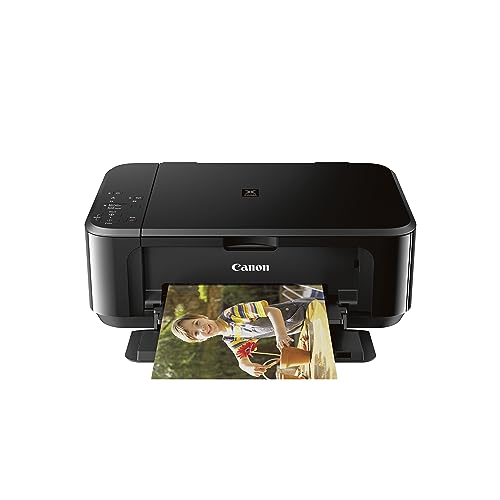
Best for Occasional Photo Printing
Canon Pixma MG3620 Wireless All-in-One Color Inkjet Printer
Small-space residents who occasionally print photos alongside documents
Our take Check price for Canon Pixma MG3620 Wireless All-in-One Color Inkjet Printer (opens in a new tab)
Our Picks
Best Overall for a Studio Apartment1 of 8
Canon PIXMA TS4320 Wireless Color Inkjet Printer on Amazon (opens in a new tab)
The PIXMA TS4320 is small enough to sit on a shelf, a closet ledge, or a small desk without needing dedicated floor space, which matters most in a studio apartment where every surface serves double duty.
Best for
- Studio apartment dwellers who need shelf-friendly placement and quiet operation
Why we like it
Print, copy, and scan cover the basics without extra bulk.
Wireless printing over a typical apartment's wifi network works reliably at normal in-unit distances, and inkjet mechanisms run quieter than laser printers, a real factor if the printer sits near a sleeping or working space. Its main tradeoff is a small paper tray that needs more frequent refills.
Key dimensions & specs
- Compact color inkjet all-in-one
- Shelf, desk, or closet-ledge friendly
- Quieter inkjet mechanism
- Wireless printing over standard home wifi
- Print, copy, scan
Pros
- Fits shelf or closet-ledge placement easily
- Quieter than laser printers nearby
- Reliable wifi performance at in-unit distances
- Low price for full AIO function
Cons
- Small paper tray needs frequent refills
- No legal or tabloid paper support
- Ink can dry out with infrequent use
Best for Weak Wifi Corners2 of 8
HP DeskJet 4355 Wireless All-in-One Color Inkjet Printer on Amazon (opens in a new tab)
In a small apartment, a printer stuck in a far corner from the router, sometimes 20-30 feet away through 1-2 walls, can drop wireless connection on a budget router.
Best for
- Apartments where the printer must sit far from the router
Why we like it
The DeskJet 4355 uses HP's standard wifi module, which performs adequately at those distances but benefits from being placed on the same side of the unit as the router when possible.
It includes a 3-month HP Instant Ink trial and covers print, scan, and copy in a compact body. If your router sits at the opposite end of a studio or one-bedroom, positioning the printer thoughtfully matters more than any single spec on the page.
Includes a starter ink trial.
Key dimensions & specs
- Compact color inkjet all-in-one
- 3-month HP Instant Ink trial
- Standard wifi module
- HP Smart app setup
- Print, scan, copy
Pros
- Reasonable wifi range for typical apartment distances
- Includes a starter ink trial
- Compact, placement-flexible body
- Full AIO function
Cons
- Wifi can weaken through multiple walls at range
- Small paper tray
- Instant Ink subscription cost after the trial
Best for Status Checks Without Getting Up3 of 8
Canon PIXMA TS6520 Wireless Color Inkjet Printer on Amazon (opens in a new tab)
42-inch OLED display lets you check ink levels and print status without walking over to inspect it or pulling out a phone app, a small but real convenience in a compact living space.
Best for
- A printer placed across the room where you'd rather glance at a screen than walk over
Why we like it
It keeps the same shelf-friendly footprint and quiet inkjet operation as the rest of Canon's compact PIXMA line, with auto duplex printing included. Wireless performance is consistent with typical small-apartment wifi setups.
Key dimensions & specs
- Compact color inkjet all-in-one
- 1.42" OLED display
- Auto duplex printing
- Quiet inkjet mechanism
- Standard wireless module
Pros
- OLED screen readable from a shelf placement
- Quiet inkjet operation
- Auto duplex printing included
- Reliable wireless at typical apartment range
Cons
- Small paper tray
- No legal or tabloid support
- Slightly pricier than the base TS4320
Best for Floor or Corner Placement4 of 8
Canon PIXMA TR4720 All-in-One Wireless Printer on Amazon (opens in a new tab)
If shelf space is truly unavailable, the PIXMA TR4720's auto document feeder and top-loading design still work reasonably well from a low floor placement or a tucked-away corner, as long as there's enough clearance for the paper tray to extend and the ADF lid to open.
Best for
- Small spaces where floor or corner placement is the only option
Why we like it
Floor placement does collect more dust over time than a shelf, worth factoring into your cleaning routine. Built-in fax and ADF add real function if you scan multi-page documents, and wireless setup follows the standard Canon PRINT app pairing.
Key dimensions & specs
- Auto document feeder
- Built-in fax
- Workable in floor or corner placement
- Compact all-in-one body
- Wireless via Canon PRINT app
Pros
- ADF handles multi-page scans
- Works acceptably in corner or floor placement
- Built-in fax for occasional use
- Wireless setup is straightforward
Cons
- Floor placement collects more dust than a shelf
- Needs clearance for tray and ADF lid to open
- Small paper tray
Best Budget Quiet Pick5 of 8
Canon PIXMA TS3720 Wireless All-in-One Printer on Amazon (opens in a new tab)
The PIXMA TS3720 strips down to the essentials, print, copy, scan, wireless, in the smallest and cheapest body among the full AIOs in this list.
Best for
- Noise-sensitive small spaces on a tight budget
Why we like it
Inkjet mechanisms are inherently quieter than laser, and this model's simplicity means less mechanical noise from extra hardware like an ADF or duplexer.
It's a sensible pick for a small bedroom-office or studio corner where noise near a sleeping or working space is the top priority, though the tradeoff is no auto duplex printing and a small paper tray.
Minimal mechanical noise from simple hardware.
Key dimensions & specs
- Basic compact color all-in-one
- No auto duplex
- Quiet inkjet mechanism, minimal extra hardware
- Wireless via Canon PRINT app
- Smallest footprint among full AIO picks
Pros
- Cheapest full AIO in this list
- Minimal mechanical noise from simple hardware
- Small, placement-flexible footprint
- Simple, reliable wireless setup
Cons
- No automatic duplex printing
- No display screen
- Small paper tray
Best Compact Laser (Placed Away from Sleeping Areas)6 of 8
Brother HL-L2405W Wireless Compact Monochrome Laser Printer on Amazon (opens in a new tab)
Laser printers like the HL-L2405W run louder during a print job than inkjet models, worth prioritizing placement away from a sleeping area or a video-call setup in a studio apartment.
Best for
- A small space where the printer can sit in a corner away from sleeping or call areas
Why we like it
It's print-only with no scan or copy, and Alexa compatibility lets you send a print job without walking over to the device, useful when it's tucked into a less accessible corner.
Key dimensions & specs
- Compact monochrome laser, print-only
- Louder during active printing than inkjet
- Smaller footprint than compact inkjet AIOs
- Alexa compatible
- Toner does not dry out
Pros
- Smallest true footprint among laser options
- Toner never dries out from infrequent use
- Alexa voice printing from across the room
- Fast mono print speed
Cons
- Louder than inkjet during active printing
- No scan or copy function
- Best placed away from sleeping or call areas
Most Placement-Flexible (Specialty Pick)7 of 8
Inkless Portable Bluetooth Thermal Printer (MT610Pro) on Amazon (opens in a new tab)
For a truly space-constrained studio where no shelf, floor spot, or under-desk area is realistically free, this inkless thermal printer can live in a drawer and come out only when needed.
Best for
- The most space-constrained studios where storability matters more than daily print quality
Why we like it
5 x 11-inch Letter and A4 pages and connects over Bluetooth rather than wifi, sidestepping any router-distance concerns entirely.
It's a specialty pick, print quality and longevity trail a standard inkjet or laser printer since it uses heat-sensitive thermal paper rather than ink or toner. Framed honestly, this is the answer when placement flexibility matters more than daily-driver print quality.
No wifi range concerns since it pairs via Bluetooth.
Key dimensions & specs
- Inkless thermal printing, 300 DPI
- Supports 8.5 x 11" Letter and A4
- Bluetooth, not wifi, sidesteps router range issues
- Storable in a drawer between uses
- Requires proprietary thermal paper
Pros
- Can be stored away entirely between uses
- No wifi range concerns since it pairs via Bluetooth
- Extremely quiet operation
- Smallest footprint of any pick here
Cons
- Requires special thermal paper, not standard copy paper
- Print quality trails inkjet or laser
- Not a realistic primary printer for daily use
Best for Occasional Photo Printing8 of 8
Canon Pixma MG3620 Wireless All-in-One Color Inkjet Printer on Amazon (opens in a new tab)
The Pixma MG3620 rounds out a small-space lineup with mobile and tablet printing support and solid photo output quality, useful for a studio apartment resident who occasionally prints photos alongside documents.
Best for
- Small-space residents who occasionally print photos alongside documents
Why we like it
Its footprint sits comfortably on a shelf or small desk.
As with other cartridge-based inkjets, it runs quieter than laser and connects over a standard wifi module that performs reliably at typical in-unit distances. It's priced higher than the most basic picks here, reflecting its stronger photo print quality rather than any small-space-specific advantage.
Mobile and tablet printing support.
Key dimensions & specs
- Compact color inkjet all-in-one
- Mobile and tablet printing
- Solid photo print quality
- Quiet inkjet mechanism
- Standard wifi module
Pros
- Strong photo print quality for occasional use
- Mobile and tablet printing support
- Quiet inkjet operation
- Shelf-friendly compact footprint
Cons
- Pricier than the more basic AIO picks in this list
- Small paper tray
- No legal or tabloid paper support
How We Chose These Printers for Small Spaces
Each pick was assessed across 5 criteria weighted for real-world use.
- Considered whether each printer works from a shelf, floor spot, corner, or drawer, since small-space placement options are rarely as simple as a dedicated desk spot.
- Wireless performance at real apartment distances
- Weighed each printer's wireless connectivity approach against typical small-apartment router distances of 20-30 feet through 1-2 walls.
- Noise level for shared or sleeping spaces
- Prioritized quieter inkjet mechanisms over louder laser operation where the printer is likely to sit near a sleeping area or a video call setup, a top concern in studio living.
- Distinguished printers that are compact from ones that simply fit a small space well due to shelf-compatible shape, since these are related but different qualities.
- Weighed price against paper tray capacity, feature set, and placement flexibility to judge which picks earn their cost for small-space living.
What to Look for in a Printer for Small Spaces
Key buying criteria so you get the right fit the first time.
Match actual size and capacity to your real need, not the category label alone
Listings for a printer often use a size or capacity label ("compact," "large," "heavy-duty") that isn't standardized across brands, so the same label can mean meaningfully different actual dimensions or capacity from one product to the next.
This matters because buying based on the category label rather than the specific listed dimensions or capacity is a common way to end up with something that doesn't actually fit your space or handle your real load.
Check the listing for exact measurements or a stated capacity figure, and compare that directly against your actual space or need, not just the marketing size category.
Verify build material and construction quality from reviews, not just spec-sheet claims
A product description can describe material or construction in flattering terms that don't always hold up under real, sustained use, and the gap between a listing's claimed quality and its actual durability only shows up in how the product performs after weeks or months of real use, not in day-one photos.
This matters more for anything you'll use daily or under real load, less for occasional light use where durability matters less.
Check reviews specifically for mentions of how the printer holds up over time, not just unboxing-day impressions, and treat a listing's own quality claims as a starting point to verify, not a guarantee.
Confirm any headline feature actually works as advertised, not just that it's listed
A feature appearing in a product's bullet points doesn't guarantee it performs well in practice, some features are functional but limited, and a few are closer to a marketing checkbox than a useful capability.
This matters directly if a specific feature is the main reason you're choosing this printer over a simpler, cheaper alternative, since a feature that underperforms in practice undermines the whole reason for paying more.
Check reviews specifically for real-world experiences with the exact feature that matters most to you, not just whether the feature is listed at all.
Weigh review count alongside rating, not rating alone
This matters more for a purchase you're relying on to perform consistently over time, less for a low-stakes, easily replaceable item.
Check both the star rating and the review count together for any printer you're considering, and treat a high rating on a very small review count as a promising but less-proven signal.
Check compatibility and fit with your existing setup before ordering
A printer that looks like a straightforward fit in photos can still have a compatibility detail, a connector type, a mounting requirement, a size threshold, that doesn't match your existing setup, and this kind of mismatch is one of the most common and avoidable reasons for a return.
This matters directly if the product needs to physically connect to, mount on, or otherwise integrate with something you already own.
Check the listing's specific compatibility details against your exact existing setup, not just the general product category, before ordering.
How to Choose a Printer for Small Spaces
By Rating Confidence: Highest Rated vs Most Reviewed
| Canon PIXMA TS4320 Wireless Color Inkjet Printer | |
| Canon PIXMA TS4320 Wireless Color Inkjet Printer |
| Inkless Portable Bluetooth Thermal Printer | |
Inkless Portable Bluetooth Thermal Printer vs Brother HL
- Inkless Portable Bluetooth Thermal Printer
- The lower-priced option in this comparison, worth checking its actual specs and review history against your specific need before assuming it's enough.
- The higher-priced option, worth it if it offers real, checkable headroom in build quality, capacity, or features over the cheaper pick.
Default to Inkless Portable Bluetooth Thermal Printer unless your specific need calls for the pricier pick's extra headroom.
| Canon PIXMA TS4320 Wireless Color Inkjet Printer |
For a First-Time Buyer Specifically
- Clear, specific dimensions or capacity and a real, established review history, not just marketing language.
- You need real durability and feature depth for regular use, where Brother HL's build gives real headroom over the cheaper picks.
- You only need this for light or occasional use, where Inkless Portable Bluetooth Thermal Printer covers the same job at a lower price.
Frequently Asked Questions
Is a "small printer" always the best fit for a small space?
Some larger all-in-ones fit fine in a corner with minimal clearance needs, while some small printers still need awkward placement due to tray extension or lid clearance. Judge each printer by whether it fits your specific placement spot, shelf, floor, corner, or under-desk, rather than by size claims alone.
Will my printer's wifi work if it's far from my router?
It depends on distance and walls. A printer placed 20-30 feet from the router through 1-2 walls, common in small apartments, can experience weaker or dropped connections on a budget router. If distance is unavoidable, position the printer on the same side of the unit as the router, or consider a Bluetooth-paired option like the inkless thermal printer, which sidesteps wifi range entirely.
Which printers are quietest for a studio apartment?
Inkjet printers run noticeably quieter than laser printers during active printing, which matters if the printer sits near a sleeping area or a video call setup. The Canon PIXMA TS3720, with minimal extra mechanical hardware, is among the quietest options in this list, while the Brother HL-L2405W laser printer is louder but has the smallest true footprint.
Can I put a printer under my desk in a small space?
Yes, as long as there's enough vertical clearance for the printer's height plus tray extension, and reasonable ventilation, especially for a laser printer. The Brother HL-L2405W's compact laser footprint tends to work well under-desk since it skips the bulkier scanner bed of an inkjet AIO.
What's the most space-saving option if I have literally no free surface?
The inkless portable thermal printer is the only pick in this list that can be stored in a drawer between uses rather than occupying permanent shelf, floor, or desk space. It's a genuine tradeoff though, print quality and paper type differ from a standard inkjet or laser printer, so it works best as an occasional-use backup rather than a daily driver.
Does printer placement affect print quality or reliability?
Floor placement collects more dust over time than shelf placement, and enclosed or under-desk spots can reduce ventilation, particularly relevant for laser printers that generate some heat during operation. Choosing a placement with reasonable airflow and occasional dusting keeps any of these printers running reliably longer.
Bottom Line
Best overall: Canon PIXMA TS4320 Wireless Color Inkjet Printer — best overall for a studio apartment pick in this roundup. See the full verdicts above for every pick, with pros, cons and who each one suits.
Browse all printers for small spaces on Amazon — Prime-eligible options with current pricing.