
Buying Guide
The Best Printers for Dorm Rooms: Our Picks
We looked at 8 printers for dorm rooms side by side, with the trade-offs that separate them and who each one suits.
By Jamie Cole, Lead Product Researcher
10 min read8 products evaluated
We may earn a commission from purchases made through links in this guide. Learn more.
A dorm room printer has to clear a different bar than a home office printer: it needs to fit on a shared desk with almost no spare surface, survive four end-of-year moves, and connect to a campus wireless network that often runs stricter WPA2-Enterprise security instead of the simple home wifi password most consumer printers expect. Ink economics matter more here too, since a printer left untouched over a three-month summer break can come back with dried-out cartridges.
97 pocket-sized thermal printer to a $139 all-in-one with a document feeder for group projects.
Quick Picks
Our 8 recommendations at a glance. Tap a pick for the full verdict.

Best Overall for Dorms
Canon PIXMA TS4320 Wireless Color Inkjet Printer
Most dorm students who want one printer that copies and scans too
Our take Check price for Canon PIXMA TS4320 Wireless Color Inkjet Printer (opens in a new tab)

Best Display & Controls
Canon PIXMA TS6520 Wireless Color Inkjet Printer
Roommate-shared setups where an easy-to-read display cuts down confusion
Our take Check price for Canon PIXMA TS6520 Wireless Color Inkjet Printer (opens in a new tab)

Best Value
HP DeskJet 4355 Wireless All-in-One Color Inkjet Printer
Budget-conscious students who want a full all-in-one under $70
Our take Check price for HP DeskJet 4355 Wireless All-in-One Color Inkjet Printer (opens in a new tab)

Best for Assignment Faxing/Scanning
Canon PIXMA TR4720 All-in-One Wireless Printer
Students who regularly scan multi-page assignments or signed documents
Our take Check price for Canon PIXMA TR4720 All-in-One Wireless Printer (opens in a new tab)

Most Compact
Canon PIXMA TS3720 Wireless All-in-One Printer
Students who move dorm rooms often and want the least bulk to pack
Our take Check price for Canon PIXMA TS3720 Wireless All-in-One Printer (opens in a new tab)
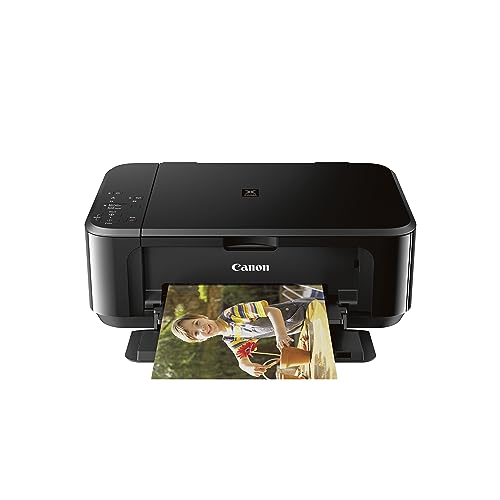
Best for Mobile & Tablet Printing
Canon Pixma MG3620 Wireless All-in-One Color Inkjet Printer
Students who print mainly from a phone or tablet instead of a laptop
Our take Check price for Canon Pixma MG3620 Wireless All-in-One Color Inkjet Printer (opens in a new tab)

Most Packable
Inkless Portable Printer for Travel (MT610Pro)
A lightweight backup printer for students who mostly rely on campus printing
Our take Check price for Inkless Portable Printer for Travel (MT610Pro) (opens in a new tab)

Best for Group Project Printing
Canon TS6420 All-in-One Wireless Printer
Roommates splitting the cost of one shared dorm printer
Our take Check price for Canon TS6420 All-in-One Wireless Printer (opens in a new tab)
Our Picks
Best Overall for Dorms1 of 8
Canon PIXMA TS4320 Wireless Color Inkjet Printer on Amazon (opens in a new tab)
The Canon PIXMA TS4320 packs printing, copying, and scanning into a compact wireless body that fits the edge of a dorm desk without eating your whole workspace.
Best for
- Most dorm students who want one printer that copies and scans too
Why we like it
Duplex printing helps stretch a limited paper supply across a semester of assignments.
Setup uses Canon's standard wireless pairing, which works on most personal-hotspot or WPA2-Personal networks without extra steps. If your dorm runs enterprise wifi, plan on a USB cable as a fallback the first time you connect, since consumer printers like this one are not built to authenticate against WPA2-Enterprise logins directly.
Key dimensions & specs
- Wireless color inkjet all-in-one
- Print, copy, scan
- Duplex (2-sided) printing
- Compact desktop footprint
- 1-year limited warranty
Pros
- Compact enough for a shared dorm desk
- Duplex printing saves paper
- Copier and scanner built in
- Straightforward wireless setup on personal networks
Cons
- No direct WPA2-Enterprise login support
- Standard inkjet cartridges can dry out over summer break
- No automatic document feeder for multi-page scans
Best Display & Controls2 of 8
Canon PIXMA TS6520 Wireless Color Inkjet Printer on Amazon (opens in a new tab)
42-inch OLED display and a more intuitive control panel over the base TS4320, which matters when a roommate who has never used the printer before needs to figure it out without asking you every time.
Best for
- Roommate-shared setups where an easy-to-read display cuts down confusion
Why we like it
It still keeps the same compact, duplex-capable design suited to a dorm desk.
Because it shares the same Canon wireless stack, expect the same WPA2-Enterprise limitation as other consumer inkjets in this list. A phone hotspot or a one-time USB connection to add it to your laptop's printer list is the reliable workaround on campus networks that block direct device pairing.
Key dimensions & specs
- Wireless color inkjet all-in-one
- 1.42" OLED display
- Duplex printing
- Print, copy, scan
- Compact design
Pros
- OLED display makes shared use easier for roommates
- Duplex printing built in
- Compact footprint for a desk corner
- More intuitive control panel than base models
Cons
- Costs more than the base TS4320
- Same WPA2-Enterprise workaround needed as other inkjets
- Ink cartridges still dry out if unused over summer
Best Value3 of 8
HP DeskJet 4355 Wireless All-in-One Color Inkjet Printer on Amazon (opens in a new tab)
HP markets the DeskJet 4355 as a best-for-home pick, and its scan, copy, and print combo in one compact body covers the core dorm workload without extra bulk.
Best for
- Budget-conscious students who want a full all-in-one under $70
Why we like it
A 3-month Instant Ink trial is included, which offsets some of the early cartridge cost while you figure out your actual print volume.
After the trial period, standard HP ink pricing applies, so it is worth calculating your real semester page count before deciding whether to keep the subscription. For a dorm printer that mostly sits idle for weeks at a time, a subscription that ships ink whether you use it or not is not automatically the cheaper option.
Competitive price for a full all-in-one.
Key dimensions & specs
- Wireless color inkjet all-in-one
- Print, scan, copy
- 3-month Instant Ink trial included
- AI-capable
- Best-for-home compact design
Pros
- Included ink trial softens upfront ink cost
- Competitive price for a full all-in-one
- Compact enough for shared desk space
- Wireless setup via HP's standard app
Cons
- Instant Ink subscription cost applies after the trial
- No WPA2-Enterprise support out of the box
- Basic scanner, no automatic document feeder
Best for Assignment Faxing/Scanning4 of 8
Canon PIXMA TR4720 All-in-One Wireless Printer on Amazon (opens in a new tab)
The PIXMA TR4720 is the only pick in this list with a built-in auto document feeder and fax, which matters if a professor requires scanning a multi-page packet or a signed form rather than a single sheet.
Best for
- Students who regularly scan multi-page assignments or signed documents
Why we like it
Feeding pages one at a time on a flatbed-only scanner gets old fast during finals week.
Mobile printing support lets you send documents straight from a phone, useful when your laptop is already tied up with an assignment. It carries the same wireless setup expectations as other consumer printers in this list, so plan on a personal hotspot or USB fallback on enterprise campus networks.
Built-in fax for signed forms.
Key dimensions & specs
- Wireless all-in-one with auto document feeder
- Built-in fax
- Mobile printing support
- Print, scan, copy, fax
- White finish
Pros
- Auto document feeder speeds up multi-page scans
- Built-in fax for signed forms
- Mobile printing from a phone
- Same price tier as simpler all-in-ones
Cons
- Larger footprint than flatbed-only models
- Fax is rarely needed by most students
- No WPA2-Enterprise support out of the box
Most Compact5 of 8
Canon PIXMA TS3720 Wireless All-in-One Printer on Amazon (opens in a new tab)
The PIXMA TS3720 strips down to basic home printing in the smallest, lightest body in this list, which is exactly what matters when you are packing a car for the fourth time in four years.
Best for
- Students who move dorm rooms often and want the least bulk to pack
Why we like it
Less bulk means less risk of cracking a scanner lid or feed tray during a move-out weekend.
It trades away the document feeder and higher-end display found on pricier picks, so it suits students whose printing needs are mostly single-page essays and forms rather than scanning-heavy coursework.
Key dimensions & specs
- Wireless all-in-one color inkjet
- Basic home printing focus
- Compact, lightweight body
- Print, scan, copy
- White finish
Pros
- Lightest, most packable pick in this list
- Lowest price among the full all-in-ones here
- Simple wireless setup
- Good fit for basic essay and form printing
Cons
- No auto document feeder
- Fewer scanning features than pricier picks
- Ink cartridges still dry out if unused over summer break
Best for Mobile & Tablet Printing6 of 8
Canon Pixma MG3620 Wireless All-in-One Color Inkjet Printer on Amazon (opens in a new tab)
The Pixma MG3620 leans on strong mobile and tablet printing support, useful if you draft most assignments on a phone or iPad rather than a laptop.
Best for
- Students who print mainly from a phone or tablet instead of a laptop
Why we like it
It still handles the standard print, scan, and copy trio in a black finish that hides fingerprints better than white models.
It costs noticeably more than the other inkjets here for a similar core feature set, so it makes the most sense if mobile printing convenience is a priority rather than an occasional nice-to-have.
Black finish hides smudges better.
Key dimensions & specs
- Wireless color inkjet all-in-one
- Mobile and tablet printing support
- Print, scan, copy
- Black finish
- Compact desktop design
Pros
- Strong mobile and tablet printing support
- Black finish hides smudges better
- Print, scan, and copy in one unit
- Reliable wireless pairing on personal networks
Cons
- Highest price among the inkjet picks in this list
- No document feeder for multi-page scans
- No WPA2-Enterprise support out of the box
Most Packable7 of 8
Inkless Portable Printer for Travel (MT610Pro) on Amazon (opens in a new tab)
5x11-inch US Letter and A4 paper over Bluetooth, and because it uses heat-sensitive thermal paper instead of ink cartridges, it sidesteps the summer dry-out problem entirely, there is no cartridge to dry out in the first place.
Best for
- A lightweight backup printer for students who mostly rely on campus printing
Why we like it
Its small, light body is the easiest printer in this list to tuck into a moving box or a backpack.
It is a useful second option for a student who mostly relies on campus printing but wants something in the room for a quick page in a pinch.
Key dimensions & specs
- Bluetooth inkless thermal printer
- Supports 8.5x11" Letter and A4
- 300 DPI resolution
- IOS, Android, and laptop compatible
- No ink or toner cartridges
Pros
- No ink to dry out over summer break
- Extremely light and packable for moves
- No ink or toner replacement cost
- Works over Bluetooth from a phone or laptop
Cons
- Thermal prints fade over time
- Black-and-white output only
- Not a realistic primary printer for a full semester's workload
Best for Group Project Printing8 of 8
Canon TS6420 All-in-One Wireless Printer on Amazon (opens in a new tab)
The TS6420 sits at the top of this list's price range but delivers the most complete feature set, wireless all-in-one printing with a black finish and the fuller control layout Canon's higher tier models use.
Best for
- Roommates splitting the cost of one shared dorm printer
Why we like it
It is the pick to consider if three or four roommates plan to split the cost and share one printer for the whole year.
At this price, run the four-year total cost of ownership math before buying, printer plus ink over four years against what your campus charges per semester for library or lab printing. For light printers, buying isn't always the cheaper option, but for a shared room that prints often, splitting this cost across roommates usually wins.
Good candidate for roommate cost-splitting.
Key dimensions & specs
- Wireless all-in-one color inkjet
- Black finish
- Print, scan, copy
- Fuller control panel layout
- Compact desktop design
Pros
- Most complete feature set in this list
- Good candidate for roommate cost-splitting
- Reliable wireless setup on personal networks
- Black finish resists visible smudging
Cons
- Highest price in this list
- Overkill for a student who prints rarely
- No WPA2-Enterprise support out of the box
How We Chose These Printers for Dorm Rooms
Each pick was assessed across 5 criteria weighted for real-world use.
- Weighed desk footprint against how easily each printer survives being boxed up and moved at the end of every school year, a real recurring cost for dorm buyers that home-office guides ignore.
- Checked how each printer pairs to a network, and flagged that consumer printers generally expect WPA2-Personal wifi, not the WPA2-Enterprise logins many campus networks use, since that gap trips up first-time dorm setups.
- True cost over a college stay
- Compared upfront price and expected ink or toner cost across a four-year stay against typical campus or library printing fees, since buying isn't always the cheaper option for light printers.
- Scored control panel clarity and setup simplicity for a printer that two to four roommates, not just the owner, need to add and use without repeated troubleshooting.
- Weighed inkjet vs thermal vs laser mechanisms against a 3-month summer break with no use, since inkjet cartridges left idle that long commonly dry out and need replacing.
What to Look for in a Printer for Dorm Rooms
Key buying criteria so you get the right fit the first time.
Match actual size and capacity to your real need, not the category label alone
Listings for a printer often use a size or capacity label ("compact," "large," "heavy-duty") that isn't standardized across brands, so the same label can mean meaningfully different actual dimensions or capacity from one product to the next.
This matters because buying based on the category label rather than the specific listed dimensions or capacity is a common way to end up with something that doesn't actually fit your space or handle your real load.
Check the listing for exact measurements or a stated capacity figure, and compare that directly against your actual space or need, not just the marketing size category.
Verify build material and construction quality from reviews, not just spec-sheet claims
A product description can describe material or construction in flattering terms that don't always hold up under real, sustained use, and the gap between a listing's claimed quality and its actual durability only shows up in how the product performs after weeks or months of real use, not in day-one photos.
This matters more for anything you'll use daily or under real load, less for occasional light use where durability matters less.
Check reviews specifically for mentions of how the printer holds up over time, not just unboxing-day impressions, and treat a listing's own quality claims as a starting point to verify, not a guarantee.
Confirm any headline feature actually works as advertised, not just that it's listed
A feature appearing in a product's bullet points doesn't guarantee it performs well in practice, some features are functional but limited, and a few are closer to a marketing checkbox than a useful capability.
This matters directly if a specific feature is the main reason you're choosing this printer over a simpler, cheaper alternative, since a feature that underperforms in practice undermines the whole reason for paying more.
Check reviews specifically for real-world experiences with the exact feature that matters most to you, not just whether the feature is listed at all.
Weigh review count alongside rating, not rating alone
This matters more for a purchase you're relying on to perform consistently over time, less for a low-stakes, easily replaceable item.
Check both the star rating and the review count together for any printer you're considering, and treat a high rating on a very small review count as a promising but less-proven signal.
Check compatibility and fit with your existing setup before ordering
A printer that looks like a straightforward fit in photos can still have a compatibility detail, a connector type, a mounting requirement, a size threshold, that doesn't match your existing setup, and this kind of mismatch is one of the most common and avoidable reasons for a return.
This matters directly if the product needs to physically connect to, mount on, or otherwise integrate with something you already own.
Check the listing's specific compatibility details against your exact existing setup, not just the general product category, before ordering.
How to Choose a Printer for Dorm Rooms
By Rating Confidence: Highest Rated vs Most Reviewed
| Canon PIXMA TS4320 Wireless Color Inkjet Printer | |
| Canon PIXMA TS4320 Wireless Color Inkjet Printer |
| Inkless Portable Printer for Travel | |
Inkless Portable Printer for Travel vs Canon TS6420 All
- Inkless Portable Printer for Travel
- The lower-priced option in this comparison, worth checking its actual specs and review history against your specific need before assuming it's enough.
- The higher-priced option, worth it if it offers real, checkable headroom in build quality, capacity, or features over the cheaper pick.
Default to Inkless Portable Printer for Travel unless your specific need calls for the pricier pick's extra headroom.
| Canon PIXMA TS4320 Wireless Color Inkjet Printer |
For a First-Time Buyer Specifically
- Clear, specific dimensions or capacity and a real, established review history, not just marketing language.
- You need real durability and feature depth for regular use, where Canon TS6420 All's build gives real headroom over the cheaper picks.
- You only need this for light or occasional use, where Inkless Portable Printer for Travel covers the same job at a lower price.
Frequently Asked Questions
Can I connect a dorm printer to my school's wifi network?
It depends on the network type. Many campus networks use WPA2-Enterprise, which requires individual login credentials rather than a shared password, and most consumer printers like the picks in this list aren't built to authenticate that way directly. The reliable workaround is a one-time USB connection to your laptop, or pairing the printer to your phone's personal hotspot instead of the dorm network.
Is it actually worth buying a printer for a dorm room?
It depends on your print volume. If you only print a handful of pages a month, campus library or lab printing can be cheaper over four years than buying a printer plus replacing dried-out ink. If you print regularly or plan to split the cost with roommates, owning one like the Canon PIXMA TS4320 or the shared-use Canon TS6420 usually pays off.
Why did my dorm printer's ink dry out over summer break?
Inkjet cartridges left unused for an extended period, like a typical 3-month summer break, commonly dry out at the print head, and replacing a dried-out cartridge set can cost $40 to $60. Laser printers and the inkless thermal pick in this list avoid the problem entirely since they don't use liquid ink.
What's the most packable printer for a student who moves every year?
The Canon PIXMA TS3720 is the lightest full inkjet all-in-one in this list, and the inkless Bluetooth thermal printer is even smaller and has no scanner lid or paper tray to protect during a move, making it the easiest to fit in a backpack or moving box.
How do multiple roommates share one dorm printer?
Most wireless printers in this list can be added to more than one laptop or phone over the same wifi network, so each roommate installs the manufacturer's app or driver once and connects independently. A model with a clear display, like the Canon PIXMA TS6520, cuts down on repeated troubleshooting for roommates who aren't as familiar with the printer.
Do I need a printer with a scanner for college assignments?
If your coursework occasionally requires scanning a signed form or a single page, a basic flatbed scanner like the one on the Canon PIXMA TS3720 is enough. If a professor regularly requires scanning multi-page packets, the Canon PIXMA TR4720's auto document feeder saves real time over feeding pages one at a time.
Bottom Line
Best overall: Canon PIXMA TS4320 Wireless Color Inkjet Printer — best overall for dorms pick in this roundup. See the full verdicts above for every pick, with pros, cons and who each one suits.
Browse all printers for dorm rooms on Amazon — Prime-eligible options with current pricing.