
Buying Guide
The Best PoE Injectors for Everyday Desk Work
We looked at 4 PoE injectors side by side, with the trade-offs that separate them and who each one suits.
By Jamie Cole, Lead Product Researcher
9 min read4 products evaluated
We may earn a commission from purchases made through links in this guide. Learn more.
A PoE injector adds Power over Ethernet capability to a single non-PoE network port, letting you power an IP camera, access point, or VoIP phone through the same cable that carries its data, without running a separate power line to the device.
3at injector is required for higher-draw devices like pan-tilt-zoom cameras or newer Wi-Fi 6 access points.
Quick Picks
Our 4 recommendations at a glance. Tap a pick for the full verdict.

Best Overall
Omada PoE+ Injector, Up to 30W, Gigabit (POE160S)
Buyers who want one injector that reliably serves both older and newer PoE devices
Our take Check price for Omada PoE+ Injector, Up to 30W, Gigabit (POE160S) (opens in a new tab)

Best Value 30W
ULTRAPOE Gigabit PoE+ Injector, 30W 48V
Buyers who want 30W Gigabit performance with a broad named device compatibility list
Our take Check price for ULTRAPOE Gigabit PoE+ Injector, 30W 48V (opens in a new tab)
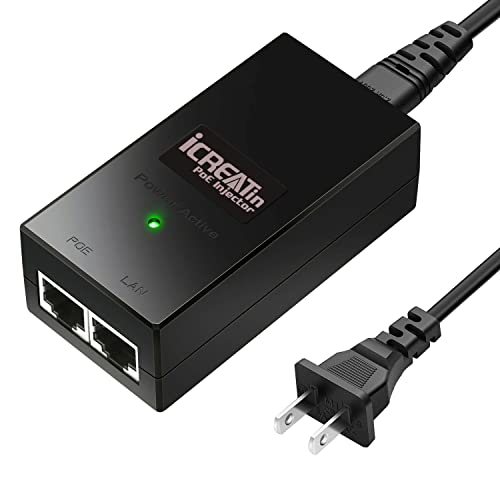
Best Basic 802.3af
Gigabit POE Injector, 48V 15.4W (TP-Link TL-POE150S compatible)
Buyers with standard IP cameras or VoIP phones that don't need PoE+ power
Our take Check price for Gigabit POE Injector, 48V 15.4W (TP-Link TL-POE150S compatible) (opens in a new tab)

Best Budget
Gigabit PoE Injector 48V with 3ft Cat 6 Cable
Buyers who want the lowest price and a bundled cable for a single basic device
Our take Check price for Gigabit PoE Injector 48V with 3ft Cat 6 Cable (opens in a new tab)
Our Picks
Best Overall1 of 4
Omada PoE+ Injector, Up to 30W, Gigabit (POE160S) on Amazon (opens in a new tab)
3af devices, letting one unit serve both device categories without manual configuration.
Best for
- Buyers who want one injector that reliably serves both older and newer PoE devices
Why we like it
Its Gigabit input and output ports avoid the throughput bottleneck that a 100Mbps-only injector would introduce on a modern network.
Compared to the budget picks below, this one's UL certification and auto-sensing power delivery justify its position at the top of this comparison, since it removes the guesswork of matching wattage to a specific device.
3at devices without manual switches.
Key dimensions & specs
- Up to 30W, 802.3at/af auto-detect
- Gigabit input and output ports
- UL certified, up to 328ft range
Pros
- Auto-detect technology serves both 15.4W and 30W devices
- UL certification adds a real safety verification
- Gigabit ports avoid a throughput bottleneck
Cons
- Higher price than the basic 15.4W picks below
- No included Ethernet cable
Best Value 30W2 of 4
ULTRAPOE Gigabit PoE+ Injector, 30W 48V on Amazon (opens in a new tab)
Compared to the Omada pick above, this one matches the same 30W power budget and Gigabit speed at an identical price, differing mainly in its explicit flame retardant housing claim and named device compatibility list rather than a UL certification.
Best for
- Buyers who want 30W Gigabit performance with a broad named device compatibility list
Why we like it
Best for buyers who want the same 30W Gigabit performance as the top pick with a broader named compatibility list.
Key dimensions & specs
- Up to 30W, 802.3af/at compliant
- Gigabit input and output, 100m range
- Flame retardant plastic housing
Pros
- Same 30W power budget as the top pick
- Flame retardant housing adds a stated safety feature
- Explicitly compatible with 802.11ac/ax routers and access points
Cons
- No UL certification stated unlike the top pick
- No included Ethernet cable
Best Basic 802.3af3 of 4
Gigabit POE Injector, 48V 15.4W (TP-Link TL-POE150S compatible) on Amazon (opens in a new tab)
3af power budget with multiple protections including over current, over load, over voltage, and anti-interference protection, a more detailed safety feature list than the basic budget pick below.
Best for
- Buyers with standard IP cameras or VoIP phones that don't need PoE+ power
Why we like it
Its Gigabit input and output ports specifically state up to 2Gbps full duplex Ethernet speed.
4W budget suits standard IP cameras and VoIP phones that don't draw PoE+ power, at a lower price than either 30W option.
Best for buyers with standard IP cameras or VoIP phones that don't need PoE+ power levels.
Key dimensions & specs
- 15.4W, 802.3af compliant
- Gigabit input/output, up to 2Gbps full duplex
- Over current, load, and voltage protection
Pros
- Multiple stated electrical protections beyond basic PoE compliance
- Gigabit speed at a lower price than the 30W picks
- Named compatibility with TP-Link TL-POE150S and TRENDnet TPE-113GI
Cons
- Fixed 15.4W budget, not enough for PoE+ devices
- No included Ethernet cable
Best Budget4 of 4
Gigabit PoE Injector 48V with 3ft Cat 6 Cable on Amazon (opens in a new tab)
This injector's listing specifically states an included 3ft Cat 6 Gigabit Ethernet cable, the only pick in this comparison bundling a cable rather than requiring you to supply your own.
Best for
- Buyers who want the lowest price and a bundled cable for a single basic device
Why we like it
Its compact, lightweight form factor is specifically called out as suited to tight spaces or network closets.
Compared to the picks above, this one's lowest price in the comparison and included cable make it a reasonable starting point for a single basic device, though its listing states fewer explicit electrical protections than the TL-POE150S-compatible pick.
Best for buyers who want the lowest price and don't want to source a separate Ethernet cable.
Key dimensions & specs
- 802.3at/af compliant, 10/100/1000Mbps
- Includes 3ft Cat 6 Ethernet cable
- Compact form factor for tight spaces
Pros
- Lowest price in this comparison
- Includes a Cat 6 cable so nothing extra to buy
- Compact size fits tight network closets
Cons
- Listing states fewer explicit electrical protections than other picks
- Power budget not clearly specified beyond 802.3at/af compliance
How We Chose These PoE Injectors
Each pick was assessed across 5 criteria weighted for real-world use.
- 3at (30W) standards it claims to meet.
- Compared Gigabit versus 100Mbps port speeds and their effect on real network throughput.
- Compared stated protections like over current, over load, and over voltage protection.
- Compared named compatibility lists against common IP camera, VoIP phone, and access point brands.
- Compared whether a listing bundles an Ethernet cable or requires a separate purchase.
What to Look for in a PoE Injector
Key buying criteria so you get the right fit the first time.
3at Standard Determines Which Devices an Injector Can Actually Power
4W-only injector simply won't power it correctly or will cause it to behave erratically. Check your device's own spec sheet or power label for its exact wattage draw, then match it against the injector's stated maximum output rather than assuming any PoE injector works with any PoE device.
Gigabit Port Speed Prevents a PoE Injector From Becoming the Slowest Link in Your Network
A PoE injector with only 100Mbps ports will cap the connected device's network speed at 100Mbps even if every other component in your network supports Gigabit speeds, effectively creating a bottleneck at that one point. This matters if you're powering a high-resolution IP camera streaming 4K footage or any device that benefits from faster data transfer, and matters less for a basic VoIP phone or low-resolution camera where 100Mbps is already more than sufficient. Check the injector's listed port speed specifically, since some budget listings only state PoE compliance without clearly stating whether the ports are Gigabit or Fast Ethernet.
A PoE Injector's Stated Electrical Protections Reduce Real Risk of Damage to Connected Equipment
Features like over current protection, over load protection, and over voltage protection are circuit-level safeguards that prevent a power fluctuation or wiring fault from damaging the connected camera, phone, or access point, and their absence from a listing doesn't necessarily mean they're missing, but a listing that explicitly names them gives you more confidence than one that doesn't mention safety features at all. This matters more in environments with less stable power, like older buildings or outdoor installations, and matters less in a controlled office environment with clean, stable power. Look for a listing that explicitly names its electrical protections in the bullet points rather than assuming all injectors include the same safeguards.
UL Certification Signals Independent Safety Verification, Not Just a Manufacturer's Own Claim
UL certification means an independent testing organization has verified the product meets defined electrical safety standards, which is a meaningfully different level of assurance than a manufacturer simply stating their product is safe in the listing copy. This matters more for a permanent installation in a wall or ceiling where fire safety is a real consideration, and matters less for a temporary desktop setup where you're more focused on data throughput than long-term electrical safety certification. Check the listing title and bullet points for an explicit UL, ETL, or similar certification mark rather than assuming generic PoE compliance implies third-party safety testing.
An Included Ethernet Cable Saves a Second Purchase but Isn't Universal Across Listings
Some PoE injector listings bundle a short Ethernet cable, typically 3 feet, meant to connect the injector to your switch or router, while others expect you to already have a compatible cable on hand, and assuming a cable is included when it isn't means your installation stalls until you source one separately. This matters more for a first-time buyer setting up a single device who wants everything in one box, and matters less for anyone who already has spare Ethernet cables around from previous networking work. Check the listing's bullet points and included-items section specifically for the word cable before assuming one comes in the box.
How to Choose a PoE Injector
| 4W (basic camera, VoIP phone) | |
|---|---|
| 3at 30W (PTZ camera, Wi-Fi 6 AP) | |
| Either, without knowing the exact spec | ULTRAPOE Gigabit PoE+ Injector 30W |
| A single basic device on a tight budget | Gigabit PoE Injector 48V with 3ft Cable |
- Suits standard IP cameras, VoIP phones, and basic access points that don't draw heavy power, at a lower unit cost, as offered by the TL-POE150S-compatible pick.
- Required for PTZ cameras, Wi-Fi 6/6E access points, and other higher-draw devices, as offered by the Omada and ULTRAPOE picks.
By Certification and Safety Features
| Flame retardant housing specifically stated | ULTRAPOE Gigabit PoE+ Injector 30W |
|---|---|
For a First IP Camera Installation Specifically
- A stated power budget matching your camera's exact wattage requirement from its own spec sheet, plus a bundled Ethernet cable if you don't already have one on hand.
- The budget pick with the included 3ft Cat 6 cable removes one shopping step for a first-time single-camera installation.
- 99 price buys documented safety certification and a wider power range.
- 97 budget pick with its included cable covers that need.
Frequently Asked Questions
What's the difference between a PoE injector and a PoE switch?
A PoE injector adds power to a single existing non-PoE network port, while a PoE switch has multiple built-in PoE ports and replaces your existing switch entirely, so an injector is the simpler and cheaper choice for powering just one or two devices.
Is it worth paying extra for a UL-certified PoE injector?
For a permanent installation, especially indoors or near flammable materials, UL certification provides independent safety verification that's worth the modest price difference over an uncertified budget option.
What's the maximum distance a PoE injector can power a device?
Standard PoE injectors are rated for up to 100 meters (328 feet) over standard Ethernet cable, consistent with the Ethernet standard's own distance limit, beyond which you'd need a repeater or extender rather than a longer run.
Does a PoE injector need Gigabit ports for a basic security camera?
A basic single security camera typically works fine with 100Mbps, but Gigabit ports future-proof the injector for higher-resolution cameras or additional bandwidth-hungry devices you might add later.
Bottom Line
Best overall: Omada PoE+ Injector, Up to 30W, Gigabit (POE160S) — best overall pick in this roundup. See the full verdicts above for every pick, with pros, cons and who each one suits.
Browse all poe injectors on Amazon — Prime-eligible options with current pricing.