
Buying Guide
The Best NAS for Mac Time Machine Backup Under $300: Picks and Trade-offs
We looked at 4 NAS for mac time machine backup under $300 side by side, with the trade-offs that separate them and who each one suits.
By Jamie Cole, Lead Product Researcher
10 min read4 products evaluated
We may earn a commission from purchases made through links in this guide. Learn more.
Every NAS in this price range runs vendor software (Synology DSM, QNAP QTS, Asustor ADM, or UGREEN's own OS) that exposes an SMB network share Time Machine can target directly, so Time Machine compatibility itself isn't the differentiator at this budget. What actually varies is CPU class and network port speed, both of which determine how fast that first full backup completes and how the NAS holds up running Time Machine alongside other tasks.
We focused on 2-bay diskless units in this tier, since a second drive bay lets you mirror your Time Machine backup for redundancy (RAID 1) rather than trusting a single drive, and checked each model's actual CPU and network port spec rather than assuming any 2-bay box performs the same.
Quick Picks
Our 4 recommendations at a glance. Tap a pick for the full verdict.

Best Value
UGREEN NAS DH2300 2-Bay Desktop NAS
Buyers on the tightest budget who want the highest capacity ceiling in this tier
Our take Check price for UGREEN NAS DH2300 2-Bay Desktop NAS (opens in a new tab)
Best CPU for the Price
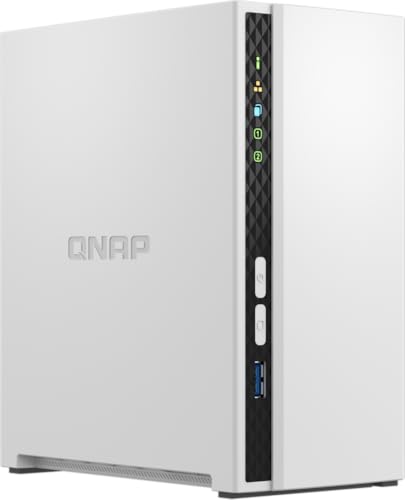
QNAP TS-233-US 2-Bay NAS
Buyers who want a documented CPU spec and QNAP's established software ecosystem
Our take Check price for QNAP TS-233-US 2-Bay NAS (opens in a new tab)

Best Network Speed
Asustor Drivestor 2 Pro Gen2 AS3302T v2
5GbE-capable networking gear who want faster backup and restore transfer speeds
Our take Check price for Asustor Drivestor 2 Pro Gen2 AS3302T v2 (opens in a new tab)

Best Established Software
Synology DS223 Home & Office Backup Hub
Buyers who want the most polished, well-documented Time Machine setup experience and room to expand into other NAS apps later
Our take Check price for Synology DS223 Home & Office Backup Hub (opens in a new tab)
| Pick | Best for | Key spec | Price |
|---|---|---|---|
| Buyers on the tightest budget who want the highest capacity ceiling in this tier | 2-bay diskless, up to 64TB capacity | Check price for UGREEN NAS DH2300 2-Bay Desktop NAS (opens in a new tab) |
| Buyers who want a documented CPU spec and QNAP's established software ecosystem | ARM Cortex-A55 quad-core, 2GB DDR4 | Check price for QNAP TS-233-US 2-Bay NAS (opens in a new tab) |
| 5GbE-capable networking gear who want faster backup and restore transfer speeds | 2.5GbE network port | Check price for Asustor Drivestor 2 Pro Gen2 AS3302T v2 (opens in a new tab) |
| Buyers who want the most polished, well-documented Time Machine setup experience and room to expand into other NAS apps later | Native DSM Time Machine setup flow | Check price for Synology DS223 Home & Office Backup Hub (opens in a new tab) |
Our Picks
Best Value1 of 4
UGREEN NAS DH2300 2-Bay Desktop NAS on Amazon (opens in a new tab)
UGREEN's DH2300 is the cheapest 2-bay diskless NAS in this comparison, rated to support up to 64TB total capacity across its two bays, giving substantial headroom for a Mac's Time Machine backups even as your data grows over the years.
Best for
- Buyers on the tightest budget who want the highest capacity ceiling in this tier
Why we like it
Against the pricier QNAP and Asustor picks below, UGREEN's own NAS OS is newer to the market than Synology's or QNAP's long-established software, a real consideration for anyone who values years of accumulated firmware stability and community troubleshooting resources.
Best for buyers on the tightest budget in this comparison who want the highest stated capacity ceiling and don't mind running a newer, less established NAS operating system.
Key dimensions & specs
- 2-bay diskless, up to 64TB capacity
- UGREEN's own NAS OS
- Cheapest pick in this comparison
Pros
- Highest stated capacity ceiling at this price
- Cheapest 2-bay diskless NAS here
- Supports SMB shares for Time Machine targeting
Cons
- Newer NAS OS with less established track record
- No stated CPU class in the listing title
Best CPU for the Price2 of 4
QNAP TS-233-US 2-Bay NAS on Amazon (opens in a new tab)
QNAP names its exact processor directly in the listing, an ARM Cortex-A55 quad-core chip paired with 2GB of DDR4 RAM, giving you a concrete spec to compare against competitors rather than a vague "efficient processor" claim.
Best for
- Buyers who want a documented CPU spec and QNAP's established software ecosystem
Why we like it
Against the UGREEN pick above, QNAP's QTS operating system has a much longer market history, which matters for long-term firmware update support and the volume of community documentation available if you run into a setup issue.
Best for buyers who want a named, comparable CPU spec and the backing of QNAP's established QTS software ecosystem over a newer NAS OS.
Key dimensions & specs
- ARM Cortex-A55 quad-core, 2GB DDR4
- 2-bay diskless design
- QNAP QTS operating system
Pros
- Named CPU and RAM spec, not vague marketing language
- Established QTS software with long support history
- Affordable entry into QNAP's NAS ecosystem
Cons
- 2GB RAM is on the lower side for running extra NAS apps
- Costs more than the UGREEN pick for similar bay count
Best Network Speed3 of 4
Asustor Drivestor 2 Pro Gen2 AS3302T v2 on Amazon (opens in a new tab)
5GbE networking gear (a compatible router, switch, or USB-C ethernet adapter on the Mac) and want to take advantage of faster network transfer speeds for large backups.
Best for
- 5GbE-capable networking gear who want faster backup and restore transfer speeds
Key dimensions & specs
- 2.5GbE network port
- 1.7GHz quad-core CPU, 2GB DDR4 RAM
- 2-bay diskless design
Pros
- 2.5GbE port, faster than standard Gigabit
- Named CPU and RAM specs
- Compact home-office-focused design
Cons
- 2.5GbE speed benefit requires compatible router/adapter too
- Priciest 2-bay pick in this comparison
Best Established Software4 of 4
Synology DS223 Home & Office Backup Hub on Amazon (opens in a new tab)
Synology's DSM operating system has native Time Machine integration built directly into its Control Panel, letting you create a dedicated Time Machine shared folder with quota limits in a few clicks, one of the most straightforward Mac-backup setup flows among NAS operating systems.
Best for
- Buyers who want the most polished, well-documented Time Machine setup experience and room to expand into other NAS apps later
Why we like it
Against the QNAP and Asustor picks, Synology doesn't state as specific a CPU number in this listing, but DSM's years of refinement and the largest third-party app ecosystem among consumer NAS platforms are a real, checkable differentiator for anyone planning to expand beyond just Time Machine backups later.
Best for buyers who specifically want DSM's polished, well-documented Time Machine setup flow and the broadest app ecosystem for future expansion beyond backup duty alone.
Key dimensions & specs
- Native DSM Time Machine setup flow
- 2-bay diskless design
- Broadest third-party NAS app ecosystem
Pros
- DSM has a dedicated, polished Time Machine setup wizard
- Largest app ecosystem among consumer NAS platforms
- Well-documented setup process with extensive community support
Cons
- No specific CPU model stated in this listing
- Similarly priced to the faster-networking Asustor pick
How We Chose These NAS for Mac Time Machine Backup Under $300
Each pick was assessed across 5 criteria weighted for real-world use.
- We confirmed each NAS operating system (DSM, QTS, ADM, or UGREEN's own OS) exposes a standard SMB network share that macOS Time Machine can target directly, the standard method all consumer NAS platforms use for Mac backup.
- CPU and RAM specification check
- We noted which listings name a specific CPU model and RAM amount versus a vague performance claim, since a named spec is directly comparable across competing NAS units.
- 5GbE-equipped models, since network speed is the real bottleneck for a NAS's first full backup and any large restore operation.
- Bay count and RAID capability
- We favored 2-bay designs at this budget specifically because a second drive bay allows mirroring your Time Machine backup for redundancy rather than trusting a single drive.
- Every pick had to be in stock and priced at or under $300 on the date this guide was checked; units that only hit this tier during a temporary sale were excluded.
What to Look for in an NA for Mac Time Machine Backup Under $300
Key buying criteria so you get the right fit the first time.
Understand that every NAS here supports Time Machine the same basic way
Time Machine on macOS backs up to any network location that exposes a standard SMB (Server Message Block) file share, and every consumer NAS operating system in this comparison, whether Synology's DSM, QNAP's QTS, Asustor's ADM, or UGREEN's own OS, creates this kind of share as a core, built-in feature. This means Time Machine compatibility itself isn't a genuine differentiator between these NAS units the way it might be with a niche or unusual device; the real differences are in CPU speed, network port speed, and how polished the setup process feels, not whether Time Machine works at all. Don't pay extra for a listing that specifically advertises "Time Machine compatible" as if it were a rare feature, since it's standard across this entire product category.
Check for a named CPU model, not just a bay count and RAM figure
A NAS's processor determines how quickly it can handle a large Time Machine backup, especially the very first full backup, which can involve transferring hundreds of gigabytes at once, and some listings name a specific CPU model (like an ARM Cortex-A55 or a stated clock speed) while others only describe the unit generally without a comparable spec. A named CPU lets you look up its real-world performance benchmarks if you want to dig deeper, while a vague description gives you nothing concrete to compare against a competing unit. Prioritize listings that state an actual processor model and RAM amount over ones that only describe general capability.
Match network port speed to your actual home network capability
5GbE-equipped NAS provides no real speed benefit until you upgrade the rest of your network too. Check your router's spec sheet and your Mac's built-in or adapter ethernet port rating before choosing a NAS specifically for its network speed.
Choose a 2-bay design if you want backup redundancy, not just capacity
A single-bay NAS stores your Time Machine backup on exactly one hard drive, meaning that drive's failure means losing your entire backup history with no recovery option. A 2-bay NAS lets you configure RAID 1 (mirroring), where the same data is written to two drives simultaneously, so one drive failing doesn't lose your backup, at the cost of effectively halving your total usable capacity compared to using both drives independently. If Time Machine is your only backup of important data, prioritize a 2-bay design specifically for that redundancy rather than choosing based on raw capacity numbers alone.
Weigh an established NAS operating system's ecosystem against a newer platform's price advantage
Synology's DSM and QNAP's QTS have been refined over many years, resulting in extensive official documentation, large user communities that have already solved most common setup problems, and broad third-party app support for tasks beyond simple backup. Newer NAS platforms can offer competitive or lower hardware pricing but come with a shorter track record, meaning fewer forum threads and guides exist if you hit an unusual setup issue. If this is your first NAS and you value having documentation readily available for every step, an established platform is worth the price premium; if you're comfortable troubleshooting independently, a newer platform's lower price is a reasonable tradeoff.
How to Choose an NA for Mac Time Machine Backup Under $300
| The lowest price with the highest capacity ceiling | UGREEN NAS DH2300 2-Bay Desktop NAS |
|---|---|
| A named, comparable CPU spec | |
| Asustor Drivestor 2 Pro Gen2 AS3302T v2 | |
| The most polished Time Machine setup flow | Synology DS223 Home & Office Backup Hub |
Established NAS OS vs Newer Software
- Established software (Synology DSM, QNAP QTS, Asustor ADM)
- Years of refinement, extensive community documentation, and mature Time Machine setup flows, at a generally higher price point than newer entrants.
- Lower price and modern hardware, but with a shorter track record and less accumulated community troubleshooting resources.
If this is your first NAS and you want the most documentation and community support available, Synology or QNAP's established software is the safer bet despite the higher price.
| UGREEN, QNAP, or Synology (all fine at standard Gigabit) | |
| Asustor Drivestor 2 Pro Gen2 AS3302T v2 |
For a First-Time Full Backup Specifically
- 5GbE) if your Mac and router both support it, since the first full Time Machine backup transfers your entire drive's contents and benefits most from network speed.
- 5GbE port is the only one here that can meaningfully speed up that initial full backup, assuming compatible networking gear on both ends.
- 99) both offer real advantages over the cheaper picks here.
- 99) covers that core function for the lowest price in this comparison.
Frequently Asked Questions
Do I need a special NAS model specifically for Time Machine, or does any NAS work?
Any NAS running a standard operating system (DSM, QTS, ADM, or similar) that exposes an SMB network share works with Time Machine, since that's the standard connection method macOS uses. Every pick in this comparison supports this natively; the real differences between them are CPU speed, network port speed, and setup polish, not Time Machine compatibility itself.
5GbE NAS worth paying more for if I only have a standard Gigabit router?
If your network is entirely standard Gigabit, the extra speed capability goes unused until you upgrade the rest of your network.
Do I need to buy hard drives separately for these NAS units?
Every pick in this comparison is sold diskless, meaning you supply your own compatible hard drives or SSDs separately. Check the specific NAS model's compatible drive list and your budget for drives before finalizing your total cost.
What's the benefit of a 2-bay NAS over a cheaper single-bay model?
A 2-bay NAS lets you configure RAID 1 mirroring, where your data is written to two drives simultaneously so one drive failing doesn't lose your Time Machine backup. If your backup is your only safety net for important data, that redundancy is worth prioritizing over a cheaper single-bay design.
How long does the first Time Machine backup to a NAS typically take?
It depends heavily on how much data you're backing up and your network speed, since the first backup transfers your entire drive's used contents at once. 5GbE) and a Mac with matching networking capability can meaningfully reduce this initial backup time compared to standard Gigabit Ethernet.
Can I use one of these NAS units for anything besides Time Machine backup?
Yes, all four picks in this comparison run a full NAS operating system capable of much more than backup, including file sharing, media streaming, and in some cases running additional apps. Synology and QNAP in particular have the broadest third-party app ecosystems if you plan to expand beyond simple backup duty later.
Bottom Line
Best overall: UGREEN NAS DH2300 2-Bay Desktop NAS — best value pick in this roundup. See the full verdicts above for every pick, with pros, cons and who each one suits.
Browse all nas for mac time machine backup under $300 on Amazon — Prime-eligible options with current pricing.