
Buying Guide
The Best Mini PC Mounts Under $40, Compared
We looked at 4 mini PC mounts under $40 side by side, with the trade-offs that separate them and who each one suits.
By Jamie Cole, Lead Product Researcher
7 min read4 products evaluated
We may earn a commission from purchases made through links in this guide. Learn more.
Under $40, mini PC mounts start supporting heavier devices like NAS enclosures and docking stations, and multi-pack options appear for buyers outfitting more than one workstation, both real upgrades over the single-device brackets at lower price tiers.
We compared this lineup on stated weight capacity, specific NAS or docking-station compatibility, and whether a listing offers a 2-pack value option, since these details determine whether a mount handles equipment heavier than a typical thin client alone.
Quick Picks
Our 4 recommendations at a glance. Tap a pick for the full verdict.

Best Overall
HumanCentric Mount for Dell OptiPlex Micro
Buyers who want documented, procurement-verifiable Dell OptiPlex Micro compatibility
Our take Check price for HumanCentric Mount for Dell OptiPlex Micro (opens in a new tab)

Best Value 2-Pack
suptek Thin Client Mount Bracket, 2 Pack
Buyers outfitting two workstations or wanting a spare mount on hand
Our take Check price for suptek Thin Client Mount Bracket, 2 Pack (opens in a new tab)

Best for NAS Devices
PUTORSEN Under Desk Mini PC Mount NAS Bracket
Buyers mounting a NAS enclosure or other device heavier than a typical mini PC
Our take Check price for PUTORSEN Under Desk Mini PC Mount NAS Bracket (opens in a new tab)
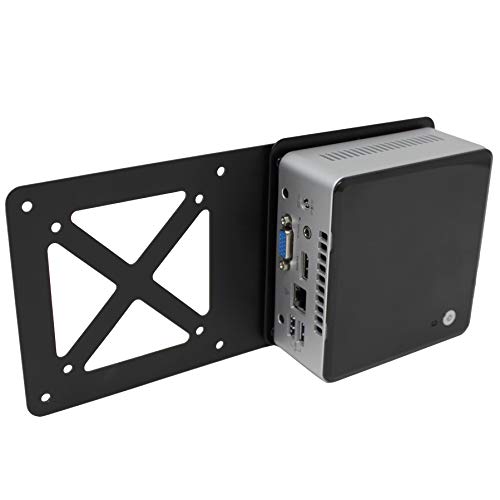
Best Compact Universal
HumanCentric Thin Client Mount Bracket
Buyers who want a simple, reliable mount without paying for unneeded weight capacity
Our take Check price for HumanCentric Thin Client Mount Bracket (opens in a new tab)
| Pick | Best for | Key spec | Price |
|---|---|---|---|
| Buyers who want documented, procurement-verifiable Dell OptiPlex Micro compatibility | Extensive Dell OptiPlex Micro model list, cross-referenced part numbers | Check price for HumanCentric Mount for Dell OptiPlex Micro (opens in a new tab) |
| Buyers outfitting two workstations or wanting a spare mount on hand | 2 complete brackets included, 0.6-2.7 in width each | Check price for suptek Thin Client Mount Bracket, 2 Pack (opens in a new tab) |
| Buyers mounting a NAS enclosure or other device heavier than a typical mini PC | 9-level height adjustment, 4.2-8.0 in range | Check price for PUTORSEN Under Desk Mini PC Mount NAS Bracket (opens in a new tab) |
| Buyers who want a simple, reliable mount without paying for unneeded weight capacity | Universal thin client mount, standard VESA compatibility | Check price for HumanCentric Thin Client Mount Bracket (opens in a new tab) |
Our Picks
Best Overall1 of 4
HumanCentric Mount for Dell OptiPlex Micro on Amazon (opens in a new tab)
This mount lists an extensive range of specific Dell OptiPlex Micro model numbers and explicitly names comparable part numbers like 482-BBBP and 452-BDEQ, letting IT buyers cross-reference against Dell's own procurement documentation rather than guessing at compatibility.
Best for
- Buyers who want documented, procurement-verifiable Dell OptiPlex Micro compatibility
Why we like it
It supports VESA behind a monitor, wall mounting, or under-desk installation, all using the same hardware kit.
Its two Velcro straps secure the OptiPlex power adapter below the mount, keeping cable management consistent across every installation scenario, and the listing is explicit that VESA mounting will occupy those same holes a monitor arm would otherwise use.
Best for buyers or IT purchasers who want cross-referenced part-number compatibility for Dell OptiPlex Micro deployments.
Key dimensions & specs
- Extensive Dell OptiPlex Micro model list, cross-referenced part numbers
- 75x75mm and 100x100mm VESA, 3 mounting options
- Velcro straps for power adapter management
Pros
- Cross-referenced Dell part numbers aid procurement verification
- Consistent power adapter management across all mount types
- Extensive, precisely documented model compatibility
Cons
- Limited to Dell OptiPlex Micro form factor only
- VESA mounting occupies the same holes a monitor arm needs
Best Value 2-Pack2 of 4
suptek Thin Client Mount Bracket, 2 Pack on Amazon (opens in a new tab)
This listing includes two complete mounting brackets rather than one, a genuine value proposition for anyone outfitting two workstations or wanting a spare on hand, at roughly $19 per unit when split across the pair.
Best for
- Buyers outfitting two workstations or wanting a spare mount on hand
Why we like it
7 inches in width, supports up to 11 lbs, and offers the same three mounting options, monitor pole clip, VESA, or under desk, as premium single-unit mounts.
Its rust-proof coating and adjustable shoulder straps with rubber padding protect mounted devices from both corrosion and scratches, and the maker backs it with 24/7 technical support despite the lower per-unit price point.
Best for buyers outfitting two workstations or wanting a backup mount without paying for two separate full-price purchases.
Key dimensions & specs
- 2 complete brackets included, 0.6-2.7 in width each
- Supports up to 11 lbs per bracket, rust-proof coating
- 3 mounting options: pole clip, VESA, or under desk
Pros
- Two complete mounts for less than buying two single units separately
- Rust-proof coating protects against long-term corrosion
- 24/7 technical support despite the lower per-unit cost
Cons
- Only useful if you actually need two separate mounts
- Same 11 lb capacity as cheaper single-pack alternatives
Best for NAS Devices3 of 4
PUTORSEN Under Desk Mini PC Mount NAS Bracket on Amazon (opens in a new tab)
This bracket specifically lists NAS and DVD drives alongside typical mini PCs and docking stations in its compatibility, a broader device category than mounts built purely around thin clients or Mac Mini form factors.
Best for
- Buyers mounting a NAS enclosure or other device heavier than a typical mini PC
Why we like it
0 inches offers considerably more vertical range than the 5 or 6-level brackets found at lower price tiers.
Rated to support up to 22 lbs, roughly double the capacity of the 11 lb universal brackets in this comparison, it's built for heavier equipment, and its complete installation kit includes a positioning template for precise drilling.
Best for buyers specifically mounting a NAS enclosure or other heavier device beyond a standard lightweight mini PC.
Key dimensions & specs
- 9-level height adjustment, 4.2-8.0 in range
- Supports up to 22 lbs, roughly double lighter brackets
- Fits NAS, DVD drives, Mac Mini with dock, and more
Pros
- 22 lb capacity handles heavier NAS and dock combinations
- 9 height levels offer the widest adjustment range in this comparison
- Explicitly rated for NAS and DVD drive mounting
Cons
- Bulkier footprint needed to support the higher weight rating
- Overkill capacity if you're only mounting a lightweight mini PC
Best Compact Universal4 of 4
HumanCentric Thin Client Mount Bracket on Amazon (opens in a new tab)
This bracket remains the most compact and low-cost option in this specific tier, built as a straightforward universal thin client mount without the heavier-duty weight capacity or multi-pack value of the pricier picks above.
Best for
- Buyers who want a simple, reliable mount without paying for unneeded weight capacity
Why we like it
It supports standard VESA mounting under a desk or behind a monitor, covering the core use case most mini PC owners actually need.
Compared to the NAS-rated PUTORSEN bracket, it trades weight capacity for a lighter, more compact design suited specifically to typical thin clients and small form factor PCs rather than heavier peripherals.
Best for buyers who want a simple, reliable universal mount without paying for NAS-level weight capacity they won't use.
Key dimensions & specs
- Universal thin client mount, standard VESA compatibility
- Under desk or behind-monitor mounting
- Compact, lightweight design
Pros
- Lowest price in this comparison
- Compact design suits standard thin clients well
- Straightforward VESA compatibility for typical setups
Cons
- Lower weight capacity than the NAS-rated PUTORSEN pick
- Fewer bonus features than the 2-pack or Dell-specific picks
How We Chose These Mini PC Mounts Under $40
Each pick was assessed across 5 criteria weighted for real-world use.
- Compared stated maximum supported weight, distinguishing standard thin-client-rated mounts from heavier-duty NAS-capable designs.
- Checked which picks explicitly support NAS enclosures, docking stations, or other heavier peripherals beyond typical mini PCs.
- Compared per-unit cost for any listing offering more than one mount in a single purchase.
- Compared the number of adjustment levels and overall vertical range each bracket supports.
- Checked how specifically each listing names compatible model numbers or manufacturer part numbers.
What to Look for in a Mini PC Mount Under $40
Key buying criteria so you get the right fit the first time.
Weight Capacity Should Be Matched to Your Heaviest Mounted Item, Not Just the Mini PC Alone
The PUTORSEN bracket's 22 lb rating exists specifically because NAS enclosures, especially once populated with hard drives, weigh meaningfully more than a bare mini PC, and mounting a heavier device on a bracket rated for only 11 lbs risks gradual sagging or outright failure over time. If you're mounting a mini PC alongside a docking station or other accessory on the same bracket, add up the combined weight rather than considering only the mini PC's weight in isolation. Check a listing's stated weight capacity against your actual total mounted load, not just the primary device's specification sheet.
A Multi-Pack Purchase Only Delivers Real Value If You Actually Need Multiple Mounts
The suptek 2-pack works out to a lower per-unit cost than buying two single mounts separately, but that value only materializes if you need two mounts, whether for two separate workstations or as a backup. Buying a 2-pack when you only need one mount means paying more upfront for a spare you may never use, even if the per-unit math looks favorable on paper. Confirm your actual mount count need before letting a lower per-unit price drive the purchase decision.
Documented Manufacturer Part-Number Cross-References Matter Most in Business or IT Procurement Contexts
The HumanCentric Dell OptiPlex Mount explicitly lists comparable Dell part numbers like 482-BBBP, a detail primarily useful if you're procuring mounts for a business deployment and need to verify compatibility against existing purchase orders or IT asset documentation. For a single home-office mount purchase, this level of cross-referencing matters less than simply confirming your specific OptiPlex model appears in the general compatibility list. Weigh how much procurement-level documentation actually matters for your specific buying context before treating this as a useful feature.
Height Adjustment Range Becomes More Important as Mounted Device Size Increases
0 inch height range accommodates larger devices like NAS enclosures that need more vertical clearance than a slim thin client, while a standard mini PC mount's narrower height range is perfectly adequate for its intended smaller devices. If you're mounting a taller or bulkier device, check the specific height range rather than assuming any height-adjustable mount provides sufficient clearance. A wider adjustable range without matching weight capacity doesn't solve the problem alone, so check both specifications together for heavier or larger equipment.
A Compact, Lower-Capacity Mount Is the Better Choice When You Don't Need Extra Weight Headroom
The HumanCentric Thin Client Mount's lower weight rating and more compact design aren't a compromise if your actual device is a standard lightweight mini PC or thin client that never approaches an 11 lb capacity anyway. Paying extra for a NAS-rated bracket's doubled weight capacity when you'll never use more than a few pounds of that headroom is a real, avoidable overspend. Match your bracket choice to your actual device's weight rather than defaulting to the highest-capacity option available in a comparison.
How to Choose a Mini PC Mount Under $40
| Documented Dell OptiPlex Micro compatibility | HumanCentric Mount for Dell OptiPlex Micro |
|---|---|
| Two mounts for two workstations | Suptek Thin Client Mount Bracket, 2 Pack |
| To mount a NAS or other heavier device | PUTORSEN Under Desk Mini PC Mount NAS Bracket |
| A simple, compact universal mount | HumanCentric Thin Client Mount Bracket |
Standard Weight Capacity vs Heavy-Duty NAS Rating
- Standard capacity (HumanCentric picks, suptek)
- Rated around 11 lbs, sufficient for typical mini PCs and thin clients but not built for heavier NAS enclosures.
- Rated up to 22 lbs, built for heavier devices like NAS units or a mini PC paired with a docking station.
If you're mounting anything heavier than a standard lightweight mini PC, the PUTORSEN's doubled weight capacity is worth prioritizing over a standard-rated bracket.
| One workstation, standard mini PC | |
|---|---|
| Two workstations or want a spare | |
| One Dell OptiPlex Micro with documented fit |
For a Home Network Closet or NAS Setup Specifically
- A stated weight capacity well above a typical mini PC's weight, since NAS enclosures with drives installed are meaningfully heavier.
- The PUTORSEN bracket's 22 lb rating and explicit NAS compatibility make it the clear choice for this specific use case.
- You're mounting a NAS or heavier device, where the PUTORSEN's doubled weight capacity handles loads the standard-rated picks aren't built for.
- You just need a simple, reliable mount for one standard mini PC, where the HumanCentric Thin Client Mount covers that need for about $10 less than the Dell-specific or 2-pack options.
Frequently Asked Questions
Does the suptek 2-pack include two identical mounts, or are they different sizes?
7 inch adjustable width and 11 lb weight capacity, making it suited to two similarly sized devices rather than one large and one small setup.
What's the most common mistake buyers make when mounting a NAS enclosure?
Using a standard-capacity mount rated around 11 lbs for a NAS that weighs meaningfully more once populated with hard drives, which risks gradual sagging or bracket failure over time compared to a properly rated 22 lb bracket like the PUTORSEN pick.
Is the HumanCentric Dell OptiPlex Mount worth it over a universal bracket for a Dell device?
If you want documented, cross-referenced compatibility with specific Dell part numbers for procurement or IT asset tracking purposes, yes, but a universal adjustable bracket will also physically fit most OptiPlex Micro units without that extra documentation.
How much height adjustment range do I actually need for a standard mini PC?
A standard mini PC or thin client typically needs only a modest height range, so the 5 to 6-level brackets at lower price tiers are usually sufficient, and the PUTORSEN's wider 9-level range mainly benefits bulkier devices like NAS enclosures.
Can I mount a docking station and a mini PC on the same bracket?
Some brackets, including the PUTORSEN NAS bracket, explicitly list docking station combinations as compatible, but always confirm the combined weight of both devices stays within the bracket's stated capacity before mounting them together.
Do these mounts work if I want to relocate my mini PC to a different desk later?
Yes, all four picks include their own mounting hardware, so relocating typically just requires new screws or drilling at the new location using the same included kit.
Bottom Line
Best overall: HumanCentric Mount for Dell OptiPlex Micro — best overall pick in this roundup. See the full verdicts above for every pick, with pros, cons and who each one suits.
Browse all mini pc mounts under $40 on Amazon — Prime-eligible options with current pricing.