
Buying Guide
The Best Mini PC Mounts for Home Labs: Our Picks
We looked at 5 mini PC mounts for home labs side by side, with the trade-offs that separate them and who each one suits.
By Jamie Cole, Lead Product Researcher
8 min read5 products evaluated
We may earn a commission from purchases made through links in this guide. Learn more.
This overlaps with our 10-inch rack mounts guide for buyers who have a dedicated rack, but we're also including non-rack wall and desk options here for home-lab builders who mount mini PCs without a full rack setup.
Home labs vary widely in scale, from a single Mac mini running a few services to a full 10-inch rack with multiple nodes, so we covered both ends of that range.
Quick Picks
Our 5 recommendations at a glance. Tap a pick for the full verdict.

Best Overall
Freejia 10inch 1U Mini PC Rack Mount Shelf Compatible with Dell Micro OptiPlex, Lenovo, HP
Home-lab builders with a dedicated 10-inch rack who want multi-brand compatibility.
Our take Check price for Freejia 10inch 1U Mini PC Rack Mount Shelf Compatible with Dell Micro OptiPlex, Lenovo, HP (opens in a new tab)

Best Space-Efficient Rack Option
SplashNColor Mac mini Rack Mount for 10 Inch Server Rack, Half Width Shelf Bracket
Home-lab builders optimizing rack-unit density.
Our take Check price for SplashNColor Mac mini Rack Mount for 10 Inch Server Rack, Half Width Shelf Bracket (opens in a new tab)
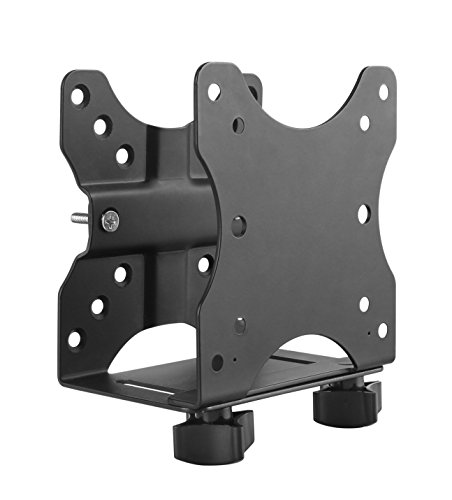
Best Non-Rack Option
HumanCentric Thin Client Mount Bracket Mini PC VESA Monitor Arm, Under Desk
Home-lab builders without a dedicated rack who want a proven, flexible mount.
Our take Check price for HumanCentric Thin Client Mount Bracket Mini PC VESA Monitor Arm, Under Desk (opens in a new tab)

Best Wall-Mount Alternative
Monzlteck Adjustable Small Device Wall Mount Or VESA Mount Behind the Monitor
Home-lab builders who want to wall-mount a node in a closet or utility space.
Our take Check price for Monzlteck Adjustable Small Device Wall Mount Or VESA Mount Behind the Monitor (opens in a new tab)

Best Budget Wall Shelf
NOTMBESTM Adjustable Wall Mount Shelf for Mini PC, WiFi Router
Budget-focused home-lab builders who want to combine mini PC and router placement.
Our take Check price for NOTMBESTM Adjustable Wall Mount Shelf for Mini PC, WiFi Router (opens in a new tab)
Our Picks
Best Overall1 of 5
Freejia 10inch 1U Mini PC Rack Mount Shelf Compatible with Dell Micro OptiPlex, Lenovo, HP on Amazon (opens in a new tab)
For home labs with a dedicated 10-inch rack, this shelf works across Dell, Lenovo, and HP mini PCs with cable-routing cutouts, the most flexible rack-format option in this comparison.
Best for
- Home-lab builders with a dedicated 10-inch rack who want multi-brand compatibility.
Why we like it
Widest confirmed brand compatibility for a rack shelf. On price, it's actually priced above SplashNColor Mac mini Rack Mount for 10 Inch Server Rack, which is worth weighing if cost is your deciding factor between the two.
On the other side, Requires an existing 10-inch rack.
Key dimensions & specs
- 1U, 10 inch rack shelf
- Compatible with Dell, Lenovo, HP mini PCs
- RJ45 CAT6 and HDMI port cutouts
Pros
- Widest confirmed brand compatibility for a rack shelf
- Purpose-built for home-lab rack use
Cons
- Requires an existing 10-inch rack
Best Space-Efficient Rack Option2 of 5
SplashNColor Mac mini Rack Mount for 10 Inch Server Rack, Half Width Shelf Bracket on Amazon (opens in a new tab)
A half-width rack shelf, useful for home labs where you want to pack more devices per rack unit.
Best for
- Home-lab builders optimizing rack-unit density.
Why we like it
On the other side, Half-width sizing limits which mini PC chassis fit.
Key dimensions & specs
- Half-width, 10 inch rack shelf
Pros
- Space-efficient half-width design for dense home-lab racks
Cons
- Half-width sizing limits which mini PC chassis fit
Best Non-Rack Option3 of 5
HumanCentric Thin Client Mount Bracket Mini PC VESA Monitor Arm, Under Desk on Amazon (opens in a new tab)
On the other side, Not a rack-format product if you specifically want rack organization.
Best for
- Home-lab builders without a dedicated rack who want a proven, flexible mount.
Key dimensions & specs
- Fits 0.65-2.55 in device depth
- Under-desk, pole, or surface mount
Pros
- No rack required
Cons
- Not a rack-format product if you specifically want rack organization
Best Wall-Mount Alternative4 of 5
Monzlteck Adjustable Small Device Wall Mount Or VESA Mount Behind the Monitor on Amazon (opens in a new tab)
The highest rating in this comparison, useful for a home-lab node mounted directly to a wall in a closet or utility space rather than a formal rack.
Best for
- Home-lab builders who want to wall-mount a node in a closet or utility space.
Why we like it
The real tradeoff against that pick: Not a rack-format product.
On the other side, Not a rack-format product.
Key dimensions & specs
- Wall mount or VESA behind-monitor mount
Pros
- Highest rating in this comparison
- Wall-mount option for a closet or utility-space home lab
Cons
- Not a rack-format product
Best Budget Wall Shelf5 of 5
NOTMBESTM Adjustable Wall Mount Shelf for Mini PC, WiFi Router on Amazon (opens in a new tab)
The cheapest option in this comparison, a simple wall-mounted shelf that also accommodates a router, useful for a minimal home-lab setup with a mini PC and networking gear together.
Best for
- Budget-focused home-lab builders who want to combine mini PC and router placement.
Why we like it
On the other side, Not a rack-format product.
Key dimensions & specs
- Adjustable wall mount shelf
- Also fits WiFi routers
Pros
- Cheapest option in this comparison
- Fits both a mini PC and a router on the same shelf
Cons
- No review history available yet
- Not a rack-format product
How We Chose These Mini PC Mounts for Home Labs
Each pick was assessed across 4 criteria weighted for real-world use.
- Covered both rack and non-rack home-lab setups
- We included genuine 10-inch rack shelves for buyers with a dedicated rack, and non-rack wall/desk mounts for those without one.
- Multi-brand compatibility noted where confirmed
- We flagged where a rack shelf explicitly supports multiple mini PC brands versus single-brand or Mac mini-specific designs.
- Space efficiency for rack-unit density
- We noted where a half-width shelf helps pack more devices into a limited rack setup.
- Review volume and rating together
- We weighted both metrics across the mixed rack and non-rack product pool.
What to Look for in a Mini PC Mount for Home Labs
Key buying criteria so you get the right fit the first time.
Verify your exact mini PC model against the mount's stated compatibility list
Mini PC mounts and brackets are built around specific chassis dimensions and screw-hole patterns, and unlike a universal VESA monitor mount, many mini PC brackets are designed for one specific brand's chassis shape, such as Dell OptiPlex Micro, Lenovo ThinkCentre Tiny, HP EliteDesk Mini, or a specific generation of Mac mini.
Mounting hardware that doesn't match your exact model can fail to align with the screw holes at all, or worse, only partially secure the device, creating a real risk of it working loose over time in a mount that's supposed to hold it stationary.
Check the listing's stated compatible models and generations specifically against your own mini PC's exact model number, not just the general "mini PC" category claim in the title.
Confirm the mount's actual mounting surface (VESA, rack, wall, or under-desk) matches your install location
Mini PC mounts split into different installation categories: VESA mounts attach to the back of a monitor or TV using the standardized VESA hole pattern, rack mounts fit a 10-inch home-lab or 19-inch commercial server rack, wall mounts attach directly to drywall or a stud, and under-desk mounts clamp to the underside of a desk surface, and these are not interchangeable hardware despite all falling under the same general product category.
Buying a rack-format shelf when you actually need a VESA bracket, for instance, means the hardware simply won't attach to your intended surface at all, since the mounting mechanism itself is fundamentally different between categories.
Identify your specific installation surface first (monitor back, rack, wall, or desk underside) and filter specifically for that mount type, rather than searching generically for "mini PC mount" and assuming any result will work for your setup.
Check the stated weight capacity against your mini PC's actual weight
A mount's weight capacity, when disclosed, reflects how much load the bracket's screws, arms, and adhesive or clamping mechanism can safely hold long-term without gradually sagging, loosening, or failing outright, and mini PCs vary meaningfully in weight depending on their chassis material and internal components, from under a pound for the lightest fanless designs to several pounds for units with larger heatsinks or multiple drive bays.
Mounting a device at or near a bracket's rated limit, especially on a mount holding the device at an angle or overhead behind a monitor, leaves little margin for the natural loosening that happens over months of use, vibration, or repeated adjustment.
Weigh your specific mini PC model (check its listed weight spec) against the mount's stated capacity, and favor a mount with meaningful headroom above your device's actual weight rather than one rated right at the edge.
Consider port and cable access after the mount is installed, not just before
A mini PC's ports are typically concentrated on the rear and sometimes front panel, and once mounted, especially behind a monitor, inside a rack, or under a desk, those ports can become significantly harder to reach for routine tasks like plugging in a USB drive or checking a status light, even though the mount holds the device perfectly securely.
Some mounts are specifically designed to preserve front-panel port access after installation, while others prioritize a low-profile or flush mount that trades away easy access for a cleaner look, and this is a real day-to-day usability tradeoff that photos alone don't always make obvious.
Think through which ports you'll need to access regularly after mounting (power, a USB drive, HDMI swaps) and check whether the specific mount's design keeps those reachable, rather than only checking that it physically holds the device.
Check what installation hardware is actually included versus what you'll need to source separately
Mount listings vary in how complete their included hardware kit is, some ship with every screw, VESA adapter plate, and cable tie needed for a full installation, while others assume you already have compatible mounting screws from the mini PC's original packaging or a previous mount, which isn't always the case if you're mounting a device for the first time or switching setups.
This matters because discovering mid-installation that you're missing a specific screw size or an adapter plate means a delayed setup and a second order, an avoidable frustration.
Check the listing's stated included contents specifically, and if you no longer have your mini PC's original mounting screws, confirm the mount ships with compatible replacements rather than assuming they're included by default.
How to Choose a Mini PC Mount for Home Labs
| Recommended pick in this comparison | |
|---|---|
| Behind a monitor or TV (VESA) | HumanCentric Thin Client Mount Bracket Mini PC VESA Monitor Arm |
| Server rack (10-inch or 19-inch) | Freejia 10inch 1U Mini PC Rack Mount Shelf Compatible with Dell Micro OptiPlex |
| Monzlteck Adjustable Small Device Wall Mount Or VESA Mount Behind the Monitor |
| NOTMBESTM Adjustable Wall Mount Shelf for Mini PC | |
| Monzlteck Adjustable Small Device Wall Mount Or VESA Mount Behind the Monitor | |
| No firm budget ceiling, prioritizing brand-specific fit | HumanCentric Thin Client Mount Bracket Mini PC VESA Monitor Arm |
Brand-Specific Fit vs Universal Compatibility
- Matches one specific chassis shape exactly, generally a more secure fit for that exact model. In this comparison: SplashNColor Mac mini Rack Mount for 10 Inch Server Rack.
- Works across several mini PC brands with adjustable hardware, more flexible if you might switch devices later. In this comparison: Freejia 10inch 1U Mini PC Rack Mount Shelf Compatible with Dell Micro OptiPlex.
Confirm your exact mini PC model against the listing's stated compatibility either way, since even a "universal" mount has real size limits.
None of these picks specifically advertise preserved front-port access after mounting; check each listing's product photos for where the ports land once installed if that matters to you.
For a Home Lab Rack Specifically
- Explicit confirmation of 10-inch (home-lab) versus 19-inch (commercial) rack compatibility, since these are different standards, plus whether it's full or half rack-unit width.
- Freejia 10inch 1U Mini PC Rack Mount Shelf Compatible with Dell Micro OptiPlex fits this specifically: Widest confirmed brand compatibility for a rack shelf.
- That's a real functional upgrade over the budget picks here, not just a brand markup.
- NOTMBESTM Adjustable Wall Mount Shelf for Mini PC already covers the essentials: Cheapest option in this comparison. The main thing you'd be paying extra for elsewhere in this list is broader compatibility you may not need.
Frequently Asked Questions
Do I need a dedicated rack for a home lab?
No, several options here mount to a desk, wall, or pole without requiring a rack at all, useful for smaller home-lab setups.
Which rack shelf works with the most brands?
The Freejia 10inch 1U Mini PC Rack Mount Shelf, explicitly compatible with Dell, Lenovo, and HP.
What's the best non-rack option?
Is there an option that also fits a router?
Yes, the NOTMBESTM Adjustable Wall Mount Shelf accommodates both a mini PC and a WiFi router.
How does this overlap with your 10-inch rack mounts guide?
Substantially for the rack-format products, though this guide also covers non-rack alternatives for home labs without a dedicated rack.
Bottom Line
Best overall: Freejia 10inch 1U Mini PC Rack Mount Shelf Compatible with Dell Micro OptiPlex, Lenovo, HP — best overall pick in this roundup. See the full verdicts above for every pick, with pros, cons and who each one suits.
Browse all mini pc mounts for home labs on Amazon — Prime-eligible options with current pricing.