
Buying Guide
The Best Ink Tank Printers for Home Offices: Picks and Trade-offs
We looked at 8 ink tank printers for home offices side by side, with the trade-offs that separate them and who each one suits.
By Jamie Cole, Lead Product Researcher
10 min read8 products evaluated
We may earn a commission from purchases made through links in this guide. Learn more.
Ink tank printers trade a higher upfront price for refillable bottles instead of cartridges, and the payback math depends on how much you print each month, not a vague promise of savings. Below are 8 cartridge-free ink tank printers we compared for home office use, all from Epson's EcoTank line or HP's Smart Tank line, the two dominant ink tank systems on the market.
We also cover the costs competitors tend to skip: the maintenance box that eventually fills up, what happens if the printer sits idle for weeks, and how print quality actually compares to a cartridge printer for text, graphics, and photos.
Quick Picks
Our 8 recommendations at a glance. Tap a pick for the full verdict.

Best Budget Entry Point
Epson EcoTank ET-2800 Cartridge-Free Supertank Printer, Black
Home offices with moderate monthly volume wanting the lowest-cost EcoTank entry point
Our take Check price for Epson EcoTank ET-2800 Cartridge-Free Supertank Printer, Black (opens in a new tab)

Best Budget Entry Point, White Finish
Epson EcoTank ET-2800 Cartridge-Free Supertank Printer, White
Home offices that want the ET-2800's value in a white finish
Our take Check price for Epson EcoTank ET-2800 Cartridge-Free Supertank Printer, White (opens in a new tab)

Best for Everyday Low-Volume Printing
Epson EcoTank ET-2400 Cartridge-Free Supertank Printer
Very light home offices wanting the lowest-cost way into ink tank printing
Our take Check price for Epson EcoTank ET-2400 Cartridge-Free Supertank Printer (opens in a new tab)

Best for Home Office with Fax and Ethernet
Epson EcoTank ET-4800 Cartridge-Free Supertank Printer with Fax and Ethernet
Home offices that want ADF and a wired Ethernet option alongside cartridge-free ink
Our take Check price for Epson EcoTank ET-4800 Cartridge-Free Supertank Printer with Fax and Ethernet (opens in a new tab)
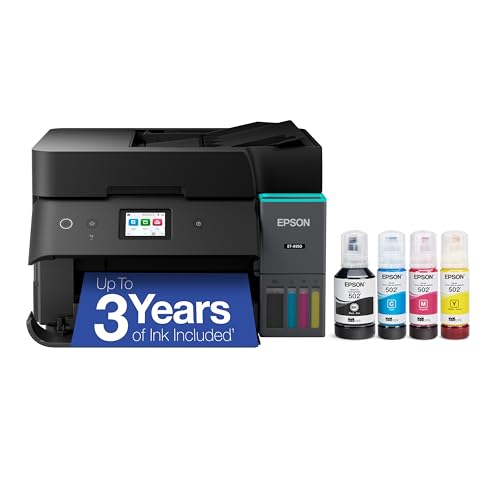
Best Touchscreen and Longest Tank Life
Epson EcoTank ET-4950 Supertank Printer, Up to 3 Years of Ink
Home offices with steady print volume who want the longest stretch between ink refills
Our take Check price for Epson EcoTank ET-4950 Supertank Printer, Up to 3 Years of Ink (opens in a new tab)

Best for Higher-Volume Home Office
Epson EcoTank ET-3850 Supertank Printer with Ethernet and ADF
Higher-volume home offices that want Ethernet and ADF alongside cartridge-free ink
Our take Check price for Epson EcoTank ET-3850 Supertank Printer with Ethernet and ADF (opens in a new tab)

Best Full-Featured Office Ink Tank
Epson EcoTank ET-4850 Supertank with Scanner, Copier, Fax, ADF, and Ethernet
Home offices that want scanner, copier, fax, and Ethernet all in one cartridge-free printer
Our take Check price for Epson EcoTank ET-4850 Supertank with Scanner, Copier, Fax, ADF, and Ethernet (opens in a new tab)

Best HP Smart Tank Alternative to EcoTank
HP Smart Tank 5101 Wireless Refillable All-in-One Printer
Home offices wanting the lowest-cost HP Smart Tank alternative to Epson's EcoTank line
Our take Check price for HP Smart Tank 5101 Wireless Refillable All-in-One Printer (opens in a new tab)
Our Picks
Best Budget Entry Point1 of 8
Epson EcoTank ET-2800 Cartridge-Free Supertank Printer, Black on Amazon (opens in a new tab)
The ET-2800 is Epson's entry-level EcoTank model, cartridge-free by design with refillable ink tanks visible on the front so you can see ink levels at a glance rather than guessing.
Best for
- Home offices with moderate monthly volume wanting the lowest-cost EcoTank entry point
Why we like it
Scan and copy are included alongside wireless printing for a capable low-cost home office setup.
At a lower price than most other EcoTank models in this guide, it's a reasonable starting point for a home office that prints a moderate volume monthly, the math on ink tank payback improves the more you print, so weigh your actual monthly page count against the upfront cost before assuming this is automatically the best value pick.
Key dimensions & specs
- Cartridge-free ink tank system
- Wireless color all-in-one
- Scan and copy included
- Visible ink tank levels on front panel
- Compact home office design
Pros
- Lowest price among the EcoTank picks in this guide
- Cartridge-free, refillable ink system
- Visible ink levels without opening a panel
- Wireless connectivity included
Cons
- No automatic document feeder
- No fax or Ethernet
- Lower monthly volume needed to justify upfront cost vs. an ultra-basic cartridge printer
Best Budget Entry Point, White Finish2 of 8
Epson EcoTank ET-2800 Cartridge-Free Supertank Printer, White on Amazon (opens in a new tab)
Identical to the black ET-2800 above in every functional respect, cartridge-free tanks, wireless printing, scan and copy, just in a white finish for a home office that wants a lighter-colored device on the desk.
Best for
- Home offices that want the ET-2800's value in a white finish
Why we like it
The same value proposition and payback math apply here as the black version.
If finish color isn't a factor for you, compare current pricing between the two before buying since they're functionally the same printer.
Key dimensions & specs
- Cartridge-free ink tank system
- Wireless color all-in-one
- Scan and copy included
- Visible ink tank levels on front panel
- White finish
Pros
- Same low price and features as the black ET-2800
- Cartridge-free, refillable ink system
- Visible ink levels without opening a panel
- White finish option
Cons
- No automatic document feeder
- No fax or Ethernet
- Same lower-volume payback ceiling as the black version
Best for Everyday Low-Volume Printing3 of 8
Epson EcoTank ET-2400 Cartridge-Free Supertank Printer on Amazon (opens in a new tab)
Positioned specifically for everyday home printing, the ET-2400 is the cheapest EcoTank pick in this guide, cartridge-free with the same refillable tank system as its siblings but a simpler feature set overall.
Best for
- Very light home offices wanting the lowest-cost way into ink tank printing
Why we like it
It covers print, scan, and copy over wireless without the extras a busier home office might want.
For a very light home office, occasional letters, forms, school assignments, this is the lowest upfront cost way into cartridge-free printing, though the payback period stretches out longer at low volume than it would for a heavier user.
Key dimensions & specs
- Cartridge-free ink tank system
- Wireless color all-in-one
- Scan and copy included
- Everyday home printing positioning
- Compact design
Pros
- Cheapest EcoTank pick in this guide
- Cartridge-free, refillable ink system
- Simple, straightforward feature set
- Wireless connectivity
Cons
- Payback period is longer at low print volumes
- No automatic document feeder
- No fax or Ethernet
Best for Home Office with Fax and Ethernet4 of 8
Epson EcoTank ET-4800 Cartridge-Free Supertank Printer with Fax and Ethernet on Amazon (opens in a new tab)
The ET-4800 steps up from the entry-level EcoTank models with an automatic document feeder, fax, and Ethernet, features a heavier home office user will actually use even though most buyers skip fax day to day.
Best for
- Home offices that want ADF and a wired Ethernet option alongside cartridge-free ink
Why we like it
Ethernet support in particular is useful if you want a wired network connection instead of relying on wifi.
Cartridge-free ink tanks keep the same long-term value proposition as the rest of the EcoTank lineup, and at roughly the same price as the basic ET-2800, this is a meaningfully better value if you need ADF or wired networking.
Key dimensions & specs
- Cartridge-free ink tank system
- Automatic document feeder
- Fax and Ethernet included
- Wireless connectivity also available
- Ideal-for-home-office positioning
Pros
- ADF, fax, and Ethernet at a similar price to basic EcoTank models
- Cartridge-free, refillable ink system
- Wired networking option via Ethernet
- Solid mid-tier home office feature set
Cons
- Bulkier than the basic ET-2800 and ET-2400
- Fax feature goes unused by most buyers
- Higher price than the entry-level EcoTank picks
Best Touchscreen and Longest Tank Life5 of 8
Epson EcoTank ET-4950 Supertank Printer, Up to 3 Years of Ink on Amazon (opens in a new tab)
4-inch color touchscreen and auto document feeder for a fuller home office workflow.
Best for
- Home offices with steady print volume who want the longest stretch between ink refills
Why we like it
At 18 PPM it's also faster than the entry-level EcoTank models here.
This is a meaningfully higher upfront cost than the basic EcoTank picks, so it makes the most financial sense for a home office printing consistently enough to actually reach that 3-year ink runway rather than a very light user who won't come close to using the tank capacity.
Key dimensions & specs
- Cartridge-free ink tank system
- Up to 3 years of ink included
- 2.4-inch color touchscreen
- Automatic document feeder
- 18 PPM print speed
Pros
- Longest stated ink runway in this guide
- Color touchscreen for easier navigation
- Faster print speed than entry-level EcoTank models
- ADF included
Cons
- Highest price among the standard EcoTank picks here
- Best value requires consistent, moderate-to-high print volume
- Larger footprint than the basic models
Best for Higher-Volume Home Office6 of 8
Epson EcoTank ET-3850 Supertank Printer with Ethernet and ADF on Amazon (opens in a new tab)
The ET-3850 pairs cartridge-free ink tanks with Ethernet, ADF, and mobile printing for a home office that wants a more complete networking and document-handling setup.
Best for
- Higher-volume home offices that want Ethernet and ADF alongside cartridge-free ink
Why we like it
A bonus black ink bottle and USB cable are included in the box, a modest extra that offsets some of the higher upfront cost.
At this price tier, the ET-3850 makes the most sense for a home office with genuine higher-volume needs, scanning multi-page documents regularly, wired networking, where the extra features justify paying meaningfully more than the entry-level EcoTank models.
Bonus ink bottle included in the box.
Key dimensions & specs
- Cartridge-free ink tank system
- Ethernet and ADF included
- Mobile printing support
- Bonus black ink bottle and USB cable included
- Scanner and copier built in
Pros
- Ethernet and ADF for a complete office setup
- Bonus ink bottle included in the box
- Mobile printing support
- Cartridge-free, refillable ink system
Cons
- High upfront price relative to entry-level EcoTank models
- Best value requires higher print volume to offset cost
- Larger footprint
Best Full-Featured Office Ink Tank7 of 8
Epson EcoTank ET-4850 Supertank with Scanner, Copier, Fax, ADF, and Ethernet on Amazon (opens in a new tab)
The ET-4850 bundles nearly every feature a home office ink tank printer could offer, scanner, copier, fax, automatic document feeder, and Ethernet, all built around the same cartridge-free tank system as the rest of the EcoTank lineup.
Best for
- Home offices that want scanner, copier, fax, and Ethernet all in one cartridge-free printer
Why we like it
It's marketed directly as an office printer rather than a home-first model.
As with the other higher-priced EcoTank picks here, the value case strengthens the more consistently you print, a home office that uses most of these features regularly will get more out of the higher price than one that only needs basic printing.
Ethernet, ADF, and fax all included.
Key dimensions & specs
- Cartridge-free ink tank system
- Scanner, copier, and fax built in
- Automatic document feeder
- Ethernet included
- Office-first positioning
Pros
- Most complete feature set among the EcoTank picks here
- Ethernet, ADF, and fax all included
- Cartridge-free, refillable ink system
- Built for consistent office use
Cons
- High upfront price
- More features than a light home user will use
- Larger footprint than the basic EcoTank models
Best HP Smart Tank Alternative to EcoTank8 of 8
HP Smart Tank 5101 Wireless Refillable All-in-One Printer on Amazon (opens in a new tab)
This is HP's Smart Tank line rather than Epson's EcoTank, the two dominant refillable ink tank systems on the market, and it's the lowest-priced ink tank printer in this guide with 2 years of ink included in the box.
Best for
- Home offices wanting the lowest-cost HP Smart Tank alternative to Epson's EcoTank line
Why we like it
Scanner and copier functions round out the all-in-one feature set.
4GHz only, which generally means better range through walls than a dual-band 5GHz printer but a somewhat slower theoretical wireless ceiling, worth knowing if your router setup leans on a 5GHz-only network for other devices. For a home office comparing HP against Epson, this is a reasonable lower-cost starting point.
4GHz-only wifi has a lower ceiling than dual-band options.
Key dimensions & specs
- Cartridge-free refillable ink tank system
- 2 years of ink included
- Wireless (2.4GHz only)
- Scanner and copier built in
- Home use positioning
Pros
- Lowest price among all ink tank picks in this guide
- 2 years of ink included in the box
- 2.4GHz wifi offers better range through walls
- Scanner and copier included
Cons
- 2.4GHz-only wifi has a lower ceiling than dual-band options
- No automatic document feeder
- No fax or Ethernet
How We Chose These Ink Tank Printers for Home Offices
Each pick was assessed across 5 criteria weighted for real-world use.
- Weighed each printer's higher upfront price against realistic monthly page-count tiers to assess how quickly the cartridge-free ink savings actually pay off.
- Feature set for home office workflows
- Compared ADF, fax, Ethernet, and touchscreen controls across picks, since these matter more for a home office than a purely casual home printer.
- Factored in the maintenance box or waste ink pad replacement most listings don't mention, a real cost after several years of use regardless of brand.
- Print quality expectations by use case
- Assessed how each pick's ink tank system compares honestly to cartridge printers for text, graphics, and photo output rather than assuming ink tank always wins across the board.
- Considered whether Epson's EcoTank or HP's Smart Tank ecosystem better matches a buyer's existing printer brand familiarity and refill bottle availability.
What to Look for in an Ink Tank Printer for Home Offices
Key buying criteria so you get the right fit the first time.
Match actual size and capacity to your real need, not the category label alone
Listings for an ink tank printer often use a size or capacity label ("compact," "large," "heavy-duty") that isn't standardized across brands, so the same label can mean meaningfully different actual dimensions or capacity from one product to the next.
This matters because buying based on the category label rather than the specific listed dimensions or capacity is a common way to end up with something that doesn't actually fit your space or handle your real load.
Check the listing for exact measurements or a stated capacity figure, and compare that directly against your actual space or need, not just the marketing size category.
Verify build material and construction quality from reviews, not just spec-sheet claims
A product description can describe material or construction in flattering terms that don't always hold up under real, sustained use, and the gap between a listing's claimed quality and its actual durability only shows up in how the product performs after weeks or months of real use, not in day-one photos.
This matters more for anything you'll use daily or under real load, less for occasional light use where durability matters less.
Check reviews specifically for mentions of how the ink tank printer holds up over time, not just unboxing-day impressions, and treat a listing's own quality claims as a starting point to verify, not a guarantee.
Confirm any headline feature actually works as advertised, not just that it's listed
A feature appearing in a product's bullet points doesn't guarantee it performs well in practice, some features are functional but limited, and a few are closer to a marketing checkbox than a useful capability.
This matters directly if a specific feature is the main reason you're choosing this ink tank printer over a simpler, cheaper alternative, since a feature that underperforms in practice undermines the whole reason for paying more.
Check reviews specifically for real-world experiences with the exact feature that matters most to you, not just whether the feature is listed at all.
Weigh review count alongside rating, not rating alone
This matters more for a purchase you're relying on to perform consistently over time, less for a low-stakes, easily replaceable item.
Check both the star rating and the review count together for any ink tank printer you're considering, and treat a high rating on a very small review count as a promising but less-proven signal.
Check compatibility and fit with your existing setup before ordering
An ink tank printer that looks like a straightforward fit in photos can still have a compatibility detail, a connector type, a mounting requirement, a size threshold, that doesn't match your existing setup, and this kind of mismatch is one of the most common and avoidable reasons for a return.
This matters directly if the product needs to physically connect to, mount on, or otherwise integrate with something you already own.
Check the listing's specific compatibility details against your exact existing setup, not just the general product category, before ordering.
How to Choose an Ink Tank Printer for Home Offices
By Rating Confidence: Highest Rated vs Most Reviewed
| HP Smart Tank 5101 Wireless Refillable All | |
HP Smart Tank 5101 Wireless Refillable All vs Epson EcoTank ET
- HP Smart Tank 5101 Wireless Refillable All
- The lower-priced option in this comparison, worth checking its actual specs and review history against your specific need before assuming it's enough.
- The higher-priced option, worth it if it offers real, checkable headroom in build quality, capacity, or features over the cheaper pick.
Default to HP Smart Tank 5101 Wireless Refillable All unless your specific need calls for the pricier pick's extra headroom.
For a First-Time Buyer Specifically
- Clear, specific dimensions or capacity and a real, established review history, not just marketing language.
- You need real durability and feature depth for regular use, where Epson EcoTank ET's build gives real headroom over the cheaper picks.
- You only need this for light or occasional use, where HP Smart Tank 5101 Wireless Refillable All covers the same job at a lower price.
Frequently Asked Questions
Are ink tank printers actually cheaper in the long run?
Usually yes, but the payback period depends heavily on your monthly print volume. At roughly 100 pages a month, savings accumulate slowly and may take a year or more to offset the higher upfront cost; at 500 to 1,000 pages a month, the payback period shrinks to a few months or weeks. Estimate your realistic monthly volume before assuming ink tank is automatically cheaper for you.
What's the maintenance box everyone skips mentioning?
It's a waste ink pad or box inside the printer that collects overflow ink during cleaning cycles, separate from the refillable tanks themselves. It fills up after roughly 3 to 5 years of typical use and requires a $30-50 replacement or service, a real hidden cost that isn't part of the initial ink tank pitch.
Does ink tank ink ever dry out or clog?
It's more resistant to drying than cartridge ink, but it isn't immune, if the printer sits completely idle for 4 or more weeks, ink can still settle and clog print head nozzles. Running an occasional test print or nozzle check prevents this if you know the printer will go unused for a while.
Is ink tank print quality as good as a cartridge printer?
For text and everyday graphics, yes, ink tank printers handle these very well, comparable to cartridge inkjets. For photos specifically, quality is good but generally falls short of a dedicated photo inkjet's cartridge-based pigment or dye ink systems for skin tones and fine gradients.
How risky is refilling the ink tanks myself?
The main risks are spilling ink while pouring and accidentally pouring the wrong color into the wrong tank, which can damage the printer. Use the bottle's own nozzle, pour slowly over a protected surface, and double-check the tank's color label before refilling to avoid both issues.
Should I choose Epson EcoTank or HP Smart Tank?
Both are legitimate refillable ink tank ecosystems. This guide includes 7 Epson EcoTank models across a range of feature tiers and 1 HP Smart Tank model as the lowest-priced overall pick with 2 years of ink included. If you don't have a brand preference, compare the specific feature set and price tier that matches your home office's actual print volume and needs.
Bottom Line
Best overall: Epson EcoTank ET-2800 Cartridge-Free Supertank Printer, Black — best budget entry point pick in this roundup. See the full verdicts above for every pick, with pros, cons and who each one suits.
Browse all ink tank printers for home offices on Amazon — Prime-eligible options with current pricing.