
Buying Guide
The Best Docking Stations With SD Card Readers
By Jamie Cole, Lead Product Researcher
9 min read8 products evaluated
We may earn a commission from purchases made through links in this guide. Learn more.
A built-in card reader saves carrying a separate adapter for camera or drone cards. Most docks include one; the differences are whether it takes both SD and microSD (TF) cards, and which card standard it supports, since that decides how quickly large photo and video folders copy.
Only one dock here, the UGREEN Revodok Max 213, lists an SD 4.0 reader, a newer, faster standard. Most others list SD 3.0 or do not specify, which is fine for occasional offloads. After the card reader, compare displays, charging and ports as with any dock.
Our comparison is based on published specifications and price position, not hands-on testing. Prices range from about $40 to $240 at the time of writing.
Quick Picks
Our 8 recommendations at a glance. Tap a pick for the full verdict.

Budget Hub With SD and Ethernet
Anker 8-in-1 USB C Hub Docking Station with SD Card Reader
An 8-in-1 hub with SD reader, two HDMI, gigabit Ethernet and 85W pass-through.
Best for: Buyers who want Anker and an SD slot.
Our take Check price for Anker 8-in-1 USB C Hub Docking Station with SD Card Reader (opens in a new tab)

Best Thunderbolt Dock for Mac
Plugable Thunderbolt 4 Dock for M4/M5 MacBook (SD Card Reader)
Plugable's certified Thunderbolt 4 dock with an SD reader, 100W and dual 4K or 6K.
Best for: MacBook desks that need an SD slot.
Our take Check price for Plugable Thunderbolt 4 Dock for M4/M5 MacBook (SD Card Reader) (opens in a new tab)

Best for Fast Card Transfers
UGREEN 13-in-1 Thunderbolt 4 Dock with SD/TF 4.0
A Thunderbolt 4 dock with an SD/TF 4.0 reader, 2.5GbE and dual 4K or single 8K.
Best for: Regular large photo and video offloads.
Our take Check price for UGREEN 13-in-1 Thunderbolt 4 Dock with SD/TF 4.0 (opens in a new tab)

Best for Three Displays
Anker 13-in-1 USB-C Docking Station, Triple Display with SD
An Anker 13-in-1 with SD reader and up to three displays.
Best for: Multi-monitor desks that also read SD cards.
Our take Check price for Anker 13-in-1 USB-C Docking Station, Triple Display with SD (opens in a new tab)

Budget Hub With Most Ports
14-in-1 USB C Docking Station Dual Monitor HDMI with SD/TF
A 14-in-1 hub with SD and TF slots, dual HDMI plus DisplayPort, Ethernet and 100W pass-through.
Best for: Budget desks that need lots of ports.
Our take Check price for 14-in-1 USB C Docking Station Dual Monitor HDMI with SD/TF (opens in a new tab)

Best Budget Pick
UGREEN 10-in-1 USB C Docking Station with SD/TF 3.0
A compact UGREEN 10-in-1 with SD/TF 3.0, dual HDMI, Ethernet and 100W.
Best for: Most buyers who want a card reader in a hub.
Our take Check price for UGREEN 10-in-1 USB C Docking Station with SD/TF 3.0 (opens in a new tab)

Triple Display With Status Screen
Selore Laptop Docking Station, Triple 4K Display with SD/microSD
A triple 4K dock with SD/microSD and a small smart display for weather and system info.
Best for: Three-monitor desks on a budget.
Our take Check price for Selore Laptop Docking Station, Triple 4K Display with SD/microSD (opens in a new tab)
Triple Display Alternative
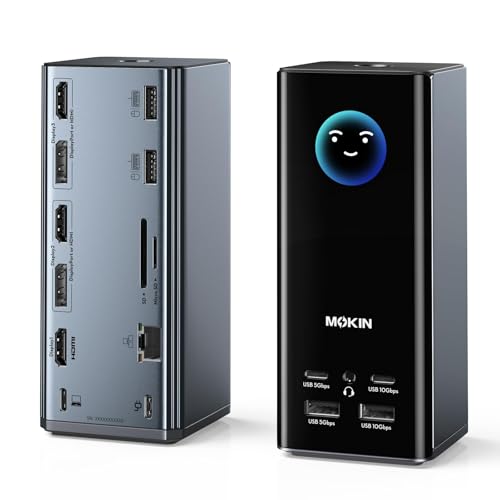
MOKiN USB C Docking Station, Triple Display with SD/TF
A MOKiN triple-display dock with smart display, SD/TF, 10Gbps USB and 100W.
Best for: Buyers who find it cheaper than the Selore.
Our take Check price for MOKiN USB C Docking Station, Triple Display with SD/TF (opens in a new tab)
Our Picks
Budget Hub With SD and Ethernet1 of 8
Anker 8-in-1 USB C Hub Docking Station with SD Card Reader on Amazon (opens in a new tab)
The Anker 8-in-1 pairs an SD reader with two HDMI outputs, gigabit Ethernet and 85W pass-through, for about $54 at the time of writing.
Best for
- Buyers who want Anker and an SD slot.
Skip if
- You also use microSD; the UGREEN 10-in-1 has both slots for less.
Why we like it
Its reader suits occasional card offloads. It has no microSD slot.
Key dimensions & specs
- SD reader
- Outputs: 2 x HDMI
- Gigabit Ethernet
- Power pass-through: 85W
Pros
- Ethernet
- Established brand
Cons
- No microSD slot
- Costs more than the UGREEN 10-in-1
Best Thunderbolt Dock for Mac2 of 8
Plugable Thunderbolt 4 Dock for M4/M5 MacBook (SD Card Reader) on Amazon (opens in a new tab)
The Plugable TBT-UDM is the Mac-friendly Thunderbolt option with an SD reader: driverless, 100W charging, dual 4K HDMI or single 6K, six USB ports and Ethernet.
Best for
- MacBook desks that need an SD slot.
Skip if
- Card speed matters most; the UGREEN Max 213 lists SD 4.0.
Why we like it
The Thunderbolt link is fast, but the listing does not state a faster card standard. It costs about $200 at the time of writing.
Key dimensions & specs
- Thunderbolt 4 certified
- Charging: 100W
- Dual 4K or single 6K
- USB: 6; Ethernet
- SD reader
Pros
- Driverless
- Certified
- 100W
Cons
- Card standard not stated
- No microSD listed
Best for Fast Card Transfers3 of 8
UGREEN 13-in-1 Thunderbolt 4 Dock with SD/TF 4.0 on Amazon (opens in a new tab)
The UGREEN Revodok Max 213 is the pick for photographers and videographers: a 40Gbps Thunderbolt 4 dock with an SD/TF 4.0 reader, the fastest listed standard here, plus dual 4K 60Hz or single 8K output and 2.5GbE.
Best for
- Regular large photo and video offloads.
Skip if
- You offload cards occasionally; a hub with SD 3.0 is enough.
Why we like it
It charges at 90W and costs about $240 at the time of writing, the most here.
Key dimensions & specs
- Thunderbolt 4, 40Gbps
- SD/TF 4.0 reader
- Dual 4K 60Hz or single 8K
- 2.5GbE
- Charging: 90W
Pros
- Fastest listed card standard
- 2.5GbE
- Thunderbolt 4
Cons
- Most expensive
- 90W charging
Best for Three Displays4 of 8
Anker 13-in-1 USB-C Docking Station, Triple Display with SD on Amazon (opens in a new tab)
The Anker 13-in-1 adds an SD reader to a three-display dock (two HDMI and a DisplayPort), with 10Gbps USB-C, 5Gbps USB-A and 85W charging, for about $140 at the time of writing.
Best for
- Multi-monitor desks that also read SD cards.
Skip if
- You use one or two monitors.
Why we like it
Three displays depend on your laptop.
Key dimensions & specs
- Displays: up to 3
- SD reader
- 10Gbps USB-C, 5Gbps USB-A
- Charging: 85W
Pros
- Three displays
- SD slot
Cons
- Laptop-dependent displays
- No microSD listed
Budget Hub With Most Ports5 of 8
14-in-1 USB C Docking Station Dual Monitor HDMI with SD/TF on Amazon (opens in a new tab)
This 14-in-1 hub offers both SD and microSD slots, two HDMI and a DisplayPort, Ethernet, six USB ports and 100W pass-through, for about $45 at the time of writing.
Best for
- Budget desks that need lots of ports.
Skip if
- You want an established brand; the UGREEN 10-in-1 is cheaper.
Why we like it
It is sold under a generic name.
Key dimensions & specs
- SD and TF slots
- Outputs: 2 x HDMI, DisplayPort
- USB: 4 + 2 USB-C
- Ethernet
- Power pass-through: 100W
Pros
- Both card slots
- Many ports
Cons
- Generic brand
Best Budget Pick6 of 8
UGREEN 10-in-1 USB C Docking Station with SD/TF 3.0 on Amazon (opens in a new tab)
The UGREEN Revodok Pro 210 is the value choice: a compact hub with SD and microSD 3.0 slots, dual 4K or single 8K HDMI, gigabit Ethernet and 100W pass-through, for about $40 at the time of writing, the lowest here.
Best for
- Most buyers who want a card reader in a hub.
Skip if
- You move large video files daily; the UGREEN Max 213 has SD 4.0.
Why we like it
SD 3.0 suits everyday offloads.
Key dimensions & specs
- SD/TF 3.0
- HDMI: dual 4K or single 8K
- Gigabit Ethernet
- Power pass-through: 100W
Pros
- Lowest price
- Both card slots
- Compact
Cons
- SD 3.0, not 4.0
Triple Display With Status Screen7 of 8
Selore Laptop Docking Station, Triple 4K Display with SD/microSD on Amazon (opens in a new tab)
The Selore adds a small always-on screen showing weather and system information to a triple 4K dock with three HDMI and two DisplayPort outputs, SD/microSD, 10Gbps USB, Ethernet and 100W.
Best for
- Three-monitor desks on a budget.
Skip if
- You do not need three displays.
Why we like it
It costs about $70 at the time of writing. Three displays depend on your laptop.
Key dimensions & specs
- Triple 4K (3 HDMI + 2 DP)
- Smart display
- SD/microSD
- 10Gbps USB
- Power: 100W
Pros
- Three displays
- Both card slots
Cons
- Smart display is a novelty
- Laptop-dependent
Triple Display Alternative8 of 8
MOKiN USB C Docking Station, Triple Display with SD/TF on Amazon (opens in a new tab)
The MOKiN matches the Selore's layout, three HDMI and two DisplayPort outputs, a smart display, SD/TF, 10Gbps USB, Ethernet and 100W, for about $10 more at the time of writing.
Best for
- Buyers who find it cheaper than the Selore.
Skip if
- The Selore is cheaper.
Why we like it
Choose between them on price.
Key dimensions & specs
- Triple display (3 HDMI + 2 DP)
- Smart display
- SD/TF
- 10Gbps USB
- 100W, Ethernet
Pros
- Three displays
- Both card slots
Cons
- Costs more than the similar Selore
How We Chose These Docks With SD Card Readers
Each pick was assessed across 3 criteria weighted for real-world use.
- Card reader
- We recorded slot types and listed standards.
- Dock features
- We compared displays, charging and ports.
- Price position
- Prices change often, so we treat them as relative position.
What to Look for in a Dock With SD Card Readers
Key buying criteria so you get the right fit the first time.
SD, microSD or both
Cameras use SD; drones and action cameras often microSD. Several docks here have both.
Card standard
The UGREEN Max 213 lists SD 4.0; the UGREEN 10-in-1 SD 3.0. Others do not specify. Faster standards help with large video files and fast cards.
Displays and charging
Check your laptop's display support and the dock's charging wattage.
How to Choose a Dock With SD Card Readers
By need
| Need | Consider | Why |
|---|---|---|
| Budget, both slots | UGREEN 10-in-1 | SD/TF 3.0, about $40 |
| Fast card transfers | UGREEN Max 213 | SD/TF 4.0, Thunderbolt 4 |
| Mac, Thunderbolt | Plugable TBT-UDM | Driverless |
| Three displays | Selore or MOKiN | Triple outputs |
Scroll sideways to see every column.
By price at the time of writing
Prices change frequently; these tiers reflect typical prices when this guide was updated.
| Price tier | Docks |
|---|---|
| About $40–$80 | UGREEN 10-in-1, 14-in-1, Anker 8-in-1, Selore, MOKiN |
| About $140–$240 | Anker 13-in-1, Plugable, UGREEN Max 213 |
Frequently Asked Questions
Are dock card readers fast?
It depends on the standard. SD 4.0 readers are faster than SD 3.0 with compatible cards. Many listings do not state the standard.
Can I read microSD cards?
Docks with TF slots (UGREEN 10-in-1, UGREEN Max 213, 14-in-1, Selore, MOKiN) take microSD directly.
Does a Thunderbolt dock make the card reader faster?
Only if the reader itself supports a faster standard.
Bottom Line
For most people, the UGREEN Revodok Pro 210 is the value choice, with SD and microSD slots in a compact hub. The UGREEN Revodok Max 213 is worth paying more for if you offload large video files regularly.
The Plugable suits Mac desks, and the Selore, MOKiN and Anker 13-in-1 add card readers to three-display setups.