
Buying Guide
The Best Docking Stations for Dell Laptops
By Jamie Cole, Lead Product Researcher
10 min read8 products evaluated
We may earn a commission from purchases made through links in this guide. Learn more.
For a Dell Latitude, XPS or Precision, Dell's own docks have one clear advantage: Dell says they negotiate full rated charging with Dell laptops, which third-party docks may not match. They also fit Dell's IT management tools.
Dell's range here runs from the Thunderbolt 3 WD19TBS to the Thunderbolt 4 WD22TB4 and the newer SD25TB4 Smart Dock with 2.5GbE and Wi-Fi. Third-party docks from Plugable, Anker and HP are included for anyone who also connects non-Dell laptops or wants a lower price.
Our comparison is based on published specifications and price position, not hands-on testing. Prices range from about $98 to $279 at the time of writing.
Quick Picks
Our 8 recommendations at a glance. Tap a pick for the full verdict.
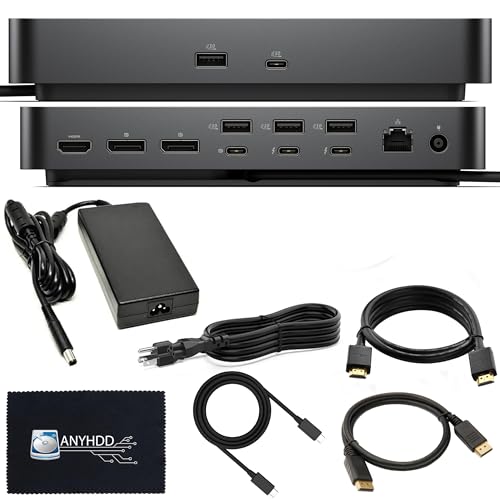
Best High-Power Dell Dock
Dell SD25TB4 Pro Thunderbolt 4 Smart Dock
Dell's SD25TB4 Smart Dock bundled with a 180W adapter, 8K support and a three-year warranty.
Best for: Precision and other high-power Dell laptops.
Our take Check price for Dell SD25TB4 Pro Thunderbolt 4 Smart Dock (opens in a new tab)

Best Dell Dock
Dell Pro Thunderbolt 4 Smart Dock SD25TB4
The SD25TB4 Smart Dock with 130W, up to four displays, 2.5GbE and Wi-Fi.
Best for: Most Dell business laptops.
Our take Check price for Dell Pro Thunderbolt 4 Smart Dock SD25TB4 (opens in a new tab)

Best Value Dell Thunderbolt 4 Dock
Dell Thunderbolt Dock WD22TB4
Dell's previous-generation WD22TB4 with Thunderbolt 4 and 130W.
Best for: Dell Thunderbolt laptops on a tighter budget.
Our take Check price for Dell Thunderbolt Dock WD22TB4 (opens in a new tab)

Best Budget Dell Dock
Dell Thunderbolt Dock WD19TBS
Dell's entry Thunderbolt 3 dock with 130W for about $122.
Best for: Budget Dell setups.
Our take Check price for Dell Thunderbolt Dock WD19TBS (opens in a new tab)

Best Cross-Brand Thunderbolt Dock
Plugable Thunderbolt 4 Dock (TBT-UDM)
Plugable's certified, driverless Thunderbolt 4 dock for Dell, Mac and other laptops.
Best for: Mixed Dell and Mac desks.
Our take Check price for Plugable Thunderbolt 4 Dock (TBT-UDM) (opens in a new tab)

Best Third-Party USB-C Dock
Anker Prime Docking Station, 14-Port
Anker's 14-port, 160W dock marketed for Dell, HP and Lenovo.
Best for: Mixed-brand Windows desks with many peripherals.
Our take Check price for Anker Prime Docking Station, 14-Port (opens in a new tab)

Budget Triple-Display Dock
Plugable USB C Triple Display Docking Station
A Plugable DisplayLink dock for one 4K 30Hz and two 1080p 60Hz displays.
Best for: Adding three monitors to a Dell that cannot drive them natively.
Our take Check price for Plugable USB C Triple Display Docking Station (opens in a new tab)

Lowest-Cost Option
HP USB-C Dock G5
HP's 11-in-1 G5 business dock, listed as compatible with Dell and other USB-C laptops.
Best for: Mixed HP and Dell offices on a budget.
Our take Check price for HP USB-C Dock G5 (opens in a new tab)
Our Picks
Best High-Power Dell Dock1 of 8
Dell SD25TB4 Pro Thunderbolt 4 Smart Dock on Amazon (opens in a new tab)
This SD25TB4 configuration is the top Dell option: a Thunderbolt 4 Smart Dock bundled with a 180W adapter, supporting 8K output, with HDMI, DisplayPort and Thunderbolt cables included and a three-year warranty.
Best for
- Precision and other high-power Dell laptops.
Skip if
- Your Dell needs 130W or less; the 130W SD25TB4 costs about $55 less.
Why we like it
The 180W adapter suits higher-power Dell laptops. It is the most expensive dock here at about $279 at the time of writing.
Key dimensions & specs
- Thunderbolt 4
- Adapter: 180W
- 8K display support
- Cables included
- Warranty: 3 years
Pros
- Highest power here
- Three-year warranty
- Current generation
Cons
- Most expensive
Best Dell Dock2 of 8
Dell Pro Thunderbolt 4 Smart Dock SD25TB4 on Amazon (opens in a new tab)
The 130W SD25TB4 is the sensible default for most Dell business laptops: Thunderbolt 4, up to four displays through two DisplayPort 1.4 and HDMI 2.1, and built-in 2.5GbE and Wi-Fi.
Best for
- Most Dell business laptops.
Skip if
- You want to save; the WD22TB4 costs about $40 less.
Why we like it
It costs about $225 at the time of writing.
Key dimensions & specs
- Thunderbolt 4
- Charging: 130W
- Up to 4 displays (2 x DP 1.4, HDMI 2.1)
- 2.5GbE, Wi-Fi
Pros
- Four displays
- 2.5GbE and Wi-Fi
- Current generation
Cons
- Expensive
Best Value Dell Thunderbolt 4 Dock3 of 8
Dell Thunderbolt Dock WD22TB4 on Amazon (opens in a new tab)
The WD22TB4 is Dell's previous-generation Thunderbolt 4 dock with 130W charging and multiple display outputs, for about $185 at the time of writing.
Best for
- Dell Thunderbolt laptops on a tighter budget.
Skip if
- You want 2.5GbE; the SD25TB4 has it.
Why we like it
It lacks the SD25TB4's built-in Wi-Fi and 2.5GbE but covers most Dell setups for less.
Key dimensions & specs
- Thunderbolt 4
- Charging: 130W
- Multiple display outputs
- Previous generation
Pros
- Cheaper than the SD25TB4
- Thunderbolt 4
Cons
- No built-in Wi-Fi or 2.5GbE
Best Budget Dell Dock4 of 8
Dell Thunderbolt Dock WD19TBS on Amazon (opens in a new tab)
The WD19TBS is the cheapest Dell dock here: a Thunderbolt 3 dock with 130W charging and multiple USB and display ports, for about $122 at the time of writing.
Best for
- Budget Dell setups.
Skip if
- You want Thunderbolt 4; the WD22TB4 has it.
Why we like it
It is an older Thunderbolt 3 design, but it works with many Dell laptops and keeps Dell's charging behavior.
Key dimensions & specs
- Thunderbolt 3
- Charging: 130W
- Multiple USB and display ports
Pros
- Lowest Dell price
- 130W
Cons
- Older Thunderbolt 3 generation
Best Cross-Brand Thunderbolt Dock5 of 8
Plugable Thunderbolt 4 Dock (TBT-UDM) on Amazon (opens in a new tab)
The Plugable TBT-UDM is the choice if a Mac or non-Dell laptop also uses the dock: certified Thunderbolt 4, driverless, 100W charging, dual 4K HDMI or single 6K, six USB ports, SD and Ethernet.
Best for
- Mixed Dell and Mac desks.
Skip if
- Only Dell laptops use it; a Dell dock charges at full rate.
Why we like it
At 100W it may charge high-power Dell laptops more slowly than Dell's 130W docks.
Key dimensions & specs
- Thunderbolt 4 certified
- Charging: 100W
- Dual 4K or single 6K
- USB: 6; SD; Ethernet
Pros
- Works across brands
- Driverless
Cons
- 100W
Best Third-Party USB-C Dock6 of 8
Anker Prime Docking Station, 14-Port on Amazon (opens in a new tab)
The Anker Prime is a 14-port USB-C dock with up to 160W total output, dual 4K and 10Gbps data, marketed for Dell, HP and Lenovo laptops, with a status display for troubleshooting.
Best for
- Mixed-brand Windows desks with many peripherals.
Skip if
- You want Dell's management and charging; choose a Dell dock.
Why we like it
It costs about $170 at the time of writing.
Key dimensions & specs
- Ports: 14
- Output: up to 160W
- Dual 4K
- 10Gbps data
- Ethernet, audio
Pros
- Most ports
- High output
Cons
- Not Dell's own charging protocol
Budget Triple-Display Dock7 of 8
Plugable USB C Triple Display Docking Station on Amazon (opens in a new tab)
This Plugable dock adds three displays through DisplayLink: one 4K at 30Hz and two 1080p at 60Hz, with 100W charging and six 5Gbps USB ports.
Best for
- Adding three monitors to a Dell that cannot drive them natively.
Skip if
- Your Dell supports enough displays natively; a Dell dock is simpler.
Why we like it
The 4K output at 30Hz feels less smooth, and DisplayLink needs a driver. It costs about $160 at the time of writing.
Key dimensions & specs
- Displays: 1 x 4K 30Hz + 2 x 1080p 60Hz (DisplayLink)
- Charging: 100W
- USB: 6 x 5Gbps
Pros
- Three displays
- Multi-OS
Cons
- 4K at 30Hz
- Driver required
Lowest-Cost Option8 of 8
HP USB-C Dock G5 on Amazon (opens in a new tab)
The HP G5 is the cheapest dock here at about $98 at the time of writing: an 11-in-1 business dock listed for USB-C and Thunderbolt laptops, including Dell machines.
Best for
- Mixed HP and Dell offices on a budget.
Skip if
- You want full Dell integration.
Why we like it
It will not use Dell's charging protocol, and its wattage is not listed here, so check it against your Dell charger.
Key dimensions & specs
- Ports: 11-in-1
- USB-C and Thunderbolt laptops
- Business management features
Pros
- Lowest price
- Business dock
Cons
- Wattage not listed
- Not Dell's own
How We Chose These Docks for Dell Laptops
Each pick was assessed across 3 criteria weighted for real-world use.
- Dell integration
- We separated Dell docks from cross-brand alternatives.
- Power and connection
- We recorded wattage and Thunderbolt generation.
- Displays and price
- We compared display support and price position.
What to Look for in a Dock for Dell Laptops
Key buying criteria so you get the right fit the first time.
Dell or third-party
Dell docks negotiate full charging with Dell laptops and fit Dell's management tools; third-party docks work across brands.
Charging wattage
130W covers many Dell business laptops; high-power models may need 180W.
Thunderbolt generation
WD19TBS is Thunderbolt 3; WD22TB4 and SD25TB4 are Thunderbolt 4.
Displays and network
The SD25TB4 supports four displays and 2.5GbE; the Plugable triple-display dock uses DisplayLink.
How to Choose a Dock for Dell Laptops
By need
| Need | Consider | Why |
|---|---|---|
| Most Dell business laptops | SD25TB4 130W | Four displays, 2.5GbE |
| High-power Dell | SD25TB4 180W | 180W adapter |
| Dell on a budget | WD19TBS or WD22TB4 | 130W |
| Dell and Mac | Plugable TBT-UDM | Certified, driverless |
| Many peripherals, mixed brands | Anker Prime | 14 ports |
Scroll sideways to see every column.
By price at the time of writing
Prices change frequently; these tiers reflect typical prices when this guide was updated.
| Price tier | Docks |
|---|---|
| About $98–$122 | HP G5, Dell WD19TBS |
| About $160–$200 | Plugable triple display, Anker Prime, Dell WD22TB4, Plugable TBT-UDM |
| About $225–$279 | Dell SD25TB4 (130W and 180W) |
Frequently Asked Questions
Do I need a Dell dock for a Dell laptop?
Not necessarily, but Dell docks negotiate full charging with Dell laptops and fit Dell's management tools.
What wattage do I need?
At least your Dell charger's wattage. Precision workstations may need 180W.
Does Thunderbolt 3 still work?
The WD19TBS is Thunderbolt 3 and works with many Dell laptops; Thunderbolt 4 docks offer newer features.
Bottom Line
For most Dell business laptops, the SD25TB4 at 130W is the sensible dock, with the 180W bundle for high-power models. The WD22TB4 and WD19TBS are cheaper Dell options that keep Dell's charging behavior.
If other brands share the desk, the Plugable TBT-UDM and Anker Prime are the cross-brand alternatives.