
Buying Guide
The Best HP and Dell Docking Stations for Business Laptops
By Jamie Cole, Lead Product Researcher
10 min read8 products evaluated
We may earn a commission from purchases made through links in this guide. Learn more.
If you use an HP EliteBook, ProBook or ZBook, or a Dell Latitude or Precision, the manufacturer's own dock is often the simplest choice: it is designed around those laptops, and IT departments often already support it. This guide compares HP's G5 and G6 USB-C docks with Dell's WD22TB4 Thunderbolt 4 dock.
The main differences are charging wattage (match it to your laptop's charger), connection type (HP's docks here are USB-C; Dell's WD22TB4 is Thunderbolt 4), and condition, since several listings are renewed units at lower prices.
Our comparison is based on published specifications and price position, not hands-on testing. Prices range from about $62 to $255 at the time of writing.
Quick Picks
Our 8 recommendations at a glance. Tap a pick for the full verdict.

Best HP Dock
HP USB-C Dock G5 11-in-1
HP's 11-in-1 G5 business USB-C dock, new.
Best for: HP business laptops.
Our take Check price for HP USB-C Dock G5 11-in-1 (opens in a new tab)

Best HP Dock for Higher Wattage
HP USB-C 100W G6 Dock
HP's current G6 USB-C dock with 100W power delivery.
Best for: HP laptops with higher charging needs.
Our take Check price for HP USB-C 100W G6 Dock (opens in a new tab)

Renewed G5 With Charger
HP USB-C Dock G5 and Charging Bundle (Renewed)
A renewed HP G5 dock bundled with a charging accessory.
Best for: Buyers who need the bundled charger.
Our take Check price for HP USB-C Dock G5 and Charging Bundle (Renewed) (opens in a new tab)

Lowest-Cost HP Dock
HP USB-C Dock G5 (Renewed)
A renewed HP G5 dock for about $62.
Best for: HP users on a budget.
Our take Check price for HP USB-C Dock G5 (Renewed) (opens in a new tab)

HP Essential Dock
HP USB-C G5 Essential Dock
HP's G5 Essential dock with a streamlined port set.
Best for: Buyers who find it cheaper than the full G5 when ordering.
Our take Check price for HP USB-C G5 Essential Dock (opens in a new tab)

Best Dell Dock
Dell Thunderbolt WD22TB4 Dock 130W
Dell's WD22TB4 Thunderbolt 4 dock with 130W charging.
Best for: Dell Latitude and similar Thunderbolt laptops.
Our take Check price for Dell Thunderbolt WD22TB4 Dock 130W (opens in a new tab)
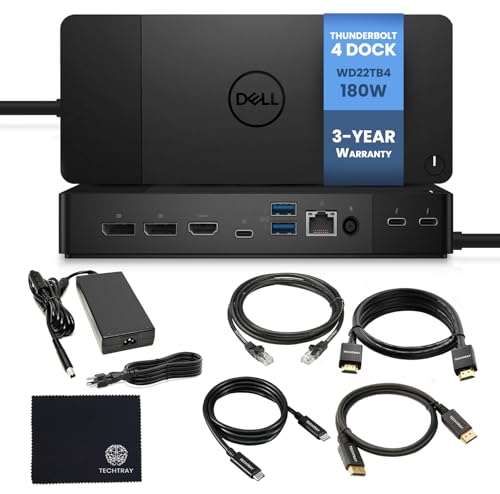
Best Dell Dock for Workstations
Dell WD22TB4 Thunderbolt 4 Dock 180W (New)
The 180W WD22TB4 for higher-draw Dell laptops such as Precision workstations.
Best for: Dell Precision and other high-draw laptops.
Our take Check price for Dell WD22TB4 Thunderbolt 4 Dock 180W (New) (opens in a new tab)

Dell WD22TB4 for IT Fleets
WD22TB4 Dell Thunderbolt 4 Dock 40Gbps
A WD22TB4 listing highlighting 40Gbps, PXE network boot and Dell approval.
Best for: IT-managed Dell fleets.
Our take Check price for WD22TB4 Dell Thunderbolt 4 Dock 40Gbps (opens in a new tab)
Our Picks
Best HP Dock1 of 8
HP USB-C Dock G5 11-in-1 on Amazon (opens in a new tab)
The HP USB-C Dock G5 is the sensible default for HP business laptops: an 11-in-1 USB-C dock that HP designs for EliteBook, ZBook and ProBook models, with multiple display outputs, for about $98 new at the time of writing.
Best for
- HP business laptops.
Skip if
- You are comfortable with renewed; the renewed G5 costs less.
Why we like it
The listing does not state its charging wattage; check it against your laptop's charger. The renewed version costs about $36 less.
Key dimensions & specs
- Ports: 11-in-1
- Connection: USB-C
- Designed for EliteBook, ZBook, ProBook
- Multiple display outputs
- Condition: new
Pros
- Designed for HP business laptops
- New condition
Cons
- Charging wattage not stated here
Best HP Dock for Higher Wattage2 of 8
HP USB-C 100W G6 Dock on Amazon (opens in a new tab)
The HP G6 is HP's current business dock with 100W power delivery, for HP laptops that need more charging power, designed for EliteBook, ZBook and ProBook lines.
Best for
- HP laptops with higher charging needs.
Skip if
- The G5 meets your laptop's wattage.
Why we like it
It costs about $195 at the time of writing, twice the G5.
Key dimensions & specs
- Power delivery: 100W
- Connection: USB-C
- Current HP business generation
Pros
- 100W
- Current generation
Cons
- Expensive
Renewed G5 With Charger3 of 8
HP USB-C Dock G5 and Charging Bundle (Renewed) on Amazon (opens in a new tab)
This is a renewed HP G5 bundled with a charging accessory, for about $135 at the time of writing.
Best for
- Buyers who need the bundled charger.
Skip if
- You have a charger; the new G5 is cheaper.
Why we like it
That is more than a new G5 costs at the time of writing, so it only makes sense if you need the included charger.
Key dimensions & specs
- HP G5 dock, renewed
- Charging accessory included
Pros
- Charger included
Cons
- Costs more than a new G5
- Renewed condition
Lowest-Cost HP Dock4 of 8
HP USB-C Dock G5 (Renewed) on Amazon (opens in a new tab)
The renewed HP G5 is the cheapest dock here at about $62 at the time of writing, the same 11-port business dock in refurbished condition.
Best for
- HP users on a budget.
Skip if
- You want a new unit.
Why we like it
Check the renewed warranty terms before buying.
Key dimensions & specs
- HP G5 dock, renewed
- Ports: 11
Pros
- Lowest price
Cons
- Renewed condition
HP Essential Dock5 of 8
HP USB-C G5 Essential Dock on Amazon (opens in a new tab)
The G5 Essential is HP's streamlined business dock with a smaller port set than the full G5, for about $106 at the time of writing.
Best for
- Buyers who find it cheaper than the full G5 when ordering.
Skip if
- The full G5 costs less.
Why we like it
At that price it costs more than the full G5 at the time of writing, so check what each is selling for.
Key dimensions & specs
- HP G5 Essential
- Connection: USB-C
- Streamlined port set
Pros
- HP business dock
Cons
- Fewer ports than the G5 but costs more at the time of writing
Best Dell Dock6 of 8
Dell Thunderbolt WD22TB4 Dock 130W on Amazon (opens in a new tab)
The Dell WD22TB4 is Dell's Thunderbolt 4 dock; this version supplies 130W, enough for many Dell business laptops, for about $185 at the time of writing.
Best for
- Dell Latitude and similar Thunderbolt laptops.
Skip if
- Your Dell needs more than 130W; choose the 180W version.
Why we like it
It works best with Thunderbolt-equipped Dell laptops.
Key dimensions & specs
- Dell WD22TB4
- Thunderbolt 4
- Charging: 130W
- Multiple display outputs
Pros
- Dell's own Thunderbolt dock
- 130W
Cons
- Expensive
Best Dell Dock for Workstations7 of 8
Dell WD22TB4 Thunderbolt 4 Dock 180W (New) on Amazon (opens in a new tab)
The 180W WD22TB4 is the version for higher-power Dell laptops, such as Precision workstations, that need more charging than 130W, sold new, for about $255 at the time of writing.
Best for
- Dell Precision and other high-draw laptops.
Skip if
- Your laptop needs 130W or less.
Key dimensions & specs
- Dell WD22TB4
- Thunderbolt 4
- Charging: 180W
- Condition: new
Pros
- Most charging power here
Cons
- Most expensive
Dell WD22TB4 for IT Fleets8 of 8
WD22TB4 Dell Thunderbolt 4 Dock 40Gbps on Amazon (opens in a new tab)
This WD22TB4 listing highlights full 40Gbps Thunderbolt 4 bandwidth, network boot (PXE) support for IT deployment, and inclusion on Dell's approved hardware list, for about $245 at the time of writing.
Best for
- IT-managed Dell fleets.
Skip if
- You are a single user; the 130W version is cheaper.
Why we like it
The listing does not state which wattage version it is; confirm 130W or 180W before ordering.
Key dimensions & specs
- Dell WD22TB4
- Thunderbolt 4, 40Gbps
- PXE network boot
- Wattage: not stated
Pros
- IT deployment features
Cons
- Wattage version not stated
- Expensive
How We Chose These Docks for HP and Dell Laptops
Each pick was assessed across 3 criteria weighted for real-world use.
- Compatibility
- We noted the laptop lines each dock is designed for.
- Power and connection
- We recorded wattage and USB-C or Thunderbolt connection.
- Condition and price
- We compared new and renewed units by price at the time of writing.
What to Look for in a Dock for HP and Dell Laptops
Key buying criteria so you get the right fit the first time.
Charging wattage
Match your laptop's charger. HP G6: 100W; Dell WD22TB4: 130W or 180W.
Connection type
HP's docks here are USB-C; the Dell is Thunderbolt 4 and suits Thunderbolt-equipped laptops.
New or renewed
Renewed docks cost less; check the warranty.
IT support
Manufacturer docks are often already supported by company IT.
How to Choose a Dock for HP and Dell Laptops
By laptop
| Laptop | Consider | Why |
|---|---|---|
| HP business, budget | HP G5 renewed | About $62 |
| HP business, new | HP G5 | About $98 |
| HP, higher wattage | HP G6 | 100W |
| Dell Thunderbolt laptop | Dell WD22TB4 130W | Thunderbolt 4 |
| Dell Precision | Dell WD22TB4 180W | 180W |
Scroll sideways to see every column.
By price at the time of writing
Prices change frequently; these tiers reflect typical prices when this guide was updated.
| Price tier | Docks |
|---|---|
| About $62–$106 | HP G5 renewed, HP G5, HP G5 Essential |
| About $135–$195 | HP G5 renewed bundle, Dell WD22TB4 130W, HP G6 |
| About $245–$255 | Dell WD22TB4 (40Gbps listing), Dell WD22TB4 180W |
Frequently Asked Questions
Will an HP dock work with a Dell laptop, or the reverse?
Often for basic functions over USB-C or Thunderbolt, but features like charging wattage and firmware management are designed around the maker's own laptops.
Is a renewed dock worth it?
It can save a lot. Check the renewed warranty and return terms.
Which wattage do I need?
At least your laptop charger's wattage; check the label on your charger.
Bottom Line
For HP business laptops, the G5 is the sensible default, the renewed G5 is the budget route, and the G6 suits higher-wattage models.
For Dell, choose the WD22TB4 by wattage: 130W for most business laptops, 180W for Precision workstations.