
Buying Guide
The Best Digital Notebooks Under $500: E-Ink, Reusable Paper and Smart Pens
We compared an e-ink tablet, five reusable Rocketbooks and two smart pen sets, to show how each turns handwriting into digital notes and what the price difference buys.
By Jamie Cole, Lead Product Researcher
9 min read8 products evaluated
We may earn a commission from purchases made through links in this guide. Learn more.
"Digital notebook" describes three quite different products, and the right one depends on how your notes need to end up on a computer. A reusable notebook is paper you scan with a phone and wipe clean. A smart pen records your handwriting as you write on special paper. An e-ink tablet replaces the paper altogether.
A $500 budget is wide enough to include all three, from a Rocketbook at about $25 to the reMarkable 2 at about $450 at the time of writing. The price gap mostly reflects how much of the digitizing work the device does for you, and whether there is a screen at all.
Our comparison is based on published specifications, included accessories and price position, not hands-on testing. Software features and any subscription terms change over time, so check them with the manufacturer before buying.
Quick Picks
Our 8 recommendations at a glance. Tap a pick for the full verdict.

Best E-Ink Notebook
reMarkable 2 with Marker Plus
The only e-ink tablet here, with the Marker Plus stylus included.
Best for: People who take a lot of handwritten notes and want them digital from the start.
Our take Check price for reMarkable 2 with Marker Plus (opens in a new tab)

Best Reusable Notebook
Rocketbook Core Reusable Spiral Notebook, Letter Size 8.5x11, Black, Dotted Pages, App-Connected, Erasable, Durable Cover
A letter-size reusable Rocketbook with dotted pages and app scanning.
Best for: Anyone who wants to digitize handwritten notes cheaply on a full-size page.
Our take Check price for Rocketbook Core Reusable Spiral Notebook, Letter Size 8.5x11, Black, Dotted Pages, App-Connected, Erasable, Durable Cover (opens in a new tab)

Best for Mixed Page Styles
Rocketbook Flip Smart Notepad, Teal Cover, Lined/Dot Grid Rule, 8.5x11, 16 Sheets
A top-bound Rocketbook Flip with both lined and dot-grid pages.
Best for: Note-takers who want both lined and dot-grid pages in one pad.
Our take Check price for Rocketbook Flip Smart Notepad, Teal Cover, Lined/Dot Grid Rule, 8.5x11, 16 Sheets (opens in a new tab)

Best Executive-Size Notepad
Rocketbook Flip Reusable Smart Notepad, Executive Size 6x8.8, Navy Blue
A smaller 6 x 8.8-inch Rocketbook Flip for carrying between meetings.
Best for: People who carry a notepad between meetings and already own a compatible pen.
Our take Check price for Rocketbook Flip Reusable Smart Notepad, Executive Size 6x8.8, Navy Blue (opens in a new tab)
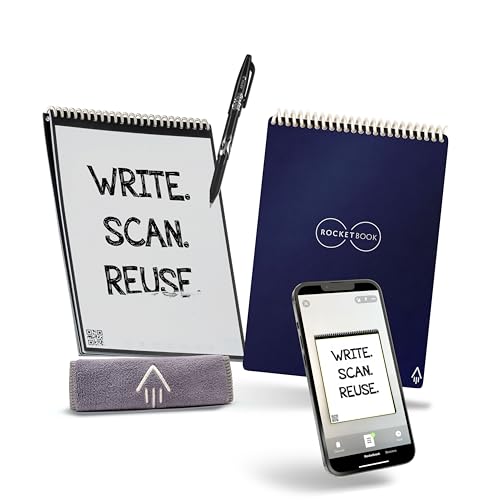
Best Starter Kit
Rocketbook Flip Reusable Smart Notepad, Eco-Friendly, Digitally Connected, Dotted and Lined Combo, 6x8.8, Navy, with Pen, Cloth, and App Included
An executive-size Rocketbook Flip with pen and cleaning cloth included.
Best for: First-time Rocketbook buyers who want everything in one box.
Our take Check price for Rocketbook Flip Reusable Smart Notepad, Eco-Friendly, Digitally Connected, Dotted and Lined Combo, 6x8.8, Navy, with Pen, Cloth, and App Included (opens in a new tab)
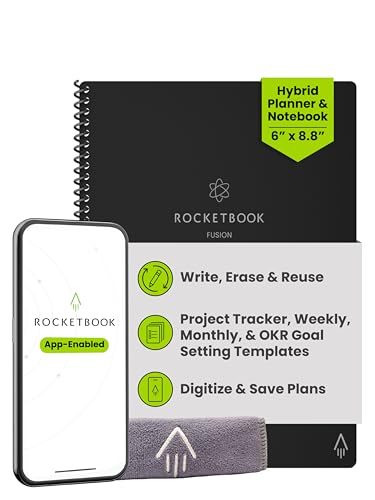
Best Planner Notebook
Rocketbook Fusion Hybrid Reusable Planner Notebook, Executive 6x8.8, Black
A reusable Rocketbook that mixes planner pages with blank note pages.
Best for: Anyone who plans the week on paper and wants it backed up digitally.
Our take Check price for Rocketbook Fusion Hybrid Reusable Planner Notebook, Executive 6x8.8, Black (opens in a new tab)
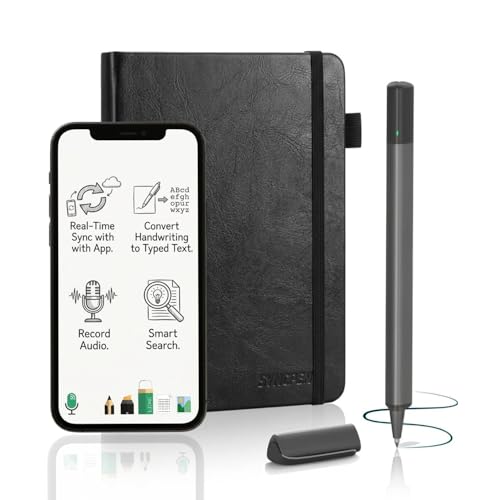
Best Budget Smart Pen
SyncPen Digital Notebook Smart Pen Set, Real Time Sync from Paper to App
A smart pen set that syncs handwriting to an app as you write, with OCR and audio recording.
Best for: Students and meeting note-takers who want notes on their phone without scanning.
Our take Check price for SyncPen Digital Notebook Smart Pen Set, Real Time Sync from Paper to App (opens in a new tab)
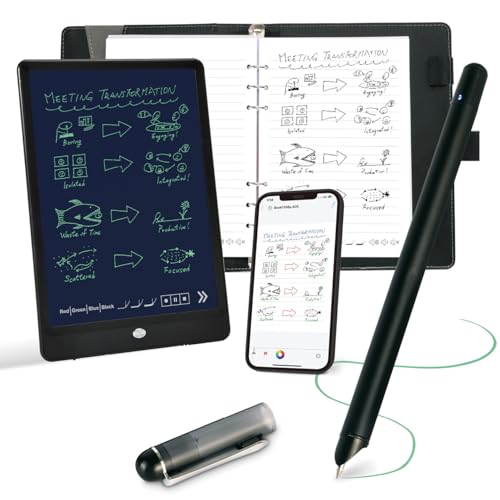
Best Smart Pen Set
Ophayapen Smart Pen and Smart Digital Notebook, Real-time Mobile Sync
A compact smart pen and notebook set with real-time mobile sync.
Best for: Buyers who prefer the Ophayapen's pen and notebook design.
Our take Check price for Ophayapen Smart Pen and Smart Digital Notebook, Real-time Mobile Sync (opens in a new tab)
Our Picks
Best E-Ink Notebook1 of 8
reMarkable 2 with Marker Plus on Amazon (opens in a new tab)
The reMarkable 2 is the choice if you want to stop scanning pages altogether: it is a standalone e-ink tablet you write on directly, with notes stored and synced digitally, and the Marker Plus stylus is included.
Best for
- People who take a lot of handwritten notes and want them digital from the start.
Skip if
- You take notes occasionally; a Rocketbook covers the basics for a fraction of the price.
Why we like it
reMarkable describes battery life in weeks, and the device is designed as a distraction-free writing tool rather than a general tablet. The display is black and white.
It costs many times more than a Rocketbook, and some cloud and conversion features may depend on a subscription; check reMarkable's current terms before buying.
Key dimensions & specs
- Type: e-ink tablet
- Stylus: Marker Plus included
- Battery: weeks (manufacturer claim)
- Display: black and white
Pros
- No scanning step
- Stylus included
- Focused, distraction-free design
Cons
- Most expensive option here by far
- Black-and-white display
- Some features may require a subscription
Best Reusable Notebook2 of 8
Rocketbook Core Reusable Spiral Notebook, Letter Size 8.5x11, Black, Dotted Pages, App-Connected, Erasable, Durable Cover on Amazon (opens in a new tab)
The Rocketbook Core is the low-cost default: a letter-size reusable notebook with dotted pages that you write on, scan with the Rocketbook app, and wipe clean.
Best for
- Anyone who wants to digitize handwritten notes cheaply on a full-size page.
Skip if
- You want notes to sync as you write; a smart pen set does that.
Why we like it
The full 8.5 x 11-inch page gives plenty of room, and Rocketbook's app is well established. It needs a compatible erasable pen, and notes only become digital when you scan them.
If you want structured planner pages, the Fusion adds them for a few dollars more.
Key dimensions & specs
- Type: reusable paper notebook
- Size: 8.5 x 11"
- Pages: dotted
- App scanning
Pros
- Low price
- Full letter-size pages
- Established app
Cons
- Needs a compatible erasable pen
- Scanning step required
Best for Mixed Page Styles3 of 8
Rocketbook Flip Smart Notepad, Teal Cover, Lined/Dot Grid Rule, 8.5x11, 16 Sheets on Amazon (opens in a new tab)
The Rocketbook Flip in teal suits anyone who switches between lined notes and dot-grid sketches or lists: it combines both page styles in a flip-over notepad format.
Best for
- Note-takers who want both lined and dot-grid pages in one pad.
Skip if
- You want a pen in the box; the Flip bundle includes one.
Why we like it
It works the same way as the Core: write with a compatible erasable pen, scan with the app, wipe clean. The listing gives 16 sheets.
The listing gives an 8.5 x 11-inch size but the product is described as a notepad; check the current listing for the actual page size before ordering.
Key dimensions & specs
- Type: reusable paper notepad
- Pages: lined and dot grid, 16 sheets
- Size: 8.5 x 11" (per listing)
- App scanning
Pros
- Lined and dot-grid pages
- Flip format
- Low price
Cons
- Needs a compatible erasable pen
- Size description is unclear in the listing
Best Executive-Size Notepad4 of 8
Rocketbook Flip Reusable Smart Notepad, Executive Size 6x8.8, Navy Blue on Amazon (opens in a new tab)
The executive-size Rocketbook Flip is the more portable version: 6 x 8.8 inches, easier to carry than a letter-size notebook but with more room than a pocket pad.
Best for
- People who carry a notepad between meetings and already own a compatible pen.
Skip if
- You need a pen; the Flip bundle includes one for about a dollar more.
Why we like it
It uses the same write, scan and wipe routine and needs a compatible erasable pen. At the time of writing it is the lowest-priced Rocketbook here.
The Flip bundle is the same size and adds a pen and cleaning cloth for about a dollar more, which is likely the better buy if you do not already have a pen.
Key dimensions & specs
- Type: reusable paper notepad
- Size: 6 x 8.8"
- App scanning
Pros
- Portable size
- Lowest price here
Cons
- Pen not listed as included
- Smaller page than the Core
Best Starter Kit5 of 8
Rocketbook Flip Reusable Smart Notepad, Eco-Friendly, Digitally Connected, Dotted and Lined Combo, 6x8.8, Navy, with Pen, Cloth, and App Included on Amazon (opens in a new tab)
The Rocketbook Flip bundle is the easiest place to start: it includes the compatible pen and a cleaning cloth with a 6 x 8.8-inch notepad of dotted and lined pages.
Best for
- First-time Rocketbook buyers who want everything in one box.
Skip if
- You want a full letter-size page; the Core is larger.
Why we like it
That saves a separate purchase, and at the time of writing it costs only slightly more than the Flip without a pen.
Like the other Rocketbooks, notes become digital only when you scan them.
Key dimensions & specs
- Type: reusable paper notepad
- Size: 6 x 8.8"
- Pages: dotted and lined
- Pen and cleaning cloth included
Pros
- Pen and cloth included
- Two page styles
- Low price
Cons
- Scanning step required
- Smaller page than the Core
Best Planner Notebook6 of 8
Rocketbook Fusion Hybrid Reusable Planner Notebook, Executive 6x8.8, Black on Amazon (opens in a new tab)
The Rocketbook Fusion is for people who want their schedule and notes in one place: it combines structured planner pages with regular notebook pages in an executive 6 x 8.8-inch size.
Best for
- Anyone who plans the week on paper and wants it backed up digitally.
Skip if
- You mostly take free-form notes; the Core or Flip gives more open pages.
Why we like it
The planner layout suits weekly agendas and task lists, and because the pages wipe clean, it can be reused from week to week.
The structured pages leave less room for free-form notes, and it needs a compatible erasable pen.
Key dimensions & specs
- Type: reusable paper notebook
- Size: 6 x 8.8"
- Pages: planner and notebook
- App scanning
Pros
- Planner and notes in one book
- Reusable week to week
Cons
- Less free-form space
- Needs a compatible erasable pen
Best Budget Smart Pen7 of 8
SyncPen Digital Notebook Smart Pen Set, Real Time Sync from Paper to App on Amazon (opens in a new tab)
The SyncPen set is the lower-cost way to get notes onto your phone as you write: the Bluetooth pen works with dot-pattern paper and syncs to an app in real time.
Best for
- Students and meeting note-takers who want notes on their phone without scanning.
Skip if
- You would rather not charge a pen; a Rocketbook needs no power.
Why we like it
The listing also mentions handwriting recognition (OCR) and audio recording, which removes the scanning step of a Rocketbook. The pen needs periodic charging.
The listing does not give an OCR accuracy figure, and SyncPen is a smaller brand, so we would read recent buyer feedback on recognition before relying on it.
Key dimensions & specs
- Type: smart pen and paper set
- Sync: real time via Bluetooth
- OCR and audio recording (per listing)
- Rechargeable pen
Pros
- Real-time sync
- Handwriting recognition listed
- Audio recording
Cons
- Pen needs charging
- Needs special paper
- Smaller brand
Best Smart Pen Set8 of 8
Ophayapen Smart Pen and Smart Digital Notebook, Real-time Mobile Sync on Amazon (opens in a new tab)
The Ophayapen set is the alternative to the SyncPen, with a compact pen and notebook combination that syncs to a phone in real time.
Best for
- Buyers who prefer the Ophayapen's pen and notebook design.
Skip if
- You want OCR or audio recording listed; the SyncPen includes both for less.
Why we like it
It costs about $20 more than the SyncPen at the time of writing, and the listing does not describe OCR or audio recording, so on paper the SyncPen offers more for less. The pen needs periodic charging.
Ophayapen is a smaller brand, so recent buyer feedback is worth checking.
Key dimensions & specs
- Type: smart pen and paper set
- Sync: real time to phone
- Rechargeable pen
Pros
- Real-time sync
- Writes on real paper
Cons
- Costs more than the SyncPen
- Fewer listed features
- Pen needs charging
How We Chose These Digital Notebooks Under $500
Each pick was assessed across 4 criteria weighted for real-world use.
- Digitizing method
- We grouped products by how handwriting becomes digital: scan, live sync or direct e-ink input.
- Included accessories
- We noted whether a pen, stylus or cleaning cloth is included.
- Software features
- We recorded listed features such as OCR and audio recording, and flagged where subscription terms should be checked.
- Price position
- We compared what each step up in price adds. Prices change often, so we treat them as relative position.
What to Look for in a Digital Notebook Under $500
Key buying criteria so you get the right fit the first time.
How notes become digital
Rocketbooks need a scan with a phone after you write. Smart pens sync as you write but need charging and special paper. The reMarkable 2 skips paper and scanning entirely.
Handwriting-to-text
If you need typed text, not just images of pages, confirm the product converts handwriting and whether that feature costs extra. The SyncPen lists OCR; check current terms for the reMarkable.
Ongoing costs
Some features on some devices are tied to subscriptions, and reusable notebooks need compatible erasable pens. Factor these into the price comparison.
Page size and layout
The Rocketbook Core is letter size; the Flip and Fusion executive models are 6 x 8.8 inches. The Fusion adds planner pages.
Export and sync
Check where your notes can go: cloud services, PDF export or specific note apps. This matters more than the device if notes feed into shared documents.
How to Choose a Digital Notebook Under $500
By priority
| Priority | Consider | Why |
|---|---|---|
| No scanning, no paper | reMarkable 2 | E-ink tablet with stylus |
| Cheapest full-size notebook | Rocketbook Core | Letter-size, dotted pages |
| Everything in one box | Rocketbook Flip with pen | Pen and cloth included |
| Planning the week | Rocketbook Fusion | Planner and note pages |
| Live sync on paper | SyncPen | Real-time sync, OCR and audio listed |
| Alternative smart pen | Ophayapen | Compact pen and notebook set |
Scroll sideways to see every column.
By price at the time of writing
Prices change frequently; these tiers reflect typical prices when this guide was updated.
| Price tier | Products |
|---|---|
| About $25–$30 | Rocketbook Core, Flip, Flip executive, Flip with pen, Fusion |
| About $80–$100 | SyncPen, Ophayapen |
| About $450 | reMarkable 2 with Marker Plus |
Frequently Asked Questions
Which type of digital notebook should I choose?
If you take notes occasionally and do not mind scanning, a Rocketbook is the low-cost choice. If you want notes to sync as you write on paper, a smart pen suits you. If you want to leave paper behind, the reMarkable 2 is the e-ink option here.
Is a reMarkable 2 worth it compared with a Rocketbook?
It removes the scanning step and gives you a dedicated writing device, but it costs many times more. It makes most sense if you write a lot every day.
Can I get real-time sync without an e-ink device?
Yes. The SyncPen and Ophayapen smart pen sets sync handwriting to a phone app as you write on their special paper.
Does the reMarkable require a subscription?
Check reMarkable's current terms. Some cloud and conversion features have been tied to a subscription plan, and those terms can change.
Bottom Line
For most occasional note-takers, a Rocketbook is enough. The Core is the full-size option, the Flip bundle is the easiest start because it includes a pen, and the Fusion suits anyone who plans the week on paper.
If scanning is the part you dislike, a smart pen syncs as you write; the SyncPen lists more features than the Ophayapen for less. The reMarkable 2 is worth paying more for only if you write every day and want a dedicated, paper-free device.