
Buying Guide
The Best Digital Notebooks Under $300: Reusable Pages and Smart Pens
We compared five Rocketbook-style reusable notebooks and three smart pen sets on how they sync, page format and what's in the box.
By Jamie Cole, Lead Product Researcher
9 min read8 products evaluated
We may earn a commission from purchases made through links in this guide. Learn more.
The most useful thing to know about this budget is that you probably won't spend it. None of the notebooks and pen sets below cost more than about $100 at the time of writing; E Ink tablets mostly sit above this range.
What you are really choosing between is two ways of digitizing handwriting. Reusable notebooks, like Rocketbook, let you write with an erasable pen, scan the page with your phone and wipe it clean. Smart pen sets capture what you write on special paper and sync it as you go. The first is cheaper and needs no charging; the second syncs live but needs a charged pen and compatible paper.
Our comparison is based on published specifications and listing details, not hands-on testing.
Quick Picks
Our 8 recommendations at a glance. Tap a pick for the full verdict.

Best Reusable Notebook
Rocketbook Core Reusable Spiral Notebook, Letter Size 8.5x11, Black, Dotted Pages, App-Connected, Erasable, Durable Cover
A letter-size reusable notebook with dotted pages and established app support.
Best for: Anyone who wants to try digitizing handwritten notes at low cost with plenty of page space.
Our take Check price for Rocketbook Core Reusable Spiral Notebook, Letter Size 8.5x11, Black, Dotted Pages, App-Connected, Erasable, Durable Cover (opens in a new tab)

Best Lined and Dot Grid Mix
Rocketbook Flip Smart Notepad, Teal Cover, Lined/Dot Grid Rule, 8.5x11, 16 Sheets
A letter-size Rocketbook notepad with both lined and dot grid pages.
Best for: People who alternate between written notes and diagrams.
Our take Check price for Rocketbook Flip Smart Notepad, Teal Cover, Lined/Dot Grid Rule, 8.5x11, 16 Sheets (opens in a new tab)

Best Executive Size
Rocketbook Flip Reusable Smart Notepad, Executive Size 6x8.8, Navy Blue
A 6 x 8.8-inch reusable notepad, a middle ground between letter and pocket sizes.
Best for: People who carry a notebook between rooms or meetings.
Our take Check price for Rocketbook Flip Reusable Smart Notepad, Executive Size 6x8.8, Navy Blue (opens in a new tab)
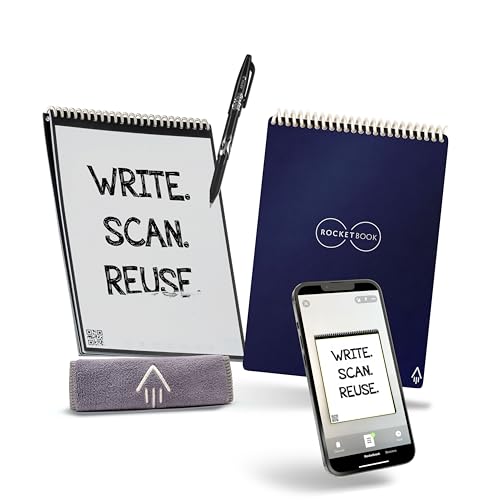
Best Complete Kit
Rocketbook Flip Reusable Smart Notepad, Eco-Friendly, Digitally Connected, Dotted and Lined Combo, 6x8.8, Navy, with Pen, Cloth, and App Included
The executive-size Flip with a pen and cleaning cloth included.
Best for: A first reusable notebook, bought as a complete kit.
Our take Check price for Rocketbook Flip Reusable Smart Notepad, Eco-Friendly, Digitally Connected, Dotted and Lined Combo, 6x8.8, Navy, with Pen, Cloth, and App Included (opens in a new tab)
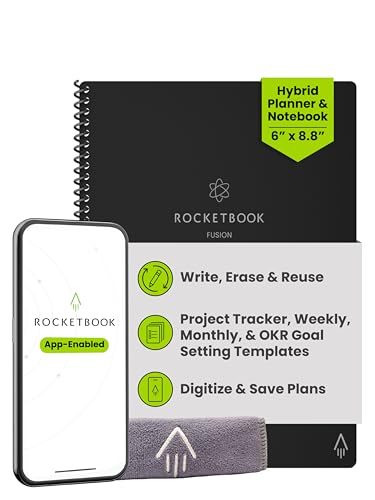
Best Planner Layout
Rocketbook Fusion Hybrid Reusable Planner Notebook, Executive 6x8.8, Black
A reusable notebook that mixes planner pages with free notes.
Best for: People who plan tasks and take notes in the same notebook.
Our take Check price for Rocketbook Fusion Hybrid Reusable Planner Notebook, Executive 6x8.8, Black (opens in a new tab)
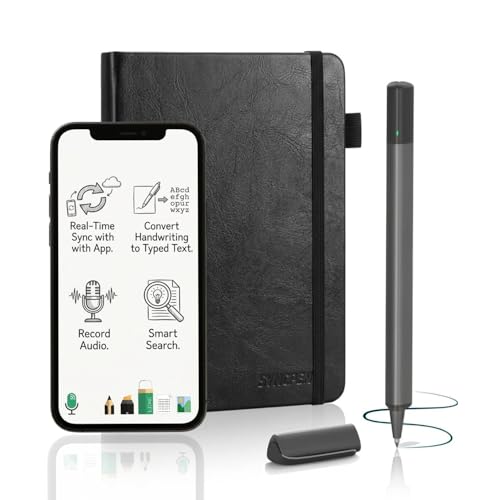
Best Real-Time Smart Pen
SyncPen Digital Notebook Smart Pen Set, Real Time Sync from Paper to App
A smart pen that syncs what you write on paper in real time, with OCR and audio recording.
Best for: Students and meeting-heavy workers who want handwriting turned into searchable notes as they write.
Our take Check price for SyncPen Digital Notebook Smart Pen Set, Real Time Sync from Paper to App (opens in a new tab)
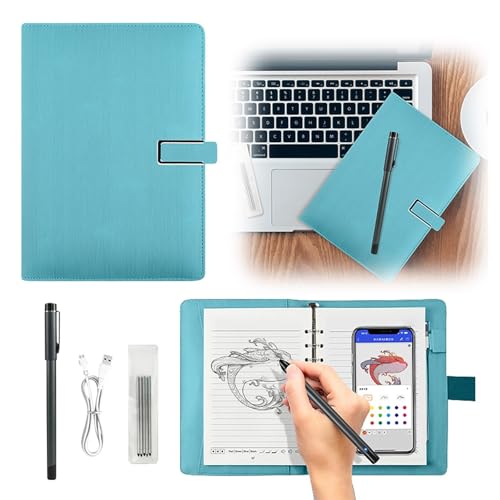
Eco-Focused Smart Set
Smart Sync Reusable Notebook, Functional Digital Notepad, Eco-Friendly
A smart pen and reusable pad set with real-time capture.
Best for: People who want live syncing and a reusable pad in one set.
Our take Check price for Smart Sync Reusable Notebook, Functional Digital Notepad, Eco-Friendly (opens in a new tab)
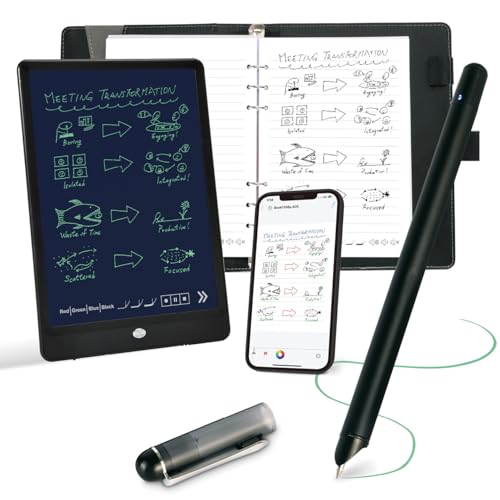
Compact Smart Pen Set
Ophayapen Smart Pen and Smart Digital Notebook, Real-time Mobile Sync
A compact smart pen and notebook set with real-time phone sync.
Best for: People who prefer this particular pen and notebook format for live syncing.
Our take Check price for Ophayapen Smart Pen and Smart Digital Notebook, Real-time Mobile Sync (opens in a new tab)
Our Picks
Best Reusable Notebook1 of 8
Rocketbook Core Reusable Spiral Notebook, Letter Size 8.5x11, Black, Dotted Pages, App-Connected, Erasable, Durable Cover on Amazon (opens in a new tab)
The Rocketbook Core is the straightforward starting point: a letter-size spiral notebook with dotted pages that you write on with an erasable pen, scan with the Rocketbook app, then wipe clean and reuse.
Best for
- Anyone who wants to try digitizing handwritten notes at low cost with plenty of page space.
Skip if
- You want notes to sync as you write; a smart pen set like the SyncPen does that.
Why we like it
Letter size gives you the most writing space of the reusable options here, and Rocketbook's app is well established. Syncing happens when you scan a page, not as you write.
You need a compatible erasable pen, and there is no on-device storage; your notes live in the app and whatever cloud service you send them to.
Key dimensions & specs
- Type: reusable notebook
- Size: letter (8.5 x 11"), dotted pages
- Sync: scan with phone app
- Reuse: wipe clean
Pros
- Full letter-size writing space
- Established companion app
- Low price and no charging
Cons
- Needs a compatible erasable pen
- Syncs only when you scan
- No on-device storage
Best Lined and Dot Grid Mix2 of 8
Rocketbook Flip Smart Notepad, Teal Cover, Lined/Dot Grid Rule, 8.5x11, 16 Sheets on Amazon (opens in a new tab)
The teal Rocketbook Flip is a notepad-style alternative to the Core, with a mix of lined and dot grid pages in a 16-sheet, letter-size format.
Best for
- People who alternate between written notes and diagrams.
Skip if
- You want a pen included; the Flip kit with pen is about the same price.
Why we like it
The combination suits people who switch between written notes and sketches or diagrams. It works the same way as the other Rocketbooks: erasable pen, scan, wipe.
The listing's description calls it compact, but its stated size is letter, 8.5 x 11 inches. If you want a smaller notepad, the executive-size Flip is the better fit.
Key dimensions & specs
- Type: reusable notepad
- Size: 8.5 x 11" (per listing), 16 sheets
- Pages: lined and dot grid
- Sync: scan with phone app
Pros
- Lined and dot grid pages in one pad
- Same scan-and-wipe system as the Core
- Low price
Cons
- Needs a compatible erasable pen
- Syncs only when you scan
- Size description in the listing is inconsistent
Best Executive Size3 of 8
Rocketbook Flip Reusable Smart Notepad, Executive Size 6x8.8, Navy Blue on Amazon (opens in a new tab)
The navy Rocketbook Flip comes in executive size, 6 x 8.8 inches, which is easier to carry than letter size while leaving more room than a pocket notebook.
Best for
- People who carry a notebook between rooms or meetings.
Skip if
- You don't already own a compatible pen; the Flip kit includes one.
Why we like it
It uses the same erasable-pen and app-scanning system as the other Rocketbooks, and it is one of the least expensive options here at the time of writing.
The pen isn't listed as included. For the same format with a pen and cleaning cloth, the Flip kit costs about a dollar more.
Key dimensions & specs
- Type: reusable notepad
- Size: executive (6 x 8.8")
- Sync: scan with phone app
- Reuse: wipe clean
Pros
- Portable executive size
- Low price
- No charging
Cons
- Pen isn't listed as included
- Syncs only when you scan
- Less writing space than letter size
Best Complete Kit4 of 8
Rocketbook Flip Reusable Smart Notepad, Eco-Friendly, Digitally Connected, Dotted and Lined Combo, 6x8.8, Navy, with Pen, Cloth, and App Included on Amazon (opens in a new tab)
The Flip kit is the executive-size Rocketbook with everything you need in the box: a compatible pen, a cleaning cloth and access to the app, plus dotted and lined pages.
Best for
- A first reusable notebook, bought as a complete kit.
Skip if
- You want letter-size pages; the Rocketbook Core is the better fit.
Why we like it
For a first reusable notebook, that removes the most common extra purchase. At the time of writing it costs only slightly more than the Flip without a pen.
Like the other Rocketbooks, notes sync when you scan them, and there is no on-device storage.
Key dimensions & specs
- Type: reusable notepad
- Size: executive (6 x 8.8")
- Included: pen, cleaning cloth
- Pages: dotted and lined
Pros
- Pen and cloth included
- Dotted and lined pages
- Ready to use out of the box
Cons
- Syncs only when you scan
- Smaller than letter size
- No on-device storage
Best Planner Layout5 of 8
Rocketbook Fusion Hybrid Reusable Planner Notebook, Executive 6x8.8, Black on Amazon (opens in a new tab)
The Rocketbook Fusion is the one to choose if you want structure: it combines planner pages for agendas and tasks with regular note pages, in executive size.
Best for
- People who plan tasks and take notes in the same notebook.
Skip if
- You mostly brainstorm or sketch; the Core's open dotted pages suit that better.
Why we like it
That suits people who plan their week and take meeting notes in the same book. It works on the same erasable-pen and scanning system as the rest of the range.
The structured pages are less flexible for open-ended brainstorming, and a compatible pen is required.
Key dimensions & specs
- Type: reusable planner notebook
- Size: executive (6 x 8.8")
- Pages: planner and note pages
- Sync: scan with phone app
Pros
- Planner and note pages in one book
- Reusable
- Portable size
Cons
- Less flexible for free-form notes
- Needs a compatible erasable pen
- Syncs only when you scan
Best Real-Time Smart Pen6 of 8
SyncPen Digital Notebook Smart Pen Set, Real Time Sync from Paper to App on Amazon (opens in a new tab)
The SyncPen is the entry point to live syncing: its Bluetooth pen captures your handwriting on special dot-pattern paper and sends it to an app as you write.
Best for
- Students and meeting-heavy workers who want handwriting turned into searchable notes as they write.
Skip if
- You don't want another device to charge; a Rocketbook needs none.
Why we like it
The listing also mentions OCR, which converts handwriting to text, and audio recording, useful for lectures or meetings. That makes it the most capable option here for turning notes into searchable text.
The pen needs charging, it depends on compatible paper, and the listing doesn't quantify OCR accuracy, so check recent buyer feedback before relying on it.
Key dimensions & specs
- Type: smart pen and paper set
- Sync: real time via Bluetooth
- OCR and audio recording (per listing)
- Pen: rechargeable
Pros
- Syncs as you write
- OCR and audio recording listed
- Least expensive smart pen here
Cons
- Pen needs charging
- Requires compatible paper
- OCR accuracy isn't quantified
Eco-Focused Smart Set7 of 8
Smart Sync Reusable Notebook, Functional Digital Notepad, Eco-Friendly on Amazon (opens in a new tab)
The Smart Sync set pairs a smart pen with a reusable notebook for real-time writing capture, and it is positioned around its reusable, eco-friendly design.
Best for
- People who want live syncing and a reusable pad in one set.
Skip if
- You need handwriting-to-text conversion; the SyncPen lists OCR.
Why we like it
It costs about the same as the SyncPen at the time of writing. The listing doesn't mention OCR or audio recording the way the SyncPen's does, so if text conversion matters, the SyncPen is the clearer choice.
It is a smaller brand with less buyer feedback, and the pen needs charging.
Key dimensions & specs
- Type: smart pen and reusable pad set
- Sync: real time
- Included: pen and pad
Pros
- Real-time capture on paper
- Reusable pad
- Pen and pad included
Cons
- OCR and text conversion aren't described
- Smaller brand with less feedback
- Pen needs charging
Compact Smart Pen Set8 of 8
Ophayapen Smart Pen and Smart Digital Notebook, Real-time Mobile Sync on Amazon (opens in a new tab)
The Ophayapen set is a compact pen-and-notebook combination that syncs to your phone in real time.
Best for
- People who prefer this particular pen and notebook format for live syncing.
Skip if
- You want OCR or audio recording; the SyncPen lists both for less.
Why we like it
It is the most expensive option here at the time of writing, and the listing doesn't describe features beyond real-time sync that the less expensive SyncPen lacks.
The pen needs charging, the set is bulkier than a paper-only notepad, and it is a smaller brand with less buyer feedback.
Key dimensions & specs
- Type: smart pen and notebook set
- Sync: real time to phone
Pros
- Real-time sync
- Compact pen and notebook combination
- Writes on real paper
Cons
- Most expensive option here
- No clear feature advantage over the SyncPen
- Pen needs charging
How We Chose These Digital Notebooks Under $300
Each pick was assessed across 4 criteria weighted for real-world use.
- Sync method
- We separated scan-to-sync reusable notebooks from real-time smart pen sets.
- Page format
- We compared page size and layout as listed.
- What's included
- We noted whether a pen, cloth or paper is included.
- Listed features
- We recorded OCR, audio recording and charging requirements where listed.
What to Look for in a Digital Notebook Under $300
Key buying criteria so you get the right fit the first time.
Decide how you want notes to sync
Reusable notebooks sync when you scan a page with your phone. Smart pens sync as you write. Scanning is cheaper and needs no charging; live syncing is more convenient for fast note-taking but depends on a charged pen and special paper.
Choose a page size and layout
Letter size gives the most room; executive size (6 x 8.8 inches) is easier to carry. Dotted, lined and planner pages suit different ways of working.
Confirm the pen
Rocketbooks need a compatible erasable pen, which isn't always included. The Flip kit includes one; smart pen sets include their own rechargeable pen.
Check text conversion
If you want handwriting turned into searchable text, look for OCR in the listing. The SyncPen lists it; accuracy isn't quantified, so recent buyer feedback is worth checking.
How to Choose a Digital Notebook Under $300
By how you write
| You want | Consider | Why |
|---|---|---|
| The most page space | Rocketbook Core | Letter-size dotted pages |
| A portable notebook | Rocketbook Flip (executive) | 6 x 8.8 inches |
| Everything in the box | Rocketbook Flip kit | Pen and cloth included |
| Planning and notes together | Rocketbook Fusion | Planner and note pages |
| Live syncing and searchable text | SyncPen | Real-time sync, OCR listed |
Scroll sideways to see every column.
Frequently Asked Questions
Do I need to spend close to $300?
Not for these types of notebook. Everything in this guide cost about $100 or less at the time of writing. E Ink tablets mostly sit above this range.
What's the difference between a reusable notebook and a smart pen?
A reusable notebook syncs when you scan a page with your phone, then wipes clean. A smart pen captures your writing on special paper as you go and syncs it live, but needs charging.
Do Rocketbooks need a special pen?
Yes, a compatible erasable pen. The Flip kit in this guide includes one.
Can these convert handwriting to text?
The SyncPen lists OCR. For the others, check the companion app's features before buying.
Bottom Line
For most people, a Rocketbook is the sensible starting point: the Flip kit is the easiest first purchase because the pen is included, the Core gives you letter-size pages, and the Fusion adds planner pages.
If you want notes to sync as you write and become searchable text, the SyncPen is the smart pen to start with. Several Rocketbook picks here overlap closely, so choose on size and layout rather than ranking.