
Buying Guide
The Best Digital Notebooks Under $200 for Handwritten Notes
We compared LCD writing tablets, a smart pen and two over-budget alternatives to show what each type of digital notebook does well under $200.
By Jamie Cole, Lead Product Researcher
8 min read5 products evaluated
We may earn a commission from purchases made through links in this guide. Learn more.
Under $200, a "digital notebook" usually isn't an E Ink tablet. It is more often an LCD writing tablet that syncs to your phone over Bluetooth, or a smart pen that captures what you write on real paper. Knowing which of those you want matters more than any single feature.
The second thing to check is the pen. Some listings include it in the price and some don't, which can change the real cost of an apparently cheaper device.
This guide includes three options that fit a $200 budget at the time of writing and two that don't, kept for context because they show what spending more buys: color and a true E Ink screen. Our comparison is based on published specifications and listing details, not hands-on testing.
Quick Picks
Our 5 recommendations at a glance. Tap a pick for the full verdict.

Above Budget: Color Option
XPPen 3 in 1 Color Digital Notebook 10.95"
A 10.95-inch color writing tablet, priced above $200 at the time of writing.
Best for: People who sketch or annotate in color and can stretch past $200.
Our take Check price for XPPen 3 in 1 Color Digital Notebook 10.95" (opens in a new tab)

Above Budget: E Ink Option
Penstar eNote2 E-Ink Digital Notebook with Pen, 10.3"
A true 10.3-inch E Ink notebook with pen, at more than double the budget.
Best for: Readers who have decided they want E Ink specifically and are willing to spend more for it.
Our take Check price for Penstar eNote2 E-Ink Digital Notebook with Pen, 10.3" (opens in a new tab)

Best Under $200
XPPen Note Plus Digital Notebook with Pen, Syncs to Phone
A Bluetooth writing tablet with the pen included, syncing notes to your phone.
Best for: Students and home-office workers who want handwritten notes saved to their phone on a modest budget.
Our take Check price for XPPen Note Plus Digital Notebook with Pen, Syncs to Phone (opens in a new tab)

Best for Notes and Drawing
HUION Note 2-in-1 Digital Notebook Drawing Tablet
A notebook that doubles as a drawing tablet, with a battery-free pen included.
Best for: People who take notes and sketch, or who want a tablet they can also use with a computer for drawing.
Our take Check price for HUION Note 2-in-1 Digital Notebook Drawing Tablet (opens in a new tab)
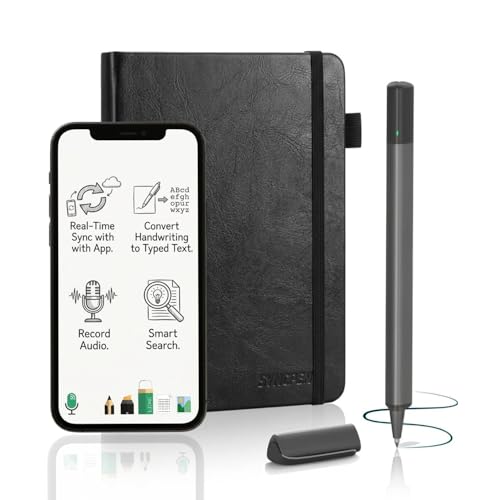
Best for Real Paper
SyncPen Digital Notebook Smart Pen Set
A smart pen that syncs what you write on real paper to an app.
Best for: People who prefer writing on paper but want their notes backed up digitally.
Our take Check price for SyncPen Digital Notebook Smart Pen Set (opens in a new tab)
| Pick | Why it’s here | Best for | Price |
|---|---|---|---|
| A 10.95-inch color writing tablet, priced above $200 at the time of writing. | People who sketch or annotate in color and can stretch past $200. | Check price for XPPen 3 in 1 Color Digital Notebook 10.95" (opens in a new tab) |
| A true 10.3-inch E Ink notebook with pen, at more than double the budget. | Readers who have decided they want E Ink specifically and are willing to spend more for it. | Check price for Penstar eNote2 E-Ink Digital Notebook with Pen, 10.3" (opens in a new tab) |
| A Bluetooth writing tablet with the pen included, syncing notes to your phone. | Students and home-office workers who want handwritten notes saved to their phone on a modest budget. | Check price for XPPen Note Plus Digital Notebook with Pen, Syncs to Phone (opens in a new tab) |
| A notebook that doubles as a drawing tablet, with a battery-free pen included. | People who take notes and sketch, or who want a tablet they can also use with a computer for drawing. | Check price for HUION Note 2-in-1 Digital Notebook Drawing Tablet (opens in a new tab) |
| A smart pen that syncs what you write on real paper to an app. | People who prefer writing on paper but want their notes backed up digitally. | Check price for SyncPen Digital Notebook Smart Pen Set (opens in a new tab) |
Our Picks
Above Budget: Color Option1 of 5
XPPen 3 in 1 Color Digital Notebook 10.95" on Amazon (opens in a new tab)
The XPPen 3 in 1 is here to show what a little more money buys: a 10.95-inch color display and 16,384 pressure levels, the most capable specification in this guide on paper.
Best for
- People who sketch or annotate in color and can stretch past $200.
Skip if
- You need to stay under $200 or only take text notes; the XPPen Note Plus is the better fit.
Why we like it
At the time of writing it is priced well above $200, so it only fits this budget if the price drops. Check the current listing before assuming it qualifies.
If you mainly take text notes, the extra capability matters less than it does for sketching or annotating in color, and the XPPen Note Plus covers note-taking for a fraction of the price.
Key dimensions & specs
- Display: 10.95" color
- Pressure levels: 16,384
Pros
- Color display
- High stated pressure sensitivity
- Most capable specification here
Cons
- Priced above $200 at the time of writing
- Pen inclusion isn't stated in the listing summary
- More than plain note-taking needs
Above Budget: E Ink Option2 of 5
Penstar eNote2 E-Ink Digital Notebook with Pen, 10.3" on Amazon (opens in a new tab)
The Penstar eNote2 is the only true E Ink device here, and it is included to show the price gap: at the time of writing it costs more than twice the $200 budget.
Best for
- Readers who have decided they want E Ink specifically and are willing to spend more for it.
Skip if
- Your budget is firmly under $200; the XPPen Note Plus is the practical alternative.
Why we like it
E Ink behaves more like paper than an LCD writing tablet, and it can display documents for reading and annotation. The pen is included.
If E Ink is what you want, it is worth saving for rather than compromising; if not, the LCD tablets below cover handwritten notes for much less.
Key dimensions & specs
- Display: 10.3" E Ink
- Pen included
Pros
- True E Ink display
- Pen included
- Suited to reading and annotating documents
Cons
- More than double a $200 budget
- Price may change significantly
- More device than simple note-taking needs
Best Under $2003 of 5
XPPen Note Plus Digital Notebook with Pen, Syncs to Phone on Amazon (opens in a new tab)
The XPPen Note Plus is our pick for most people shopping under $200: the pen is included in the price, and notes sync to your phone over Bluetooth.
Best for
- Students and home-office workers who want handwritten notes saved to their phone on a modest budget.
Skip if
- You want to read and annotate PDFs on the device; that needs an E Ink notebook like the Penstar.
Why we like it
It is a Bluetooth writing tablet rather than an E Ink screen, so it captures your handwriting and sends it to an app rather than displaying documents. For note-taking, that is often all you need, and it keeps the cost well under the budget.
It also has by far the most buyer reviews of the products here, which gives more feedback to check before you buy.
Key dimensions & specs
- Type: Bluetooth writing tablet
- Pen included
- Sync: to phone app
Pros
- Pen included in the price
- Phone sync for handwritten notes
- Well under the budget
Cons
- Not an E Ink display
- Doesn't display documents for reading
- Depends on the companion app
Best for Notes and Drawing4 of 5
HUION Note 2-in-1 Digital Notebook Drawing Tablet on Amazon (opens in a new tab)
The HUION Note is the better fit if you want one device for notes and drawing: it works as a digital notebook and as a drawing tablet, and its pen is battery-free, so there is nothing to charge.
Best for
- People who take notes and sketch, or who want a tablet they can also use with a computer for drawing.
Skip if
- You only take notes; the XPPen Note Plus does that for less.
Why we like it
It costs a little more than the XPPen Note Plus at the time of writing. The drawing-tablet mode is the reason to choose it; for note-taking alone, the XPPen covers the same need.
Key dimensions & specs
- Type: 2-in-1 notebook and drawing tablet
- Pen: battery-free, included
Pros
- Doubles as a drawing tablet
- Battery-free pen included
- Well under the budget
Cons
- Costs a little more than the XPPen Note Plus
- Not an E Ink display
- Fewer buyer reviews than the XPPen
Best for Real Paper5 of 5
SyncPen Digital Notebook Smart Pen Set on Amazon (opens in a new tab)
The SyncPen takes a different approach: instead of a tablet, it is a smart pen that captures what you write on paper and syncs it to an app in real time.
Best for
- People who prefer writing on paper but want their notes backed up digitally.
Skip if
- You want a more established product; the XPPen Note Plus has far more buyer feedback.
Why we like it
That suits anyone who prefers the feel of paper but still wants a digital copy. It is also the least established product here, with the fewest buyer reviews, so it is worth reading recent feedback before relying on it.
Key dimensions & specs
- Type: smart pen with paper
- Sync: real time to app
Pros
- Keeps you writing on real paper
- Real-time digital copy
- Well under the budget
Cons
- Fewest buyer reviews in this guide
- Depends on compatible paper and the app
- No screen for reviewing notes on the device
How We Chose These Digital Notebooks Under $200
Each pick was assessed across 4 criteria weighted for real-world use.
- Price against the budget
- We checked listed prices against the $200 ceiling at the time of writing and labeled products that exceed it.
- Pen inclusion
- We noted whether the pen is included in the listed price.
- Display type
- We distinguished E Ink notebooks, LCD writing tablets and smart pens, since they suit different uses.
- Established feedback
- We noted how much buyer feedback each product has, as context rather than proof of quality.
What to Look for in a Digital Notebook Under $200
Key buying criteria so you get the right fit the first time.
Decide on the display type first
E Ink notebooks display documents and feel closer to paper, but at the time of writing they sit above $200 in this guide. LCD writing tablets capture handwriting and sync it to an app. Smart pens capture writing on real paper. Each suits a different way of working.
Confirm the pen is included
A cheaper device without a pen can end up costing more than a pricier one with it. The XPPen Note Plus, HUION Note and Penstar list the pen as included.
Check where your notes go
Syncing to a phone app, exporting to PDF, or connecting to a note-taking service all vary by device. Check the manufacturer's stated export and sync options against the software you actually use.
Look for subscription requirements
Some digital notebook brands put handwriting conversion or cloud features behind a subscription. Check each listing for what is included in the purchase price and what requires an ongoing plan.
Weigh how established a product is
Newer devices have less buyer feedback to check. That doesn't make them worse, but it gives you less to go on. Here, the XPPen Note Plus has by far the most reviews and the SyncPen the fewest.
How to Choose a Digital Notebook Under $200
By how you want to write
| You want | Consider | Fits $200? |
|---|---|---|
| Handwritten notes saved to your phone | XPPen Note Plus | Yes |
| Notes and drawing in one device | HUION Note 2-in-1 | Yes |
| To keep writing on real paper | SyncPen | Yes |
| Color and high pressure sensitivity | XPPen 3 in 1 | Not at the time of writing |
| A true E Ink screen for reading and notes | Penstar eNote2 | No |
Scroll sideways to see every column.
Frequently Asked Questions
Is everything in this guide under $200?
No. At the time of writing, the XPPen 3 in 1 and the Penstar eNote2 are above $200 and are included for comparison. The XPPen Note Plus, HUION Note and SyncPen fit the budget.
Does the pen come included?
The listings for the XPPen Note Plus, HUION Note and Penstar eNote2 include the pen. Check the current listing for the others.
Can I get a true E Ink notebook under $200?
Not among the products in this guide at the time of writing. The under-$200 options here are LCD writing tablets and a smart pen.
What is the most established option under $200?
The XPPen Note Plus, which has far more buyer reviews than the other products here.
Is there a real-paper option?
Yes, the SyncPen smart pen, though it has the least buyer feedback of the products here.
Bottom Line
Under $200, the XPPen Note Plus is the sensible choice for most people: the pen is included, notes sync to your phone, and it has the most buyer feedback here. The HUION Note is the better fit if you also want to draw, and the SyncPen suits anyone who prefers real paper.
If what you actually want is an E Ink screen for reading and annotating, the Penstar eNote2 shows that it currently means spending well over $200, and it may be worth saving for rather than compromising.