
Buying Guide
The Best Digital Notebooks Under $100: Reusable Paper and Bluetooth Writing Pads
By Jamie Cole, Lead Product Researcher
7 min read5 products evaluated
We may earn a commission from purchases made through links in this guide. Learn more.
Set expectations first: there is no E Ink writing tablet like a reMarkable under $100. What this budget buys is either a reusable Rocketbook notebook, where you write on special paper, scan pages with a phone app and wipe them clean, or a Bluetooth writing pad from XPPen or Huion that records handwriting and syncs it to your phone.
The choice comes down to how notes should reach your phone. Rocketbooks cost $15 to $27 at the time of writing and need a scan step; the XPPen and Huion pads cost more and capture notes as you write. Very cheap LCD "writing tablets" that cannot save anything are not included.
Our comparison is based on published specifications, included accessories and price position, not hands-on testing.
Quick Picks
Our 5 recommendations at a glance. Tap a pick for the full verdict.

Best Overall
Rocketbook Core Reusable Smart Notebook, Letter Size, Blue
A letter-size reusable Rocketbook that you scan with an app and wipe clean.
Best for: Most note-takers who want handwritten notes on their phone for little money.
Our take Check price for Rocketbook Core Reusable Smart Notebook, Letter Size, Blue (opens in a new tab)
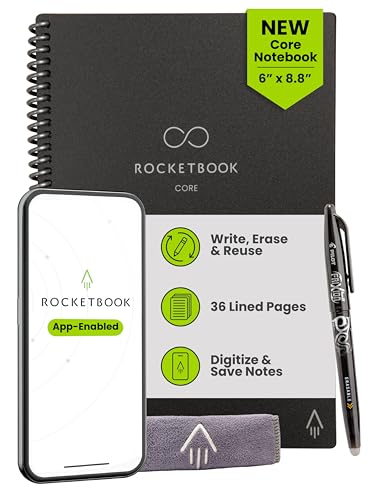
Best Portable Rocketbook
Rocketbook Core Reusable Smart Notebook, Executive Size 6x8.8
The same Rocketbook Core system in a 6 x 8.8-inch executive size.
Best for: People who carry a notebook between meetings or classes.
Our take Check price for Rocketbook Core Reusable Smart Notebook, Executive Size 6x8.8 (opens in a new tab)

Lowest-Cost Option
Rocketbook Smart Reusable Notebook, Mini Spiral Notebook
A mini spiral Rocketbook for quick notes, for about $15.
Best for: Trying reusable notebooks, or keeping a pocket notebook for lists.
Our take Check price for Rocketbook Smart Reusable Notebook, Mini Spiral Notebook (opens in a new tab)

Best Bluetooth Writing Pad
XPPen Note Plus Digital Notebook with Pen, Syncs to Phone
A writing pad with pen that syncs handwriting to your phone over Bluetooth.
Best for: People who want notes on their phone as they write without paying for an E Ink tablet.
Our take Check price for XPPen Note Plus Digital Notebook with Pen, Syncs to Phone (opens in a new tab)

Best for Notes and Drawing
HUION Note 2-in-1 Digital Notebook Drawing Tablet
A Huion notebook-and-drawing tablet with a battery-free pen.
Best for: Students or creatives who want note capture and a drawing tablet in one.
Our take Check price for HUION Note 2-in-1 Digital Notebook Drawing Tablet (opens in a new tab)
Our Picks
Best Overall1 of 5
Rocketbook Core Reusable Smart Notebook, Letter Size, Blue on Amazon (opens in a new tab)
The letter-size Rocketbook Core is the sensible default: full 8.5 x 11-inch pages you write on, scan with the Rocketbook app and wipe with a damp cloth, for about $27 at the time of writing.
Best for
- Most note-takers who want handwritten notes on their phone for little money.
Skip if
- You want notes to sync as you write; the XPPen Note Plus does that.
Why we like it
The full page leaves plenty of room for meeting notes or sketches, and notes can be sent from the app to cloud services.
It needs a compatible erasable pen, and notes only become digital when you scan them.
Key dimensions & specs
- Size: 8.5 x 11"
- Reusable pages, erase with damp cloth
- Capture: scan with Rocketbook app
Pros
- Full letter-size page
- Low price
- App capture and export
Cons
- Needs a compatible erasable pen
- Scanning step required
Best Portable Rocketbook2 of 5
Rocketbook Core Reusable Smart Notebook, Executive Size 6x8.8 on Amazon (opens in a new tab)
The executive-size Rocketbook Core works exactly like the letter-size version in a smaller 6 x 8.8-inch format that is easier to carry, and it costs slightly less at the time of writing.
Best for
- People who carry a notebook between meetings or classes.
Skip if
- You need room to spread out; the letter-size Core is larger for about a dollar more.
Why we like it
The smaller page means more frequent scanning and erasing if you write a lot.
It has fewer buyer reviews than the letter-size and mini Rocketbooks.
Key dimensions & specs
- Size: 6 x 8.8"
- Reusable pages
- Capture: scan with Rocketbook app
Pros
- More portable
- Slightly cheaper than letter size
Cons
- Smaller page
- Scanning step required
Lowest-Cost Option3 of 5
Rocketbook Smart Reusable Notebook, Mini Spiral Notebook on Amazon (opens in a new tab)
The Rocketbook Mini is the cheapest way to try the system: a small spiral notebook for quick notes and lists, for about $15 at the time of writing.
Best for
- Trying reusable notebooks, or keeping a pocket notebook for lists.
Skip if
- You take long notes; a Core notebook gives more space.
Why we like it
It is widely reviewed.
It uses the same scan-and-erase routine as the larger Rocketbooks.
The small page fills quickly, so it suits lists and reminders better than long notes.
Key dimensions & specs
- Size: mini, spiral-bound
- Reusable pages
- Capture: scan with Rocketbook app
Pros
- Lowest price here
- Pocketable
- Widely reviewed
Cons
- Small page
- Scanning step required
Best Bluetooth Writing Pad4 of 5
XPPen Note Plus Digital Notebook with Pen, Syncs to Phone on Amazon (opens in a new tab)
The XPPen Note Plus is the pick if the scanning step is what puts you off a Rocketbook: it is a writing pad with a pen that syncs your handwriting to your phone over Bluetooth, for about $70 at the time of writing.
Best for
- People who want notes on their phone as they write without paying for an E Ink tablet.
Skip if
- You are happy to scan pages; a Rocketbook costs far less.
Why we like it
It is widely reviewed for its category. It is not an E Ink tablet, and the listing does not detail export formats or handwriting-to-text conversion, so check XPPen's app features for what you need.
It costs more than any Rocketbook, and the pen or pad may need charging; check the listing for power details.
Key dimensions & specs
- Type: Bluetooth writing pad with pen
- Sync: to phone app
Pros
- Notes sync without scanning
- Widely reviewed
Cons
- Costs more than a Rocketbook
- App features and export formats not detailed in the listing
Best for Notes and Drawing5 of 5
HUION Note 2-in-1 Digital Notebook Drawing Tablet on Amazon (opens in a new tab)
The Huion Note is the choice if you also want to draw: a 2-in-1 digital notebook and drawing tablet with a battery-free pen, so the pen never needs charging.
Best for
- Students or creatives who want note capture and a drawing tablet in one.
Skip if
- You only take notes; the XPPen costs less.
Why we like it
It costs about $88 at the time of writing, the most here, and buyer feedback is slightly less positive than for the XPPen.
As with the XPPen, check Huion's app and export options against how you plan to use your notes.
Key dimensions & specs
- Type: notebook and drawing tablet
- Pen: battery-free
Pros
- Doubles as a drawing tablet
- Battery-free pen
Cons
- Most expensive option here
- Slightly weaker buyer feedback than the XPPen
How We Chose These Digital Notebooks Under $100
Each pick was assessed across 3 criteria weighted for real-world use.
- Capture method
- We separated scan-based reusable notebooks from Bluetooth writing pads, and excluded LCD pads that cannot save notes.
- Size and accessories
- We compared page sizes and pen details.
- Price position
- We compared what each step up in price adds. Prices change often, so we treat them as relative position.
What to Look for in a Digital Notebook Under $100
Key buying criteria so you get the right fit the first time.
Scan or live sync
Rocketbooks need a phone scan after writing; the XPPen and Huion pads capture notes as you write.
Page size
Rocketbooks here come in letter (8.5 x 11 inches), executive (6 x 8.8 inches) and mini sizes.
Export and handwriting conversion
Check where notes can go (cloud services, PDF, note apps) and whether handwriting-to-text is included or costs extra.
Pen and power
Rocketbooks need a compatible erasable pen. The Huion's pen is battery-free; check the XPPen listing for charging details.
How to Choose a Digital Notebook Under $100
By priority
| Priority | Consider | Why |
|---|---|---|
| Most note-takers | Rocketbook Core letter | Full page, low price |
| Portability | Rocketbook Core executive | 6 x 8.8 inches |
| Lowest cost | Rocketbook Mini | About $15 |
| No scanning | XPPen Note Plus | Bluetooth sync |
| Notes and drawing | Huion Note | Battery-free pen, drawing tablet |
Scroll sideways to see every column.
By price at the time of writing
Prices change frequently; these tiers reflect typical prices when this guide was updated.
| Price tier | Products |
|---|---|
| About $15–$27 | Rocketbook Mini, Core executive, Core letter |
| About $70–$88 | XPPen Note Plus, Huion Note |
Frequently Asked Questions
Can I get an E Ink smart notebook under $100?
Not new, at the time of writing. Under $100 the realistic choices are reusable paper notebooks and Bluetooth writing pads.
What's the closest thing to a digital notebook under $100?
The XPPen Note Plus, which syncs handwriting to your phone over Bluetooth instead of requiring a scan.
What's the cheapest option that still captures notes?
The Rocketbook Mini, at about $15 at the time of writing.
Do these save notes automatically?
Rocketbooks require you to scan each page with the app before erasing. The XPPen and Huion pads sync to your phone as you write.
Are there cheap writing tablets that can't save notes?
Yes. Basic LCD writing pads often cannot save or export anything. None are included here.
Bottom Line
For most people, a Rocketbook is enough: the letter-size Core for general notes, the executive size for carrying, or the Mini to try the system for about $15.
If scanning each page is the obstacle, the XPPen Note Plus syncs as you write for about $70, and the Huion Note adds drawing-tablet use with a battery-free pen at the top of the budget.