
Buying Guide
The Best Digital Notebooks for Getting Handwritten Notes into OneNote
No device here lists native OneNote sync, so we compared four E Ink tablets and a reusable notebook on how notes get from page to OneNote.
By Jamie Cole, Lead Product Researcher
8 min read5 products evaluated
We may earn a commission from purchases made through links in this guide. Learn more.
If you want handwritten notes to appear in OneNote automatically, the first thing to know is that none of the devices here lists native, automatic OneNote sync. The realistic workflow is to export a page as a PDF or image from the device's own app, then add that file to OneNote.
That changes what matters. Instead of sync features, compare how easily each device exports, whether color survives the export, what the device costs and whether any features you need sit behind a subscription.
The five options below include four E Ink tablets and one reusable paper notebook that is scanned with a phone. Our comparison is based on published specifications and manufacturer feature descriptions, not hands-on testing. Integrations change, so check each manufacturer's current export options before buying.
Quick Picks
Our 5 recommendations at a glance. Tap a pick for the full verdict.
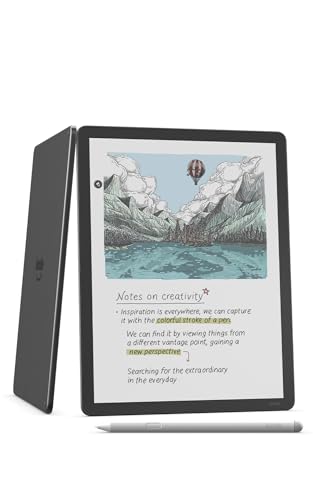
Best for Color Notes
Amazon Kindle Scribe Colorsoft 64GB
Kindle Scribe with a color E Ink display and 64GB; color notes carry through to exported PDFs.
Best for: Color-coded notes or annotated PDFs you want to file in OneNote.
Our take Check price for Amazon Kindle Scribe Colorsoft 64GB (opens in a new tab)

Best Value Kindle Option
Amazon Kindle Scribe (16GB)
The monochrome Kindle Scribe with 16GB, using the same export path as the Colorsoft for less.
Best for: Black-and-white note-taking that ends up in OneNote.
Our take Check price for Amazon Kindle Scribe (16GB) (opens in a new tab)

Best Established Writing Tablet
reMarkable 2 with Marker Plus
reMarkable 2 with the Marker Plus stylus; PDF export works, and full cloud features need Connect.
Best for: A dedicated writing tablet, where OneNote is one of several destinations.
Our take Check price for reMarkable 2 with Marker Plus (opens in a new tab)

Most Open App Environment
XPPen 3 in 1 Color Digital Notebook 10.95"
A 10.95-inch color notebook with a more open app environment, at a lower price than the Kindles.
Best for: A color notebook on a lower budget, with more flexible file handling.
Our take Check price for XPPen 3 in 1 Color Digital Notebook 10.95" (opens in a new tab)

Best Paper Option
Rocketbook Fusion Reusable Undated Productivity Planner, Letter Size
A reusable paper planner you scan with the Rocketbook app, at a fraction of a tablet's price.
Best for: Anyone who prefers paper and wants notes in OneNote occasionally.
Our take Check price for Rocketbook Fusion Reusable Undated Productivity Planner, Letter Size (opens in a new tab)
| Pick | Why it’s here | Best for | Price |
|---|---|---|---|
| Kindle Scribe with a color E Ink display and 64GB; color notes carry through to exported PDFs. | Color-coded notes or annotated PDFs you want to file in OneNote. | Check price for Amazon Kindle Scribe Colorsoft 64GB (opens in a new tab) |
| The monochrome Kindle Scribe with 16GB, using the same export path as the Colorsoft for less. | Black-and-white note-taking that ends up in OneNote. | Check price for Amazon Kindle Scribe (16GB) (opens in a new tab) |
| reMarkable 2 with the Marker Plus stylus; PDF export works, and full cloud features need Connect. | A dedicated writing tablet, where OneNote is one of several destinations. | Check price for reMarkable 2 with Marker Plus (opens in a new tab) |
| A 10.95-inch color notebook with a more open app environment, at a lower price than the Kindles. | A color notebook on a lower budget, with more flexible file handling. | Check price for XPPen 3 in 1 Color Digital Notebook 10.95" (opens in a new tab) |
| A reusable paper planner you scan with the Rocketbook app, at a fraction of a tablet's price. | Anyone who prefers paper and wants notes in OneNote occasionally. | Check price for Rocketbook Fusion Reusable Undated Productivity Planner, Letter Size (opens in a new tab) |
Our Picks
Best for Color Notes1 of 5
Amazon Kindle Scribe Colorsoft 64GB on Amazon (opens in a new tab)
The Kindle Scribe Colorsoft is the pick if color matters in your notes: its color E Ink display means highlights and colored ink can be preserved when you export a notebook or annotated PDF for OneNote.
Best for
- Color-coded notes or annotated PDFs you want to file in OneNote.
Skip if
- Your notes are black and white; the standard Kindle Scribe uses the same export path for less.
Why we like it
It has 64GB of storage. Getting notes into OneNote is still a two-step process: export from Kindle, then import into OneNote.
It was the most expensive option here at the time of writing, and there is no automatic sync.
Key dimensions & specs
- Display: color E Ink
- Storage: 64GB
- OneNote path: PDF export, manual import
Pros
- Color preserved in exports
- 64GB storage
- PDF export
Cons
- Most expensive here at the time of writing
- No automatic OneNote sync
- Two-step workflow
Best Value Kindle Option2 of 5
Amazon Kindle Scribe (16GB) on Amazon (opens in a new tab)
The standard Kindle Scribe offers the same export-then-import route into OneNote as the Colorsoft, without color, at a considerably lower price at the time of writing.
Best for
- Black-and-white note-taking that ends up in OneNote.
Skip if
- You want a wider app ecosystem for file transfer; the XPPen is cheaper and more open.
Why we like it
It has a monochrome E Ink display and 16GB of storage.
Exported notes are black and white, and, like every device here, there's no automatic sync.
Key dimensions & specs
- Display: monochrome E Ink
- Storage: 16GB
- OneNote path: PDF export, manual import
Pros
- Much cheaper than the Colorsoft
- Same export workflow
- PDF export
Cons
- No color
- Less storage
- No automatic sync
Best Established Writing Tablet3 of 5
reMarkable 2 with Marker Plus on Amazon (opens in a new tab)
The reMarkable 2 is the most established writing tablet here, with the largest base of buyer feedback among the E Ink devices, and it comes bundled with the Marker Plus stylus.
Best for
- A dedicated writing tablet, where OneNote is one of several destinations.
Skip if
- You want to avoid subscriptions; check the Kindle Scribe's included features instead.
Why we like it
It exports pages to PDF for manual import into OneNote. reMarkable gates its full cloud features behind the paid Connect subscription, so check which features you need are included without it.
It costs more than the standard Kindle Scribe at the time of writing, and there's no native OneNote sync.
Key dimensions & specs
- Stylus: Marker Plus included
- OneNote path: PDF export, manual import
- Subscription: reMarkable Connect for full cloud features
Pros
- Established device with extensive feedback
- Stylus included
- PDF export
Cons
- Full cloud features need a subscription
- Costs more than the Kindle Scribe
- No native OneNote sync
Most Open App Environment4 of 5
XPPen 3 in 1 Color Digital Notebook 10.95" on Amazon (opens in a new tab)
The XPPen 3-in-1 may make file transfer more direct: its app environment is more open than the Kindle or reMarkable ecosystems, which may let you move exports into OneNote with fewer steps.
Best for
- A color notebook on a lower budget, with more flexible file handling.
Skip if
- You want an established ecosystem; the Kindle Scribe or reMarkable has more feedback behind it.
Why we like it
Confirm what apps it supports before relying on that.
It has a 10.95-inch color display and exports PDFs or images, and it was the lowest-priced tablet here at the time of writing.
It has less buyer feedback than the Kindle Scribe or reMarkable.
Key dimensions & specs
- Display: 10.95" color
- OneNote path: PDF/image export, manual import
- App environment: more open than Kindle or reMarkable
Pros
- Lowest-priced tablet here at the time of writing
- Color display
- More open app environment
Cons
- Less buyer feedback
- App support should be confirmed
- No native OneNote sync
Best Paper Option5 of 5
Rocketbook Fusion Reusable Undated Productivity Planner, Letter Size on Amazon (opens in a new tab)
The Rocketbook Fusion is the low-cost alternative: you write on reusable paper pages, scan them with the Rocketbook phone app, and send the scans to cloud services, from which they can go into OneNote.
Best for
- Anyone who prefers paper and wants notes in OneNote occasionally.
Skip if
- You annotate PDFs; an E Ink tablet like the Kindle Scribe handles that.
Why we like it
It is a letter-size undated productivity planner with extensive, positive buyer feedback, and it costs a small fraction of any tablet here.
It is a different workflow entirely: there's no screen, and each page needs scanning. Check the Rocketbook app's current list of destinations, as OneNote support may make the transfer simpler.
Key dimensions & specs
- Format: reusable paper planner, letter size
- Capture: scanned via Rocketbook app
- OneNote path: export via cloud services
Pros
- Very low cost
- Real paper
- Extensive positive buyer feedback
Cons
- No screen
- Each page needs scanning
- Planner layout may not suit free-form notes
How We Chose These Digital Notebooks for OneNote
Each pick was assessed across 4 criteria weighted for real-world use.
- Path into OneNote
- We checked each manufacturer's listed export options and found no native OneNote sync among them.
- Export quality
- We noted whether color is preserved and which file formats are listed.
- Ecosystem
- We noted subscriptions and how open each device's app environment is.
- Price
- We compared prices at the time of writing.
What to Look for in a Digital Notebook for OneNote
Key buying criteria so you get the right fit the first time.
Expect a manual export step
None of these devices lists automatic OneNote sync. Plan on exporting a PDF or image and adding it to OneNote.
Decide whether color matters
The Kindle Scribe Colorsoft and XPPen have color displays; the standard Kindle Scribe and reMarkable 2 are monochrome.
Check subscriptions
reMarkable's full cloud features require the paid Connect plan. Confirm which features you need are included without a subscription.
Confirm the stylus
The reMarkable listing includes the Marker Plus. Check whether a stylus is included for the others.
How to Choose a Digital Notebook for OneNote
By priority
| Priority | Consider |
|---|---|
| Color notes and PDFs | Kindle Scribe Colorsoft |
| Lower-cost Kindle | Kindle Scribe 16GB |
| Established writing tablet | reMarkable 2 |
| Open app environment, lower price | XPPen 3-in-1 |
| Paper, minimal cost | Rocketbook Fusion |
Frequently Asked Questions
Does any digital notebook here sync automatically with OneNote?
None of these lists native, automatic OneNote sync. The workflow is to export a PDF or image and add it to OneNote. Integrations change, so check the manufacturer's current features.
Which device exports color?
The Kindle Scribe Colorsoft preserves color in exported notes, and the XPPen has a color display.
What's the cheapest route into OneNote?
The Rocketbook Fusion, a reusable paper planner scanned with a phone app, costs a small fraction of the tablets.
Do I need a subscription?
Basic PDF export doesn't list a subscription requirement. reMarkable's full cloud features need its paid Connect plan.
Why include a paper notebook?
Because the tablets also rely on a manual export, a scanned paper notebook reaches the same end result for much less, if you don't need a screen.
Bottom Line
Since no device here syncs with OneNote on its own, choose on the device itself: the Kindle Scribe Colorsoft for color, the standard Kindle Scribe for the same workflow for less, or the reMarkable 2 for an established writing tablet, subscription aside.
The XPPen is the lower-cost color option with a more open app environment, and the Rocketbook Fusion is the paper route for anyone who only occasionally needs notes in OneNote.