
Buying Guide
The Best Vertical Docking Stations and Compact Docks for a Clean Desk
Two vertical stand-docks and six compact docks compared on form factor, displays, ports and charging for a clamshell setup.
By Jamie Cole, Lead Product Researcher
10 min read8 products evaluated
We may earn a commission from purchases made through links in this guide. Learn more.
A vertical docking station holds a closed laptop upright, like a book, while connecting it to monitors and peripherals, freeing desk space when you work in clamshell mode. Only two picks here are true vertical stand-docks: the PULWTOP for most laptops and the 4URPC for MacBooks.
The other six are compact horizontal docks that can pair with a separate vertical laptop stand. They're included because they add features the vertical docks don't, such as DisplayLink, triple displays or more ports.
Check your laptop's thickness against a vertical dock's slot, and your laptop's external display support. Our comparison is based on published specifications, not hands-on testing.
Quick Picks
Our 8 recommendations at a glance. Tap a pick for the full verdict.
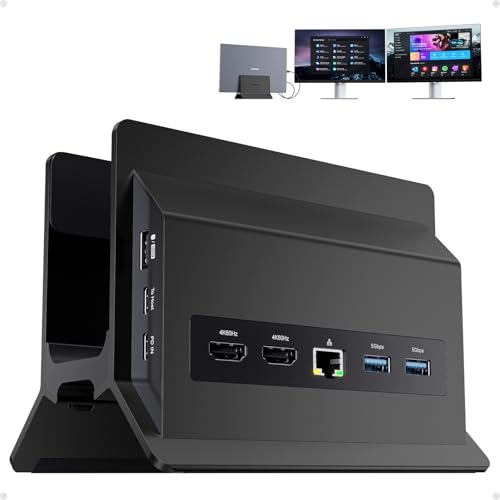
Best Vertical Dock for Any Laptop
PULWTOP 11-in-1 USB C Docking Station, Vertical Laptop Dock Stand
An 11-in-1 vertical laptop stand and dock with two 4K@60Hz HDMI, 10Gbps USB and Ethernet.
Best for: Running a closed laptop upright with external monitors.
Our take Check price for PULWTOP 11-in-1 USB C Docking Station, Vertical Laptop Dock Stand (opens in a new tab)

Best Vertical Dock for MacBook
4URPC MacBook Pro Docking Station, Vertical Stand for MacBook
A vertical MacBook stand-dock with dual 4K@60Hz HDMI, a 100W adapter, SD/microSD and Ethernet.
Best for: A MacBook in clamshell mode with external monitors.
Our take Check price for 4URPC MacBook Pro Docking Station, Vertical Stand for MacBook (opens in a new tab)

Most Ports for MacBook
TobenONE 18-in-2 MacBook Docking Station, Dual Monitor
A MacBook-focused 18-in-2 dock with dual 4K@60Hz and a 150W adapter.
Best for: MacBooks needing two 4K displays.
Our take Check price for TobenONE 18-in-2 MacBook Docking Station, Dual Monitor (opens in a new tab)

Compact Windows Dock (Not Vertical)
Baseus Spacemate Laptop Docking Station, 11-in-1 for Windows
An 11-in-1 Baseus dock with triple display, 10Gbps USB, Ethernet and 100W PD.
Best for: A compact multi-display desk.
Our take Check price for Baseus Spacemate Laptop Docking Station, 11-in-1 for Windows (opens in a new tab)

DisplayLink Dock (Not Vertical)
WAVLINK USB C Docking Station, Dual 5K/4K DisplayLink 13-in-1
A DisplayLink dock with 130W PD rating, dual 5K/4K output, 2 HDMI, 2 DisplayPort and Ethernet.
Best for: Base M-series MacBooks that need two external monitors.
Our take Check price for WAVLINK USB C Docking Station, Dual 5K/4K DisplayLink 13-in-1 (opens in a new tab)

Compact Triple Display (Not Vertical)
Plugable USB C Triple Display Docking Station
A 100W dock with three HDMI outputs: one 4K at 30Hz and two 1080p at 60Hz.
Best for: Three 1080p monitors on one dock.
Our take Check price for Plugable USB C Triple Display Docking Station (opens in a new tab)

Detachable Hub (Not Vertical)
Anker Nano 13-in-1 Laptop Docking Station, Detachable 6-in-1 Hub
A 13-in-1 dock with 100W, three displays and a detachable 6-in-1 travel hub.
Best for: Desk-and-travel users who want one dock for both.
Our take Check price for Anker Nano 13-in-1 Laptop Docking Station, Detachable 6-in-1 Hub (opens in a new tab)

High-End Triple 4K (Not Vertical)
Anker Prime Docking Station (DL7400), 14-Port Triple Display
A 14-port DisplayLink dock with triple 4K at 60Hz, 140W output and a cooling fan.
Best for: Windows laptops driving three 4K monitors.
Our take Check price for Anker Prime Docking Station (DL7400), 14-Port Triple Display (opens in a new tab)
Our Picks
Best Vertical Dock for Any Laptop1 of 8
PULWTOP 11-in-1 USB C Docking Station, Vertical Laptop Dock Stand on Amazon (opens in a new tab)
The PULWTOP combines a vertical laptop stand with an 11-in-1 dock, so a closed laptop stands upright and connects in one place: two HDMI outputs at 4K 60Hz, three 10Gbps USB-A/C ports, two 5Gbps USB-A, a USB 2.0 port, Ethernet and PD 3.0 charging passthrough.
Best for
- Running a closed laptop upright with external monitors.
Skip if
- You use a MacBook; the 4URPC is designed for it.
Why we like it
It was the lowest-priced vertical dock here at the time of writing. Check that your laptop's thickness fits the stand, and on a Mac, dual HDMI may mirror rather than extend.
Key dimensions & specs
- Type: vertical stand + 11-in-1 dock
- Displays: 2x HDMI 4K@60Hz
- USB: 3x 10Gbps, 2x 5Gbps, 1x 2.0
- Ethernet; PD 3.0 passthrough
Pros
- Stand and dock in one
- Dual 4K@60Hz
- Low price
Cons
- Laptop thickness must fit
- Passthrough wattage not stated
- Dual HDMI may mirror on Mac
Best Vertical Dock for MacBook2 of 8
4URPC MacBook Pro Docking Station, Vertical Stand for MacBook on Amazon (opens in a new tab)
The 4URPC is a vertical stand built for MacBook Pro and Air, holding the closed laptop upright while providing two HDMI outputs at 4K 60Hz, USB 3.0, SD and microSD, Ethernet and audio, with a 100W power adapter included.
Best for
- A MacBook in clamshell mode with external monitors.
Skip if
- You need more ports; the TobenONE 18-in-2 has more.
Why we like it
Whether two HDMI displays extend on your MacBook depends on its chip; check 4URPC's notes and Apple's display support for your model.
Key dimensions & specs
- Type: vertical MacBook stand + dock
- Displays: 2x HDMI, 4K@60Hz
- Power: 100W adapter included
- Ports: USB 3.0, SD/microSD, Ethernet, audio
Pros
- Designed for MacBook
- Adapter included
- SD and microSD
Cons
- Dual display depends on Mac chip
- MacBook sizes only
- Fewer ports than TobenONE
Most Ports for MacBook3 of 8
TobenONE 18-in-2 MacBook Docking Station, Dual Monitor on Amazon (opens in a new tab)
The TobenONE 18-in-2 is aimed at MacBooks, connecting over two cables to support dual 4K at 60Hz, with many USB and data ports and a 150W adapter.
Best for
- MacBooks needing two 4K displays.
Skip if
- You want the laptop to stand upright; the 4URPC is a vertical stand.
Why we like it
The listing summary doesn't confirm 2.5GbE or give exact port details.
Key dimensions & specs
- Connection: 2 cables (18-in-2)
- Displays: dual 4K@60Hz
- Power: 150W adapter
- Focus: MacBook
Pros
- MacBook-focused
- Dual 4K@60Hz
- Many ports
Cons
- Not a vertical stand
- Uses two ports on the Mac
- Details not in summary
Compact Windows Dock (Not Vertical)4 of 8
Baseus Spacemate Laptop Docking Station, 11-in-1 for Windows on Amazon (opens in a new tab)
The Baseus Spacemate is a compact 11-in-1 dock with triple display output over 4K HDMI and DisplayPort, 10Gbps USB-C and USB-A, Ethernet, audio and 100W charging, with a power adapter included.
Best for
- A compact multi-display desk.
Skip if
- You want a vertical stand; the PULWTOP combines both.
Why we like it
The listing summary doesn't confirm 2.5GbE.
Key dimensions & specs
- Displays: triple (4K HDMI + DP)
- Data: 10Gbps USB-C/A
- Charging: 100W PD
- Ethernet: speed not stated
Pros
- Compact
- 100W
- 10Gbps data
Cons
- Not a vertical stand
- Triple display depends on laptop
- Ethernet speed not stated
DisplayLink Dock (Not Vertical)5 of 8
WAVLINK USB C Docking Station, Dual 5K/4K DisplayLink 13-in-1 on Amazon (opens in a new tab)
The WAVLINK uses DisplayLink to drive two external displays at up to 5K or 4K at 60Hz, which WAVLINK lists as working across M1 to M4 Macs and Windows.
Best for
- Base M-series MacBooks that need two external monitors.
Skip if
- Your laptop supports multiple displays natively; the Anker Nano avoids DisplayLink for less.
Why we like it
That matters because many base M-series Macs natively support only one external display.
It has a 130W PD rating, two HDMI and two DisplayPort outputs, Gigabit Ethernet, five USB ports and audio.
DisplayLink requires driver software, adds some processor load and is less suited to color-critical work or gaming. Charging to one laptop is still subject to USB PD limits.
Key dimensions & specs
- Charging: 130W PD rating
- Displays: dual 5K/4K@60Hz via DisplayLink
- Video ports: 2x HDMI, 2x DisplayPort
- Ethernet: Gigabit
- USB: 5 ports
Pros
- Dual displays on Macs that support only one natively
- Many video outputs
- Ethernet
Cons
- Requires DisplayLink software
- Adds processor load
- Not for color-critical work
Compact Triple Display (Not Vertical)6 of 8
Plugable USB C Triple Display Docking Station on Amazon (opens in a new tab)
The Plugable triple-display dock drives three monitors while keeping 100W charging, with support for Windows, macOS and ChromeOS.
Best for
- Three 1080p monitors on one dock.
Skip if
- You want 4K at 60Hz; the UGREEN 10-in-1 offers dual 4K@60Hz for far less.
Why we like it
Read the display split carefully: one HDMI runs 4K at 30Hz and two run 1080p at 60Hz. It has six 5Gbps USB ports.
A 4K display at 30Hz feels less smooth when moving windows or scrolling, so this suits three modest monitors better than a 4K setup. The listing doesn't mention Ethernet.
Key dimensions & specs
- Charging: 100W
- Displays: 1x 4K@30Hz + 2x 1080p@60Hz (HDMI)
- USB: 6x 5Gbps
- OS: Windows, macOS, ChromeOS
Pros
- Three displays
- ChromeOS support listed
- Six USB ports
Cons
- 4K only at 30Hz
- Two outputs limited to 1080p
- Ethernet not listed
Detachable Hub (Not Vertical)7 of 8
Anker Nano 13-in-1 Laptop Docking Station, Detachable 6-in-1 Hub on Amazon (opens in a new tab)
The Anker Nano is two products in one: a desk dock supporting three displays via two HDMI and one DisplayPort, and a detachable 6-in-1 hub you can take with you.
Best for
- Desk-and-travel users who want one dock for both.
Skip if
- You never travel with a hub; the Acer 11-in-1 offers three displays for less.
Why we like it
It has a 10Gbps USB-C port, three USB-A ports, SD/TF reader, Ethernet and audio, with 100W charging.
Triple-display support depends on your laptop and operating system, and the detachable hub is one more part to keep track of.
Key dimensions & specs
- Charging: 100W
- Displays: 3 (2x HDMI + 1x DP)
- Data: 10Gbps USB-C, 3x USB-A
- Detachable 6-in-1 hub
- SD/TF, Ethernet, audio
Pros
- Detachable travel hub
- Three displays
- 10Gbps USB-C
Cons
- Triple display depends on laptop/OS
- Extra part to lose
- Not Thunderbolt
High-End Triple 4K (Not Vertical)8 of 8
Anker Prime Docking Station (DL7400), 14-Port Triple Display on Amazon (opens in a new tab)
The Anker Prime DL7400 drives three 4K displays at 60Hz through DisplayLink, which is uncommon, with 140W total output, a built-in cooling fan and a display status indicator.
Best for
- Windows laptops driving three 4K monitors.
Skip if
- You use a Mac; the Plugable UD-ULTCDL lists Mac support.
Why we like it
Anker lists it for Windows laptops with the latest DisplayLink driver installed. It isn't Thunderbolt certified.
Key dimensions & specs
- Displays: triple 4K@60Hz via DisplayLink
- Output: 140W max
- Cooling: built-in fan
- Ports: 14
- OS: Windows (driver required)
Pros
- Three 4K 60Hz displays
- 140W
- Cooling fan
Cons
- Driver required
- Windows-focused
- Fan may be audible
How We Chose These Vertical Docking Stations
Each pick was assessed across 4 criteria weighted for real-world use.
- Form factor
- We separated vertical stand-docks from compact docks.
- Displays
- We compared outputs and refresh.
- Ports and charging
- We compared connectivity and power.
- Price
- We compared prices at the time of writing.
What to Look for in a Vertical Docking Station
Key buying criteria so you get the right fit the first time.
True vertical or dock plus stand
The PULWTOP and 4URPC are integrated; others need a separate stand.
Check laptop fit
Vertical slots suit specific thicknesses; the 4URPC is for MacBooks.
Confirm display support
Clamshell mode relies on external monitors; check your laptop's limit.
Plan charging
Check passthrough wattage and whether an adapter is included.
How to Choose a Vertical Docking Station
By setup
| Setup | Consider |
|---|---|
| Vertical, any laptop | PULWTOP |
| Vertical, MacBook | 4URPC |
| MacBook, most ports | TobenONE 18-in-2 |
| Two displays via DisplayLink | WAVLINK 13-in-1 |
| Three displays, compact | Anker Nano or Baseus |
| Three 4K, Windows | Anker Prime DL7400 |
Frequently Asked Questions
What is a vertical dock?
A stand that holds a closed laptop upright and connects it to peripherals, saving desk space.
Does clamshell mode need an external monitor?
Typically yes, plus keyboard and mouse; check your laptop's settings.
Will my laptop fit?
Check the slot width against your laptop's thickness.
Can I use a normal dock vertically?
Pair it with a separate vertical laptop stand.
Does a vertical laptop run hotter?
It depends on the laptop's vents; leave vents unobstructed.
Bottom Line
For a true vertical setup, the PULWTOP suits most laptops for a low price, and the 4URPC is designed for MacBooks with an adapter included.
If you need DisplayLink, three displays or more ports, pair one of the compact docks, such as the WAVLINK, Anker Nano or TobenONE, with a separate vertical stand.