
Buying Guide
The Best Ergonomic Keyboards for Wrist Pain and Carpal Tunnel: Picks and Trade-offs
We looked at 8 ergonomic keyboards for wrist pain and carpal tunnel side by side, with the trade-offs that separate them and who each one suits.
By Jamie Cole, Lead Product Researcher
10 min read8 products evaluated
We may earn a commission from purchases made through links in this guide. Learn more.
An ergonomic keyboard can help reduce the wrist strain that builds up from hours of typing on a flat, positive-tilt layout, but it is worth being direct about what it can and cannot do. A keyboard is not medical treatment. If you already have symptoms of carpal tunnel syndrome, such as pain, numbness, tingling, or weakness in your hand or wrist, the right next step is seeing a doctor, not buying a new keyboard and hoping it resolves on its own. What a well-designed ergonomic keyboard can realistically offer is prevention for people who are symptom-free but spend long hours typing, or mild relief as one part of a broader routine that also includes posture, break frequency, and mouse choice.
23 keyboard and vertical mouse bundle. Each pick is matched to a specific buyer situation rather than ranked as a single universal best, since wrist comfort depends heavily on your hand size, typing style, and how long you sit at a desk each day.
Quick Picks
Our 8 recommendations at a glance. Tap a pick for the full verdict.

Best Overall
Logitech Ergo K860 Wireless Ergonomic Split Keyboard with Wrist Rest
Buyers who want the strongest negative-tilt design without a fully separable split
Our take Check price for Logitech Ergo K860 Wireless Ergonomic Split Keyboard with Wrist Rest (opens in a new tab)

Best Entry Point
Logitech Wave Keys Wireless Ergonomic Keyboard - Graphite
First-time buyers who want a gentle, low-effort introduction to ergonomic typing
Our take Check price for Logitech Wave Keys Wireless Ergonomic Keyboard - Graphite (opens in a new tab)
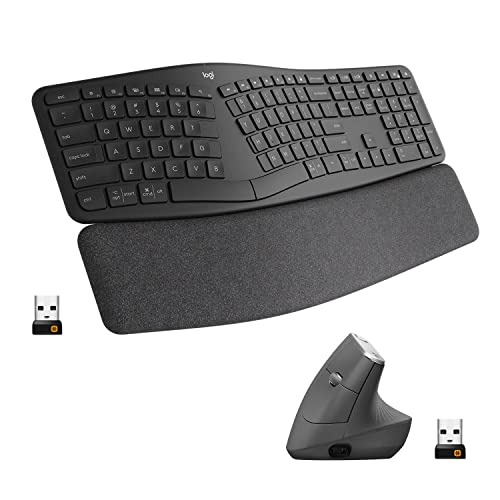
Best Keyboard and Mouse Bundle
Logitech Ergo K860 Wireless Ergonomic Keyboard with Wrist Rest and MX Vertical Wireless Mouse
Buyers who know mouse grip is part of their wrist strain, not just the keyboard
Our take Check price for Logitech Ergo K860 Wireless Ergonomic Keyboard with Wrist Rest and MX Vertical Wireless Mouse (opens in a new tab)

Best Budget Split Keyboard
Perixx PERIBOARD-512B Wired Ergonomic Split Keyboard with Wrist Rest
Budget-conscious buyers who want to try a true split layout risk-free
Our take Check price for Perixx PERIBOARD-512B Wired Ergonomic Split Keyboard with Wrist Rest (opens in a new tab)

Best Color Alternative
Logitech Wave Keys Wireless Ergonomic Keyboard with Cushioned Palm Rest - Sand
Buyers who want the Wave Keys experience in a lighter finish
Our take Check price for Logitech Wave Keys Wireless Ergonomic Keyboard with Cushioned Palm Rest - Sand (opens in a new tab)

Best Adjustable Split
Arteck Split Ergonomic Keyboard with Cushioned Wrist and Palm Rest
4G wireless connection over Bluetooth
Our take Check price for Arteck Split Ergonomic Keyboard with Cushioned Wrist and Palm Rest (opens in a new tab)

Best Compact Vertical Mouse Bundle
Logitech Ergo K860 Wireless Ergonomic Keyboard and Lift Vertical Ergonomic Mouse
Buyers with smaller hands who still want a matched vertical mouse and keyboard set
Our take Check price for Logitech Ergo K860 Wireless Ergonomic Keyboard and Lift Vertical Ergonomic Mouse (opens in a new tab)
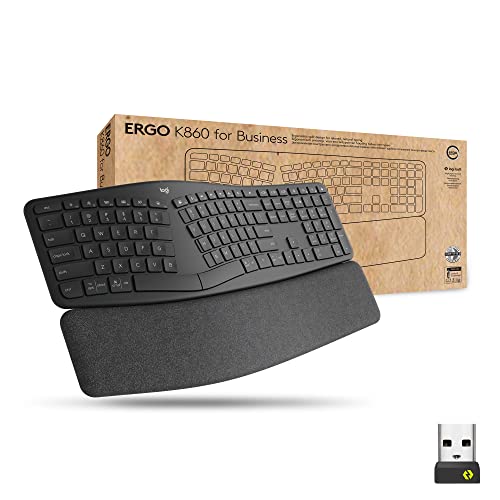
Best for Business Deployment
Logitech Ergo K860 Split for Business Wireless Keyboard
Office managers sourcing ergonomic keyboards for multiple employees
Our take Check price for Logitech Ergo K860 Split for Business Wireless Keyboard (opens in a new tab)
Our Picks
Best Overall1 of 8
Logitech Ergo K860 Wireless Ergonomic Split Keyboard with Wrist Rest on Amazon (opens in a new tab)
The Ergo K860 uses a curved split layout with a negative tilt, meaning the front of the keyboard sits higher than the back, which keeps your wrists closer to a neutral, straight position instead of bending them upward the way a traditional flat keyboard does.
Best for
- Buyers who want the strongest negative-tilt design without a fully separable split
Why we like it
That negative tilt is one of the most consistently cited design features for reducing wrist extension during long typing sessions.
Negative tilt keeps wrists in a straighter typing position. On price, it's actually priced above Logitech Wave Keys Wireless Ergonomic Keyboard, which is worth weighing if cost is your deciding factor between the two.
On the other side, Premium price versus a basic wave keyboard.
Key dimensions & specs
- Curved split layout with negative tilt
- Integrated dense foam wrist rest
- Bluetooth or USB Logi Bolt receiver
- Multi-device switching
- Rechargeable battery
Pros
- Negative tilt keeps wrists in a straighter typing position
- Built-in wrist rest sized for the curved layout
- Works across multiple paired devices
- Widely available replacement/compatible parts
Cons
- Not a true separable split keyboard
- Curved layout has a short adjustment period
- Premium price versus a basic wave keyboard
Best Entry Point2 of 8
Logitech Wave Keys Wireless Ergonomic Keyboard - Graphite on Amazon (opens in a new tab)
Wave Keys uses a single-piece wave-shaped frame rather than a true split, so there is far less adjustment period than a separable ergonomic keyboard while still introducing a gentle wave curve and negative tilt to the typing surface.
Best for
- First-time buyers who want a gentle, low-effort introduction to ergonomic typing
Why we like it
It is a reasonable first step for someone who wants to try ergonomic typing without committing to a steep learning curve.
On the other side, Palm rest is fixed, not adjustable.
Key dimensions & specs
- One-piece wave-shaped frame
- Cushioned attached palm rest
- Bluetooth or USB receiver
- Extended battery life
- Compact wave curve, not a true split
Pros
- Low-cost, low-commitment entry point into ergonomic typing
- Minimal adjustment period versus a true split layout
- Attached palm rest needs no separate purchase
- Reliable multi-device wireless connection
Cons
- Cannot be separated for shoulder-width positioning
- Less pronounced ergonomic benefit than a true split
- Palm rest is fixed, not adjustable
Best Keyboard and Mouse Bundle3 of 8
Logitech Ergo K860 Wireless Ergonomic Keyboard with Wrist Rest and MX Vertical Wireless Mouse on Amazon (opens in a new tab)
This bundle pairs the same curved, negative-tilt Ergo K860 with the MX Vertical, a mouse angled at 57 degrees to keep the forearm in a handshake position instead of rotated flat.
Best for
- Buyers who know mouse grip is part of their wrist strain, not just the keyboard
Why we like it
That matters because wrist strain often comes from mouse use as much as, or more than, keyboard use, and pairing an ergonomic keyboard with a standard flat mouse leaves half the problem unaddressed.
On the other side, Bulkier combined footprint on a small desk.
Key dimensions & specs
- Ergo K860 curved split keyboard with wrist rest
- MX Vertical mouse at 57-degree angle
- Wireless pairing for both devices
- Rechargeable mouse battery
- Matched ergonomic keyboard and mouse set
Pros
- Addresses both keyboard and mouse wrist strain together
- Vertical mouse angle reduces forearm rotation
- No separate research needed to find a compatible mouse
- Same negative-tilt keyboard benefits as the standalone K860
Cons
- Highest price in this list
- Vertical mouse has its own adjustment period
- Bulkier combined footprint on a small desk
Best Budget Split Keyboard4 of 8
Perixx PERIBOARD-512B Wired Ergonomic Split Keyboard with Wrist Rest on Amazon (opens in a new tab)
The PERIBOARD-512B is a wired split keyboard with an angled key layout and a padded wrist rest, and it is the most affordable true split option in this list.
Best for
- Budget-conscious buyers who want to try a true split layout risk-free
Why we like it
Because it is wired, there is no battery to manage and no wireless dropout risk, which some buyers prefer for an all-day desk setup.
The real tradeoff against that pick: Split angle is fixed, not adjustable.
On the other side, Build materials are basic at this price point.
Key dimensions & specs
- Wired USB connection
- Fixed-angle split layout
- Padded wrist rest included
- Natural typing curve
- No battery or pairing required
Pros
- Lowest price of any true split keyboard here
- No battery to charge or replace
- Padded wrist rest included in the box
- Simple plug-and-play wired setup
Cons
- Split angle is fixed, not adjustable
- Wired cable limits desk placement flexibility
- Build materials are basic at this price point
Best Color Alternative5 of 8
Logitech Wave Keys Wireless Ergonomic Keyboard with Cushioned Palm Rest - Sand on Amazon (opens in a new tab)
This is the same Wave Keys wave-shaped, negative-tilt design as the Graphite model above, offered in a lighter Sand colorway with the same cushioned palm rest built into the front edge.
Best for
- Buyers who want the Wave Keys experience in a lighter finish
Why we like it
If the entry-level wave layout fits your needs but graphite does not match your desk setup, this variant covers the same ergonomic ground with a different finish.
On the other side, Same capped ergonomic benefit as any single-piece wave design.
Key dimensions & specs
- One-piece wave-shaped frame
- Sand colorway with cushioned palm rest
- Bluetooth or USB receiver
- Extended battery life
- Same negative-tilt design as the Graphite model
Pros
- Identical ergonomic benefit to the Graphite Wave Keys
- Lighter colorway for brighter desk setups
- Low adjustment period
- Attached, no-assembly palm rest
Cons
- Cannot be separated for shoulder-width positioning
- Lighter finish may show wear more visibly
- Same capped ergonomic benefit as any single-piece wave design
Best Adjustable Split6 of 8
Arteck Split Ergonomic Keyboard with Cushioned Wrist and Palm Rest on Amazon (opens in a new tab)
4G wireless receiver rather than Bluetooth.
Best for
- 4G wireless connection over Bluetooth
Why we like it
That receiver choice tends to give a more consistent connection than Bluetooth in offices with a lot of competing wireless devices.
4G connection is more stable than Bluetooth in crowded offices.
On the other side, Receiver can be misplaced since it is a separate small dongle.
Key dimensions & specs
- Split, angled key layout
- Cushioned wrist and palm rest
- 2.4G USB wireless receiver
- Compatible with Windows desktop and laptop
- Compact wireless dongle storage
Pros
- 2.4G connection is more stable than Bluetooth in crowded offices
- Built-in cushioned rest needs no separate purchase
- Mid-range price for a true split layout
- Simple wireless setup with a single receiver
Cons
- Split angle is fixed, not tenting-adjustable
- Windows-focused compatibility
- Receiver can be misplaced since it is a separate small dongle
Best Compact Vertical Mouse Bundle7 of 8
Logitech Ergo K860 Wireless Ergonomic Keyboard and Lift Vertical Ergonomic Mouse on Amazon (opens in a new tab)
This bundle pairs the Ergo K860 with the Lift, a smaller vertical mouse angled at 57 degrees but built for a more compact hand size and desk footprint than the MX Vertical.
Best for
- Buyers with smaller hands who still want a matched vertical mouse and keyboard set
Why we like it
Both connect over Bluetooth or Logi Bolt, and the vertical grip keeps the forearm from rotating flat the way a standard mouse forces it to.
The real tradeoff against that pick: Still a premium combined price.
On the other side, Smaller mouse body may not suit larger hands.
Key dimensions & specs
- Ergo K860 curved split keyboard with wrist rest
- Lift vertical mouse at 57-degree angle
- Bluetooth or Logi Bolt USB receiver
- Compact mouse size for smaller hands
- Quiet click buttons
Pros
- Compact vertical mouse suits smaller hand sizes
- Addresses both keyboard and mouse wrist strain
- Quiet clicks reduce noise in shared spaces
- Flexible Bluetooth or receiver pairing
Cons
- Still a premium combined price
- Vertical mouse angle needs an adjustment period
- Smaller mouse body may not suit larger hands
Best for Business Deployment8 of 8
Logitech Ergo K860 Split for Business Wireless Keyboard on Amazon (opens in a new tab)
This Business edition of the Ergo K860 keeps the same curved, negative-tilt split layout and integrated wrist rest, packaged for IT procurement and fleet deployment rather than individual retail sale.
Best for
- Office managers sourcing ergonomic keyboards for multiple employees
Why we like it
It is a fit for an employer or office manager sourcing ergonomic keyboards for an entire team rather than a single desk.
On the other side, No meaningful ergonomic upgrade over the standard model.
Key dimensions & specs
- Curved split layout with negative tilt
- Integrated foam wrist rest
- Business-focused packaging and support
- Bluetooth or USB Logi Bolt receiver
- Multi-device switching
Pros
- Identical ergonomic design to the standard K860
- Suited to office-wide procurement
- Same negative-tilt wrist benefit
- Multi-device support for shared or rotating desks
Cons
- Priced above the standard retail K860 in some listings
- Business packaging is unnecessary for a single home desk
- No meaningful ergonomic upgrade over the standard model
How We Chose These Ergonomic Keyboards for Wrist Pain and Carpal Tunnel
Each pick was assessed across 5 criteria weighted for real-world use.
- Split or wave layout design
- Compared true separable splits against one-piece wave layouts, since a true split allows shoulder-width positioning while a wave layout only softens the flat typing angle.
- Checked whether each keyboard uses negative tilt, front higher than back, which keeps the wrist straighter, versus traditional positive tilt that forces the wrist to bend upward.
- Wrist and palm support quality
- Evaluated whether a cushioned rest was integrated into the frame versus a separate accessory, and noted that a rest is meant for resting between typing bursts, not leaning on while actively typing.
- For bundled picks, evaluated whether the included mouse actually reduces wrist deviation, since mouse grip is frequently as significant a contributor to wrist strain as keyboard choice.
- 4G receiver connections for consistency, since a dropped connection during typing can lead to compensatory hand movements that add strain.
What to Look for in an Ergonomic Keyboard for Wrist Pain and Carpal Tunnel
Key buying criteria so you get the right fit the first time.
Understand what split, curved, and vertical layouts each actually change about your hand position
A curved keyboard bends the key rows into an arc that reduces how far your fingers reach across the board but keeps both hands in a fixed relative position, a split keyboard physically separates the two halves so each hand and wrist can angle independently to a more natural position, and a fully vertical keyboard rotates the hands toward a handshake-like orientation that reduces forearm rotation (pronation) more aggressively than either curved or split designs.
These are meaningfully different interventions, not just cosmetic variations on the same idea, and the amount of adjustment period and the specific relief they provide differs: a curved board requires almost no adaptation, a split board requires learning a new hand spacing, and a vertical board requires the most significant adaptation period but addresses forearm rotation most directly.
If a specific pain type (wrist deviation, forearm rotation, shoulder width) has been identified, match the layout type to that specific issue rather than assuming any keyboard labeled "ergonomic" addresses the same problem.
Check the key switch type, since it affects both typing feel and finger force required
Ergonomic keyboards commonly use one of three switch technologies: membrane (a soft rubber dome under each key, quiet and inexpensive but requiring the key to bottom out fully to register), scissor or low-profile (a shorter, more stable keystroke similar to a laptop keyboard), or mechanical (an individual physical switch per key with more configurable actuation force and travel distance, generally louder but often preferred for tactile feedback and reduced bottoming-out force).
This matters for anyone with existing wrist or finger strain specifically because mechanical switches can be selected for lighter actuation force, requiring less pressure to register a keystroke than a standard membrane keyboard, a genuine factor in repetitive strain rather than just a preference for typing feel.
If finger fatigue or strain is a specific concern, check for stated actuation force (measured in grams) rather than assuming all keyboards require the same finger pressure to type.
Confirm wireless connection type matches your actual devices, and know the battery tradeoffs
4GHz USB receiver (generally lower latency and more reliable than Bluetooth, but requires a free USB port and the receiver can be lost), or wired USB (zero latency and no battery to manage, but no cable-free movement).
Multi-device Bluetooth models that support pairing with several devices and switching between them are a genuine convenience for anyone alternating between a work laptop and a personal computer, but this feature isn't universal even among Bluetooth keyboards.
Check the specific connection type and, for wireless models, confirm multi-device pairing support explicitly if you need to switch between more than one computer regularly, and factor in that backlit wireless models draw more power and need more frequent charging than non-backlit equivalents.
Check for a negative tilt option and separate wrist rest, since flat isn't always neutral
A truly neutral wrist position during typing involves the hands tilting slightly downward from the wrist toward the keys (negative tilt), which is the opposite of the upward tilt most standard and even many "ergonomic" keyboards default to with their built-in feet, and only some ergonomic models offer an actual negative-tilt adjustment or come with a design that achieves this angle by default.
A separate, adequately sized wrist rest matters independently of the keyboard's own tilt, since resting the wrist (not just the palm) on a support surface during typing reduces the upward bend at the wrist that a raised keyboard back otherwise creates.
Check specifically for a stated negative tilt option or a naturally downward-sloping design, and confirm whether a wrist rest is included versus needing to be purchased separately, rather than assuming any "ergonomic" label includes proper tilt geometry.
Weigh review volume against star rating, since some ergonomic keyboards share variants with different genuine track records
Ergonomic keyboards, especially from smaller brands, are frequently sold in multiple color or configuration variants that share the same underlying design and sometimes the same pooled review history despite being technically separate listings, which can make one specific variant's review count look artificially large or, conversely, leave a new design with almost no independent track record despite looking similar to an established model.
A keyboard central to your daily work deserves a design with substantial, focused review history behind it, not just a plausible-looking rating built on a thin or shared sample.
When comparing keyboards, especially similarly-designed variants from the same brand, check both the star rating and the review count together, and read a handful of reviews to confirm they describe the exact variant you're considering.
How to Choose an Ergonomic Keyboard for Wrist Pain and Carpal Tunnel
| Recommended pick in this comparison | |
|---|---|
| Independent hand and wrist angling | Logitech Ergo K860 Wireless Ergonomic Split Keyboard with Wrist Rest |
| Logitech Ergo K860 Wireless Ergonomic Keyboard with Wrist Rest and MX Vertical Wireless Mouse |
| Perixx PERIBOARD-512B Wired Ergonomic Split Keyboard with Wrist Rest | |
| Logitech Ergo K860 Wireless Ergonomic Split Keyboard with Wrist Rest | |
| No firm budget ceiling, prioritizing switch quality or ergonomics | Logitech Ergo K860 Wireless Ergonomic Keyboard with Wrist Rest and MX Vertical Wireless Mouse |
- Zero input latency and no battery to manage, including no backlight battery drain if illuminated. In this comparison: Perixx PERIBOARD-512B Wired Ergonomic Split Keyboard with Wrist Rest.
- Cable-free desk setup, at the cost of battery management and, for Bluetooth, potentially more input latency. In this comparison: Logitech Ergo K860 Wireless Ergonomic Split Keyboard with Wrist Rest, Logitech Wave Keys Wireless Ergonomic Keyboard, Logitech Ergo K860 Wireless Ergonomic Keyboard with Wrist Rest and MX Vertical Wireless Mouse.
By Switch Type and Typing Feel
| Perixx PERIBOARD-512B Wired Ergonomic Split Keyboard with Wrist Rest | |
| Tactile feedback, lighter actuation force | Logitech Ergo K860 Wireless Ergonomic Keyboard with Wrist Rest and MX Vertical Wireless Mouse |
For Wrist Pain or Carpal Tunnel Specifically
- A genuine split or vertical layout (not just a curved surface), a negative tilt option or naturally downward-sloping design, and an included wrist rest sized for your hand.
- Logitech Ergo K860 Wireless Ergonomic Keyboard with Wrist Rest and MX Vertical Wireless Mouse fits this specifically: Addresses both keyboard and mouse wrist strain together.
- You want what Logitech Ergo K860 Wireless Ergonomic Keyboard with Wrist Rest and MX Vertical Wireless Mouse offers: Addresses both keyboard and mouse wrist strain together. That's a real functional upgrade over the budget picks here, not just a brand markup.
- Perixx PERIBOARD-512B Wired Ergonomic Split Keyboard with Wrist Rest already covers the essentials: Lowest price of any true split keyboard here. The main thing you'd be paying extra for elsewhere in this list is adjustability you may not need.
Frequently Asked Questions
Can an ergonomic keyboard cure carpal tunnel syndrome?
A keyboard is not medical treatment. If you have existing symptoms such as pain, numbness, tingling, or weakness, see a doctor. An ergonomic keyboard is best understood as a prevention tool for people who are symptom-free, or a mild-relief aid used alongside proper posture, breaks, and medical guidance, not a cure on its own.
What's the difference between a wave keyboard and a true split keyboard for wrist pain?
A wave keyboard, like the Logitech Wave Keys, is one solid piece with a gentle curve and reduced tilt, offering a lower-effort introduction to ergonomic typing. A true split keyboard, like the Ergo K860 or Arteck Split, can be angled or positioned further apart, which more directly reduces shoulder and forearm rotation, though it also has a longer adjustment period.
Should I use the wrist rest while typing or only when resting?
Leaning your wrists on the rest while actively typing increases pressure on the carpal tunnel rather than relieving it. Use the rest during pauses between typing bursts, and keep your wrists floating just above it while your fingers are moving.
Is negative tilt or positive tilt better for wrist pain?
Negative tilt, where the front of the keyboard sits higher than the back, keeps the wrist closer to a straight, neutral position while typing. Positive tilt, the traditional design where the back is propped higher, forces the wrist into extension, which is a known contributor to carpal tunnel pressure. Several picks in this list, including the Ergo K860 and Wave Keys, use negative tilt by design.
Does my mouse matter as much as my keyboard for wrist pain?
Gripping, click force, and wrist deviation from mouse use are frequent contributors to wrist strain, sometimes more than keyboard use itself. That's why bundles like the Ergo K860 with MX Vertical or Lift mouse pair a wrist-neutral keyboard with a vertical mouse angled to reduce forearm rotation.
How long does it take to adjust to a split or wave ergonomic keyboard?
Most people notice a temporary dip in typing speed for the first one to two weeks as their hands relearn key positions and hand placement on a new layout. Give a new keyboard a fair trial period of a couple of weeks before deciding whether it's working for you.
Bottom Line
Best overall: Logitech Ergo K860 Wireless Ergonomic Split Keyboard with Wrist Rest — best overall pick in this roundup. See the full verdicts above for every pick, with pros, cons and who each one suits.
Browse all ergonomic keyboards for wrist pain and carpal tunnel on Amazon — Prime-eligible options with current pricing.