
Buying Guide
The Best Vertical Mice Under $20: Our Picks
We looked at 4 vertical mice under $20 side by side, with the trade-offs that separate them and who each one suits.
By Jamie Cole, Lead Product Researcher
7 min read4 products evaluated
We may earn a commission from purchases made through links in this guide. Learn more.
4GHz wireless models, and the real differentiator isn't the ergonomic shape itself, which is fairly standardized at this price, but connection reliability and DPI adjustability.
We compared this lineup on DPI range, wired versus wireless connection type, and cable or wireless receiver design, since these details determine whether a budget vertical mouse feels responsive day to day or just technically fits the ergonomic category.
Quick Picks
Our 4 recommendations at a glance. Tap a pick for the full verdict.
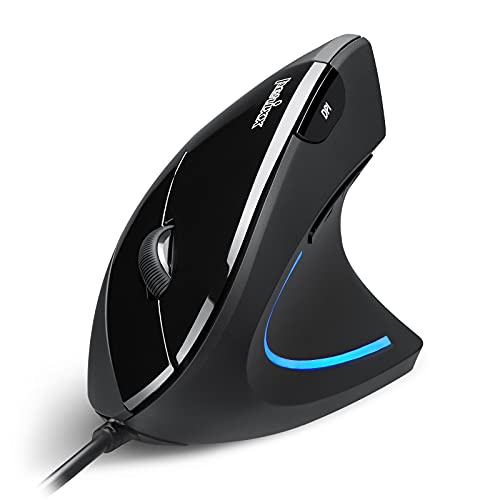
Best Overall
Perixx PERIMICE-513 Wired Ergonomic Vertical Mouse
Buyers who want the widest DPI range and longest cable available
Our take Check price for Perixx PERIMICE-513 Wired Ergonomic Vertical Mouse (opens in a new tab)

Best Wireless Value
Anker 2.4G Wireless Ergonomic Vertical Mouse
Buyers who want a reliable wireless mouse with power-saving features and a longer warranty
Our take Check price for Anker 2.4G Wireless Ergonomic Vertical Mouse (opens in a new tab)
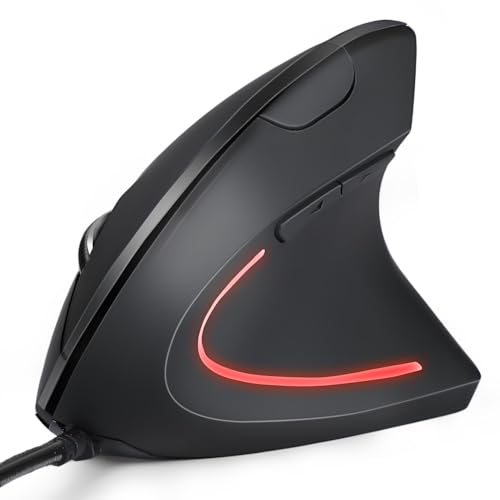
Best Wired Budget
KUNSI Wired Ergonomic Vertical Mouse
Buyers who want the simplest, cheapest reliable wired vertical mouse
Our take Check price for KUNSI Wired Ergonomic Vertical Mouse (opens in a new tab)

Best Wireless Budget
KUNSI Wireless Ergonomic Vertical Mouse
Buyers who want wireless freedom at the lowest possible price
Our take Check price for KUNSI Wireless Ergonomic Vertical Mouse (opens in a new tab)
Our Picks
Best Overall1 of 4
Perixx PERIMICE-513 Wired Ergonomic Vertical Mouse on Amazon (opens in a new tab)
This mouse's DPI range of 1000, 1600, 3200, and 6400 is dramatically wider than the 800-1600 range typical of other budget vertical mice, giving more sensitivity options for different tasks.
Best for
- Buyers who want the widest DPI range and longest cable available
Why we like it
Its silent left and right click buttons help minimize noise, though the scroll wheel and back/forward buttons aren't silent.
9-foot USB-A cable allows flexible placement and easy routing above or below the desk, longer than most competitors' cables, and the soft rubber-coated surface provides a secure, comfortable grip for extended use. Backed by a 12-month limited warranty through Perixx's website.
Best for buyers who want the widest DPI range and longest cable in this comparison.
Key dimensions & specs
- 6 buttons, 1000/1600/3200/6400 DPI
- Silent left/right clicks, 5.9 ft USB-A cable
- 12-month limited warranty
Pros
- Widest DPI range in this comparison up to 6400
- Longest cable at 5.9 feet for flexible desk routing
- Silent left and right click buttons reduce noise
Cons
- Wired only, no wireless option
- Recommends a 1-2 week adjustment period for the ergonomic shape
Best Wireless Value2 of 4
Anker 2.4G Wireless Ergonomic Vertical Mouse on Amazon (opens in a new tab)
4GHz wireless connection via USB receiver offers 800/1200/1600 DPI optical tracking, and its power-saving mode automatically disconnects after 8 minutes of inactivity, extending battery life meaningfully compared to a mouse without this feature.
Best for
- Buyers who want a reliable wireless mouse with power-saving features and a longer warranty
Why we like it
A simple button press wakes it instantly.
4 ounces it's lightweight for extended use. Anker backs the purchase with an 18-month hassle-free warranty, longer than most competitors at this price point.
Best for buyers who want a reliable wireless connection with genuine power-saving features and a longer warranty.
Key dimensions & specs
- 6 buttons, 800/1200/1600 DPI, 2.4GHz wireless
- Power-saving mode after 8 min inactivity
- 18-month warranty
Pros
- Genuine power-saving mode extends battery life
- 18-month warranty is longer than most competitors here
- Lightweight at 3.4 ounces for extended use
Cons
- Requires 2 AAA batteries not included
- Key click sounds are unavoidable per the listing
Best Wired Budget3 of 4
KUNSI Wired Ergonomic Vertical Mouse on Amazon (opens in a new tab)
8 meter cable requires no driver installation, offering genuine plug-and-play simplicity at the lowest price for a wired option in this comparison.
Best for
- Buyers who want the simplest, cheapest reliable wired vertical mouse
Why we like it
Its 800/1200/1600 DPI adjustable sensitivity covers basic to moderate precision needs.
Its 6 buttons include next and previous buttons for convenient web page browsing, though these are unavailable on Mac OS systems. The vertical design keeps the arm and wrist in a natural, relaxed position throughout use.
Best for buyers who want the simplest, cheapest wired vertical mouse without any wireless connectivity concerns.
Key dimensions & specs
- 6 buttons, 800/1200/1600 DPI, USB wired
- 1.8m cable, no driver needed
- Plug-and-play simplicity
Pros
- Lowest price among wired options in this comparison
- No driver installation needed, genuine plug-and-play
- Simple, reliable wired connection with no battery concerns
Cons
- No wireless option like the Anker or KUNSI Wireless picks
- Basic DPI range compared to the Perixx pick
Best Wireless Budget4 of 4
KUNSI Wireless Ergonomic Vertical Mouse on Amazon (opens in a new tab)
4GHz USB wireless connection with up to 10 meters of working distance, freeing you from cable management at the lowest price point in this comparison.
Best for
- Buyers who want wireless freedom at the lowest possible price
Why we like it
Its 800/1200/1600 DPI adjustable sensitivity and 6-button layout match the wired version's core specifications.
Its USB receiver stores conveniently in the bottom of the mouse when not in use, reducing the risk of losing it, and the vertical design promotes the same neutral handshake wrist position as pricier competitors.
Best for buyers who want wireless freedom at the same rock-bottom price as a basic wired mouse.
Key dimensions & specs
- 6 buttons, 800/1200/1600 DPI, 2.4GHz wireless
- 10m working distance, receiver stores in mouse
- Requires 2 AAA batteries (not included)
Pros
- Lowest price for a wireless option in this comparison
- 10 meter working distance for genuine cable-free freedom
- Receiver stores in the mouse bottom to avoid losing it
Cons
- Requires 2 AAA batteries not included
- No power-saving mode like the Anker pick
How We Chose These Vertical Mice Under $20
Each pick was assessed across 5 criteria weighted for real-world use.
- Compared stated DPI levels and adjustability across the budget lineup.
- 4GHz wireless designs and their respective tradeoffs.
- Cable Length or Wireless Range
- Compared cable length for wired picks and working distance for wireless picks.
- Compared total button count and next/previous browsing button inclusion.
- Compared stated warranty duration across the lineup where specified.
What to Look for in a Vertical Mouse Under $20
Key buying criteria so you get the right fit the first time.
Every Vertical Mouse Requires a Genuine Adjustment Period Regardless of Price
The Perixx pick's listing specifically recommends allowing 1-2 weeks to adapt to the ergonomic shape, a realistic expectation that applies to vertical mice generally, not just budget options, since the fundamentally different wrist angle takes time to feel natural regardless of how much you spend. Buyers expecting instant comfort from any vertical mouse, budget or premium, may be disappointed during this initial adjustment window and mistakenly conclude the product doesn't work for them. Set realistic expectations for a genuine adjustment period before judging whether a vertical mouse suits you, rather than expecting immediate comfort.
A Wider DPI Range Matters for Task Variety, Not Just as a Spec Sheet Number
The Perixx pick's 1000-6400 DPI range covers everything from precise detail work at lower DPI to fast cursor movement across large or multiple monitors at higher DPI, a wider practical range than the 800-1600 DPI ceiling on the other picks in this comparison. If you work across multiple monitors or switch between detailed editing and fast navigation tasks, this wider range provides more actual utility than a narrower range would. Consider your actual monitor setup and task variety before assuming any DPI range labeled adjustable meets your specific needs.
A Power-Saving Mode on a Wireless Mouse Extends Battery Life Beyond What Battery Capacity Alone Determines
The Anker pick's automatic power-saving mode after 8 minutes of inactivity actively conserves battery by fully disconnecting power rather than just dimming or reducing polling rate, a more aggressive and effective battery-saving approach than a wireless mouse without this specific feature. This matters over the mouse's total lifespan, since a mouse that drains batteries faster due to lacking this feature means more frequent battery replacement, a real ongoing cost and inconvenience. Check specifically for stated power-saving or auto-sleep features rather than assuming all wireless mice manage battery consumption equally well.
Cable Length on a Wired Vertical Mouse Affects Real Desk Setup Flexibility More Than It First Appears
9-foot cable provides meaningfully more routing flexibility, above or below the desk, around a monitor stand, or to a more distant USB port, than a shorter cable would allow, while a shorter cable can constrain where you can actually position the mouse relative to your computer's available ports. This matters more in a setup with the computer tower positioned away from the desk surface, such as under a desk or in a separate location. Measure your actual desk-to-port distance before assuming any wired mouse's cable length will comfortably reach your intended mouse placement.
A USB Receiver That Stores Inside the Mouse Reduces a Real, Common Risk of Losing Small Wireless Components
The KUNSI Wireless pick's design stores its USB receiver in a compartment in the mouse's bottom when not connected, a small but practical feature that reduces the common annoyance of misplacing a tiny wireless receiver during travel or when temporarily disconnecting the mouse. A wireless mouse without this storage design leaves the receiver as a separate, easily lost component you must track independently. Check whether a wireless mouse includes built-in receiver storage if you anticipate moving the mouse between locations or storing it away when not in use.
How to Choose a Vertical Mouse Under $20
| The widest DPI range and longest cable | Perixx PERIMICE-513 Wired Ergonomic Vertical Mouse |
|---|---|
| Reliable wireless with power-saving and longer warranty | 4G Wireless Ergonomic Vertical Mouse |
| The simplest, cheapest wired option | KUNSI Wired Ergonomic Vertical Mouse |
| Wireless freedom at the lowest price | KUNSI Wireless Ergonomic Vertical Mouse |
Wired vs Wireless at This Price
- No battery concerns and no wireless dropout risk, at the cost of desk cable management.
- Frees up desk space from cables but requires AAA batteries and occasional battery swaps.
If cable clutter bothers you, a wireless pick like the Anker or KUNSI Wireless frees up desk space. If you'd rather avoid battery management entirely, a wired pick removes that concern.
| Maximum DPI range for varied tasks | Perixx PERIMICE-513 (up to 6400) |
|---|---|
| Anker, KUNSI Wired, or KUNSI Wireless (up to 1600) |
For a First-Time Vertical Mouse User Specifically
- The lowest-risk price point to try the ergonomic shape before committing to a pricier model, since adjustment takes 1-2 weeks regardless of price.
- Either KUNSI pick, wired or wireless, lets you try the vertical mouse format for under $10 before investing more.
- You just want to try the vertical mouse format at minimal cost, where either KUNSI pick covers that for under $10.
Frequently Asked Questions
How long does it actually take to get comfortable using a vertical mouse for the first time?
Most manufacturers, including Perixx in this comparison, recommend a 1-2 week adjustment period, so don't expect the ergonomic benefits or comfort to feel natural immediately on day one.
What's the most common mistake buyers make when comparing DPI ranges across budget vertical mice?
Assuming any stated DPI range meets their needs without considering their actual monitor setup or task variety, when a wider range like the Perixx pick's 1000-6400 serves more varied use cases than a narrower 800-1600 range.
Is the Anker pick worth it over the cheaper KUNSI wireless option?
If a genuine power-saving mode and a longer 18-month warranty matter to you, yes, but if you just want basic wireless functionality at the lowest possible price, the KUNSI Wireless pick covers that for about $10 less.
Do these budget vertical mice work the same on Mac and Windows?
Core functionality works on both, but next/previous browsing buttons specifically are unavailable on Mac OS across all four picks in this comparison, a limitation worth knowing if you rely on those buttons for web navigation.
How do I know if a wired or wireless vertical mouse is better for my desk setup?
If cable clutter is a concern or you frequently move the mouse between locations, a wireless pick like the Anker or KUNSI Wireless is more convenient, but if you'd rather avoid battery management entirely, a wired pick like the Perixx or KUNSI Wired removes that concern.
Can I use these vertical mice for gaming, or are they only suited to office work?
While designed primarily for ergonomic office use, the adjustable DPI settings on all four picks provide enough sensitivity range for casual gaming, though a dedicated gaming mouse would offer more specialized features like higher polling rates.
Bottom Line
Best overall: Perixx PERIMICE-513 Wired Ergonomic Vertical Mouse — best overall pick in this roundup. See the full verdicts above for every pick, with pros, cons and who each one suits.
Browse all vertical mice under $20 on Amazon — Prime-eligible options with current pricing.