
Buying Guide
The Best Vertical Mice for Gaming: Our Picks
We looked at 6 vertical mice for gaming side by side, with the trade-offs that separate them and who each one suits.
By Jamie Cole, Lead Product Researcher
9 min read6 products evaluated
We may earn a commission from purchases made through links in this guide. Learn more.
Gaming-marketed vertical mice are a small niche, and the label 'gaming' doesn't guarantee the sensor and DPI quality of a dedicated gaming mouse at a similar price. This category tends to see less R&D investment than mainstream gaming mice, so it's worth checking actual DPI figures and buyer feedback on tracking accuracy rather than assuming parity just because a product uses gaming branding or RGB lighting.
We also looked at how comfortable each pick is for fast lateral movement common in FPS-style games specifically, since the vertical grip changes wrist mechanics in ways that can help or hurt depending on genre, and checked programmable button count and placement against typical needs for MMO or MOBA titles versus FPS titles. Adjustable weight is rare in this niche, more often fixed, so we noted that explicitly rather than assuming it's available.
Quick Picks
Our 6 recommendations at a glance. Tap a pick for the full verdict.

Best Purpose-Built Gaming Vertical Mouse
Attoe Gaming Mouse with 5D Rocker, Wireless Vertical Mouse with 2400 DPI
Buyers who want a vertical mouse purpose-built for gaming and don't need an extremely high DPI ceiling.
Our take Check price for Attoe Gaming Mouse with 5D Rocker, Wireless Vertical Mouse with 2400 DPI (opens in a new tab)

Best Budget Crossover Pick
Anker 2.4G Wireless Ergonomic Mouse, Right Hand Vertical Mouse
Buyers who mostly want an ergonomic office mouse and only occasionally play less demanding games.
Our take Check price for Anker 2.4G Wireless Ergonomic Mouse, Right Hand Vertical Mouse (opens in a new tab)

Best for MMO-Style Button Needs
Logitech MX Vertical Wireless Mouse Ergonomic Design
Buyers who want programmable shortcuts for slower-paced genres like MMOs or strategy games, not competitive FPS play.
Our take Check price for Logitech MX Vertical Wireless Mouse Ergonomic Design (opens in a new tab)

Best High-DPI Budget Pick
TECKNET Wired Mouse, Comfortable Ergonomic Mouse with 6400 DPI
Buyers who want a higher DPI ceiling and wired responsiveness on a budget, without needing gaming-specific extras.
Our take Check price for TECKNET Wired Mouse, Comfortable Ergonomic Mouse with 6400 DPI (opens in a new tab)
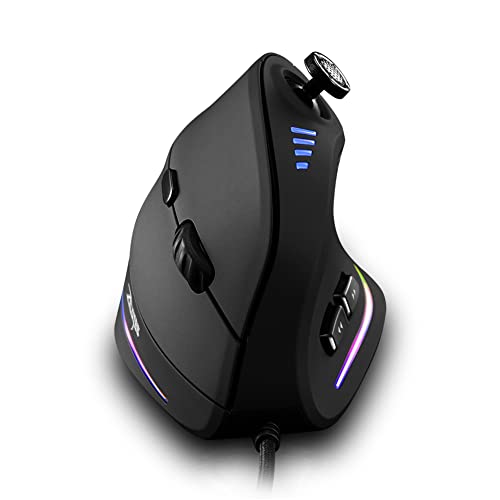
Best for Joystick Control and Highest DPI
zelotes Wired Gaming Mouse with Joystick, 10000 DPI, 11 Programmable Buttons
Gaming-focused buyers who want the highest DPI ceiling and joystick control, with a lighter emphasis on ergonomic angle.
Our take Check price for zelotes Wired Gaming Mouse with Joystick, 10000 DPI, 11 Programmable Buttons (opens in a new tab)

Best Gaming Brand Vertical Pick
Razer Pro Click V2 Vertical Wireless Mouse, 6 Button Ergonomic Design
Buyers who want a recognizable gaming brand's take on a vertical mouse with reliable remapping software.
Our take Check price for Razer Pro Click V2 Vertical Wireless Mouse, 6 Button Ergonomic Design (opens in a new tab)
Our Picks
Best Purpose-Built Gaming Vertical Mouse1 of 6
Attoe Gaming Mouse with 5D Rocker, Wireless Vertical Mouse with 2400 DPI on Amazon (opens in a new tab)
One of the few vertical mice explicitly designed and marketed for gaming, with a 2400 DPI sensor and a 5D rocker button for extra in-game controls beyond a standard vertical mouse's layout.
Best for
- Buyers who want a vertical mouse purpose-built for gaming and don't need an extremely high DPI ceiling.
Why we like it
Its 2400 DPI ceiling is modest next to dedicated gaming mice that often exceed 16000 DPI, so buyers doing fast-flick FPS play should temper expectations, while slower-paced genres are less demanding on raw sensor ceiling.
Key dimensions & specs
- 2400 DPI sensor
- 5D rocker button for extra controls
- Wireless connectivity
- Small review sample
Pros
- Explicitly gaming-marketed vertical design, not a repurposed office mouse
- 5D rocker adds an extra control input
- low-cost price for a gaming-focused vertical mouse
- Wireless connectivity
Cons
- 2400 DPI ceiling is modest compared to dedicated gaming mice
- Small review sample size, verify current buyer feedback
- Fixed weight, no adjustable weight system
Best Budget Crossover Pick2 of 6
Anker 2.4G Wireless Ergonomic Mouse, Right Hand Vertical Mouse on Amazon (opens in a new tab)
Its sensor and button count are built for office use, not fast lateral FPS movement, so treat this as a general-use mouse that happens to work for casual gaming rather than a genuine gaming product.
Best for
- Buyers who mostly want an ergonomic office mouse and only occasionally play less demanding games.
Why we like it
That said, not designed or marketed for gaming, sensor quality is unverified for fast play.
Key dimensions & specs
- Office-grade sensor
- 2.4GHz wireless receiver
- Right-hand specific
- Budget price point
Pros
- Very low price if gaming is a secondary use case
- Moderate tilt eases the adjustment period
- Simple setup
Cons
- Not designed or marketed for gaming, sensor quality is unverified for fast play
- No adjustable weight or RGB customization
- Limited button count for complex game genres
Best for MMO-Style Button Needs3 of 6
Logitech MX Vertical Wireless Mouse Ergonomic Design on Amazon (opens in a new tab)
Also not marketed as a gaming mouse, but its programmable buttons and companion software can be remapped for game shortcuts, which suits slower-paced MMO or strategy genres more than fast FPS play.
Best for
- Buyers who want programmable shortcuts for slower-paced genres like MMOs or strategy games, not competitive FPS play.
Why we like it
Check buyer feedback specifically for gaming use before relying on this for competitive play, since Logitech's gaming-specific mouse lines are a separate product family with different sensors.
Key dimensions & specs
- Programmable buttons via companion software
- Dual 2.4GHz and Bluetooth
- Not a dedicated gaming sensor
- Premium price
Pros
- Programmable buttons remappable for game shortcuts
- Comfortable for long non-competitive play sessions
- Dual connectivity
Cons
- Not a dedicated gaming sensor or DPI ceiling
- Premium price if gaming is your primary use case
- No adjustable weight or RGB
Best High-DPI Budget Pick4 of 6
TECKNET Wired Mouse, Comfortable Ergonomic Mouse with 6400 DPI on Amazon (opens in a new tab)
A 6400 DPI sensor is a higher ceiling than most vertical mice in this guide, and the wired connection avoids any wireless input latency, both relevant for gaming even though this isn't marketed as a gaming product.
Best for
- Buyers who want a higher DPI ceiling and wired responsiveness on a budget, without needing gaming-specific extras.
Why we like it
It lacks gaming-specific extras like RGB or macro software, so it suits buyers who prioritize sensor responsiveness over dedicated gaming features.
Wired connection avoids wireless latency concerns.
Key dimensions & specs
- 6400 DPI sensor
- Wired USB connection
- Adjustable DPI levels
- Budget price point
Pros
- Higher DPI ceiling than most picks in this guide
- Wired connection avoids wireless latency concerns
- Strong review rating at a low price
- Adjustable DPI switch
Cons
- Not marketed or designed specifically for gaming
- No RGB, macro software, or adjustable weight
- Basic button count for complex genres
Best for Joystick Control and Highest DPI5 of 6
zelotes Wired Gaming Mouse with Joystick, 10000 DPI, 11 Programmable Buttons on Amazon (opens in a new tab)
A gaming-oriented design with a 10000 DPI sensor, the highest ceiling in this guide, plus a built-in joystick and 11 programmable buttons that suit MMO or strategy genres needing many shortcuts.
Best for
- Gaming-focused buyers who want the highest DPI ceiling and joystick control, with a lighter emphasis on ergonomic angle.
Why we like it
Its vertical tilt is less pronounced than the dedicated ergonomic picks in this guide, so it leans more toward a gaming mouse with vertical-leaning shape than a full ergonomic design.
The standout detail is that joystick control is a unique input for gaming. Balancing that out, less pronounced vertical tilt than dedicated ergonomic picks.
Key dimensions & specs
- 10000 DPI sensor
- Built-in joystick control
- 11 programmable buttons
- Wired USB connection
Pros
- Highest DPI ceiling in this guide
- Joystick control is a unique input for gaming
- 11 programmable buttons suit MMO or strategy genres
- Wired connection avoids latency concerns
Cons
- Less pronounced vertical tilt than dedicated ergonomic picks
- Not marketed as a purely ergonomic vertical mouse
- Smaller review sample than the top picks
Best Gaming Brand Vertical Pick6 of 6
Razer Pro Click V2 Vertical Wireless Mouse, 6 Button Ergonomic Design on Amazon (opens in a new tab)
From an established gaming brand, this pairs a 6-button ergonomic vertical body with wireless connectivity, useful for gaming-adjacent buyers who want brand-name software support for remapping.
Best for
- Buyers who want a recognizable gaming brand's take on a vertical mouse with reliable remapping software.
Why we like it
0-star rating are worth weighing against the premium price, and its sensor is not positioned as a top-tier competitive gaming sensor despite the brand name.
6 programmable buttons for remapping.
Key dimensions & specs
- Wireless connectivity
- 6 programmable buttons
- Rechargeable battery
- Premium price point
Pros
- Established gaming brand with software support
- 6 programmable buttons for remapping
- Rechargeable battery
- Ergonomic vertical body
Cons
- Premium price relative to its rating
- Sensor not positioned as top-tier for competitive play
How We Chose These Vertical Mice for Gaming
Each pick was assessed across 4 criteria weighted for real-world use.
- Sensor and DPI quality checked against gaming mice at similar price
- We compared stated DPI ceilings to dedicated gaming mice at similar prices rather than assuming 'gaming' branding implies equivalent sensor quality.
- Fast lateral movement comfort weighed for FPS-style genres
- We considered how the vertical grip's wrist mechanics likely affect comfort during fast lateral movement common in FPS-style games.
- Programmable button count matched against genre needs
- We checked whether button count and placement suit MMO or MOBA genres that need many shortcuts versus FPS genres that need fewer, faster inputs.
- RGB, software, and adjustable weight verified rather than assumed
- We noted where RGB customization, macro software, or adjustable weight are actually present versus absent, since this niche is more likely fixed-weight only.
What to Look for in a Vertical Mouse for Gaming
Key buying criteria so you get the right fit the first time.
Match the vertical angle to your actual hand size and grip
A vertical mouse's tilt angle, usually somewhere between 45 and 90 degrees from flat, is what actually reduces forearm rotation strain, but the ideal angle isn't the same for every hand, a mouse shaped for a larger hand can feel awkwardly steep and unstable in a smaller hand, and vice versa.
This matters because the entire ergonomic benefit depends on the mouse fitting your hand well enough to hold a natural, relaxed grip, a mismatched size can actually introduce new strain from over-gripping to keep the mouse stable.
Check the listing for hand-size guidance (often given in inches from wrist to middle fingertip) rather than assuming a single design fits all hand sizes equally well.
Consider DPI range and sensor quality for your actual desk surface and use
DPI (dots per inch) determines cursor sensitivity, and while a wide adjustable DPI range sounds like a universal benefit, what actually matters is whether the sensor tracks accurately and consistently at the DPI level you'll realistically use, a mouse with an impressively high max DPI but a mediocre sensor can still feel imprecise in daily use.
This matters more for precision work like design or spreadsheet navigation than for basic web browsing, where sensor quality differences are less noticeable.
Check reviews specifically for mentions of tracking accuracy and cursor jitter, not just the advertised maximum DPI number, since the two don't always correlate.
Weigh wireless connectivity type against your actual setup and battery expectations
A vertical mouse connects via Bluetooth, a proprietary RF USB dongle, or a wired cable, and each comes with real tradeoffs, Bluetooth avoids using a USB port but can have a small input lag some users notice, an RF dongle is generally more responsive but takes up a port and is easy to lose while traveling, and wired eliminates battery concerns entirely but limits desk placement flexibility.
This matters directly if you're already short on USB ports, travel frequently with the mouse, or care about minimal input latency for precise work.
Check the specific connectivity type and, for wireless options, the claimed battery life under real use, not just standby time, before assuming any wireless mouse fits your setup equally well.
Check button placement and count against how you actually use a mouse day to day
Extra programmable buttons for back/forward navigation or DPI switching are only useful if they're placed where your thumb naturally rests during normal use, a button that requires shifting your grip to reach defeats its own ergonomic purpose.
This matters more for anyone doing heavy web browsing or navigation-heavy work where back/forward buttons get used constantly, less for someone doing simple pointing and clicking.
Check reviews specifically for mentions of thumb button reachability and accidental misclicks, not just the total button count listed in the specs.
Factor in adjustment period and whether the design suits your actual daily tasks
Switching to a vertical mouse from a standard mouse involves a genuine adjustment period, typically one to two weeks, during which precision and speed can feel worse before the new grip becomes natural, this is a normal part of the transition, not a sign the mouse is a bad fit.
This matters most for anyone doing precision-dependent work like graphic design or gaming, where a temporary drop in accuracy during the adjustment period has a real short-term cost worth planning around.
Check reviews for mentions of how long the adjustment period took for reviewers with a similar use case to yours, and consider trying the new grip during a lower-stakes work period rather than a deadline crunch.
How to Choose a Vertical Mouse for Gaming
| Attoe Gaming Mouse with 5D Rocker | |
| Razer Pro Click V2 Vertical Wireless Mouse |
- No recurring battery purchases, usually a USB-C charge cable does the job in downtime. In this comparison: Razer Pro Click V2 Vertical Wireless Mouse.
- Simple to swap anywhere without carrying a charge cable, at the cost of ongoing battery purchases. 4G Wireless Ergonomic Mouse, Logitech MX Vertical Wireless Mouse Ergonomic Design, TECKNET Wired Mouse, zelotes Wired Gaming Mouse with Joystick.
Default to rechargeable unless you specifically want to avoid ever plugging the mouse in to charge.
For Wrist or Forearm Strain Specifically
- A pronounced vertical angle matched to your hand size, with reviews specifically mentioning strain relief after the adjustment period.
- You use a mouse for many hours daily and strain relief or sensor precision is the priority, where Razer Pro Click V2 Vertical Wireless Mouse's higher price buys real headroom over the cheaper picks.
- You only need occasional use, where TECKNET Wired Mouse covers the same job at a lower price.
Frequently Asked Questions
Are vertical mice good for competitive gaming?
It depends on genre and sensor quality. Fast FPS play generally benefits from a dedicated gaming mouse, while slower-paced genres are more forgiving of a vertical grip.
Do gaming-marketed vertical mice have as good a sensor as dedicated gaming mice?
This niche often sees less R&D investment, so check the actual stated DPI ceiling rather than trusting the gaming label alone.
Can I use a non-gaming vertical mouse for casual gaming?
Yes, for casual or slower-paced games a general ergonomic vertical mouse can work fine, though it won't match a dedicated gaming sensor for competitive play.
Do vertical gaming mice have adjustable weight?
This niche is more likely to be fixed-weight only, so check the specific listing if adjustable weight matters to you.
Bottom Line
Best overall: Attoe Gaming Mouse with 5D Rocker, Wireless Vertical Mouse with 2400 DPI — best purpose-built gaming vertical mouse pick in this roundup. See the full verdicts above for every pick, with pros, cons and who each one suits.
Browse all vertical mice for gaming on Amazon — Prime-eligible options with current pricing.