
Buying Guide
The Best USB Microphones for Everyday Desk Work
We looked at 8 USB microphones side by side, with the trade-offs that separate them and who each one suits.
By Jamie Cole, Lead Product Researcher
10 min read8 products evaluated
We may earn a commission from purchases made through links in this guide. Learn more.
A USB microphone has to work for whatever room it ends up in, a treated podcast corner, a noisy shared apartment, or a desk two feet from a mechanical keyboard, and the right pick depends more on room type than on price alone. Condenser mics capture more detail but also pick up everything else in the room, while dynamic mics reject background noise better and tend to suit untreated spaces.
99 budget condenser to a full XLR/USB kit with a boom arm included.
Quick Picks
Our 8 recommendations at a glance. Tap a pick for the full verdict.

Best Overall
Logitech Blue Yeti USB Microphone (Midnight Blue)
Buyers in a reasonably quiet room who want the most established all-around USB mic
Our take Check price for Logitech Blue Yeti USB Microphone (Midnight Blue) (opens in a new tab)

Best Compact
Logitech Blue Yeti Nano USB Microphone (Blackout)
Small desks that need a compact condenser without giving up plug and play simplicity
Our take Check price for Logitech Blue Yeti Nano USB Microphone (Blackout) (opens in a new tab)

Best Budget Dynamic
FIFINE AmpliGame AM8 USB/XLR Dynamic Microphone
Untreated rooms, shared spaces, or buyers who want a hardware mute button
Our take Check price for FIFINE AmpliGame AM8 USB/XLR Dynamic Microphone (opens in a new tab)

Best Boom Arm Kit
FIFINE AmpliGame AM8T XLR/USB Gaming Microphone Set
Buyers on a desk with a mechanical keyboard who need the mic off the desk surface
Our take Check price for FIFINE AmpliGame AM8T XLR/USB Gaming Microphone Set (opens in a new tab)

Best Podcast Kit
FIFINE K688 Podcast Microphone Kit with Boom Arm
Solo podcasters who want a dedicated boom-mounted mic without extra pattern options
Our take Check price for FIFINE K688 Podcast Microphone Kit with Boom Arm (opens in a new tab)

Best Budget Condenser
FIFINE K669B Metal Condenser USB Microphone
Budget buyers testing whether a USB mic upgrade is worth it before spending more
Our take Check price for FIFINE K669B Metal Condenser USB Microphone (opens in a new tab)

Best Streaming Setup
TONOR TC310+ Gaming Microphone Set with Boom Arm
Streamers who want a complete boom-mounted mic kit without piecing parts together
Our take Check price for TONOR TC310+ Gaming Microphone Set with Boom Arm (opens in a new tab)
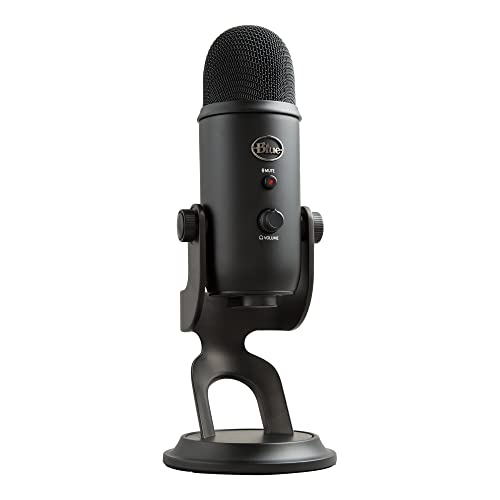
Best Renewed Value
Blue Yeti USB Microphone, Blackout Edition (Renewed)
Budget-conscious buyers who want full Yeti pattern flexibility for less
Our take Check price for Blue Yeti USB Microphone, Blackout Edition (Renewed) (opens in a new tab)
Our Picks
Best Overall1 of 8
Logitech Blue Yeti USB Microphone (Midnight Blue) on Amazon (opens in a new tab)
CE effects software for real-time voice shaping during streams or calls.
Best for
- Buyers in a reasonably quiet room who want the most established all-around USB mic
Why we like it
It plugs in and works immediately on both PC and Mac without a driver install.
Because it is a sensitive condenser, it performs best in a quieter or lightly treated room and will pick up fan noise, AC units, and desk vibration more readily than a dynamic mic. Pair it with a shock mount or boom arm rather than setting it directly on the desk to avoid picking up keyboard clatter.
CE software adds real-time voice shaping.
Key dimensions & specs
- 4 pickup patterns: cardioid, omnidirectional, bidirectional, stereo
- Condenser capsule design
- Blue VO!CE real-time voice effects software
- Plug and play for PC and Mac
- Built-in headphone monitoring jack
Pros
- 4 pickup patterns cover solo, interview, and room recording
- Blue VO!CE software adds real-time voice shaping
- True plug and play, no drivers needed
- Headphone jack for zero-latency monitoring
Cons
- Condenser sensitivity means it picks up room and desk noise easily
- Software mute has slight lag versus a hardware mute button
- Bulkier desktop footprint than smaller USB mics
Best Compact2 of 8
Logitech Blue Yeti Nano USB Microphone (Blackout) on Amazon (opens in a new tab)
The Blue Yeti Nano shrinks the classic Yeti body down to a smaller desktop footprint while keeping cardioid and omnidirectional pickup patterns for solo recording or small-room capture.
Best for
- Small desks that need a compact condenser without giving up plug and play simplicity
Why we like it
It is a straightforward plug and play condenser for streaming, Discord calls, and podcasting.
Like its larger sibling, the Nano is a condenser and will pick up more of the room than a dynamic mic, so it suits a quieter space or one with some soft furnishings to absorb echo. Its smaller base also makes it easier to fit on a crowded desk next to a keyboard and monitor arm.
Simple 2-pattern selection, easy for beginners.
Key dimensions & specs
- 2 pickup patterns: cardioid, omnidirectional
- Condenser capsule design
- Compact desktop footprint
- Plug and play for PC and Mac
- Built-in headphone monitoring jack
Pros
- Smaller footprint than a full-size Yeti
- Simple 2-pattern selection, easy for beginners
- True plug and play setup
- Headphone jack for real-time monitoring
Cons
- Fewer pickup pattern options than the full Yeti
- Still a condenser, so room noise is picked up readily
- No XLR output for a future upgrade path
Best Budget Dynamic3 of 8
FIFINE AmpliGame AM8 USB/XLR Dynamic Microphone on Amazon (opens in a new tab)
The AmpliGame AM8 is a true dynamic microphone, which rejects background noise far better than a condenser and is the more forgiving choice for an untreated bedroom, shared apartment, or a desk near a noisy street.
Best for
- Untreated rooms, shared spaces, or buyers who want a hardware mute button
Why we like it
It includes a hardware mute button with instant zero-latency response, RGB lighting, and a headphone jack for direct monitoring.
Because it offers both USB and XLR outputs, it also functions as an upgrade-path mic, you can start on USB and later move to a full XLR audio interface without buying a new microphone. Its included desktop stand is basic, so a boom arm is worth adding if desk space allows.
Hardware mute button has no lag, unlike software mute.
Key dimensions & specs
- Dynamic capsule design
- Dual USB and XLR output
- Hardware mute button (instant, zero-latency)
- RGB lighting with adjustable modes
- Includes basic desktop stand
Pros
- Dynamic capsule rejects room noise better than a condenser
- Hardware mute button has no lag, unlike software mute
- USB and XLR output supports a future interface upgrade
- Headphone jack for direct monitoring
Cons
- Less detailed capture than a condenser for treated-room use
- Included stand is basic compared to a real boom arm
- RGB lighting adds visual bulk some buyers won't want
Best Boom Arm Kit4 of 8
FIFINE AmpliGame AM8T XLR/USB Gaming Microphone Set on Amazon (opens in a new tab)
The AmpliGame AM8T is a dynamic USB/XLR mic that ships as a complete kit with a boom arm included, which matters more than it sounds, a condenser or dynamic mic sitting flat on the desk picks up keyboard clatter and desk vibration that a boom arm decouples entirely.
Best for
- Buyers on a desk with a mechanical keyboard who need the mic off the desk surface
Why we like it
It also includes a hardware mute button and headphone monitoring jack.
Like the AM8, its dynamic capsule handles background noise better than a condenser, making it a solid pick for a desk shared with a mechanical keyboard or in a room without acoustic treatment. The dual USB/XLR output again gives a clear upgrade path to a full audio interface later.
Key dimensions & specs
- Dynamic capsule design
- Dual USB and XLR output
- Included boom arm stand
- Hardware mute button
- Headphone monitoring jack
Pros
- Boom arm included, avoids desk vibration and keyboard noise pickup
- Dynamic capsule suits untreated rooms
- Hardware mute button with no lag
- USB and XLR output for a future interface upgrade
Cons
- Bulkier full kit takes up more desk space when deployed
- Dynamic capsule captures less detail than a condenser in a treated room
- Boom arm needs a clamp point on the desk edge
Best Podcast Kit5 of 8
FIFINE K688 Podcast Microphone Kit with Boom Arm on Amazon (opens in a new tab)
The K688 pairs a dynamic USB/XLR microphone with a boom arm in one kit, aimed squarely at podcast and voice-over use where consistent mic positioning matters more than pattern flexibility.
Best for
- Solo podcasters who want a dedicated boom-mounted mic without extra pattern options
Why we like it
A hardware mute button and headphone jack round out the core feature set.
As a dynamic mic it handles an untreated home office better than a condenser, and the boom arm keeps it off the desk surface so typing and desk bumps don't bleed into the recording. The dual USB/XLR output means it can move to a mixer-based setup later without a mic replacement.
Dynamic capsule suits podcast and voice-over recording in untreated rooms.
Key dimensions & specs
- Dynamic capsule design
- Dual USB and XLR output
- Included boom arm
- Hardware mute button
- Headphone jack for monitoring
Pros
- Complete kit with boom arm included
- Dynamic capsule suits podcast and voice-over recording in untreated rooms
- Zero-latency hardware mute
- USB and XLR flexibility for future setups
Cons
- Single fixed cardioid-style pattern, no pattern switching
- Less natural room ambience capture than a condenser
- Boom arm clamp needs a compatible desk edge
Best Budget Condenser6 of 8
FIFINE K669B Metal Condenser USB Microphone on Amazon (opens in a new tab)
The K669B is the cheapest true condenser mic in this list, built with a metal body and a cardioid pickup pattern aimed at voice recording, meeting audio, and casual streaming.
Best for
- Budget buyers testing whether a USB mic upgrade is worth it before spending more
Why we like it
It works across both Mac and Windows without extra driver installation.
At this price it skips a hardware mute button and headphone monitoring jack, so it is best suited to a quiet room where you are not relying on real-time mute or in-ear monitoring. Its low cost also makes it a reasonable first mic before deciding whether a dynamic or a pricier condenser fits your setup better.
Key dimensions & specs
- Condenser capsule design
- Metal body construction
- Cardioid pickup pattern
- Mac and Windows compatible
- USB plug and play
Pros
- Lowest price of any true condenser in this list
- Metal body feels sturdier than its price suggests
- Simple plug and play, no drivers needed
- Reasonable starter mic for meetings or casual recording
Cons
- No hardware mute button
- No headphone monitoring jack
- Condenser sensitivity still picks up room and desk noise
Best Streaming Setup7 of 8
TONOR TC310+ Gaming Microphone Set with Boom Arm on Amazon (opens in a new tab)
The TC310+ pairs a condenser capsule with a boom arm, RGB lighting, and a tap-to-mute button in one low-cost streaming bundle.
Best for
- Streamers who want a complete boom-mounted mic kit without piecing parts together
Why we like it
Gain control is built into the base, letting you adjust input level directly instead of relying only on software settings.
Because it is a condenser, it still benefits from a quieter or lightly treated room, but the included boom arm helps by keeping it off the desk surface and away from keyboard vibration. At this price it is a reasonable way to add a dedicated streaming mic setup without buying stand and mic separately.
Tap mute button with visual RGB status indicator.
Key dimensions & specs
- Condenser capsule design
- Included boom arm
- Tap-to-mute button with RGB indicator
- Onboard gain control
- USB plug and play
Pros
- Boom arm included at a budget price
- Tap mute button with visual RGB status indicator
- Onboard gain control for quick level adjustment
- Complete kit, nothing extra to buy for basic streaming
Cons
- Condenser capsule still picks up more room noise than a dynamic mic
- RGB lighting adds visual clutter some buyers won't want
- No XLR output for a future interface upgrade
Best Renewed Value8 of 8
Blue Yeti USB Microphone, Blackout Edition (Renewed) on Amazon (opens in a new tab)
This renewed Blue Yeti gives access to the same multi-pattern condenser capsule as the full-price Blackout model at a lower cost, a reasonable way to get the Yeti's flexibility if a factory-refurbished unit doesn't bother you.
Best for
- Budget-conscious buyers who want full Yeti pattern flexibility for less
Why we like it
It carries the same cardioid, omnidirectional, bidirectional, and stereo pattern options.
As with any Yeti, room treatment matters more than with a dynamic mic, and a renewed unit is worth checking for the seller's return window before committing. For buyers comfortable with renewed electronics, it is the most affordable way into the Yeti's pattern flexibility in this list.
Same 4-pattern flexibility as the full-price model.
Key dimensions & specs
- 4 pickup patterns: cardioid, omnidirectional, bidirectional, stereo
- Condenser capsule design
- Renewed/refurbished condition
- Plug and play for PC and Mac
- Built-in headphone monitoring jack
Pros
- Lower price than a new Blue Yeti
- Same 4-pattern flexibility as the full-price model
- Headphone jack for zero-latency monitoring
- True plug and play setup
Cons
- Renewed condition means checking the seller's return policy closely
- Condenser sensitivity still applies, best in a quieter room
- No hardware mute button
How We Chose These USB Microphones
Each pick was assessed across 5 criteria weighted for real-world use.
- Weighed condenser versus dynamic capsule design against how forgiving each mic is in an untreated room, since this is the single biggest factor in how a USB mic actually sounds day to day.
- Distinguished hardware mute, which is instant, from software mute, which can lag half a second to a second and clip the first word after unmuting in a meeting.
- Checked whether each mic ships with or supports a boom arm, since a mic sitting flat on the desk picks up keyboard clatter and desk bumps that a boom arm decouples.
- Noted which mics offer both USB and XLR output, letting a buyer start simple and later move to a full audio interface without replacing the microphone itself.
- Weighed included accessories, boom arms, stands, RGB, mute buttons, against price, from the budget picks up through the full-size Blue Yeti.
What to Look for in a USB Microphone
Key buying criteria so you get the right fit the first time.
Match actual size and capacity to your real need, not the category label alone
Listings for a usb microphone often use a size or capacity label ("compact," "large," "heavy-duty") that isn't standardized across brands, so the same label can mean meaningfully different actual dimensions or capacity from one product to the next.
This matters because buying based on the category label rather than the specific listed dimensions or capacity is a common way to end up with something that doesn't actually fit your space or handle your real load.
Check the listing for exact measurements or a stated capacity figure, and compare that directly against your actual space or need, not just the marketing size category.
Verify build material and construction quality from reviews, not just spec-sheet claims
A product description can describe material or construction in flattering terms that don't always hold up under real, sustained use, and the gap between a listing's claimed quality and its actual durability only shows up in how the product performs after weeks or months of real use, not in day-one photos.
This matters more for anything you'll use daily or under real load, less for occasional light use where durability matters less.
Check reviews specifically for mentions of how the usb microphone holds up over time, not just unboxing-day impressions, and treat a listing's own quality claims as a starting point to verify, not a guarantee.
Confirm any headline feature actually works as advertised, not just that it's listed
A feature appearing in a product's bullet points doesn't guarantee it performs well in practice, some features are functional but limited, and a few are closer to a marketing checkbox than a useful capability.
This matters directly if a specific feature is the main reason you're choosing this usb microphone over a simpler, cheaper alternative, since a feature that underperforms in practice undermines the whole reason for paying more.
Check reviews specifically for real-world experiences with the exact feature that matters most to you, not just whether the feature is listed at all.
Weigh review count alongside rating, not rating alone
This matters more for a purchase you're relying on to perform consistently over time, less for a low-stakes, easily replaceable item.
Check both the star rating and the review count together for any usb microphone you're considering, and treat a high rating on a very small review count as a promising but less-proven signal.
Check compatibility and fit with your existing setup before ordering
A usb microphone that looks like a straightforward fit in photos can still have a compatibility detail, a connector type, a mounting requirement, a size threshold, that doesn't match your existing setup, and this kind of mismatch is one of the most common and avoidable reasons for a return.
This matters directly if the product needs to physically connect to, mount on, or otherwise integrate with something you already own.
Check the listing's specific compatibility details against your exact existing setup, not just the general product category, before ordering.
How to Choose a USB Microphone
By Rating Confidence: Highest Rated vs Most Reviewed
| Logitech Blue Yeti USB Microphone | |
| Logitech Blue Yeti USB Microphone |
| FIFINE K669B Metal Condenser USB Microphone | |
| Logitech Blue Yeti USB Microphone |
FIFINE K669B Metal Condenser USB Microphone vs Logitech Blue Yeti USB Microphone
- FIFINE K669B Metal Condenser USB Microphone
- The lower-priced option in this comparison, worth checking its actual specs and review history against your specific need before assuming it's enough.
- Logitech Blue Yeti USB Microphone
- The higher-priced option, worth it if it offers real, checkable headroom in build quality, capacity, or features over the cheaper pick.
Default to FIFINE K669B Metal Condenser USB Microphone unless your specific need calls for the pricier pick's extra headroom.
| Logitech Blue Yeti USB Microphone |
For a First-Time Buyer Specifically
- Clear, specific dimensions or capacity and a real, established review history, not just marketing language.
- You need real durability and feature depth for regular use, where Logitech Blue Yeti USB Microphone's build gives real headroom over the cheaper picks.
- You only need this for light or occasional use, where FIFINE K669B Metal Condenser USB Microphone covers the same job at a lower price.
Frequently Asked Questions
Should I get a condenser or dynamic USB microphone?
It depends mainly on your room. Condenser mics like the Blue Yeti capture more detail and nuance but also pick up background noise, AC units, and echo more easily, so they suit a quieter or lightly treated room. Dynamic mics like the FIFINE AmpliGame AM8 reject background noise better and are the more forgiving choice for an untreated bedroom or shared apartment.
Why does my USB microphone cut out or sound distorted through a hub?
Many USB condenser mics don't get enough stable power through an unpowered USB hub port, which causes voltage drop and can produce dropouts or distortion that looks like a defective mic. Plug the mic directly into a USB port on the computer, or use a powered hub, before assuming the microphone itself is faulty.
Is a hardware mute button actually better than software mute?
Yes, for anyone who mutes and unmutes frequently during calls. A hardware mute button on mics like the FIFINE AM8 or K688 responds instantly with no delay, while software mute through an app can lag half a second to a full second, long enough to clip the first word after you come off mute.
Can I use a USB microphone and later upgrade to XLR?
Yes, if you buy a mic with both USB and XLR output, like the FIFINE AM8, AM8T, or K688. These work over USB now and can plug into a full audio interface or mixer later without needing to replace the microphone. A USB-only mic like the Blue Yeti Nano has no such path.
Should I put my USB microphone directly on the desk?
No, not if you can help it. A mic sitting flat on the desk picks up keyboard clatter and desk vibration far more than most buyers expect, especially with a mechanical keyboard nearby. A shock mount or boom arm, like the ones included with the FIFINE AM8T, K688, and TONOR TC310+, decouples the mic from the desk surface.
Is a renewed USB microphone worth buying to save money?
It can be, as long as you check the seller's return policy before purchasing. The renewed Blue Yeti in this list offers the same 4-pattern condenser flexibility as the new version at a lower price, which is a reasonable trade-off for budget-conscious buyers comfortable with refurbished electronics.
Bottom Line
Best overall: Logitech Blue Yeti USB Microphone (Midnight Blue) — best overall pick in this roundup. See the full verdicts above for every pick, with pros, cons and who each one suits.
Browse all usb microphones on Amazon — Prime-eligible options with current pricing.