
Buying Guide
The Best USB-C Monitors Under $250, Compared
We looked at 4 USB-C monitors under $250 side by side, with the trade-offs that separate them and who each one suits.
By Jamie Cole, Lead Product Researcher
7 min read4 products evaluated
We may earn a commission from purchases made through links in this guide. Learn more.
At the $250 mark, 4K resolution becomes accessible on a USB-C monitor for the first time in this budget-tier series, though it arrives on a larger 32 inch panel rather than the tighter pixel density of a 27 inch screen.
We compared this lineup on resolution and pixel density, factory calibration claims, and built-in extras like speakers, since the real decision at this price is whether 4K on a bigger screen or calibrated 1440p on a smaller one better fits your actual desk setup.
Quick Picks
Our 4 recommendations at a glance. Tap a pick for the full verdict.

Best Overall
ASUS ProArt PA278CV 27 Inch QHD Professional Monitor
Buyers who want calibrated color accuracy on a larger panel without going to 4K
Our take Check price for ASUS ProArt PA278CV 27 Inch QHD Professional Monitor (opens in a new tab)

Best Value 4K
CUNPU Z32UI06-TE 32 Inch 4K USB-C Monitor
Buyers who want genuine 4K resolution and color gamut at the lowest price here
Our take Check price for CUNPU Z32UI06-TE 32 Inch 4K USB-C Monitor (opens in a new tab)

Best for Audio and Speed
Dell 27 Plus QHD USB-C Monitor S2725DC
Buyers who want a fast refresh rate with useful built-in audio
Our take Check price for Dell 27 Plus QHD USB-C Monitor S2725DC (opens in a new tab)
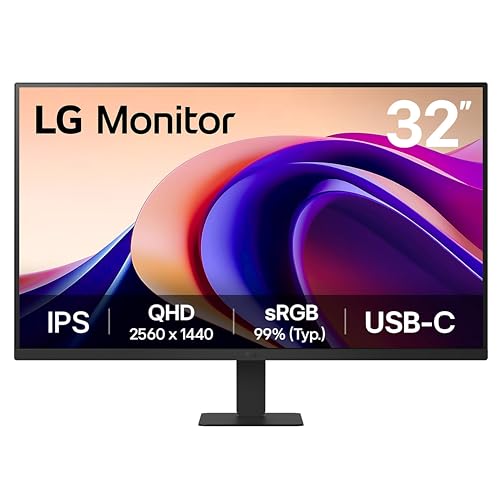
Best 32" QHD Panel
LG 32U631A-B 32-inch QHD Monitor
Buyers who want a large QHD screen and multitasking software, without needing laptop charging
Our take Check price for LG 32U631A-B 32-inch QHD Monitor (opens in a new tab)
Our Picks
Best Overall1 of 4
ASUS ProArt PA278CV 27 Inch QHD Professional Monitor on Amazon (opens in a new tab)
This 27 inch QHD panel carries the same Calman-verified Delta E under 2 accuracy and 100% SRGB coverage as the smaller 24 inch ASUS ProArt pick in our under $200 guide, but steps up to a larger screen and sharper 2560x1440 resolution while keeping the same 65W USB-C power delivery.
Best for
- Buyers who want calibrated color accuracy on a larger panel without going to 4K
Why we like it
Its 90 degree pivot lets you rotate the panel to portrait orientation for coding or document review, and DisplayPort daisy-chaining supports connecting up to four displays for a larger workstation, both useful features for a desk-bound professional setup rather than the color-neutral USB-C monitors below.
Best for buyers who want factory-calibrated color accuracy on a larger, sharper panel than our under $200 guide's 24 inch option, without stepping up to 4K resolution.
Key dimensions & specs
- 27" QHD IPS, Delta E < 2, 100% SRGB, Calman Verified
- 65W USB-C Power Delivery, 90 degree pivot
- DisplayPort daisy-chain, up to 4 displays
Pros
- Factory-calibrated Delta E under 2 accuracy on a larger 27" panel
- 90 degree pivot for portrait orientation work
- DisplayPort daisy-chain supports a multi-monitor workstation
Cons
- Stays at 1440p rather than the 4K resolution of the CUNPU pick below
- 65W power delivery is lower than some competing 90W monitors
Best Value 4K2 of 4
CUNPU Z32UI06-TE 32 Inch 4K USB-C Monitor on Amazon (opens in a new tab)
At the lowest price in this comparison, this 32 inch panel is also the only genuine 4K option here, packing 3840x2160 resolution into a 138 PPI density with 100% DCI-P3 wide color gamut, a real step up in sharpness and color range over the 1440p ASUS ProArt pick above for less money.
Best for
- Buyers who want genuine 4K resolution and color gamut at the lowest price here
Why we like it
Its 65W USB-C connection charges a laptop and carries 4K video simultaneously over one cable, and the 3-side ultra-thin bezel design suits a multi-monitor arrangement, though the listing doesn't claim the same factory Delta E calibration that backs the ASUS ProArt's accuracy claim.
Best for buyers who want genuine 4K resolution and wide color gamut at the lowest price in this comparison, without needing a factory-verified Delta E figure.
Key dimensions & specs
- 32" 4K IPS, 138 PPI, 100% DCI-P3 color gamut
- 65W USB-C, HDMI 2.0, DisplayPort 1.4
- 3-side ultra-thin bezel, VESA 100x100mm mountable
Pros
- Only genuine 4K panel in this comparison at the lowest price
- 100% DCI-P3 wide color gamut for vivid color range
- Ultra-thin 3-side bezel suits multi-monitor arrangements
Cons
- No factory Delta E calibration claim like the ASUS ProArt pick
- Larger 32" size means lower pixel density benefit than a smaller 4K panel
Best for Audio and Speed3 of 4
Dell 27 Plus QHD USB-C Monitor S2725DC on Amazon (opens in a new tab)
This Dell pick pairs a 144Hz refresh rate, faster than either the ASUS ProArt or CUNPU picks above, with integrated dual 3W speakers described as delivering a wider frequency range, a genuine audio upgrade over monitors that rely entirely on your laptop's own speakers or a separate soundbar.
Best for
- Buyers who want a fast refresh rate with useful built-in audio
Why we like it
Its 65W USB-C connection plus a pop-out quick-access USB-C and USB-A port makes charging a phone or connecting a flash drive simpler without reaching behind the monitor, and its 4-star TUV certification specifically targets blue light reduction without sacrificing image quality.
Best for buyers who want a faster 144Hz panel with useful built-in speakers and easy-access front ports.
Key dimensions & specs
- 27" QHD IPS, 144Hz, 1500:1 contrast, 1ms MPRT
- 65W USB-C, dual 3W integrated speakers
- Pop-out quick-access USB-C and USB-A ports
Pros
- Fastest refresh rate in this comparison at 144Hz
- Integrated dual speakers useful for calls and media
- Easy-access pop-out ports for quick phone charging
Cons
- No 4K resolution or factory Delta E calibration claim
- Speakers add convenience but won't match a dedicated audio setup
Best 32" QHD Panel4 of 4
LG 32U631A-B 32-inch QHD Monitor on Amazon (opens in a new tab)
LG's 32 inch panel keeps QHD resolution rather than jumping to 4K like the CUNPU pick above, a deliberate tradeoff that pairs a larger screen with less demanding resolution for older or lower-powered laptops that might struggle driving a full 4K display over USB-C.
Best for
- Buyers who want a large QHD screen and multitasking software, without needing laptop charging
Why we like it
HDR10 support and up to 99% SRGB color gamut deliver richer visuals than a standard panel, and LG's Switch app lets you split the screen into up to 6 sections for multitasking, a software feature none of the other picks in this comparison mention. Its USB-C power delivery caps at 15W, the lowest in this guide, suitable for charging a phone or tablet but not a laptop.
Best for buyers who want a large 32" QHD screen with useful multitasking software, and who don't need the monitor to charge their laptop over USB-C.
Key dimensions & specs
- 32" QHD IPS, HDR10, up to 99% SRGB
- LG Switch app, splits screen into up to 6 sections
- USB-C 15W PD, HDMI input
Pros
- Large 32" QHD screen easier to drive than 4K for older laptops
- LG Switch app adds genuine multitasking screen-splitting software
- HDR10 support for richer contrast and color
Cons
- 15W USB-C power delivery won't charge a laptop
- No factory color calibration claim like the ASUS ProArt pick
How We Chose These USB-C Monitors Under $250
Each pick was assessed across 5 criteria weighted for real-world use.
- 4K vs 1440p Resolution Tradeoff
- Weighed the sharper text and detail of the CUNPU's 4K panel against the more moderate GPU and USB-C bandwidth demands of the 1440p picks in this comparison.
- Checked which listings state a specific Delta E figure and independent verification versus general color gamut percentages without calibration backing.
- Compared stated wattage figures across the lineup, from 15W phone-only charging up to 65W laptop charging.
- Noted useful extras like integrated speakers, pop-out quick-access ports, and multitasking software that differentiate otherwise similar panels.
- Refresh Rate for General Use
- Compared stated refresh rates, since a faster panel improves everyday scrolling and window movement even outside of gaming.
What to Look for in a USB-C Monitor Under $250
Key buying criteria so you get the right fit the first time.
4K on a 32" Screen Has Lower Pixel Density Than 4K on a Smaller Panel
Pixel density, measured in pixels per inch (PPI), describes how tightly packed the pixels are on a screen, and a 32 inch 4K panel like the CUNPU pick in this comparison has a lower PPI (138) than a smaller 27 inch 4K panel would at the same resolution. This still delivers noticeably sharper text and detail than a 1440p panel of the same size, but it's worth knowing that "4K" alone doesn't guarantee the same sharpness across every screen size, since the physical panel dimensions change how tightly those pixels are packed.
Not Every Monitor's USB-C Port Provides the Same Charging Wattage, Even at This Price
In this comparison alone, USB-C power delivery ranges from 15W on the LG pick, enough only for a phone or tablet, up to 65W on three other picks, enough to fully charge most ultrabooks. Before assuming any USB-C monitor in this price range will charge your laptop, check the specific wattage stated in the listing, since a lower-wattage monitor with an otherwise larger, sharper screen might not actually replace your laptop's charger the way you expect.
Driving 4K Content Requires More From Your Laptop's Graphics Than 1440p
8 times the pixel count of a 1440p display, which can mean a lower maximum refresh rate, more strain on integrated graphics, or occasional performance hiccups on older or lower-powered laptops. If your laptop is a few years old or uses basic integrated graphics, a 1440p panel like the ASUS ProArt or Dell picks in this comparison may deliver a smoother experience than pushing a 32 inch 4K panel to its full resolution.
Built-In Software Features Like Screen-Splitting Can Replace a Separate Window Manager App
Some monitors, like the LG pick in this comparison with its Switch app, include manufacturer software that splits the screen into multiple sections for multitasking, similar to third-party window management tools you might otherwise install separately on your computer. If you already rely on a window-snapping tool or built-in OS feature for this, a monitor's own software adds less value, but if you don't, it's a genuine built-in convenience worth factoring into the comparison.
A Faster Refresh Rate Pairs Best With a Laptop That Can Actually Output at That Rate
The Dell pick's 144Hz refresh rate only delivers a smoother visual experience if your laptop's graphics output, and the connection method you're using, can actually push a signal at that refresh rate; some USB-C connections or lower-powered graphics chips may cap out lower than the monitor's maximum, especially at higher resolutions. Check your laptop's own display output specifications, not just the monitor's advertised maximum, before assuming you'll see the full refresh rate benefit in practice.
How to Choose a USB-C Monitor Under $250
| Calibrated color accuracy on a larger panel | ASUS ProArt PA278CV 27 Inch QHD Professional Monitor |
|---|---|
| The sharpest resolution at the lowest price | CUNPU Z32UI06-TE 32 Inch 4K USB-C Monitor |
| Fast refresh rate with useful built-in audio | Dell 27 Plus QHD USB-C Monitor S2725DC |
4K on 32" vs Calibrated 1440p on 27"
- Sharper text and more visible detail thanks to higher pixel count, at the lowest price in this comparison, but without a stated factory Delta E calibration figure.
- Calibrated QHD 27" (ASUS ProArt)
- Verified Delta E under 2 color accuracy on a tighter, more manageable screen size, better suited to color-critical creative work.
If color accuracy for professional work matters most, choose the ASUS ProArt. If sharper resolution and lower cost matter more, the CUNPU 4K pick is the stronger value.
By USB-C Power Delivery Needs
| A laptop needing up to 65W | ASUS ProArt PA278CV, CUNPU 4K, or Dell S2725DC |
|---|---|
| Just a phone or tablet (15W) | LG 32U631A-B 32-inch QHD Monitor |
- Integrated speakers with a stated wider frequency range, so you're not relying solely on your laptop's built-in speakers during calls.
- The Dell 27 Plus QHD USB-C Monitor S2725DC specifically states dual 3W speakers with a wider frequency response, the strongest audio-focused pick here.
- You want a larger 32" QHD screen with useful multitasking software, where the LG 32U631A-B's Switch app adds genuine screen-splitting functionality.
- You want the sharpest resolution for the least money, where the CUNPU Z32UI06-TE delivers genuine 4K at the lowest price in this guide.
Frequently Asked Questions
Is the CUNPU's 4K resolution actually noticeably sharper than the ASUS ProArt's 1440p at these screen sizes?
Yes, moving from 1440p to 4K roughly doubles the pixel count, and even on a larger 32 inch panel, text and fine detail appear noticeably crisper on the CUNPU pick, particularly for reading dense text or viewing high-resolution photos and video.
Can the LG 32U631A-B charge my laptop through its USB-C port?
Its USB-C port is rated for only 15W of power delivery, which is enough to charge a phone or tablet but not sufficient to power most laptops, which typically need 45W or more depending on the model.
Do I need a specific graphics card to drive a 32 inch 4K monitor smoothly?
Most modern integrated graphics found in recent laptops can handle basic 4K desktop use, like browsing and document work, but demanding tasks like video editing or gaming at 4K benefit from a dedicated graphics card. Check your laptop's specific graphics capabilities if you plan to do intensive work on the 4K panel.
Is factory color calibration necessary if I mostly do general office work rather than design?
No, factory calibration mainly benefits color-critical work like photo editing, video color grading, or print design. For general office tasks, browsing, and everyday productivity, an uncalibrated panel like the CUNPU or LG picks in this comparison performs perfectly well.
How does LG's Switch app compare to built-in window snapping in Windows or macOS?
LG's Switch app offers more granular pre-set screen-splitting layouts (up to 6 sections) specifically designed around the monitor, while built-in OS window snapping is generally simpler and less customizable but works across any monitor without additional software installation.
Will a 144Hz monitor like the Dell S2725DC actually run at 144Hz over a basic USB-C connection?
It depends on your laptop's USB-C port capabilities and cable bandwidth; a full-featured USB-C port with sufficient DisplayPort Alt Mode bandwidth can support 144Hz at QHD resolution, but a lower-bandwidth connection may cap the effective refresh rate lower. Check your laptop's specific USB-C video output specifications to confirm.
Bottom Line
Best overall: ASUS ProArt PA278CV 27 Inch QHD Professional Monitor — best overall pick in this roundup. See the full verdicts above for every pick, with pros, cons and who each one suits.
Browse all usb-c monitors under $250 on Amazon — Prime-eligible options with current pricing.