
Buying Guide
The Best Thin Desk Pads for a Low-Profile Desk Surface
Few desk pads state their thickness, so we compared eight thin leather, felt and hard mats on size and surface, and flag the thicker charging pads.
By Jamie Cole, Lead Product Researcher
11 min read8 products evaluated
We may earn a commission from purchases made through links in this guide. Learn more.
A thin desk pad keeps your keyboard and wrists close to the desk surface and avoids a noticeable step at the pad's edge. The difficulty is that most listings don't state thickness. Of the eight picks here, only the Razer Sphex V3 (0.4mm) gives a figure for a thin pad; the PU leather protectors are thin by construction, and two RGB charging pads are thicker by design.
Beyond thickness, compare size and surface. PU leather wipes clean and protects the desk; felt is soft but absorbs spills; a hard polycarbonate mat like the Razer is built for mouse tracking rather than covering the desk.
Our comparison is based on published specifications, not hands-on testing. If thickness matters, check each listing or ask the seller.
Quick Picks
Our 8 recommendations at a glance. Tap a pick for the full verdict.

Best Low-Cost Leather Protector
Aothia Non-Slip Waterproof PU Leather Desk Pad Protector for Mouse
A 23.6 x 13.7-inch PU leather desk protector with a non-slip design.
Best for: A compact desk that needs a thin protective surface.
Our take Check price for Aothia Non-Slip Waterproof PU Leather Desk Pad Protector for Mouse (opens in a new tab)
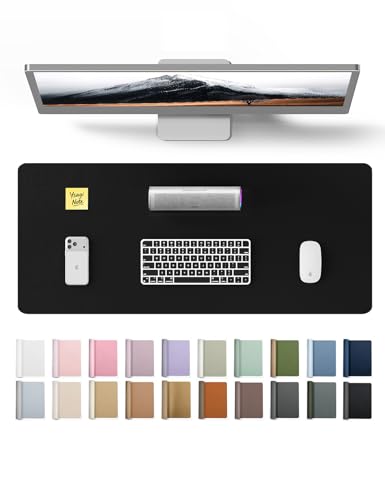
YSAGi Leather Protector
YSAGi Leather Office Desk Pad Protector
A YSAGi PU leather desk protector described as waterproof and easy to clean.
Best for: A basic protective pad at the lowest price.
Our take Check price for YSAGi Leather Office Desk Pad Protector (opens in a new tab)
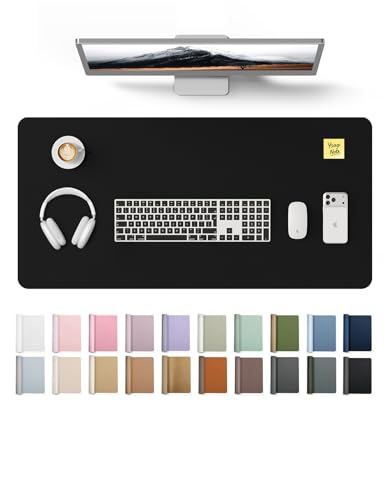
Alternate YSAGi Listing
YSAGi Leather Desk Protector
Another YSAGi PU leather protector listing with the same description at a higher price.
Best for: Readers comparing YSAGi sizes and colors.
Our take Check price for YSAGi Leather Desk Protector (opens in a new tab)
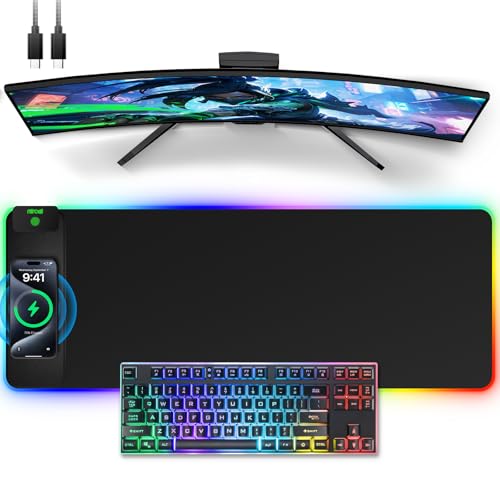
Charging RGB Mat (Not Ultra-Thin)
Wireless Charging Mouse Pad
A 31.5 x 11.81-inch, 4mm RGB mouse pad with 15W Qi wireless charging.
Best for: A gaming desk that wants charging and lighting in the mat.
Our take Check price for Wireless Charging Mouse Pad (opens in a new tab)

Thinnest Stated: 0.4mm
Razer Sphex V3 Hard Gaming Mouse Mat: Ultra-Thin Form Factor
A 0.4mm hard polycarbonate mouse mat with adhesive base, built for optical sensor tracking.
Best for: A near-flush mouse surface.
Our take Check price for Razer Sphex V3 Hard Gaming Mouse Mat: Ultra-Thin Form Factor (opens in a new tab)

Best Felt Pad
DAWNTREES Felt Desk Mat
A 36 x 12-inch felt desk mat, soft and wide.
Best for: A soft, wide strip under keyboard and mouse.
Our take Check price for DAWNTREES Felt Desk Mat (opens in a new tab)
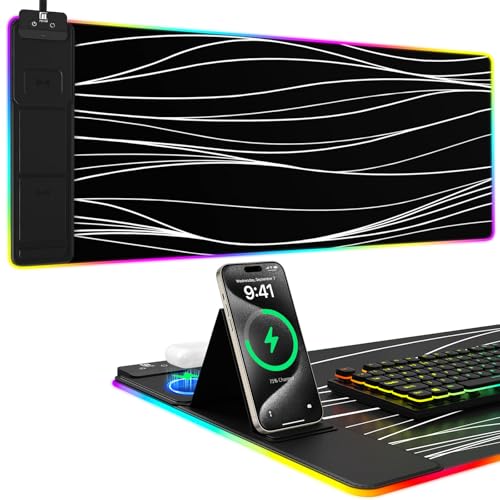
Charging Mat with Phone Holder
Mouse Pad with Phone Holder
An RGB mouse pad with 15W wireless charging and a phone holder.
Best for: Keeping a phone upright and charging on the mat.
Our take Check price for Mouse Pad with Phone Holder (opens in a new tab)

Best Mid-Size Leather Pad
Hsurbtra Desk Pad
A 30 x 14-inch synthetic leather pad with buffed, coated finish.
Best for: A thin leather surface for a standard keyboard and mouse.
Our take Check price for Hsurbtra Desk Pad (opens in a new tab)
Our Picks
Best Low-Cost Leather Protector1 of 8
Aothia Non-Slip Waterproof PU Leather Desk Pad Protector for Mouse on Amazon (opens in a new tab)
The Aothia is a simple, low-cost PU leather pad, 23.6 x 13.7 inches, described as protecting the desk from scratches, stains, spills, heat and scuffs, with a non-slip design.
Best for
- A compact desk that needs a thin protective surface.
Skip if
- You need more width; the DAWNTREES felt mat is 36 inches wide.
Why we like it
It is smaller than most pads here, enough for a compact keyboard and mouse or a laptop. Thickness isn't stated.
Key dimensions & specs
- Size: 23.6 x 13.7"
- Material: PU leather
- Non-slip design
- Thickness: not stated
Pros
- Low price
- Wipe-clean
- Thin leather construction
Cons
- Smaller than most
- Thickness not stated
- Plain design
YSAGi Leather Protector2 of 8
YSAGi Leather Office Desk Pad Protector on Amazon (opens in a new tab)
The YSAGi Leather Office Desk Pad is a plain PU leather protector that YSAGi says guards against scratches, stains, spills, heat and scuffs, large enough to replace a separate mouse pad.
Best for
- A basic protective pad at the lowest price.
Skip if
- You want a stated size; the Hsurbtra lists 30 x 14 inches.
Why we like it
Its size and thickness aren't given in the listing summary. It appears very similar to the other YSAGi listing here, which cost more at the time of writing.
Key dimensions & specs
- Material: PU leather
- Waterproof, easy to clean (per listing)
- Size and thickness: check listing
Pros
- Low price
- Wipe-clean
- Desk protection
Cons
- Size not stated here
- Thickness not stated
- Overlaps with the other YSAGi listing
Alternate YSAGi Listing3 of 8
YSAGi Leather Desk Protector on Amazon (opens in a new tab)
This YSAGi listing uses the same description as the one above, likely in a different size or color, and cost about $4 more at the time of writing.
Best for
- Readers comparing YSAGi sizes and colors.
Skip if
- The other YSAGi listing suits your desk; it cost less.
Why we like it
Compare both YSAGi pages for size and finish, and buy whichever matches your desk at the lower price.
Key dimensions & specs
- Material: PU leather
- Easy to clean
- Size and color: check listing
Pros
- Wipe-clean
- Desk protection
- Possibly a different size or color
Cons
- Costs more than the other YSAGi
- Size not stated here
- Thickness not stated
Charging RGB Mat (Not Ultra-Thin)4 of 8
Wireless Charging Mouse Pad on Amazon (opens in a new tab)
This RGB pad adds a 15W Qi-certified wireless charger, listed for iPhone 12 to 17 and Samsung Galaxy phones, plus 11 lighting colors and 5 modes, on a 31.5 x 11.81-inch surface.
Best for
- A gaming desk that wants charging and lighting in the mat.
Skip if
- Thinness is the goal; the Razer Sphex V3 is 0.4mm.
Why we like it
At 4mm thick with charging and lighting built in, it isn't an ultra-thin pad, and it needs a power connection.
Key dimensions & specs
- Size: 31.5 x 11.81"
- Thickness: 4mm
- Charging: 15W Qi
- Lighting: RGB, 11 colors, 5 modes
Pros
- Wireless charging
- RGB lighting
- Moderate price
Cons
- Not ultra-thin
- Needs power
- Shallow depth
Thinnest Stated: 0.4mm5 of 8
Razer Sphex V3 Hard Gaming Mouse Mat: Ultra-Thin Form Factor on Amazon (opens in a new tab)
The Razer Sphex V3 is the thinnest pad with a stated figure here: 0.4mm, which Razer says is 20% thinner than before, with a hard polycarbonate surface optimized for optical sensors and an adhesive base that holds it to the desk.
Best for
- A near-flush mouse surface.
Skip if
- You want to cover the whole desk area; a PU leather pad suits that.
Why we like it
Razer says it is lab-tested for impact, rip and tear strength. It is a mouse mat rather than a full desk pad, so it won't sit under your keyboard.
Key dimensions & specs
- Thickness: 0.4mm
- Surface: hard polycarbonate
- Base: adhesive
- Type: mouse mat
Pros
- Thinnest stated here
- Adhesive base stays put
- Hard tracking surface
Cons
- Mouse area only
- Adhesive needs care on some finishes
- Hard surface isn't for writing
Best Felt Pad6 of 8
DAWNTREES Felt Desk Mat on Amazon (opens in a new tab)
The DAWNTREES is the felt option: 36 x 12 inches, the widest here, with a soft felt surface.
Best for
- A soft, wide strip under keyboard and mouse.
Skip if
- You drink at the desk; a PU leather pad wipes clean.
Why we like it
The listing calls it water-absorbing, so spills soak in rather than wipe off, and its 12-inch depth is shallow. Thickness isn't stated.
Key dimensions & specs
- Size: 36 x 12"
- Material: felt
- Thickness: not stated
Pros
- Widest here
- Soft felt
- Moderate price
Cons
- Absorbs spills
- Shallow depth
- Thickness not stated
Charging Mat with Phone Holder7 of 8
Mouse Pad with Phone Holder on Amazon (opens in a new tab)
This pad combines 15W wireless charging with a phone holder and RGB lighting in 11 static modes and 2 dynamic effects.
Best for
- Keeping a phone upright and charging on the mat.
Skip if
- You don't need a phone holder; the other charging pad costs less.
Why we like it
It was the most expensive pad here at the time of writing.
Like the other charging pad, it isn't an ultra-thin product, and its size and thickness aren't stated in the listing summary.
Key dimensions & specs
- Charging: 15W wireless
- Phone holder: yes
- Lighting: RGB
- Size and thickness: check listing
Pros
- Phone holder
- Wireless charging
- RGB lighting
Cons
- Most expensive here
- Not ultra-thin
- Size not stated
Best Mid-Size Leather Pad8 of 8
Hsurbtra Desk Pad on Amazon (opens in a new tab)
The Hsurbtra is a mid-size synthetic leather pad, 30 x 14 inches, large enough for a laptop, keyboard and mouse, with a buffed, coated and glazed finish.
Best for
- A thin leather surface for a standard keyboard and mouse.
Skip if
- Your desk is small; the Aothia is 23.6 inches wide.
Why we like it
It costs slightly more than the Aothia but covers more of the desk. Thickness isn't stated.
Key dimensions & specs
- Size: 30 x 14"
- Material: synthetic leather (buffed, coated, glazed)
- Thickness: not stated
Pros
- Stated mid-size dimensions
- Wipe-clean surface
- Moderate price
Cons
- Thickness not stated
- Base type not detailed
- Plain design
How We Chose These Ultra-Thin Desk Pads
Each pick was assessed across 4 criteria weighted for real-world use.
- Profile
- We noted stated thickness and flagged where it's missing.
- Size and surface
- We compared dimensions and materials.
- Extras
- We noted charging and lighting, which add thickness.
- Price
- We compared prices at the time of writing.
What to Look for in an Ultra-Thin Desk Pad
Key buying criteria so you get the right fit the first time.
Look for a stated thickness
Few listings give one. The Razer Sphex V3 lists 0.4mm; the charging pads are 4mm or thicker by design.
Desk pad or mouse mat
PU leather and felt pads cover keyboard and mouse; the Razer covers only the mouse area.
Choose the surface
PU leather wipes clean; felt is soft but absorbs spills; hard polycarbonate is for mouse tracking.
Measure the desk
Pads here range from 23.6 to 36 inches wide and 12 to 14 inches deep.
How to Choose an Ultra-Thin Desk Pad
By priority
| Priority | Consider |
|---|---|
| Thinnest mouse surface | Razer Sphex V3 |
| Compact leather protector | Aothia |
| Mid-size leather pad | Hsurbtra |
| Wide, soft felt | DAWNTREES |
| Lowest-cost basic pad | YSAGi |
| Charging (not thin) | Wireless Charging Mouse Pad |
Frequently Asked Questions
How thin is ultra-thin?
There's no standard. The Razer Sphex V3 lists 0.4mm; most leather pads here don't state thickness.
Why choose a thin pad?
It keeps your hands close to the desk and avoids a step at the edge. It also offers less cushioning.
Are charging pads thin?
No. The charging pad here lists 4mm, and built-in electronics add bulk.
Will a thin pad slide?
Look for a non-slip or adhesive base; the Razer uses adhesive.
Leather or felt?
Leather wipes clean; felt is softer but absorbs spills.
Bottom Line
For the thinnest mouse surface with a stated figure, the Razer Sphex V3 is the pick. To cover the whole desk thinly, the Hsurbtra and Aothia PU leather pads are simple, low-cost options, and the DAWNTREES is the soft felt alternative.
The two charging pads are here for readers who want charging in the mat, but they aren't ultra-thin.