
Buying Guide
The Best Speakerphones for Zoom: Picks and Trade-offs
We looked at 5 speakerphones for zoom side by side, with the trade-offs that separate them and who each one suits.
By Jamie Cole, Lead Product Researcher
8 min read5 products evaluated
We may earn a commission from purchases made through links in this guide. Learn more.
Zoom certification means a device has gone through Zoom's own hardware testing program, confirming its audio driver and echo/noise handling work correctly with Zoom's specific audio pipeline, general USB or Bluetooth plug-and-play compatibility works too, but isn't the same tested guarantee.
Zoom Rooms certification (for dedicated conference room hardware) is a distinct, stricter tier from basic Zoom-certified peripheral compatibility, don't assume the two labels mean the same level of testing.
Quick Picks
Our 5 recommendations at a glance. Tap a pick for the full verdict.
Best Zoom-Certified Speakerphone
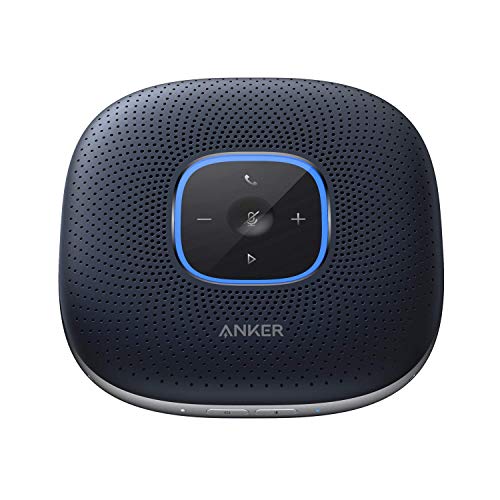
Anker PowerConf Speakerphone, Zoom Certified Conference Speaker with 6 Mics
Buyers who want confirmed, tested Zoom compatibility for regular video calls
Our take Check price for Anker PowerConf Speakerphone, Zoom Certified Conference Speaker with 6 Mics (opens in a new tab)

Best Dual-Certified Zoom and Google Meet Pick
Jabra Speak2 40 Portable Speakerphone - 4 Noise-Cancelling Mics, Full-Range 50mm Portable Speaker, Wideband Audio and USB-A and USB-C Connections - Certified for Zoom and Google Meet - Dark Grey
Buyers who use both Zoom and Google Meet and want certified compatibility with each
Our take Check price for Jabra Speak2 40 Portable Speakerphone - 4 Noise-Cancelling Mics, Full-Range 50mm Portable Speaker, Wideband Audio and USB-A and USB-C Connections - Certified for Zoom and Google Meet - Dark Grey (opens in a new tab)
Best Established Zoom-Certified Pick
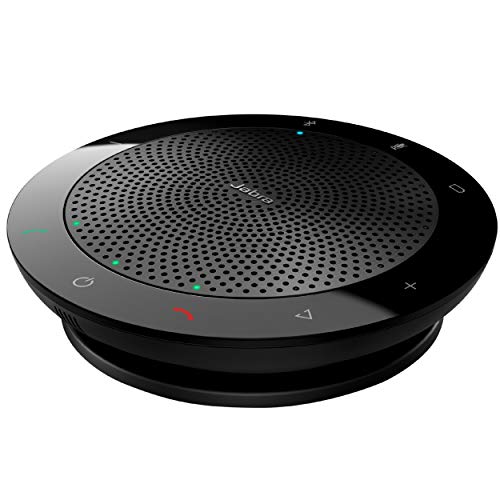
Jabra Speak 510 UC Wireless Bluetooth Speakerphone, Outstanding Sound Quality, Portable Conference Speaker for Holding Meetings Anywhere - Certified for Zoom & Google Meet
Buyers who want the most-proven, longest track record for Zoom calls
Our take Check price for Jabra Speak 510 UC Wireless Bluetooth Speakerphone, Outstanding Sound Quality, Portable Conference Speaker for Holding Meetings Anywhere - Certified for Zoom & Google Meet (opens in a new tab)

Best Budget Zoom-Compatible Pick
Yealink SP92 Conference Speaker and Microphone with AI Noise Cancellation, 20H Call Time, 13ft Pick-up, 360 Omni Mic 50mm Full-Duplex Speaker, Bluetooth 5.3 USB Speakerphone for Teams
Budget-conscious buyers who want general Zoom compatibility without paying for formal certification
Our take Check price for Yealink SP92 Conference Speaker and Microphone with AI Noise Cancellation, 20H Call Time, 13ft Pick-up, 360 Omni Mic 50mm Full-Duplex Speaker, Bluetooth 5.3 USB Speakerphone for Teams (opens in a new tab)

Best Budget USB Speakerphone
EMEET M1A USB Speakerphone, Built-in Mics, 360° Voice Pickup, Plug&Play
Buyers who want a simple, affordable USB speakerphone for basic Zoom calls
Our take Check price for EMEET M1A USB Speakerphone, Built-in Mics, 360° Voice Pickup, Plug&Play (opens in a new tab)
Our Picks
Best Zoom-Certified Speakerphone1 of 5
Anker PowerConf Speakerphone, Zoom Certified Conference Speaker with 6 Mics on Amazon (opens in a new tab)
Explicitly Zoom certified, meaning it's passed Zoom's own hardware testing program, not just general USB plug-and-play compatibility.
Best for
- Buyers who want confirmed, tested Zoom compatibility for regular video calls
Why we like it
6 microphones improve voice isolation for Zoom calls with several people around a table.
6 mics for strong voice isolation on Zoom calls.
Key dimensions & specs
- 6 microphones, Zoom certified
- Echo cancellation, background noise reduction
- Bluetooth and USB connectivity
- Compact design
Pros
- Genuine Zoom certification, not just general compatibility
- 6 mics for strong voice isolation on Zoom calls
- Both echo and background noise handling
Cons
- Not certified for Zoom Rooms specifically, the stricter dedicated-hardware tier
- Higher price than some alternatives
- Bluetooth range may be limited in a larger room
Best Dual-Certified Zoom and Google Meet Pick2 of 5
Jabra Speak2 40 Portable Speakerphone - 4 Noise-Cancelling Mics, Full-Range 50mm Portable Speaker, Wideband Audio and USB-A and USB-C Connections - Certified for Zoom and Google Meet - Dark Grey on Amazon (opens in a new tab)
Certified for both Zoom and Google Meet specifically, useful if your team occasionally uses both platforms rather than exclusively Zoom.
Best for
- Buyers who use both Zoom and Google Meet and want certified compatibility with each
Why we like it
4 noise-cancelling mics with wideband audio for clear call quality.
Key dimensions & specs
- 4 noise-cancelling mics, certified for Zoom and Google Meet
- USB-An and USB-C connections
- Wideband audio
- Portable design
Pros
- Certified for Zoom and Google Meet, useful if you use both
- 4 dedicated noise-cancelling mics
- Both USB-An and USB-C included
- Portable form factor
Cons
- Fewer mics than the 6-mic Anker option
- Higher price relative to its review count
Best Established Zoom-Certified Pick3 of 5
Jabra Speak 510 UC Wireless Bluetooth Speakerphone, Outstanding Sound Quality, Portable Conference Speaker for Holding Meetings Anywhere - Certified for Zoom & Google Meet on Amazon (opens in a new tab)
Portable wireless form factor suits moving between a desk and a meeting room.
Best for
- Buyers who want the most-proven, longest track record for Zoom calls
Why we like it
An older but proven design, the large review count reflects years of real-world Zoom call usage.
Key dimensions & specs
- Wireless Bluetooth, certified for Zoom and Google Meet
- Portable conference speaker
- Outstanding sound quality per established reputation
- Long track record
Pros
- Highest rating of any pick in this guide
- Certified for both Zoom and Google Meet
- Portable, easy to move between spaces
Cons
- Older design than the 2025-edition alternatives
- Fewer physical mics than the Anker 6-mic pick
- Wireless-only, no wired USB fallback confirmed
Best Budget Zoom-Compatible Pick4 of 5
Yealink SP92 Conference Speaker and Microphone with AI Noise Cancellation, 20H Call Time, 13ft Pick-up, 360 Omni Mic 50mm Full-Duplex Speaker, Bluetooth 5.3 USB Speakerphone for Teams on Amazon (opens in a new tab)
The most affordable pick in this guide, works over standard USB/Bluetooth with Zoom without carrying explicit Zoom certification, general compatibility that's fine for most everyday calls but not the same tested guarantee as a certified device.
Best for
- Budget-conscious buyers who want general Zoom compatibility without paying for formal certification
Why we like it
AI noise cancellation and full-duplex audio help call clarity, even without formal Zoom certification.
AI noise cancellation and full-duplex audio.
Key dimensions & specs
- AI noise cancellation, full-duplex, general USB/Bluetooth compatibility
- 13ft pickup radius, 360° omni mic
- 20H call time
- Marketed primarily for Teams, works with Zoom generally
Pros
- Most affordable pick in this guide
- AI noise cancellation and full-duplex audio
- Good pickup radius
- Long call time
Cons
- No explicit Zoom certification, general compatibility only
- Marketed primarily toward Teams rather than Zoom specifically
Best Budget USB Speakerphone5 of 5
EMEET M1A USB Speakerphone, Built-in Mics, 360° Voice Pickup, Plug&Play on Amazon (opens in a new tab)
A simple USB plug-and-play design, works with Zoom over standard USB audio without any specific setup, a reasonable option if you just need reliable basic call audio rather than certified premium features.
Best for
- Buyers who want a simple, affordable USB speakerphone for basic Zoom calls
Why we like it
Solid rating base for the price, though it lacks the explicit platform certification of the top picks in this guide.
Key dimensions & specs
- USB plug-and-play, 360° voice pickup
- Built-in microphones
- Compact design
- low-cost
Pros
- Simple USB plug-and-play setup
- Solid rating base for the price
- Compact, easy to store
- Works with Zoom over standard USB audio
Cons
- No specific Zoom certification
- Fewer premium features than the certified picks
- 360° pickup less directional for narrow tables
How We Chose These Speakerphones for Zoom
Each pick was assessed across 3 criteria weighted for real-world use.
- Distinguished picks that have passed Zoom's own hardware testing program from those offering general plug-and-play compatibility, since these represent different levels of tested confidence.
- Mic count and pickup radius for real conference-table performance
- Compared physical mic count and pickup radius across picks, since these drive real voice isolation on a Zoom call more than certification alone.
What to Look for in a Speakerphone for Zoom
Key buying criteria so you get the right fit the first time.
Match actual size and capacity to your real need, not the category label alone
Listings for a speakerphone often use a size or capacity label ("compact," "large," "heavy-duty") that isn't standardized across brands, so the same label can mean meaningfully different actual dimensions or capacity from one product to the next.
This matters because buying based on the category label rather than the specific listed dimensions or capacity is a common way to end up with something that doesn't actually fit your space or handle your real load.
Check the listing for exact measurements or a stated capacity figure, and compare that directly against your actual space or need, not just the marketing size category.
Verify build material and construction quality from reviews, not just spec-sheet claims
A product description can describe material or construction in flattering terms that don't always hold up under real, sustained use, and the gap between a listing's claimed quality and its actual durability only shows up in how the product performs after weeks or months of real use, not in day-one photos.
This matters more for anything you'll use daily or under real load, less for occasional light use where durability matters less.
Check reviews specifically for mentions of how the speakerphone holds up over time, not just unboxing-day impressions, and treat a listing's own quality claims as a starting point to verify, not a guarantee.
Confirm any headline feature actually works as advertised, not just that it's listed
A feature appearing in a product's bullet points doesn't guarantee it performs well in practice, some features are functional but limited, and a few are closer to a marketing checkbox than a useful capability.
This matters directly if a specific feature is the main reason you're choosing this speakerphone over a simpler, cheaper alternative, since a feature that underperforms in practice undermines the whole reason for paying more.
Check reviews specifically for real-world experiences with the exact feature that matters most to you, not just whether the feature is listed at all.
Weigh review count alongside rating, not rating alone
This matters more for a purchase you're relying on to perform consistently over time, less for a low-stakes, easily replaceable item.
Check both the star rating and the review count together for any speakerphone you're considering, and treat a high rating on a very small review count as a promising but less-proven signal.
Check compatibility and fit with your existing setup before ordering
A speakerphone that looks like a straightforward fit in photos can still have a compatibility detail, a connector type, a mounting requirement, a size threshold, that doesn't match your existing setup, and this kind of mismatch is one of the most common and avoidable reasons for a return.
This matters directly if the product needs to physically connect to, mount on, or otherwise integrate with something you already own.
Check the listing's specific compatibility details against your exact existing setup, not just the general product category, before ordering.
How to Choose a Speakerphone for Zoom
By Rating Confidence: Highest Rated vs Most Reviewed
| Jabra Speak 510 UC Wireless Bluetooth Speakerphone, Outstanding Sound Quality | |
| Jabra Speak 510 UC Wireless Bluetooth Speakerphone, Outstanding Sound Quality |
| Yealink SP92 Conference Speaker and Microphone with AI Noise Cancellation | |
Yealink SP92 Conference Speaker and Microphone with AI Noise Cancellation vs Anker PowerConf Speakerphone
- Yealink SP92 Conference Speaker and Microphone with AI Noise Cancellation
- The lower-priced option in this comparison, worth checking its actual specs and review history against your specific need before assuming it's enough.
- The higher-priced option, worth it if it offers real, checkable headroom in build quality, capacity, or features over the cheaper pick.
Default to Yealink SP92 Conference Speaker and Microphone with AI Noise Cancellation unless your specific need calls for the pricier pick's extra headroom.
| Jabra Speak 510 UC Wireless Bluetooth Speakerphone, Outstanding Sound Quality |
For a First-Time Buyer Specifically
- Clear, specific dimensions or capacity and a real, established review history, not just marketing language.
- You need real durability and feature depth for regular use, where Anker PowerConf Speakerphone's build gives real headroom over the cheaper picks.
- You only need this for light or occasional use, where Yealink SP92 Conference Speaker and Microphone with AI Noise Cancellation covers the same job at a lower price.
Frequently Asked Questions
What does 'Zoom certified' actually mean for a speakerphone?
It means the device has passed Zoom's own hardware testing program, confirming its audio driver and echo/noise handling work correctly with Zoom's specific audio pipeline, a stronger guarantee than general USB or Bluetooth plug-and-play compatibility.
Is Zoom Rooms certification the same as Zoom certification?
Zoom Rooms certification is a separate, stricter tier that applies to dedicated conference room hardware. Basic Zoom-certified peripheral compatibility is a different, less rigorous testing level.
Can I use a non-Zoom-certified speakerphone with Zoom?
Yes, most speakerphones work with Zoom over standard USB or Bluetooth audio without formal certification. It's fine for casual or occasional use, but a certified device offers more tested reliability for daily calls.
How many microphones do I need for Zoom calls with multiple people?
More physical microphones with a wider pickup radius improve voice isolation. A 6-mic design like the Anker PowerConf handles a larger table better than a single-mic speakerphone.
Bottom Line
Best overall: Anker PowerConf Speakerphone, Zoom Certified Conference Speaker with 6 Mics — best zoom-certified speakerphone pick in this roundup. See the full verdicts above for every pick, with pros, cons and who each one suits.
Browse all speakerphones for zoom on Amazon — Prime-eligible options with current pricing.