
Buying Guide
The Best Printers with Automatic Document Feeders: Picks and Trade-offs
We looked at 8 printers with automatic document feeders side by side, with the trade-offs that separate them and who each one suits.
By Jamie Cole, Lead Product Researcher
10 min read8 products evaluated
We may earn a commission from purchases made through links in this guide. Learn more.
An automatic document feeder saves real time on multi-page scanning, but it's not a universal upgrade over the flatbed glass. ADFs commonly can't handle thick cardstock, glossy photo paper, or thermal receipt paper, they're noisier than flatbed scanning, and budget ADFs are more prone to feeding pages crooked or pulling two sheets at once, none of which typical spec sheets mention.
Below are 8 printers with automatic document feeders we compared on ADF capacity, paper type limits, and how each fits into an ADF-versus-flatbed decision, ranging from a $69 budget inkjet to a $491 duplex color laser built for heavier document volume.
Quick Picks
Our 8 recommendations at a glance. Tap a pick for the full verdict.

Best Budget ADF Pick
Canon PIXMA TR4720 All-in-One Wireless Printer with ADF
Buyers who scan occasional multi-page text documents on a budget
Our take Check price for Canon PIXMA TR4720 All-in-One Wireless Printer with ADF (opens in a new tab)

Best Balance of Speed and Reliability
HP OfficeJet Pro 8125e Wireless All-in-One with ADF
Home offices that scan and duplex print regularly in one workflow
Our take Check price for HP OfficeJet Pro 8125e Wireless All-in-One with ADF (opens in a new tab)

Most Full-Featured ADF Pick
Canon PIXMA TR8620a All-in-One Printer with ADF
Buyers who want ADF scanning plus stronger photo printing and smart-home features
Our take Check price for Canon PIXMA TR8620a All-in-One Printer with ADF (opens in a new tab)

Best for Heavy Document Volume
Canon Color imageCLASS MF753Cdw II Duplex Laser Printer with ADF
Home offices with real document volume that need a durable, faster ADF
Our take Check price for Canon Color imageCLASS MF753Cdw II Duplex Laser Printer with ADF (opens in a new tab)

Best Value Combined ADF and Duplex
HP OfficeJet Pro 8125 Wireless All-in-One with ADF
Home offices wanting ADF and duplex printing
Our take Check price for HP OfficeJet Pro 8125 Wireless All-in-One with ADF (opens in a new tab)
Best Long-Term Ink Economics with ADF
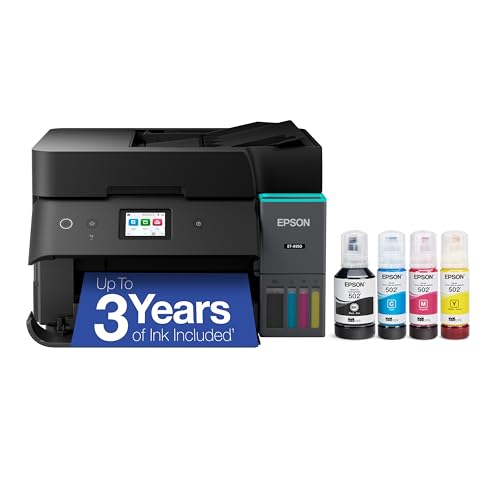
Epson EcoTank ET-4950 Wireless Supertank Printer with ADF
Home offices with steady document volume wanting long-term ink savings
Our take Check price for Epson EcoTank ET-4950 Wireless Supertank Printer with ADF (opens in a new tab)

Best Value Supertank with ADF
Epson EcoTank ET-4800 Wireless Supertank Printer with ADF
Home offices wanting supertank ink savings and an ADF at a lower entry price
Our take Check price for Epson EcoTank ET-4800 Wireless Supertank Printer with ADF (opens in a new tab)
Alternate Pick, Verify ADF Before Buying
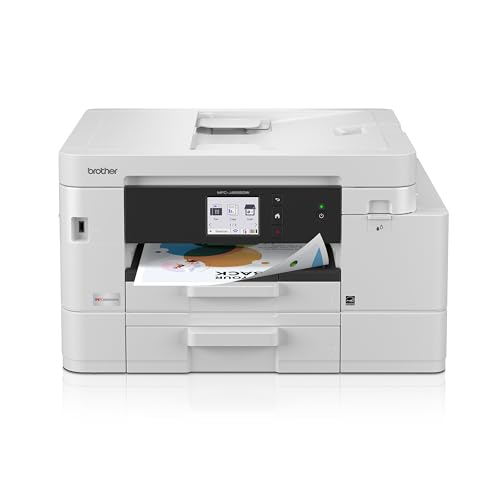
Brother INKvestment 4555 Wireless Color Inkjet All-in-One (MFC-J4555DW)
Buyers who want dual paper trays and ink-tank economics, and will confirm ADF specs directly
Our take Check price for Brother INKvestment 4555 Wireless Color Inkjet All-in-One (MFC-J4555DW) (opens in a new tab)
Our Picks
Best Budget ADF Pick1 of 8
Canon PIXMA TR4720 All-in-One Wireless Printer with ADF on Amazon (opens in a new tab)
The PIXMA TR4720's automatic document feeder is a genuine time-saver for scanning multi-page documents, a stack of standard letter paper goes through without repositioning each sheet on the glass manually.
Best for
- Buyers who scan occasional multi-page text documents on a budget
Why we like it
Mobile printing setup follows a short guided process, and built-in fax remains for anyone who still needs it.
Budget ADFs like this one are best suited to standard text documents rather than photos, thick cardstock, or glossy paper, which generally shouldn't go through an ADF mechanism at all regardless of the printer. For everyday multi-page scanning at the lowest price in this list, it's a reasonable starting point.
Automatic document feeder handles standard multi-page scans.
Key dimensions & specs
- Automatic document feeder for standard paper
- Print, scan, copy, fax
- Mobile printing support
- Wireless connectivity
- Compact home printer design
Pros
- Lowest price of any ADF pick in this list
- Automatic document feeder handles standard multi-page scans
- Guided mobile printing setup
- Full 4-in-1 feature set including fax
Cons
- Budget ADF mechanisms are more prone to skew and multi-feed than premium models
- Cartridge-based ink costs more at high volume
- Not built for sustained high-volume printing
Best Balance of Speed and Reliability2 of 8
HP OfficeJet Pro 8125e Wireless All-in-One with ADF on Amazon (opens in a new tab)
The OfficeJet Pro 8125e's ADF is paired with duplex printing, aimed at a home office that regularly handles both scanning stacks of documents and printing two-sided reports.
Best for
- Home offices that scan and duplex print regularly in one workflow
Why we like it
A 3-month Instant Ink trial helps offset early ink cost on a printer built for more consistent volume than the budget picks in this list.
As with any inkjet ADF, standard weight paper is the safe zone, thick cardstock and photo paper should still go on the flatbed rather than through the feeder to avoid a jam.
Key dimensions & specs
- Automatic document feeder with duplex printing
- 3-month Instant Ink trial included
- AI-capable printing features
- Home-office oriented design
- Wireless connectivity
Pros
- ADF and duplex printing work together well for document-heavy workflows
- Instant Ink trial reduces early ink cost
- Built for steadier home-office volume
- Reliable wireless setup
Cons
- Higher upfront price than budget ADF picks
- Thick paper and photo stock should skip the ADF
- Cartridge costs return to normal after the trial
Most Full-Featured ADF Pick3 of 8
Canon PIXMA TR8620a All-in-One Printer with ADF on Amazon (opens in a new tab)
The TR8620a combines an automatic document feeder with AirPrint support, Alexa compatibility, and photo printing quality, a fuller feature set than the more basic ADF picks here.
Best for
- Buyers who want ADF scanning plus stronger photo printing and smart-home features
Why we like it
It's the pricier option in this list, worth it if you'll use the extra capability rather than just the ADF.
Like other inkjet ADFs, keep photo paper and thick cardstock on the flatbed instead. For document-heavy scanning combined with better photo output than a typical budget inkjet, this covers both jobs reasonably well.
Better photo printing than basic ADF inkjets.
Key dimensions & specs
- Automatic document feeder
- Print, copy, scan, fax
- AirPrint and Android compatible
- Works with Alexa
- Photo and document printing
Pros
- Fullest feature set of any ADF pick in this list
- Better photo printing than basic ADF inkjets
- AirPrint and Alexa support
- Automatic document feeder for multi-page scanning
Cons
- Most expensive inkjet pick in this list
- Overkill if you only need basic document scanning
- Larger footprint than budget picks
Best for Heavy Document Volume4 of 8
Canon Color imageCLASS MF753Cdw II Duplex Laser Printer with ADF on Amazon (opens in a new tab)
This is the most capable ADF pick in this list, a color laser printer rated at 35 pages per minute with a full copier, scanner, and fax built in, backed by a 3-year limited warranty.
Best for
- Home offices with real document volume that need a durable, faster ADF
Why we like it
The ADF on a laser-class machine like this is generally built to handle sustained daily volume better than the inkjet ADFs above.
It's a higher price point than the rest of this list, appropriate for a home office scanning and printing documents at real volume rather than occasionally. For lighter needs, one of the lower-priced inkjet ADF picks will do the job for far less money.
Key dimensions & specs
- Automatic document feeder, laser-class reliability
- 35 PPM duplex color laser printing
- Copier, scanner, fax built in
- 3-year limited warranty
- Wireless connectivity
Pros
- Built for sustained higher-volume document scanning and printing
- 35 PPM print speed with duplex support
- 3-year limited warranty
- Laser reliability over inkjet at this volume
Cons
- Significantly higher price than the rest of this list
- Larger footprint than compact inkjet picks
- Overkill for occasional home scanning needs
Best Value Combined ADF and Duplex5 of 8
HP OfficeJet Pro 8125 Wireless All-in-One with ADF on Amazon (opens in a new tab)
The standard OfficeJet Pro 8125 offers the same ADF and duplex printing combination as the 8125e, a solid middle-ground price for a home office that needs both multi-page scanning and two-sided printing without stepping up to laser pricing.
Best for
- Home offices wanting ADF and duplex printing
Why we like it
A 3-month Instant Ink trial is included.
As with the 8125e, standard weight paper is the safe zone for this ADF, thicker stock belongs on the flatbed.
Instant Ink trial reduces early ink cost.
Key dimensions & specs
- Automatic document feeder with duplex printing
- 3-month Instant Ink trial included
- AI-capable printing features
- Home-office oriented design
- Wireless connectivity
Pros
- ADF and duplex printing work together for document workflows
- Instant Ink trial reduces early ink cost
- Competitive pricing versus the 8125e
- Reliable wireless setup
Cons
- Thick paper and photo stock should skip the ADF
- Higher upfront price than budget inkjet picks
- Cartridge costs return to normal after the trial
Best Long-Term Ink Economics with ADF6 of 8
Epson EcoTank ET-4950 Wireless Supertank Printer with ADF on Amazon (opens in a new tab)
The ET-4950 pairs an automatic document feeder with Epson's refillable ink tank system rated for up to 3 years of ink, a strong option for a home office that scans and prints regularly and wants to avoid frequent cartridge purchases.
Best for
- Home offices with steady document volume wanting long-term ink savings
Why we like it
4-inch color touchscreen makes navigating scan and copy settings straightforward.
The higher upfront cost is offset by the long-run ink savings if your volume justifies a supertank system, for occasional light use, a cheaper cartridge-based ADF pick will be more cost-effective overall.
Color touchscreen simplifies scan and copy tasks.
Key dimensions & specs
- Automatic document feeder
- Refillable ink tanks, up to 3 years of ink
- 2.4-inch color touchscreen
- 18 PPM print speed
- Wireless connectivity
Pros
- Long-lasting ink supply reduces per-page cost over time
- Color touchscreen simplifies scan and copy tasks
- Automatic document feeder for multi-page scanning
- Good fit for steady home-office document volume
Cons
- High upfront price compared to cartridge-based picks
- Larger footprint due to the ink tank system
- Only cost-effective if your volume justifies it
Best Value Supertank with ADF7 of 8
Epson EcoTank ET-4800 Wireless Supertank Printer with ADF on Amazon (opens in a new tab)
The ET-4800 brings supertank ink economics and an automatic document feeder to a lower price point than the ET-4950, still including a scanner, copier, fax, and Ethernet for a wired network option if WiFi isn't reliable in your space.
Best for
- Home offices wanting supertank ink savings and an ADF at a lower entry price
Why we like it
It's a useful middle ground for home offices weighing ink cost against upfront price.
Like the ET-4950, the higher upfront cost pays off mainly at moderate-to-higher print and scan volume, not for someone printing a handful of pages a month.
Key dimensions & specs
- Automatic document feeder
- Cartridge-free supertank ink system
- Scanner, copier, fax built in
- Ethernet and wireless connectivity
- Compact for a supertank printer
Pros
- Lower entry price than the ET-4950 supertank pick
- Ethernet option for a wired network alternative
- Cartridge-free ink reduces long-term cost
- Full document-handling feature set
Cons
- Higher upfront price than basic cartridge-based ADF picks
- Only cost-effective at moderate-to-higher volume
- Larger footprint than compact inkjet picks
Alternate Pick, Verify ADF Before Buying8 of 8
Brother INKvestment 4555 Wireless Color Inkjet All-in-One (MFC-J4555DW) on Amazon (opens in a new tab)
7-inch color touchscreen and 2 paper trays, useful for a home office juggling different paper sizes without swapping trays constantly.
Best for
- Buyers who want dual paper trays and ink-tank economics, and will confirm ADF specs directly
Why we like it
The listing highlights the touchscreen and dual trays prominently rather than explicitly confirming an automatic document feeder in its title.
Brother's MFC-series printers commonly include an ADF, but since it isn't stated outright in this listing, confirm the automatic document feeder spec on the full product page before buying if that's the feature you specifically need. The dual paper trays and ink-tank system are solid selling points either way.
Key dimensions & specs
- 2.7-inch color touchscreen
- 2 paper trays
- Ink-tank system
- Refresh Subscription trial included
- Wireless connectivity
Pros
- 2 paper trays reduce swapping for different paper sizes
- Color touchscreen simplifies navigation
- Ink-tank system reduces per-page cost over time
- Ink subscription trial included
Cons
- Automatic document feeder is not explicitly confirmed in the listing title, verify before buying
- Higher price than basic cartridge-based ADF picks
- Ink-tank refills take longer than a cartridge swap
How We Chose These Printers with Automatic Document Feeders
Each pick was assessed across 5 criteria weighted for real-world use.
- ADF capacity and use case fit
- Weighed whether each pick's ADF is built for occasional short stacks or sustained higher-volume multi-page scanning, matching the pick to a realistic home or home-office workload.
- Flagged paper types that generally shouldn't go through any ADF, thick cardstock, glossy photo paper, thermal receipts, regardless of how premium the printer is.
- Distinguished picks with automatic two-sided scanning from those requiring a manual flip halfway through a stack, a real time difference for double-sided documents.
- Price relative to document volume needs
- Assessed whether each pick's price makes sense for its target volume, from a budget inkjet for occasional scanning to a laser built for sustained daily document handling.
- Feature completeness beyond the ADF
- Considered what else each pick offers, duplex printing, fax, photo quality, ink system, since the ADF is rarely the only factor that should drive the purchase decision.
What to Look for in a Printer with Automatic Document Feeders
Key buying criteria so you get the right fit the first time.
Match actual size and capacity to your real need, not the category label alone
Listings for a printer with automatic document feeder often use a size or capacity label ("compact," "large," "heavy-duty") that isn't standardized across brands, so the same label can mean meaningfully different actual dimensions or capacity from one product to the next.
This matters because buying based on the category label rather than the specific listed dimensions or capacity is a common way to end up with something that doesn't actually fit your space or handle your real load.
Check the listing for exact measurements or a stated capacity figure, and compare that directly against your actual space or need, not just the marketing size category.
Verify build material and construction quality from reviews, not just spec-sheet claims
A product description can describe material or construction in flattering terms that don't always hold up under real, sustained use, and the gap between a listing's claimed quality and its actual durability only shows up in how the product performs after weeks or months of real use, not in day-one photos.
This matters more for anything you'll use daily or under real load, less for occasional light use where durability matters less.
Check reviews specifically for mentions of how the printer with automatic document feeder holds up over time, not just unboxing-day impressions, and treat a listing's own quality claims as a starting point to verify, not a guarantee.
Confirm any headline feature actually works as advertised, not just that it's listed
A feature appearing in a product's bullet points doesn't guarantee it performs well in practice, some features are functional but limited, and a few are closer to a marketing checkbox than a useful capability.
This matters directly if a specific feature is the main reason you're choosing this printer with automatic document feeder over a simpler, cheaper alternative, since a feature that underperforms in practice undermines the whole reason for paying more.
Check reviews specifically for real-world experiences with the exact feature that matters most to you, not just whether the feature is listed at all.
Weigh review count alongside rating, not rating alone
This matters more for a purchase you're relying on to perform consistently over time, less for a low-stakes, easily replaceable item.
Check both the star rating and the review count together for any printer with automatic document feeder you're considering, and treat a high rating on a very small review count as a promising but less-proven signal.
Check compatibility and fit with your existing setup before ordering
A printer with automatic document feeder that looks like a straightforward fit in photos can still have a compatibility detail, a connector type, a mounting requirement, a size threshold, that doesn't match your existing setup, and this kind of mismatch is one of the most common and avoidable reasons for a return.
This matters directly if the product needs to physically connect to, mount on, or otherwise integrate with something you already own.
Check the listing's specific compatibility details against your exact existing setup, not just the general product category, before ordering.
How to Choose a Printer with Automatic Document Feeders
By Rating Confidence: Highest Rated vs Most Reviewed
| Canon Color imageCLASS MF753Cdw II Duplex Laser Printer with ADF |
Canon PIXMA TR4720 All vs Canon Color imageCLASS MF753Cdw II Duplex Laser Printer with ADF
- The lower-priced option in this comparison, worth checking its actual specs and review history against your specific need before assuming it's enough.
- Canon Color imageCLASS MF753Cdw II Duplex Laser Printer with ADF
- The higher-priced option, worth it if it offers real, checkable headroom in build quality, capacity, or features over the cheaper pick.
Default to Canon PIXMA TR4720 All unless your specific need calls for the pricier pick's extra headroom.
For a First-Time Buyer Specifically
- Clear, specific dimensions or capacity and a real, established review history, not just marketing language.
- You need real durability and feature depth for regular use, where Canon Color imageCLASS MF753Cdw II Duplex Laser Printer with ADF's build gives real headroom over the cheaper picks.
- You only need this for light or occasional use, where Canon PIXMA TR4720 All covers the same job at a lower price.
Frequently Asked Questions
Can I put a photo through the automatic document feeder?
No, use the flatbed instead. ADF mechanisms are built for standard-weight text paper, and feeding a photo or glossy print through the rollers risks creasing or jamming it. This applies to every pick in this list, not just budget models.
Why did my document come out of the ADF crooked?
Skew is more common on budget ADF mechanisms than premium ones. If you scan important documents regularly, a mid-tier pick like the HP OfficeJet Pro 8125e generally handles alignment better than the cheapest ADF options.
What's the difference between a duplex ADF and a single-sided ADF?
A duplex ADF scans both sides of each page automatically in one pass through the feeder. A single-sided ADF only scans one side per pass, requiring you to manually flip the stack and run it through again for the second side, a real time cost on longer double-sided documents.
Is ADF scanning louder than flatbed scanning?
Yes, the mechanical feeding process of an ADF is noticeably louder than the quiet pass of a flatbed scan head. If your desk doubles as a video call space, plan to batch ADF scans outside of meeting times.
Why does my ADF jam more often than the paper tray?
ADF jams are more common than paper tray jams because the feed mechanism handles thinner sheets moving through rollers rather than sitting flat. Creased paper, stray staples, or paper that's too thin are the most common causes, remove staples and straighten your stack before loading it.
Does the Brother INKvestment 4555 have an automatic document feeder?
7-inch color touchscreen and 2 paper trays but doesn't explicitly confirm an ADF in the title. Brother's MFC-series printers commonly include one, but confirm this spec on the full product page before buying if an ADF is a useful feature for you.
Bottom Line
Best overall: Canon PIXMA TR4720 All-in-One Wireless Printer with ADF — best budget adf pick pick in this roundup. See the full verdicts above for every pick, with pros, cons and who each one suits.
Browse all printers with automatic document feeders on Amazon — Prime-eligible options with current pricing.