
Buying Guide
The Best Printer Stands Under $20, Compared
We looked at 4 printer stands under $20 side by side, with the trade-offs that separate them and who each one suits.
By Jamie Cole, Lead Product Researcher
7 min read4 products evaluated
We may earn a commission from purchases made through links in this guide. Learn more.
Under $20, printer stands are compact 2-tier shelves built from particleboard and metal, and the real differentiator is stated weight capacity and whether the unit rolls or stays fixed in place.
We compared this lineup on weight capacity, caster mobility, and construction material, since a stand rated too low for your specific printer can wobble or sag over time even if it looks similar to a higher-capacity option in photos.
Quick Picks
Our 4 recommendations at a glance. Tap a pick for the full verdict.
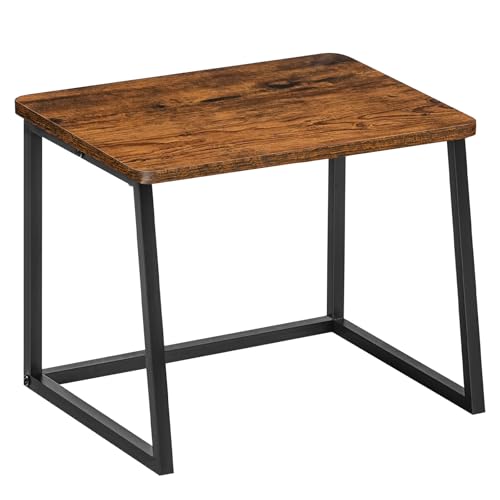
Best Overall
HOOBRO Printer Stand for Desk, 2-Tier Desktop Printer Shelf
Buyers who want the highest weight capacity at the lowest price
Our take Check price for HOOBRO Printer Stand for Desk, 2-Tier Desktop Printer Shelf (opens in a new tab)

Best Mobility
Asgolion Printer Table, 2-Tier Under Desk Printer Stand
Buyers who specifically want rolling mobility for their printer setup
Our take Check price for Asgolion Printer Table, 2-Tier Under Desk Printer Stand (opens in a new tab)

Best Weight Capacity Value
Gewudraw Printer Stand, Printer Table for Home Office
Buyers who want the highest weight capacity with warranty coverage
Our take Check price for Gewudraw Printer Stand, Printer Table for Home Office (opens in a new tab)

Best Stability Design
VYUOL Printer Stand for Desk
Buyers who want reinforced bracing and a document-catching mesh design
Our take Check price for VYUOL Printer Stand for Desk (opens in a new tab)
Our Picks
Best Overall1 of 4
HOOBRO Printer Stand for Desk, 2-Tier Desktop Printer Shelf on Amazon (opens in a new tab)
This stand's 55 lb weight capacity is the highest stated figure in this comparison at the lowest price point, backed by sturdy particleboard and metal construction.
Best for
- Buyers who want the highest weight capacity at the lowest price
Why we like it
Rounded corners help prevent bumps, and non-slip pads secure the unit in place while protecting your desk surface from scratches.
Compared to the Asgolion pick below, this one skips rolling casters entirely in favor of a fixed, stable base, positioning it for buyers who want a stationary desktop or under-desk shelf rather than a mobile cart. 8 inch footprint maximizes desktop area while still providing genuine storage.
Best for buyers who want the highest weight capacity at the lowest price in this tier.
Key dimensions & specs
- 55 lb capacity, 15.7in x 11.8in x 11.8in
- Particleboard and metal frame
- Fixed base, non-slip pads
Pros
- Highest weight capacity in this comparison at 55 lbs
- Cheapest pick in this tier
- Non-slip pads protect desk surface and improve stability
Cons
- No rolling casters, unlike the Asgolion pick
- Fixed placement design without mobility
Best Mobility2 of 4
Asgolion Printer Table, 2-Tier Under Desk Printer Stand on Amazon (opens in a new tab)
This stand's four 360-degree swivel casters, two of which lock, let you push, pull, or reposition it easily while still securing it firmly once positioned under a desk.
Best for
- Buyers who specifically want rolling mobility for their printer setup
Why we like it
Its solid MDF board and metal frame construction provide stable support for standard home printers and office supplies.
Compared to the fixed HOOBRO pick above, this one trades some weight capacity for genuine rolling mobility, a worthwhile tradeoff if you need to move your printer setup between rooms or configurations regularly. The spacious top fits inkjet, laser, photo, and all-in-one printer models.
Best for buyers who specifically want rolling mobility for repositioning their printer setup.
Key dimensions & specs
- 15in x 11in x 12.5in, MDF and metal frame
- 4 swivel casters, 2 with locks
- Fits inkjet, laser, photo, all-in-one printers
Pros
- Rolling casters allow easy repositioning between rooms
- Locking wheels secure the stand once positioned
- Spacious top accommodates most standard printer types
Cons
- No stated weight capacity figure, unlike the HOOBRO pick
- Slightly pricier than the fixed HOOBRO option
Best Weight Capacity Value3 of 4
Gewudraw Printer Stand, Printer Table for Home Office on Amazon (opens in a new tab)
This stand's stated 120 lb maximum loading capacity substantially exceeds the other picks in this comparison, backed by heavy-duty MDF boards with a thickened metal frame measuring 1 inch thick.
Best for
- Buyers who want the highest weight capacity with warranty coverage
Why we like it
Four adjustable feet keep the organizer stable and prevent scratching on your tabletop.
Compared to the HOOBRO pick, this one costs slightly more but delivers over double the stated weight capacity, a meaningful consideration if your printer or combined office supplies are on the heavier side. A 12-month product replacement warranty backs the purchase alongside 24/7 customer service support.
Best for buyers who want the highest stated weight capacity with warranty backing.
Key dimensions & specs
- 120 lb max capacity, 15.35in x 11.02in x 11.88in
- Heavy-duty MDF, thickened metal frame
- 12-month replacement warranty
Pros
- Highest stated weight capacity in this comparison at 120 lbs
- 12-month replacement warranty backs the purchase
- Adjustable feet prevent tabletop scratching
Cons
- No rolling casters, fixed placement only
- Slightly pricier than the HOOBRO pick
Best Stability Design4 of 4
VYUOL Printer Stand for Desk on Amazon (opens in a new tab)
This stand's X-shaped support design between its iron pipes specifically improves structural stability beyond a simple straight-leg design, and a diamond-shaped iron mesh at the bottom prevents papers and files from falling through.
Best for
- Buyers who want reinforced bracing and a document-catching mesh design
Why we like it
Its particle board and iron pipe construction is built to withstand the weight of most standard printers.
Compared to the Gewudraw pick above, this one prioritizes structural bracing design over a headline weight capacity figure, though the listing doesn't specify an exact number the way the Gewudraw does. 8 inch footprint works both above and under a desk.
Best for buyers who want reinforced structural bracing with a document-catching mesh design.
Key dimensions & specs
- 16.5in x 11.4in x 11.8in, X-shape iron support
- Particle board, iron pipe construction
- Diamond mesh bottom shelf
Pros
- X-shaped bracing improves stability over simple straight legs
- Diamond mesh bottom shelf prevents papers from falling through
- Works both above and under a desk
Cons
- No stated weight capacity figure, unlike the Gewudraw pick
- Most expensive pick in this tier
How We Chose These Printer Stands Under $20
Each pick was assessed across 5 criteria weighted for real-world use.
- Compared stated weight capacity figures where disclosed across the lineup.
- Compared fixed-base stands against rolling caster designs for repositioning.
- Checked for reinforced support designs like X-shaped bracing beyond simple straight legs.
- Compared particleboard, MDF, and metal frame combinations across all four picks.
- Checked for stated warranty coverage and customer support availability.
What to Look for in a Printer Stand Under $20
Key buying criteria so you get the right fit the first time.
A Stated Weight Capacity Figure Matters More Than a Stand's Visual Sturdiness in Photos
The Gewudraw pick's stated 120 lb maximum loading capacity gives you a concrete number to check against your actual printer's weight plus any additional supplies you plan to store, while the Asgolion and VYUOL picks don't specify an exact capacity figure despite looking similarly built in product photos. This matters because a heavier all-in-one printer or laser printer can weigh considerably more than a compact inkjet, and exceeding an unstated capacity limit risks sagging shelves or structural failure over time. Weigh your actual printer (checking the manufacturer's spec sheet if needed) and compare it against any stated capacity figure, treating an unstated capacity as a reason for extra caution rather than assumed safety.
Rolling Casters Add Genuine Mobility Value Only If Your Setup Actually Needs to Move
The Asgolion pick's four swivel casters with 2 locking wheels let you reposition the stand between desk configurations or rooms without lifting it, a feature that provides real value if you regularly rearrange your workspace or share the printer between different desk setups. This matters less if your printer stand will realistically sit in one permanent spot for its entire service life, where a fixed-base pick like the HOOBRO delivers the same core storage function without paying for unused mobility. Consider your actual space's flexibility needs honestly before assuming rolling casters are worth any price premium over a fixed-base alternative.
X-Shaped or Reinforced Bracing Provides Real Structural Stability Benefits Beyond Simple Straight-Leg Designs
The VYUOL pick's X-shaped support design between its iron pipes specifically improves lateral stability compared to a simple straight-leg design, since the diagonal bracing resists side-to-side wobble more effectively than vertical legs alone, a detail that matters more on a taller or narrower stand where tipping risk is naturally higher. This matters most if your stand will regularly experience some lateral force, like a printer's paper feed mechanism vibrating during operation, and matters less on a very short, wide, inherently stable base. Check product images and descriptions for diagonal or X-shaped bracing details if stability during active printer use is a specific concern for your setup.
A Document-Catching Mesh Bottom Shelf Solves a Small But Annoying Everyday Problem
The VYUOL pick's diamond-shaped iron mesh bottom shelf specifically prevents loose papers, files, or documents from falling through gaps that a simple open-frame or wire-shelf design might allow, a small but real practical detail for anyone storing loose paper stacks on the lower shelf. This matters if you plan to store unbound documents or loose paper reams on the bottom shelf, less so if you're only storing boxed items or bound folders that won't slip through gaps regardless. Check whether a listing specifically describes a solid or fine-mesh bottom shelf versus a wider wire-grid design if loose paper storage is part of your plan.
A Stated Warranty Length Changes the Real Risk Calculation for a Budget Furniture Purchase
The Gewudraw pick's stated 12-month product replacement warranty backed by 24/7 customer service support provides a concrete fallback if the stand develops a defect or fails prematurely, a detail the other three picks in this comparison don't specifically highlight in their listings. This matters more for a purchase you're relying on to hold expensive equipment like a printer, where an early structural failure could risk damage to that equipment, not just the stand itself. Check the listing's warranty section specifically rather than assuming all budget furniture at this price point carries equivalent coverage.
How to Choose a Printer Stand Under $20
| The highest weight capacity at the lowest price | HOOBRO Printer Stand for Desk, 2-Tier Desktop Printer Shelf |
|---|---|
| Rolling mobility to reposition your setup | Asgolion Printer Table, 2-Tier Under Desk Printer Stand |
| The highest weight capacity with warranty backing | Gewudraw Printer Stand, Printer Table for Home Office |
| Reinforced bracing and a document-catching mesh | VYUOL Printer Stand for Desk |
Fixed Base vs Rolling Casters
- Fixed base (HOOBRO, Gewudraw, VYUOL)
- Provides a stable, stationary platform without the added cost or complexity of caster wheels, better for a printer that stays in one spot.
- Lets you reposition the stand easily between desk configurations or rooms, worth the tradeoff if your setup changes regularly.
If your printer setup is permanent and won't move, a fixed-base pick like the HOOBRO saves a little money. If you rearrange your workspace often, the Asgolion's rolling casters add genuine convenience.
| Light printers under 55 lbs total load | |
|---|---|
| Heavier printers or combined supplies up to 120 lbs | |
| Unspecified capacity, standard home printers |
For a Shared Home Office With Multiple Users Specifically
- Rolling casters with locking wheels, so the printer stand can be repositioned to accommodate different users' desk setups without needing to lift and carry it.
- The Asgolion pick's four swivel casters with 2 locking wheels specifically support easy repositioning for a shared or frequently rearranged office space.
- You want the highest stated weight capacity with warranty backing, where the Gewudraw pick delivers both at the top of this tier.
- You just need a basic fixed stand for a lightweight printer, where the HOOBRO pick covers that for about $3 less.
Frequently Asked Questions
Can the fixed-base picks in this tier be used with rolling casters added separately?
It's possible to add aftermarket casters to a fixed-base stand, but doing so isn't officially supported by the manufacturer and could affect the stand's stated weight capacity, so choosing a pick with built-in casters like the Asgolion is the more reliable option if mobility matters.
What's the most common mistake buyers make when choosing a printer stand under $20?
Not checking their printer's actual weight against a stand's stated capacity, or assuming an unstated capacity figure means the stand handles any printer safely, when a heavier all-in-one printer could exceed what a budget stand is actually built to support.
Is the Gewudraw pick worth it over the cheaper HOOBRO option?
If you specifically need the highest weight capacity or want warranty backing, yes, but if your printer is lightweight and you just want a basic, low-cost stand, the HOOBRO pick covers that for about $3 less.
How do I know if my printer will fit on the top shelf of these compact stands?
5 inches wide, which fits most standard printers but not larger professional-grade models.
Do any of these printer stands require tools for assembly?
No, all four picks in this comparison are designed for tool-free or minimal-tool assembly with included hardware and step-by-step instructions, typically completable in 10 minutes or less.
Can these stands double as general storage shelves if I don't have a printer?
Yes, all four picks are explicitly marketed as multi-purpose organizers suitable for books, plants, kitchen items, or general storage beyond just printer use, making them versatile even without a dedicated printer to place on top.
Bottom Line
Best overall: HOOBRO Printer Stand for Desk, 2-Tier Desktop Printer Shelf — best overall pick in this roundup. See the full verdicts above for every pick, with pros, cons and who each one suits.
Browse all printer stands under $20 on Amazon — Prime-eligible options with current pricing.