
Buying Guide
The Best Printer Stands for Small Spaces, Compared
We looked at 8 printer stands for small spaces side by side, with the trade-offs that separate them and who each one suits.
By Jamie Cole, Lead Product Researcher
10 min read8 products evaluated
We may earn a commission from purchases made through links in this guide. Learn more.
Small space printer stands live or die on real footprint, not marketing copy. Small is a meaningless label unless it is tied to actual dimensions, and a stand that looks compact in a photo can still block a tray from opening if it is wedged too far into a corner. Total footprint also matters more than the stand's own dimensions, since most printers overhang their base by 2 to 4 inches per side once you set them on top.
This list includes dedicated printer stands alongside a few honestly labeled alternatives, including a couple of CPU tower stands and general-purpose utility carts that were originally built for other jobs. Where that is the case, we say so directly rather than calling something a purpose-built printer stand when it is not. 99 for a full rolling printer table.
Quick Picks
Our 8 recommendations at a glance. Tap a pick for the full verdict.

Best Overall for Small Spaces
HUANUO Printer Stand with Cable Management and Storage Drawer
Buyers who want a genuine, dedicated printer stand sized for small rooms
Our take Check price for HUANUO Printer Stand with Cable Management and Storage Drawer (opens in a new tab)

Best Under-Desk Fit
HOOBRO 2-Tier Printer Stand with Charging Station
Studio apartments and dorm-size rooms that need a compact under-desk stand
Our take Check price for HOOBRO 2-Tier Printer Stand with Charging Station (opens in a new tab)

Best for Larger Printers in a Small Room
YAOHUOO 22x15 Large Printer Stand with Drawer
Small rooms where the printer itself, not the room, is the larger constraint
Our take Check price for YAOHUOO 22x15 Large Printer Stand with Drawer (opens in a new tab)
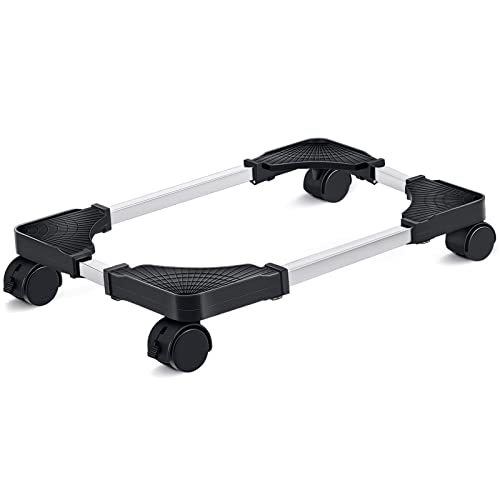
Honest Pick: CPU Stand, Not a Printer Stand
Liitrton Mobile CPU Stand, Adjustable Computer Tower Stand
Buyers who specifically need the smallest possible footprint and are comfortable repurposing a CPU stand
Our take Check price for Liitrton Mobile CPU Stand, Adjustable Computer Tower Stand (opens in a new tab)

Honest Pick: Monitor Riser, Not a Printer Stand
WALI Computer Monitor Stand with Underneath Storage
Tiny rooms with no floor space, where the printer must sit on the desk itself
Our take Check price for WALI Computer Monitor Stand with Underneath Storage (opens in a new tab)
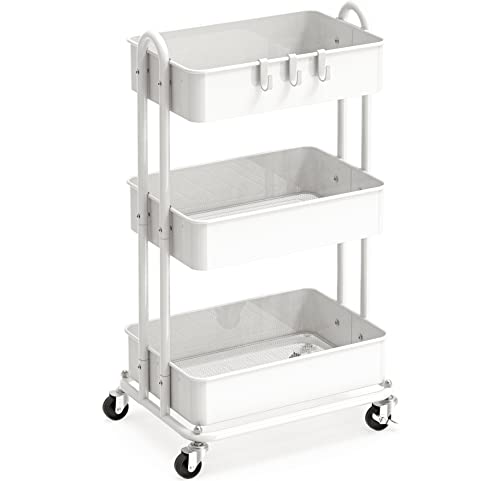
Honest Pick: Utility Cart, Flexible Small-Space Platform
Simple Houseware 3-Tier Heavy Duty Metal Utility Rolling Cart
Buyers who want one flexible rolling cart to handle a printer plus general small-space storage
Our take Check price for Simple Houseware 3-Tier Heavy Duty Metal Utility Rolling Cart (opens in a new tab)

Honest Pick: Compact Utility Cart
Pipishell 3 Tier Rolling Cart, Metal Utility Cart with Wheels and Handle
Buyers who want to store a printer out of sight and wheel it out only when needed
Our take Check price for Pipishell 3 Tier Rolling Cart, Metal Utility Cart with Wheels and Handle (opens in a new tab)

Honest Pick: Lightest Utility Cart
Sywhitta 3-Tier Plastic Rolling Utility Cart with Handle
Budget buyers with a lightweight compact printer who want the cheapest flexible cart
Our take Check price for Sywhitta 3-Tier Plastic Rolling Utility Cart with Handle (opens in a new tab)
Our Picks
Best Overall for Small Spaces1 of 8
HUANUO Printer Stand with Cable Management and Storage Drawer on Amazon (opens in a new tab)
1 inches maximum height rather than sitting as a bulky standalone piece in a small room.
Best for
- Buyers who want a genuine, dedicated printer stand sized for small rooms
Why we like it
A rear cable management channel keeps power and USB cords from adding visible clutter to a tight space.
Locking wheels let you park it exactly where it fits, and the storage drawer keeps ink or paper out of sight instead of taking up separate shelf space elsewhere in the room. This is the clearest purpose-built pick in this list for buyers who specifically want printer stand furniture rather than a repurposed cart or riser.
Slides fully under most desks when not in use.
Key dimensions & specs
- 14.1-inch maximum height
- Rear cable management channel
- Locking caster wheels
- Storage drawer under the top shelf
- Fits compact and mid-size printers
Pros
- Purpose-built as a printer stand, not a repurposed cart
- Slides fully under most desks when not in use
- Locking wheels hold position once placed
- Built-in drawer avoids needing separate storage
Cons
- Not sized for large business AIO printers
- Single drawer limits total storage
- Low height means bending down if used as a standalone floor piece
Best Under-Desk Fit2 of 8
HOOBRO 2-Tier Printer Stand with Charging Station on Amazon (opens in a new tab)
The HOOBRO is a dedicated under-desk printer stand with a low, narrow profile that suits studio apartments and small home offices where floor space is the scarcest resource.
Best for
- Studio apartments and dorm-size rooms that need a compact under-desk stand
Why we like it
Its built-in charging shelf adds function without adding footprint, since it uses vertical space rather than a wider base. The 2-tier open design keeps the total footprint tight while still separating the printer from a paper ream or accessories below. It is one of the more affordable dedicated printer stands in this list, and its rustic finish reads as real furniture rather than a utility cart. The standout detail is that charging shelf adds function without extra floor space. Balancing that out, open shelves offer less dust protection.
Key dimensions & specs
- 2-tier open shelf design
- Built-in charging station shelf
- Compact under-desk profile
- Rustic brown and black finish
- Suited to compact printers
Pros
- Compact footprint suits small rooms
- Charging shelf adds function without extra floor space
- Affordable dedicated printer stand
- Furniture-style finish, not a utility-cart look
Cons
- Open shelves offer less dust protection
- Smaller tabletop than larger printer tables
- No locking wheels
Best for Larger Printers in a Small Room3 of 8
YAOHUOO 22x15 Large Printer Stand with Drawer on Amazon (opens in a new tab)
This is a genuine tradeoff pick: the largest tabletop in this list at 22 by 15 inches, which fits a business-class printer that would overhang a smaller stand, but it also occupies more floor space than the other picks.
Best for
- Small rooms where the printer itself, not the room, is the larger constraint
Why we like it
If your printer itself is large, a bigger stand designed to hold it properly is often the better small-space choice than squeezing an oversized printer onto an undersized platform.
The 2-tier rolling design adds a lower shelf for paper, and the built-in drawer keeps ink and cables contained. Measure your available floor footprint carefully, including the printer's overhang once placed on top, before choosing this over a more compact pick.
2-tier layout adds real storage.
Key dimensions & specs
- 22"W x 15"D tabletop
- 2-tier rolling design
- Built-in storage drawer
- Fits business-class AIO printers
- Casters for repositioning
Pros
- Large enough tabletop for bigger printers
- 2-tier layout adds real storage
- Rolling casters for repositioning in a tight room
- Drawer keeps supplies out of sight
Cons
- Largest footprint in this list, needs more floor space
- Not the best fit for the smallest rooms
- Heavier to reposition than the compact picks
Honest Pick: CPU Stand, Not a Printer Stand4 of 8
Liitrton Mobile CPU Stand, Adjustable Computer Tower Stand on Amazon (opens in a new tab)
To be direct, this is a CPU tower stand, not a printer stand, and it is not marketed as printer furniture.
Best for
- Buyers who specifically need the smallest possible footprint and are comfortable repurposing a CPU stand
Why we like it
What makes it worth including here is its small, low, adjustable platform with rolling casters, which can support a compact desktop printer for a buyer who needs the smallest possible footprint and does not mind repurposing a computer accessory.
Its adjustable width fits it into a tight gap beside a desk, and the low profile keeps it out of sight. This works as a flexible, budget small-footprint platform, not as a dedicated printer solution, so check your printer's weight and base size against the stand's adjustable width before relying on it.
Adjustable width fits narrow gaps beside furniture. Both are worth keeping in mind before deciding.
Key dimensions & specs
- Adjustable width, fits most tower sizes
- Rolling casters
- Low, compact platform
- Originally designed as a CPU tower stand
- $15.99
Pros
- Very small footprint, ideal for the tightest spaces
- Adjustable width fits narrow gaps beside furniture
- Rolling casters for repositioning
- Lowest price in this list
Cons
- Not designed or marketed as a printer stand
- No dedicated cable management
- Limited to compact, lightweight printers only
Honest Pick: Monitor Riser, Not a Printer Stand5 of 8
WALI Computer Monitor Stand with Underneath Storage on Amazon (opens in a new tab)
This is a monitor and laptop riser, not a printer stand, and we are labeling it honestly rather than pretending otherwise.
Best for
- Tiny rooms with no floor space, where the printer must sit on the desk itself
Why we like it
It earns a spot here because its flat, sturdy top and underneath storage compartment can hold a small compact printer on a desk corner, which is a useful option in a tiny room with no floor space to spare for a standalone stand. It is the cheapest pick in this list by a wide margin. It is best thought of as a desktop-level platform rather than a floor-standing printer stand, and it will not accommodate a printer heavier than a small compact model.
Key dimensions & specs
- Desktop riser platform
- Underneath storage compartment
- Originally designed as a monitor/laptop riser
- Compact desktop footprint
- $9.99
Pros
- Lowest price in this list
- Underneath storage adds a bonus compartment
- Works on a desk when there is zero floor space
- Small enough to fit any desk corner
Cons
- Not designed or marketed as a printer stand
- Only suits small, light compact printers
- No cable management or drawer
Honest Pick: Utility Cart, Flexible Small-Space Platform6 of 8
Simple Houseware 3-Tier Heavy Duty Metal Utility Rolling Cart on Amazon (opens in a new tab)
This is a general-purpose 3-tier rolling utility cart, not a printer-specific product, and we are framing it that way rather than mislabeling it.
Best for
- Buyers who want one flexible rolling cart to handle a printer plus general small-space storage
Why we like it
Its genuine strength for a small room is flexibility: the narrow metal frame rolls easily between rooms and can hold a printer on one tier while keeping paper or supplies on another.
Heavy-duty metal construction supports more total weight than most dedicated printer stands, useful if you want one cart to double as printer storage and general organization in a tight apartment.
Higher total weight capacity than most dedicated stands. That said, not designed or marketed as printer furniture.
Key dimensions & specs
- 3-tier heavy duty metal frame
- Rolling casters
- White finish
- Originally a general utility cart
- Narrow footprint for its capacity
Pros
- Rolls easily between rooms in a small apartment
- Higher total weight capacity than most dedicated stands
- 3 tiers separate printer, paper, and supplies
- Narrow footprint given its capacity
Cons
- Not designed or marketed as printer furniture
- Open wire-shelf look, not furniture-style finish
- No cable management
Honest Pick: Compact Utility Cart7 of 8
Pipishell 3 Tier Rolling Cart, Metal Utility Cart with Wheels and Handle on Amazon (opens in a new tab)
Another general-purpose rolling utility cart rather than dedicated printer furniture, the Pipishell's narrow 3-tier metal frame and built-in handle make it easy to wheel between a closet and a desk in a small apartment, which suits buyers who do not want a printer stand taking up permanent floor space.
Best for
- Buyers who want to store a printer out of sight and wheel it out only when needed
Why we like it
Its handle is a small but useful detail for maneuvering the cart in a tight room where a wide turning radius is not an option. Like the other utility carts in this list, expect an open wire-shelf appearance rather than a furniture finish.
Key dimensions & specs
- 3-tier metal frame
- Built-in handle for maneuvering
- Rolling wheels
- White finish
- Originally a general utility cart
Pros
- Handle makes it easy to wheel in tight spaces
- Narrow frame fits between furniture
- 3 tiers for printer plus supplies
- Affordable at under $30
Cons
- Not designed or marketed as printer furniture
- Open wire shelving, not enclosed storage
- No cable management
Honest Pick: Lightest Utility Cart8 of 8
Sywhitta 3-Tier Plastic Rolling Utility Cart with Handle on Amazon (opens in a new tab)
This is the lightest and most affordable general utility cart in this list, plastic rather than metal, and again not marketed as a printer stand.
Best for
- Budget buyers with a lightweight compact printer who want the cheapest flexible cart
Why we like it
Its lighter weight makes it easier to lift and reposition in a small room, though it also means a lower overall weight capacity than the metal utility carts above.
A 3-tier layout works the same way as the metal carts, separating a compact printer from paper and supplies across separate shelves. This is the pick for buyers who want the absolute lowest-cost flexible platform and are working with a lighter, compact printer rather than a heavier business AIO.
Lightweight and easy to lift or reposition.
Key dimensions & specs
- 3-tier plastic frame
- Rolling wheels
- Built-in handle
- White finish
- Lightest pick in this list
Pros
- Cheapest option among the utility cart picks
- Lightweight and easy to lift or reposition
- 3 tiers for printer plus supplies
- Handle aids maneuvering in tight rooms
Cons
- Lower weight capacity than metal utility carts
- Not designed or marketed as printer furniture
- Plastic construction feels less sturdy long-term
How We Chose These Printer Stands for Small Spaces
Each pick was assessed across 5 criteria weighted for real-world use.
- Real footprint versus marketed size
- Compared each pick's actual dimensions against small-space footprint tiers, rather than trusting the word small in a listing title without a number behind it.
- Confirmed whether each pick is a printer stand or actually a CPU tower stand, monitor riser, or general utility cart, and framed each one according to what it actually is rather than its search-optimized title.
- Total footprint including printer overhang
- Accounted for the printer's own overhang, typically 2 to 4 inches per side beyond the stand's base, since the real floor footprint is always larger than the stand's dimensions alone.
- Vertical versus horizontal space use
- Weighed taller, narrower designs against wider, lower ones, since going vertical is often the better small-space strategy when floor width is the limiting factor.
- Scored caster quality and overall weight, since a small-space stand often needs to be wheeled out of the way rather than staying in one fixed spot permanently.
What to Look for in a Printer Stand for Small Spaces
Key buying criteria so you get the right fit the first time.
Verify real weight capacity against your printer's actual weight, not the display model
A printer stand's listed weight capacity is often demonstrated with a small inkjet in marketing photos, which understates the load a heavy all-in-one laser printer or multifunction unit with a large paper tray actually places on the platform.
This matters because a stand rated below your specific printer's real weight can flex, wobble, or fail over time even if it looks sturdy when empty, and this category overlaps heavily with CPU tower stands and monitor risers that were never marketed for printer weight specifically.
Check your printer's actual listed weight in its own spec sheet, and compare it directly against the stand's stated capacity with real margin, not just enough to technically clear the number.
Check for genuine vibration stability, not just static weight capacity
A printer generates real vibration during operation, especially a laser printer's internal mechanisms or an inkjet's print head carriage moving back and forth, and a stand that holds static weight fine can still wobble or transmit noise during active printing if its construction isn't rigid enough.
This matters more for a printer used frequently throughout the day, where vibration and noise become a real recurring annoyance, less for one used only occasionally.
Check reviews specifically for mentions of stability or wobble during actual printing, not just whether the stand holds the printer's weight while sitting idle.
Consider ventilation clearance for a printer's exhaust and paper path
Many printers vent heat from internal components and need clearance around the paper output tray for pages to eject without jamming, and a stand or enclosure that boxes the printer in too tightly can interfere with both, and this becomes a real issue with fully enclosed cabinet-style stands versus open shelf designs.
This matters more for a printer under regular heavy use generating real internal heat, and for any stand style that partially encloses the unit rather than a simple open platform.
Check the stand's design for open sides or back clearance around where your printer vents and ejects paper, not just its front-facing dimensions.
Match storage features to what you'll actually use them for
Many printer stands include drawers or shelves for paper and supplies, and while this consolidates printer supplies in one spot, an oversized storage-heavy stand can eat significantly more floor or desk space than a simple platform-only riser, without adding proportional benefit if you don't actually keep much paper or supplies nearby.
This matters directly if floor or desk space is tight, where a simpler platform-only design maximizes the space savings that's likely the whole point of buying a stand in the first place.
Check the stand's actual footprint including any drawers or shelves against your available space, not just the platform surface dimensions.
Weigh honest labeling: a CPU stand or monitor riser can work just as well as a dedicated printer stand
This product category overlaps heavily with CPU tower stands and monitor risers, since a low, stable platform rated for real weight works just as well under a compact printer as under a computer tower, even when it was never marketed specifically as a printer stand, and this often means more design and price options than searching "printer stand" alone would surface.
This matters because limiting your search strictly to products labeled "printer stand" can mean missing a better-built, better-priced option marketed for a different but functionally identical use case.
Check listed dimensions and real weight capacity rather than the product category label alone, since a well-built CPU stand or monitor riser with adequate capacity is a legitimate substitute.
How to Choose a Printer Stand for Small Spaces
By Rating Confidence: Highest Rated vs Most Reviewed
| HUANUO Printer Stand with Cable Management and Storage Drawer | |
| HUANUO Printer Stand with Cable Management and Storage Drawer |
| WALI Computer Monitor Stand with Underneath Storage | |
| YAOHUOO 22x15 Large Printer Stand with Drawer |
- Easy to reposition for access or cleaning, worth it if the stand needs to move regularly. In this comparison: HUANUO Printer Stand with Cable Management and Storage Drawer, YAOHUOO 22x15 Large Printer Stand with Drawer, Liitrton Mobile CPU Stand, Simple Houseware 3, Pipishell 3 Tier Rolling Cart, Sywhitta 3.
- More stable under a heavy printer since there's no wheel mechanism to add wobble. In this comparison: HOOBRO 2, WALI Computer Monitor Stand with Underneath Storage.
Default to stationary unless you specifically need to reposition the stand often.
Check each pick's design for open clearance around your printer's exhaust and paper output path before buying, not just its front-facing dimensions.
For a Heavy All-in-One Printer Specifically
- A weight capacity with real margin above your printer's actual listed weight, and genuine vibration stability confirmed in reviews, not just static capacity.
- Check each pick's listing directly, since weight capacity isn't consistently disclosed across every stand in this comparison.
- Your printer is heavy or used frequently throughout the day, where YAOHUOO 22x15 Large Printer Stand with Drawer's capacity and stability give real headroom over the cheaper picks.
- You have a light, compact printer used only occasionally, where WALI Computer Monitor Stand with Underneath Storage covers the same job at a lower price.
Frequently Asked Questions
What counts as a small footprint for a printer stand?
A footprint under roughly 16 by 14 inches suits a tight desk nook or dorm corner, while under 20 by 16 inches still counts as compact but allows a slightly larger printer. Compare these tiers against your actual available space rather than trusting the word small in a product title.
Should I get a taller, narrower stand instead of a wide one for a small room?
Floor width is usually the scarcer resource in an apartment or dorm room, so a vertical stand like the HUANUO or HOOBRO can leave more clear floor space around it than a wide, low utility cart occupying the same square footage differently.
Is a CPU stand or monitor riser actually okay to use as a printer stand?
It can work for a lightweight, compact printer, but these products were not designed or rated for printer use. The Liitrton CPU stand and WALI monitor riser in this list are honestly framed as repurposed platforms rather than dedicated printer furniture, and they suit the smallest footprints when a purpose-built stand does not fit.
How much extra space does a printer add beyond the stand's own dimensions?
Most printers overhang their stand's base by roughly 2 to 4 inches per side once placed on top, so the real total footprint is always larger than the stand's listed dimensions. Factor this overhang into your room measurements before ordering.
Do I need clearance in front of or above a printer stand for the paper tray?
It depends on your printer. Top-load printers need clearance above the unit for the lid or tray to open, while front-load printers need clearance in front for the tray to slide out. Check your printer's tray type before placing a stand tightly into a corner.
Are the utility carts in this list actually good for printers, or just repurposed?
They are repurposed general-purpose carts, not printer-specific furniture, and we say so directly rather than mislabeling them. Their real advantage is flexibility, a metal or plastic rolling cart can hold a printer on one tier and paper or supplies on another, often for less money than dedicated printer stands.
Bottom Line
Best overall: HUANUO Printer Stand with Cable Management and Storage Drawer — best overall for small spaces pick in this roundup. See the full verdicts above for every pick, with pros, cons and who each one suits.
Browse all printer stands for small spaces on Amazon — Prime-eligible options with current pricing.