
Buying Guide
The Best Monitor Arm Desk Mounts: Clamp, Grommet or Wall
Eight single monitor arms compared on clamp, grommet or wall mounting, weight range, screen size and VESA.
By Jamie Cole, Lead Product Researcher
10 min read8 products evaluated
We may earn a commission from purchases made through links in this guide. Learn more.
Choosing a monitor arm starts with how it attaches. A C-clamp grips the desk edge; a grommet mount passes through a hole in the desk; a wall mount avoids the desk entirely but needs drilling into a stud. Check your desk's edge thickness and whether it has, or can take, a grommet hole.
Then match the arm's weight range to your monitor's weight without its stand, and confirm the VESA pattern. Budget arms here top out around 20 to 26 lb; the TitanLift handles 44 lb and 49-inch screens.
Our comparison is based on published specifications, not hands-on testing. Prices ranged from about $20 to $240 at the time of writing.
Quick Picks
Our 8 recommendations at a glance. Tap a pick for the full verdict.

Best Long-Term Arm
Ergotron LX Monitor Arm
Ergotron's LX for monitors up to 34 inches and 7 to 25 lb, with clamp or grommet mounting.
Best for: A heavier monitor up to 34 inches, used daily.
Our take Check price for Ergotron LX Monitor Arm (opens in a new tab)

Best Budget Clamp and Grommet Arm
HUANUO FlowLift Single Monitor Mount
A HUANUO arm for 13- to 32-inch monitors, 4.4 to 19.8 lb, with clamp and grommet bases included.
Best for: Standard monitors on any desk edge or grommet.
Our take Check price for HUANUO FlowLift Single Monitor Mount (opens in a new tab)

Lowest Price, Tool-Free VESA
ErGear Single Monitor Arm
An ErGear arm for 13- to 34-inch screens up to 19.8 lb, with tool-free VESA and cable management.
Best for: A simple arm for a light monitor on a tight budget.
Our take Check price for ErGear Single Monitor Arm (opens in a new tab)

Highest Rating Under $20
WALI Single Monitor Mount
A WALI clamp arm for 13- to 34-inch screens up to 26.4 lb, VESA 75/100mm.
Best for: Heavier monitors on a budget.
Our take Check price for WALI Single Monitor Mount (opens in a new tab)

Best Tool-Free Clamp and Grommet Arm
HUANUO FlowLift Pro Monitor Arm
HUANUO's FlowLift Pro for 13- to 32-inch screens up to 19.8 lb, with tool-free VESA and both mounts.
Best for: Easy monitor attachment on any desk.
Our take Check price for HUANUO FlowLift Pro Monitor Arm (opens in a new tab)

Best for Heavy and Ultrawide Screens
HUANUO TitanLift Heavy Duty Monitor Arm
A reinforced aluminum arm for screens up to 49 inches and 44 lb, with dual C-clamp.
Best for: Heavy curved and ultrawide monitors.
Our take Check price for HUANUO TitanLift Heavy Duty Monitor Arm (opens in a new tab)

Premium White Arm
Ergotron LX Pro Premium Monitor Arm
Ergotron's LX Pro in white, for monitors up to 34 inches and 4 to 22 lb.
Best for: A white desk setup with a light to mid-weight monitor.
Our take Check price for Ergotron LX Pro Premium Monitor Arm (opens in a new tab)
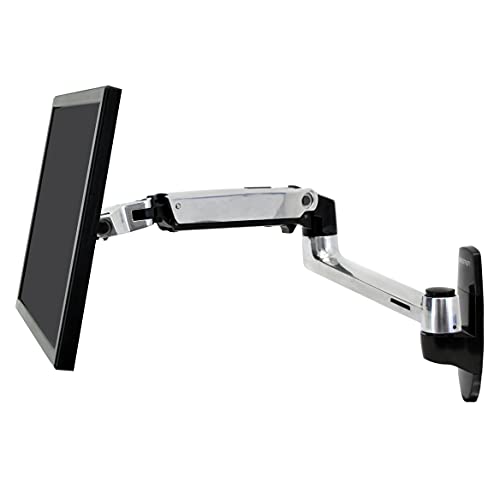
Wall-Mounted Arm
Ergotron LX Single Monitor Arm, VESA Wall Mount
Ergotron's LX wall-mount arm for monitors up to 34 inches, 7 to 25 lb; requires stud installation.
Best for: Desks that can't take a clamp, where wall mounting is possible.
Our take Check price for Ergotron LX Single Monitor Arm, VESA Wall Mount (opens in a new tab)
| Pick | Why it’s here | Best for | Price |
|---|---|---|---|
| Ergotron's LX for monitors up to 34 inches and 7 to 25 lb, with clamp or grommet mounting. | A heavier monitor up to 34 inches, used daily. | Check price for Ergotron LX Monitor Arm (opens in a new tab) |
| A HUANUO arm for 13- to 32-inch monitors, 4.4 to 19.8 lb, with clamp and grommet bases included. | Standard monitors on any desk edge or grommet. | Check price for HUANUO FlowLift Single Monitor Mount (opens in a new tab) |
| An ErGear arm for 13- to 34-inch screens up to 19.8 lb, with tool-free VESA and cable management. | A simple arm for a light monitor on a tight budget. | Check price for ErGear Single Monitor Arm (opens in a new tab) |
| A WALI clamp arm for 13- to 34-inch screens up to 26.4 lb, VESA 75/100mm. | Heavier monitors on a budget. | Check price for WALI Single Monitor Mount (opens in a new tab) |
| HUANUO's FlowLift Pro for 13- to 32-inch screens up to 19.8 lb, with tool-free VESA and both mounts. | Easy monitor attachment on any desk. | Check price for HUANUO FlowLift Pro Monitor Arm (opens in a new tab) |
| A reinforced aluminum arm for screens up to 49 inches and 44 lb, with dual C-clamp. | Heavy curved and ultrawide monitors. | Check price for HUANUO TitanLift Heavy Duty Monitor Arm (opens in a new tab) |
| Ergotron's LX Pro in white, for monitors up to 34 inches and 4 to 22 lb. | A white desk setup with a light to mid-weight monitor. | Check price for Ergotron LX Pro Premium Monitor Arm (opens in a new tab) |
| Ergotron's LX wall-mount arm for monitors up to 34 inches, 7 to 25 lb; requires stud installation. | Desks that can't take a clamp, where wall mounting is possible. | Check price for Ergotron LX Single Monitor Arm, VESA Wall Mount (opens in a new tab) |
Our Picks
Best Long-Term Arm1 of 8
Ergotron LX Monitor Arm on Amazon (opens in a new tab)
The Ergotron LX is the established choice for a single monitor up to 34 inches, including curved and ultrawide panels, rated for 7 to 25 lb with VESA 75 or 100mm, and it mounts by clamp or grommet.
Best for
- A heavier monitor up to 34 inches, used daily.
Skip if
- Your monitor is light and standard size; the HUANUO FlowLift costs a fraction.
Why we like it
It costs several times more than the budget arms here at the time of writing; what the extra buys is Ergotron's track record and wide weight range.
Key dimensions & specs
- Screen: up to 34" (flat, curved, ultrawide)
- Load: 7–25 lb
- VESA: 75 or 100mm
- Mount: clamp or grommet
- Finish: matte black
Pros
- Wide weight range
- Clamp or grommet
- Established brand
Cons
- Costs far more than budget arms
- Not for 49-inch screens
- 100mm VESA maximum
Best Budget Clamp and Grommet Arm2 of 8
HUANUO FlowLift Single Monitor Mount on Amazon (opens in a new tab)
The HUANUO FlowLift covers standard monitors from 13 to 32 inches and 4.4 to 19.8 lb, with both a C-clamp and grommet base in the box, plus tilt, swivel and rotation.
Best for
- Standard monitors on any desk edge or grommet.
Skip if
- Your monitor is over 19.8 lb; the WALI or Ergotron LX is rated higher.
Why we like it
It was under $35 at the time of writing. Heavier or larger screens need a higher-rated arm.
Key dimensions & specs
- Screen: 13–32"
- Load: 4.4–19.8 lb
- Mount: C-clamp and grommet included
- Adjustment: tilt, swivel, rotation
Pros
- Both mounts included
- Low price
- Full adjustment
Cons
- 19.8 lb maximum
- Up to 32 inches
- VESA pattern not stated in summary
Lowest Price, Tool-Free VESA3 of 8
ErGear Single Monitor Arm on Amazon (opens in a new tab)
The ErGear is the least expensive arm here: it holds 13- to 34-inch screens up to 19.8 lb, with a tool-free VESA plate (up to 100 x 100mm), a clamp mount and built-in cable management.
Best for
- A simple arm for a light monitor on a tight budget.
Skip if
- You need a grommet mount; the HUANUO FlowLift includes one.
Why we like it
It was under $20 at the time of writing. A grommet option isn't mentioned.
Key dimensions & specs
- Screen: 13–34"
- Load: up to 19.8 lb
- VESA: tool-free, up to 100 x 100mm
- Mount: clamp
- Cable management: built in
Pros
- Lowest price here
- Tool-free VESA
- Cable management
Cons
- Clamp only
- 19.8 lb maximum
- Minimum weight not stated
Highest Rating Under $204 of 8
WALI Single Monitor Mount on Amazon (opens in a new tab)
The WALI carries more weight than the other budget arms, up to 26.4 lb, for 13- to 34-inch screens (WALI suggests regular screens up to 32 inches), with a VESA 75/100mm plate and clamp mount.
Best for
- Heavier monitors on a budget.
Skip if
- You want grommet mounting; the HUANUO FlowLift Pro includes it.
Why we like it
It was under $20 at the time of writing. A grommet option isn't mentioned in the summary.
Key dimensions & specs
- Screen: 13–34" (regular up to 32")
- Load: up to 26.4 lb
- VESA: 75/100mm
- Mount: clamp
Pros
- Highest load among budget arms
- Low price
- Standard VESA
Cons
- Clamp only
- Adjustment details limited
- Minimum weight not stated
Best Tool-Free Clamp and Grommet Arm5 of 8
HUANUO FlowLift Pro Monitor Arm on Amazon (opens in a new tab)
The FlowLift Pro adds a tool-free VESA attachment to the FlowLift formula: 13- to 32-inch screens up to 19.8 lb, clamp and grommet bases included, with tilt, swivel and rotation.
Best for
- Easy monitor attachment on any desk.
Skip if
- Your screen is heavy; the WALI or Ergotron LX is rated higher.
Why we like it
It was slightly cheaper than the standard FlowLift at the time of writing.
Key dimensions & specs
- Screen: 13–32"
- Load: up to 19.8 lb
- VESA: tool-free
- Mount: clamp and grommet included
Pros
- Tool-free VESA
- Both mounts
- Low price
Cons
- 19.8 lb maximum
- Up to 32 inches
- Minimum weight not stated
Best for Heavy and Ultrawide Screens6 of 8
HUANUO TitanLift Heavy Duty Monitor Arm on Amazon (opens in a new tab)
The TitanLift is the arm for big screens: rated up to 49 inches and 44 lb, aluminum, with a dual C-clamp base, and HUANUO describes a reinforced design.
Best for
- Heavy curved and ultrawide monitors.
Skip if
- Your monitor is under 20 lb; a budget arm is enough.
Why we like it
It has a five-year warranty in other listings.
VESA is 100 x 100mm maximum, so check larger monitors' patterns, and the dual clamp needs clear desk edge.
Key dimensions & specs
- Screen: up to 49"
- Load: up to 44 lb
- Mount: dual C-clamp
- Material: aluminum
- VESA: up to 100 x 100mm
Pros
- Highest load here
- Ultrawide-capable
- Reinforced (per manufacturer)
Cons
- No grommet listed
- VESA max 100mm
- Costs more than budget arms
Premium White Arm7 of 8
Ergotron LX Pro Premium Monitor Arm on Amazon (opens in a new tab)
The Ergotron LX Pro is the premium version in white, for flat, curved or ultrawide monitors up to 34 inches from 4 to 22 lb, with clamp or grommet mounting and VESA 75 or 100mm.
Best for
- A white desk setup with a light to mid-weight monitor.
Skip if
- You need up to 25 lb; the standard LX is rated higher.
Why we like it
Its upper weight limit is lower than the standard LX's 25 lb, and it costs more; the white finish is the main reason to choose it.
Key dimensions & specs
- Screen: up to 34"
- Load: 4–22 lb
- VESA: 75 or 100mm
- Mount: clamp or grommet
- Finish: white
Pros
- White finish
- Lower minimum weight (4 lb)
- Clamp or grommet
Cons
- Lower max than the LX
- Costs more than the LX
- Not for heavy screens
Wall-Mounted Arm8 of 8
Ergotron LX Single Monitor Arm, VESA Wall Mount on Amazon (opens in a new tab)
The Ergotron LX wall mount frees the desk entirely: the arm attaches to a wall rather than the desk, holding monitors up to 34 inches from 7 to 25 lb, in polished aluminum.
Best for
- Desks that can't take a clamp, where wall mounting is possible.
Skip if
- You rent or can't drill; a clamp or grommet arm avoids wall work.
Why we like it
It requires installation into a wall stud, so it involves drilling and suits spaces where that's allowed. It was the most expensive arm here at the time of writing.
Key dimensions & specs
- Mount: wall (stud installation)
- Screen: up to 34"
- Load: 7–25 lb
- Finish: polished aluminum
Pros
- No desk clamp needed
- Clear desk surface
- Established brand
Cons
- Requires drilling into a stud
- Most expensive here
- Fixed to one wall position
How We Chose These Monitor Arm Desk Mounts
Each pick was assessed across 4 criteria weighted for real-world use.
- Mounting
- We compared clamp, grommet and wall options.
- Load and size
- We compared weight ranges and screen sizes.
- Adjustment
- We noted VESA attachment and movement.
- Price
- We compared prices at the time of writing.
What to Look for in a Monitor Arm Desk Mount
Key buying criteria so you get the right fit the first time.
Pick a mount type
Clamp, grommet or wall; several arms include both clamp and grommet bases.
Use the bare-panel weight
Compare with the arm's range, including any minimum (Ergotron LX 7 lb).
Check VESA
Most here support 75/100mm; larger screens may need other patterns.
Check desk strength
Heavy monitors need a solid desk; glass or hollow-core tops may not suit clamps.
How to Choose a Monitor Arm Desk Mount
By monitor
| Monitor / desk | Consider |
|---|---|
| Light monitor, lowest cost | ErGear |
| Up to 26 lb, budget | WALI |
| Clamp or grommet, budget | HUANUO FlowLift or FlowLift Pro |
| Up to 34", long-term | Ergotron LX |
| White setup | Ergotron LX Pro |
| Heavy or 49" ultrawide | HUANUO TitanLift |
| Wall instead of desk | Ergotron LX wall mount |
Frequently Asked Questions
Clamp or grommet?
A clamp needs a solid desk edge; a grommet needs a hole but keeps the edge clear. The HUANUO FlowLift models include both.
How do I know my monitor's weight?
Use the weight without the stand from the manufacturer's specifications.
What if my monitor is too light?
Some arms have a minimum; below it, a gas spring may not hold position.
Does the wall mount need drilling?
Yes, it installs into a wall stud.
Is a $20 arm enough?
For a light, standard monitor, often; check load and VESA.
Bottom Line
For a standard monitor, the HUANUO FlowLift Pro and FlowLift include clamp and grommet mounts for little money, and the WALI handles more weight under $20. The Ergotron LX is worth paying more for a heavier 34-inch screen used every day.
For heavy ultrawides, the TitanLift is rated to 44 lb. The Ergotron wall mount clears the desk entirely, if you can drill into a stud.