
Buying Guide
The Best Mini PCs with OCuLink: Picks and Trade-offs
We looked at 5 mini PCs with OCuLink side by side, with the trade-offs that separate them and who each one suits.
By Jamie Cole, Lead Product Researcher
9 min read5 products evaluated
We may earn a commission from purchases made through links in this guide. Learn more.
OCuLink delivers closer-to-native PCIe bandwidth to an external GPU than USB4 or Thunderbolt-based EGPU connections, worth understanding this real performance advantage before assuming any external GPU interface performs similarly.
OCuLink cable length and connector quality affect signal reliability more than buyers expect, worth using a certified cable at a reasonable length rather than assuming any OCuLink cable performs identically regardless of length or build quality.
Quick Picks
Our 5 recommendations at a glance. Tap a pick for the full verdict.

Best OCuLink Mini PC Overall
GMKtec AI Mini PC Ultra 9 285H (Turbo 5.4GHz) 32GB DDR5 1TB PCIe 4.0 SSD
Buyers wanting a powerful, well-proven base system for OCuLink EGPU pairing
Our take Check price for GMKtec AI Mini PC Ultra 9 285H (Turbo 5.4GHz) 32GB DDR5 1TB PCIe 4.0 SSD (opens in a new tab)

Best Value OCuLink Pick
GMKtec K15 Mini PC AI Ultra 5 125U(up to 4.3GHz) 32GB DDR5 1TB PCIe 4.0 SSD
Buyers wanting OCuLink EGPU flexibility at a more accessible base system price
Our take Check price for GMKtec K15 Mini PC AI Ultra 5 125U(up to 4.3GHz) 32GB DDR5 1TB PCIe 4.0 SSD (opens in a new tab)
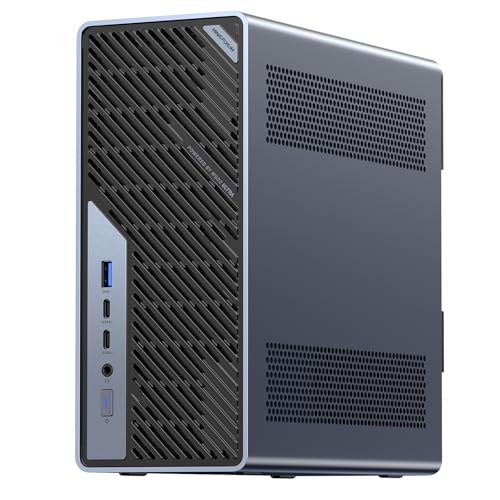
Best Workstation-Class OCuLink Pick
MINISFORUM MS-02 Ultra Mini Workstation PC, Intel Core Ultra 9 285HX (24C/24T, up to 5.5GHz)
Buyers wanting workstation-class processing power alongside genuine OCuLink EGPU expansion
Our take Check price for MINISFORUM MS-02 Ultra Mini Workstation PC, Intel Core Ultra 9 285HX (24C/24T, up to 5.5GHz) (opens in a new tab)

Best HS-Class Pick with OCuLink
GMKtec M6 Ultra Gaming Mini PC Ryzen 7640HS 32GB RAM DDR5 1TB SSD
Buyers wanting a well-balanced HS-class base system for OCuLink EGPU pairing at a moderate price
Our take Check price for GMKtec M6 Ultra Gaming Mini PC Ryzen 7640HS 32GB RAM DDR5 1TB SSD (opens in a new tab)

Best High-AI-Capability Pick with OCuLink Potential
GEEKOM A9 Max High AI Productivity Mini PC,AMD Ryzen AI 9 HX 370(80 Tops)
Buyers wanting a strong AI-capable base system for potential combined AI and EGPU graphics use
Our take Check price for GEEKOM A9 Max High AI Productivity Mini PC,AMD Ryzen AI 9 HX 370(80 Tops) (opens in a new tab)
Our Picks
Best OCuLink Mini PC Overall1 of 5
GMKtec AI Mini PC Ultra 9 285H (Turbo 5.4GHz) 32GB DDR5 1TB PCIe 4.0 SSD on Amazon (opens in a new tab)
0 SSD for one main reason.
Best for
- Buyers wanting a powerful, well-proven base system for OCuLink EGPU pairing
Why we like it
0 SSD, which is worth weighing if cost is your deciding factor between the two.
On the other side, Verify the specific OCuLink port generation and bandwidth.
Key dimensions & specs
- Intel Ultra 9 285H (Turbo 5.4GHz)
- 32GB DDR5 RAM
- 1TB PCIe 4.0 SSD
Pros
- Powerful base processor well-suited to OCuLink EGPU pairing
- 32GB DDR5 RAM for strong overall system performance
- 1TB fast storage included
Cons
- Requires a separate OCuLink EGPU enclosure and card purchase
- Higher price reflecting the powerful base system
- Verify the specific OCuLink port generation and bandwidth
Best Value OCuLink Pick2 of 5
GMKtec K15 Mini PC AI Ultra 5 125U(up to 4.3GHz) 32GB DDR5 1TB PCIe 4.0 SSD on Amazon (opens in a new tab)
An Intel Ultra 5 125U with OCuLink connectivity at a more accessible price than the top pick, appropriate for buyers wanting EGPU flexibility without premium base-system pricing.
Best for
- Buyers wanting OCuLink EGPU flexibility at a more accessible base system price
Why we like it
On the other side, Verify the specific OCuLink port generation and bandwidth.
Key dimensions & specs
- Intel Ultra 5 125U (up to 4.3GHz)
- 32GB DDR5 RAM
- 1TB PCIe 4.0 SSD
- More accessible price point
Pros
- More accessible price than the flagship OCuLink pick
- 32GB DDR5 RAM for strong overall performance
- Good value for buyers wanting EGPU flexibility
Cons
- Less powerful base processor than the Ultra 9 top pick
- Requires a separate OCuLink EGPU enclosure and card purchase
- Verify the specific OCuLink port generation and bandwidth
Best Workstation-Class OCuLink Pick3 of 5
MINISFORUM MS-02 Ultra Mini Workstation PC, Intel Core Ultra 9 285HX (24C/24T, up to 5.5GHz) on Amazon (opens in a new tab)
A genuine workstation-class 24-core, 24-thread processor appropriate for buyers wanting maximum processing power alongside OCuLink EGPU expansion capability.
Best for
- Buyers wanting workstation-class processing power alongside genuine OCuLink EGPU expansion
Why we like it
On the other side, Requires a separate OCuLink EGPU enclosure and card purchase.
Key dimensions & specs
- Intel Core Ultra 9 285HX, 24C/24T
- Workstation-class processor
- OCuLink connectivity
- Premium price point
Pros
- Genuine workstation-class 24-core processor for demanding parallel workloads
- OCuLink connectivity for genuine near-native EGPU bandwidth
- Strong overall system capability for professional use
- Appropriate for professional compute alongside graphics needs
Cons
- Premium price reflecting the workstation-class processor
- Requires a separate OCuLink EGPU enclosure and card purchase
Best HS-Class Pick with OCuLink4 of 5
GMKtec M6 Ultra Gaming Mini PC Ryzen 7640HS 32GB RAM DDR5 1TB SSD on Amazon (opens in a new tab)
A genuine HS-class Ryzen 7640HS with 32GB DDR5 RAM, appropriate for buyers wanting a well-balanced base system for OCuLink EGPU pairing at a more moderate price.
Best for
- Buyers wanting a well-balanced HS-class base system for OCuLink EGPU pairing at a moderate price
Why we like it
The real tradeoff against that pick: Requires a separate OCuLink EGPU enclosure and card purchase.
On the other side, Less powerful base than the Intel Ultra 9 workstation-class pick.
Key dimensions & specs
- AMD Ryzen 7640HS (HS-class)
- 32GB DDR5 RAM
- 1TB SSD
- OCuLink connectivity
Pros
- Genuine HS-class chip for strong sustained base system performance
- 32GB DDR5 RAM for strong overall system performance
- More moderate price than premium OCuLink picks
Cons
- Requires a separate OCuLink EGPU enclosure and card purchase
- Verify the specific OCuLink port generation and bandwidth
- Less powerful base than the Intel Ultra 9 workstation-class pick
Best High-AI-Capability Pick with OCuLink Potential5 of 5
GEEKOM A9 Max High AI Productivity Mini PC,AMD Ryzen AI 9 HX 370(80 Tops) on Amazon (opens in a new tab)
A powerful Ryzen AI 9 HX 370 with high AI processing capability, appropriate for buyers wanting a strong AI-capable base to potentially pair with an OCuLink EGPU for combined AI and graphics workloads.
Best for
- Buyers wanting a strong AI-capable base system for potential combined AI and EGPU graphics use
Why we like it
On the other side, Requires a separate OCuLink EGPU enclosure and card purchase if pursued.
Key dimensions & specs
- AMD Ryzen AI 9 HX 370
- High AI processing capability (80 TOPS)
- Verify OCuLink port availability
- Premium price point
Pros
- powerful chip with strong integrated graphics and AI capability
- High AI processing capability for combined AI and graphics workloads
- Strong overall system performance
Cons
- Verify this specific chassis includes OCuLink connectivity
- Highest price in this guide
- Requires a separate OCuLink EGPU enclosure and card purchase if pursued
How We Chose These Mini PCs with OCuLink
Each pick was assessed across 4 criteria weighted for real-world use.
- OCuLink's near-native bandwidth advantage explained and weighted
- Explained and weighted OCuLink's genuine near-native PCIe bandwidth advantage over USB4 or Thunderbolt-based EGPU connections.
- Base system processing power weighed against OCuLink pairing potential
- Weighed base system processing power against how well it would pair with an OCuLink-connected external GPU.
- Cable quality and length flagged as a real reliability factor
- Flagged that OCuLink cable length and connector quality affect signal reliability, encouraging use of certified cables.
- Total EGPU system cost considered beyond the base mini PC price
- Considered that a genuine OCuLink EGPU setup requires a separate enclosure and card purchase beyond the base mini PC price.
What to Look for in a Mini PC with OCuLink
Key buying criteria so you get the right fit the first time.
Match RAM and storage to your actual workload, not just the headline spec
Mini PC listings often lead with a large RAM number like 16GB, 32GB, or 64GB, but the amount you actually need depends heavily on what you're running: basic web browsing and office work is comfortable at 8 to 16GB, while running multiple virtual machines, a Plex transcoding server, or memory-hungry emulation benefits from 32GB or more.
Buying far more RAM than your workload needs is simply wasted money, while buying too little means the system will lean on slower disk-based swap memory under load, causing real stuttering that a spec sheet number won't warn you about.
Check whether the RAM is soldered (fixed at purchase) or user-upgradeable via SO-DIMM slots, since a soldered configuration means you're locked into whatever capacity you buy today with no future upgrade path.
Understand what the CPU generation and core count actually mean for your use case
A mini PC's processor model number (like an Intel N100, N150, or a specific AMD Ryzen model) tells you its generation and general performance tier, but raw core count and clock speed matter less than how well that specific chip handles your actual workload, since a low-power efficiency chip like the N100 is fine for a home server or media player but will bottleneck video editing or modern gaming badly.
This distinction matters because two mini PCs can list similar-sounding specs while being built around completely different design goals, one optimized for low power draw and silence, the other for sustained performance under load.
Look up independent benchmark results for the exact CPU model rather than trusting a generic "powerful" or "fast" marketing description, since chip model numbers are the one spec that translates directly to comparable real-world performance data.
Check whether the mini PC includes dedicated graphics or relies on integrated graphics alone
Most mini PCs rely on integrated graphics built into the CPU itself, which handles everyday desktop use, video playback, and light gaming fine, but a genuine dedicated GPU or officially supported external GPU (EGPU) connection is a meaningfully different tier needed for serious gaming or GPU-accelerated video editing work.
This is a real distinguishing feature worth checking specifically, since "mini PC" as a category spans everything from a fanless office box with no gaming capability at all to a compact system that can be paired with an external GPU enclosure for near-desktop gaming performance.
If your use case involves gaming or GPU-accelerated tasks, check explicitly for a dedicated GPU or a confirmed Oculink/Thunderbolt EGPU connection rather than assuming any mini PC can be upgraded that way.
Confirm the exact port selection matches your real peripherals, not just the port count
A mini PC's small size means its port selection is fixed at purchase with essentially no room for internal expansion the way a desktop tower allows, so the specific mix of USB versions, display outputs, and networking ports listed matters far more here than on a full-size computer.
Check specifically for the number and type of display outputs if you run multiple monitors, since some budget mini PCs only support two displays despite having enough physical ports to suggest otherwise, and check for dual Ethernet ports specifically if you're planning a home server, router, or NAS build that benefits from network redundancy or link aggregation.
Count your actual peripherals and required display outputs against the listed ports before buying, since there's no expansion card slot to add what's missing later on most mini PC designs.
Weigh fanless passive cooling against active cooling for your noise and thermal tolerance
Mini PCs use either active cooling (an internal fan that spins up under load) or fully passive fanless cooling (relying entirely on the metal chassis itself to dissipate heat), and this choice is a genuine tradeoff rather than one being strictly better: fanless designs run completely silent and have no moving parts to fail, but they also throttle performance under sustained heavy load once the passive heatsink reaches its thermal limit, something an actively cooled system with a fan can sustain longer.
This matters concretely for anyone running a 24/7 home server or media server in a bedroom or living room, where fan noise is a real annoyance, versus anyone running sustained CPU-heavy workloads like video transcoding, where a fanless design may throttle noticeably during long jobs.
Check whether cooling is explicitly described as fanless/passive or fan-cooled/active, and match that to whether silence or sustained performance matters more for where this mini PC will actually live.
How to Choose a Mini PC with OCuLink
| Recommended pick in this comparison | |
|---|---|
| Light everyday or office use | GMKtec M6 Ultra Gaming Mini PC Ryzen 7640HS 32GB RAM DDR5 1TB SSD |
| GMKtec AI Mini PC Ultra 9 285H |
| GMKtec M6 Ultra Gaming Mini PC Ryzen 7640HS 32GB RAM DDR5 1TB SSD | |
| MINISFORUM MS-02 Ultra Mini Workstation PC | |
| No firm budget ceiling, prioritizing CPU or RAM | GMKtec AI Mini PC Ultra 9 285H |
Fanless (Passive) vs Actively Cooled
- Completely silent with no moving parts, at the cost of throttling under sustained heavy load. In this comparison: check each listing's cooling design directly.
- Sustains heavier workloads longer without throttling, at the cost of some fan noise under load. 0 SSD, MINISFORUM MS-02 Ultra Mini Workstation PC.
Default to a fanless pick like GMKtec AI Mini PC Ultra 9 285H for a quiet home office or media setup, and step up to active cooling if you're running sustained CPU-heavy work.
By RAM and Storage Headroom
| GMKtec M6 Ultra Gaming Mini PC Ryzen 7640HS 32GB RAM DDR5 1TB SSD | |
| Maximum RAM and storage headroom | GMKtec AI Mini PC Ultra 9 285H |
For GPU-Accelerated Work or Gaming Specifically
- A dedicated GPU or a confirmed Oculink/Thunderbolt EGPU connection explicitly stated in the listing, not just a generic "gaming capable" claim.
- No pick in this specific comparison explicitly confirms dedicated or external GPU support; check our EGPU-focused mini PC roundup if that's a hard requirement.
- That's a real functional upgrade over the budget picks here, not just a brand markup.
- GMKtec M6 Ultra Gaming Mini PC Ryzen 7640HS 32GB RAM DDR5 1TB SSD already covers the essentials: Genuine HS-class chip for strong sustained base system performance. The main thing you'd be paying extra for elsewhere in this list is headroom you may not need.
Frequently Asked Questions
Is OCuLink better than USB4 or Thunderbolt for an external GPU?
Generally yes, OCuLink delivers closer-to-native PCIe bandwidth, a genuine performance advantage over USB4 or Thunderbolt-based EGPU connections.
Does OCuLink cable quality matter?
Yes, cable length and connector quality affect signal reliability, use a certified cable at a reasonable length.
Do I need a powerful base mini PC for OCuLink EGPU use?
A more powerful base processor pairs better with a high-end external GPU, match your base system to your intended card.
Is an OCuLink EGPU setup expensive?
It requires a separate enclosure and GPU purchase beyond the base mini PC, calculate total system cost before committing.
Bottom Line
Best overall: GMKtec AI Mini PC Ultra 9 285H (Turbo 5.4GHz) 32GB DDR5 1TB PCIe 4.0 SSD — best oculink mini pc overall pick in this roundup. See the full verdicts above for every pick, with pros, cons and who each one suits.
Browse all mini pcs with oculink on Amazon — Prime-eligible options with current pricing.