
Buying Guide
The Best Mini PC Mounts Under $15: Our Picks
We looked at 4 mini PC mounts under $15 side by side, with the trade-offs that separate them and who each one suits.
By Jamie Cole, Lead Product Researcher
7 min read4 products evaluated
We may earn a commission from purchases made through links in this guide. Learn more.
Under $15, mini PC mounts are almost entirely simple VESA extension plates rather than adjustable brackets, meaning the real differentiator is which specific devices each plate's hole pattern and screw kit actually fit, not flexible width or height adjustment.
We compared this lineup on VESA pattern compatibility, specific device fit, and included mounting hardware, since a mismatched hole spacing or missing screw at this price tier means the mount simply won't work for your exact PC model.
Quick Picks
Our 4 recommendations at a glance. Tap a pick for the full verdict.
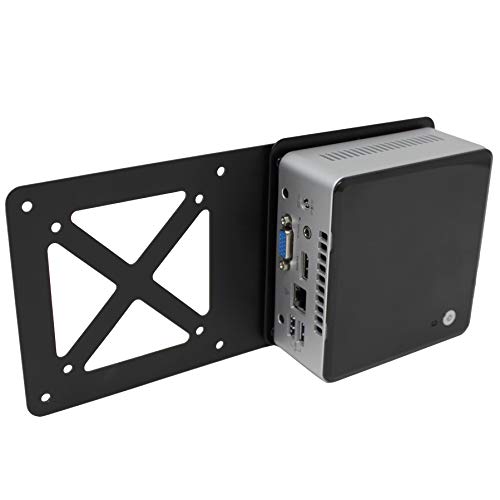
Best Overall
HumanCentric Mounting Bracket for Intel NUC
Intel NUC owners who already have the factory mounting bracket
Our take Check price for HumanCentric Mounting Bracket for Intel NUC (opens in a new tab)

Best for NUC 13/12/11
Bedycoon Mounting Bracket for Intel NUC
Buyers who want to confirm exact NUC generation compatibility upfront
Our take Check price for Bedycoon Mounting Bracket for Intel NUC (opens in a new tab)

Best for Multiple Monitor Setups
IFCASE Metal VESA Extension Plate
Buyers whose monitor stand already occupies the VESA mount point
Our take Check price for IFCASE Metal VESA Extension Plate (opens in a new tab)

Best Budget Value
JINGCHENGMEI Mini PC Wall Mount for Dell OptiPlex Micro
Dell OptiPlex Micro or Lenovo ThinkCentre Tiny owners on the tightest budget
Our take Check price for JINGCHENGMEI Mini PC Wall Mount for Dell OptiPlex Micro (opens in a new tab)
Our Picks
Best Overall1 of 4
HumanCentric Mounting Bracket for Intel NUC on Amazon (opens in a new tab)
This is a VESA extension plate specifically for Intel NUC mini PCs, supporting both the 75x75mm and 100x100mm standard VESA patterns so it fits most monitor arms and wall mounts without a separate adapter search.
Best for
- Intel NUC owners who already have the factory mounting bracket
Why we like it
The listing is explicit that this plate alone doesn't complete the mount, since you still need the Intel NUC mounting bracket that shipped with your NUC to attach the device to this extension plate.
Installation takes only minutes with a screwdriver and included hardware, and the maker backs it with direct support if fit issues come up, a reassurance worth having given how many NUC generations and form factors exist.
Best for buyers with an Intel NUC who already have its factory mounting bracket and just need the VESA extension piece.
Key dimensions & specs
- VESA extension plate, 75x75mm and 100x100mm
- For Intel NUC, requires the NUC's factory bracket
- Includes screws, screwdriver installation
Pros
- Supports both common VESA hole patterns in one plate
- Fast, tool-light installation in minutes
- Direct maker support if fit issues arise
Cons
- Requires the NUC's original bracket, not a complete kit alone
- Not compatible with Hades Canyon, Skull Canyon NUC variants
Best for NUC 13/12/112 of 4
Bedycoon Mounting Bracket for Intel NUC on Amazon (opens in a new tab)
Unlike the HumanCentric extension plate above, this bracket is an all-in-one design built to fit specific back hole spacings of 85mm or 94mm across a wide range of Intel NUC generations, from NUC 13 Pro down through NUC 5, without needing to buy a separate factory adapter.
Best for
- Buyers who want to confirm exact NUC generation compatibility upfront
Why we like it
It includes a cable strap specifically for wire organization, a small but useful inclusion at this price point.
Its compatibility list spans an unusually broad range of specific NUC model numbers, making it a safer bet if you're unsure whether your exact NUC generation is supported by a more general-purpose bracket.
Best for buyers with a specific Intel NUC generation who want to confirm exact model compatibility before buying.
Key dimensions & specs
- All-in-one bracket, 85mm or 94mm NUC back hole spacing
- Supports NUC 13 Pro through NUC 5 generations
- Includes cable strap for wire management
Pros
- Eliminates the need for a separate factory NUC adapter
- Extremely detailed model-number compatibility list
- Includes a cable strap most extension plates skip
Cons
- Only fits Intel NUC, not other mini PC brands
- Slightly narrower use case than a universal VESA plate
Best for Multiple Monitor Setups3 of 4
IFCASE Metal VESA Extension Plate on Amazon (opens in a new tab)
This solid steel adapter solves a specific problem: when your monitor's own stand already occupies its VESA mounting point, this plate lets you still mount a mini PC behind the display by working around that occupied port.
Best for
- Buyers whose monitor stand already occupies the VESA mount point
Why we like it
At just 9 ounces, it adds minimal extra load to whatever monitor arm or stand it attaches to.
One side features built-in threads, letting you skip loose nuts entirely during installation, and the listing states setup takes under two minutes with just a screwdriver and the included M4 screws.
Best for buyers whose monitor's base stand is already using the VESA mount point and need a workaround to still mount a mini PC.
Key dimensions & specs
- Solid steel, 9 oz, 75mm and 100mm VESA
- Built-in threads, no loose nuts needed
- Compatible with Intel NUC, HP Mini, and similar
Pros
- Solves the specific problem of an occupied VESA port
- Lightest pick in this comparison at 9 ounces
- Under 2-minute installation with built-in threads
Cons
- Steel construction only, no adjustable width for varied device sizes
- Best suited to devices already matching its screw pattern
Best Budget Value4 of 4
JINGCHENGMEI Mini PC Wall Mount for Dell OptiPlex Micro on Amazon (opens in a new tab)
At under $10, this is the least expensive pick in this comparison, yet it still covers three different mounting scenarios, wall, under desk, or VESA behind a monitor, using the same 75x75mm or 100x100mm four-hole pattern the pricier picks rely on.
Best for
- Dell OptiPlex Micro or Lenovo ThinkCentre Tiny owners on the tightest budget
Why we like it
It's built specifically for Dell OptiPlex Micro and Lenovo ThinkCentre Tiny form factors rather than a universal fit.
Its button screw mounting system uses a black hand screw for Dell units and a white hand screw for Lenovo units, a small detail that shows real attention to matching each brand's hardware color scheme, and three sets of mounting holes per VESA pattern add flexibility for awkward hole positioning.
Best for buyers with a Dell OptiPlex Micro or Lenovo ThinkCentre Tiny who want the lowest price without sacrificing mounting flexibility.
Key dimensions & specs
- Fits Dell OptiPlex Micro and Lenovo ThinkCentre Tiny
- 75x75mm and 100x100mm VESA, 3 mounting hole sets
- Wall, under-desk, or VESA mounting options
Pros
- Lowest price in this comparison by a wide margin
- Covers 3 distinct mounting scenarios in one bracket
- Color-matched hand screws for Dell versus Lenovo hardware
Cons
- Limited to Dell OptiPlex Micro and Lenovo ThinkCentre Tiny only
- Doesn't fit OptiPlex tower or small form factor models
How We Chose These Mini PC Mounts Under $15
Each pick was assessed across 5 criteria weighted for real-world use.
- Checked whether each pick supports the standard 75x75mm and 100x100mm VESA hole patterns used by most monitor arms.
- Compared which exact mini PC models and generations each mount is verified to fit.
- Checked what screws, straps, and installation aids ship in the box versus what buyers must source separately.
- Compared how many distinct mounting locations, wall, under desk, or behind a monitor, each pick supports.
- Noted stated installation time and tool requirements across the lineup.
What to Look for in a Mini PC Mount Under $15
Key buying criteria so you get the right fit the first time.
A VESA Extension Plate and a Complete Mounting Bracket Solve Different Problems
The HumanCentric pick in this comparison is explicitly an extension plate only, meaning it requires your mini PC's original factory mounting bracket to actually attach the device, while the Bedycoon, IFCASE, and JINGCHENGMEI picks work as standalone solutions without that extra piece. Buying an extension-plate-only product without realizing you need a separate bracket is a common and avoidable mistake at this price tier. Read the listing's included-items section carefully, not just the compatible-devices list, before assuming any VESA mount is a complete kit.
Exact Model Number Compatibility Matters More at This Price Than General Brand Matching
The Bedycoon bracket lists dozens of specific Intel NUC model numbers by generation, and this level of detail exists because NUC back hole spacing has changed across generations, meaning a bracket compatible with one NUC generation may not physically fit another despite both being labeled Intel NUC. The same logic applies to Dell OptiPlex Micro and Lenovo ThinkCentre Tiny mounts, which specify exact supported model numbers rather than a general brand claim. Cross-reference your specific device's model number against a listing's compatibility list rather than assuming brand-level compatibility guarantees a physical fit.
A VESA Port Already in Use by Your Monitor's Stand Requires a Specific Workaround Product
If your monitor's own stand uses its VESA mounting point, as most monitor stands do, you can't simply attach a standard VESA mini PC mount to the same spot without removing the monitor's stand entirely. The IFCASE extension plate in this comparison specifically addresses this scenario by working around an occupied VESA port rather than requiring a free one. Check whether your monitor's stand occupies its VESA mount before assuming any standard VESA mini PC bracket will work with your existing setup.
Cable Management Features Add Real Value at a Cost of Essentially Nothing
The Bedycoon bracket includes a cable strap specifically for organizing wire, a small addition that costs the manufacturer very little but reduces visible cable clutter once the mount is installed behind a monitor or under a desk. A mount without any cable management feature works identically for actually holding the device, but you'll be left improvising your own cable organization separately. This is a minor but real differentiator worth noting when two mounts are otherwise comparable in price and compatibility.
Color-Matched or Brand-Specific Hardware Signals More Careful Product Design
The JINGCHENGMEI mount includes a black hand screw for Dell OptiPlex units and a white hand screw for Lenovo ThinkCentre units, a detail that shows the manufacturer specifically designed the hardware kit around each brand's existing color scheme rather than shipping one generic screw for everything. While this doesn't affect the mount's functional performance, it's a small signal of attention to detail worth weighing when comparing otherwise similar budget options at this price tier.
How to Choose a Mini PC Mount Under $15
| An Intel NUC with its factory bracket | HumanCentric Mounting Bracket for Intel NUC |
|---|---|
| A specific NUC 13/12/11/10/8/7/6/5 generation | Bedycoon Mounting Bracket for Intel NUC |
| A monitor with an occupied VESA port | IFCASE Metal VESA Extension Plate |
| A Dell OptiPlex Micro or Lenovo ThinkCentre Tiny | JINGCHENGMEI Mini PC Wall Mount |
Complete Kits vs Requires Your Own Bracket
- Complete kits (Bedycoon, IFCASE, JINGCHENGMEI)
- Work as standalone mounting solutions without needing an additional factory bracket from your PC's manufacturer.
- Requires you already have your NUC's original factory mounting bracket, since this plate only bridges that bracket to a VESA arm.
Check whether you still have your mini PC's original factory bracket before buying an extension-plate-only pick like the HumanCentric option.
| Intel NUC (any recent generation) | Bedycoon or HumanCentric NUC brackets |
|---|---|
| Dell OptiPlex Micro or Lenovo ThinkCentre Tiny | JINGCHENGMEI Mini PC Wall Mount |
| Any brand behind an already-mounted monitor | IFCASE Metal VESA Extension Plate |
For a Multi-Monitor Desk Setup Specifically
- A VESA extension solution that works around an already-occupied monitor mount point rather than requiring a free VESA port.
- The IFCASE Metal VESA Extension Plate is specifically designed to solve this exact occupied-port problem.
- You want direct maker support and confirmed compatibility for a specific NUC generation, where the HumanCentric or Bedycoon picks both offer detailed compatibility documentation.
- You own a Dell OptiPlex Micro or Lenovo ThinkCentre Tiny and want the lowest price, where the JINGCHENGMEI pick covers 3 mounting scenarios for under $10.
Frequently Asked Questions
Do I need any tools beyond a screwdriver to install these mounts?
No, every pick in this comparison installs with basic hand tools, typically just a screwdriver, and all include the necessary screws in the box.
What's the most common mistake buyers make when choosing a mount at this price?
Buying an extension-plate-only product like the HumanCentric pick without realizing they still need their mini PC's original factory bracket, resulting in an incomplete mounting solution.
Is the Bedycoon bracket worth it over the HumanCentric extension plate for an Intel NUC?
If you no longer have your NUC's original factory bracket, yes, the Bedycoon's all-in-one design eliminates that requirement, but if you already have the factory bracket, the HumanCentric plate is a perfectly functional and slightly cheaper option.
How do I know if my monitor's VESA port is already occupied by its stand?
Check the back of your monitor where the four VESA screw holes are located; if your monitor's own stand or arm is currently screwed into that pattern, it's occupied, and you'd need a workaround solution like the IFCASE extension plate.
Can I use the JINGCHENGMEI mount for a mini PC brand other than Dell or Lenovo?
No, it's specifically built for Dell OptiPlex Micro and Lenovo ThinkCentre Tiny form factors, so a different brand's mini PC would need a differently sized or patterned mount instead.
Do these mounts work if I want to switch from under-desk mounting to behind-monitor mounting later?
The JINGCHENGMEI, Bedycoon, and IFCASE picks all support multiple mounting scenarios using the same hardware, so switching locations later is possible without buying a new mount, though the HumanCentric plate specifically requires your NUC's factory bracket regardless of mounting location.
Bottom Line
Best overall: HumanCentric Mounting Bracket for Intel NUC — best overall pick in this roundup. See the full verdicts above for every pick, with pros, cons and who each one suits.
Browse all mini pc mounts under $15 on Amazon — Prime-eligible options with current pricing.