
Buying Guide
The Best Mini DC UPS for WiFi Routers Under $40: Picks and Trade-offs
We looked at 4 mini DC UPS for WiFi routers under $40 side by side, with the trade-offs that separate them and who each one suits.
By Jamie Cole, Lead Product Researcher
9 min read4 products evaluated
We may earn a commission from purchases made through links in this guide. Learn more.
A router's power adapter almost never matches the mini UPS you buy for it by coincidence, both need to output the exact same voltage or the backup power simply won't work. Under $40, that voltage-matching detail matters more than the battery capacity number every listing leads with.
We checked each pick's actual output voltage options against typical router and modem power bricks (5V, 9V, and 12V are the three that matter), and looked at battery chemistry and rated capacity in Wh rather than the less useful mAh figure alone, since mAh ratings aren't comparable across different battery voltages.
Quick Picks
Our 4 recommendations at a glance. Tap a pick for the full verdict.
Best Value
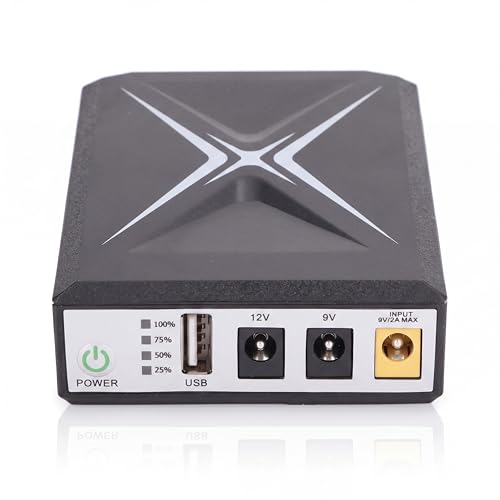
Luqeeg 10400mAh Mini UPS Battery Backup
Buyers who need to bridge short outages on a standard router without paying for extra capacity
Our take Check price for Luqeeg 10400mAh Mini UPS Battery Backup (opens in a new tab)

Best for Longer Outages
Mini UPS Battery Backup, 6000mAh, Uninterruptible Power Supply
Buyers who want a stated runtime number to plan around and need multiple output voltages
Our take Check price for Mini UPS Battery Backup, 6000mAh, Uninterruptible Power Supply (opens in a new tab)
Best Capacity in This Tier
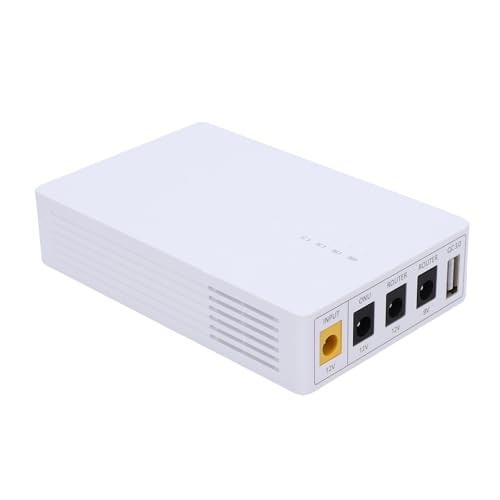
VISLONE Mini UPS Battery Backup 13500mAh
Buyers who want the most raw battery capacity available in this price tier
Our take Check price for VISLONE Mini UPS Battery Backup 13500mAh (opens in a new tab)

Best Dual-Input Flexibility
Mini UPS Battery Backup 10400mAh Uninterruptible Power Supply
Buyers who want flexibility to recharge via either a DC adapter or a USB cable
Our take Check price for Mini UPS Battery Backup 10400mAh Uninterruptible Power Supply (opens in a new tab)
Our Picks
Best Value1 of 4
Luqeeg 10400mAh Mini UPS Battery Backup on Amazon (opens in a new tab)
Luqeeg is the cheapest pick in this comparison and still covers both 9V and 12V DC inputs, the two voltages that cover the large majority of router and modem power bricks, alongside a 5V USB output for a phone or small accessory.
Best for
- Buyers who need to bridge short outages on a standard router without paying for extra capacity
Why we like it
The 18Wh capacity (10400mAh) is modest but keeps a typical low-power router running through short to moderate outages.
Against the pricier VISLONE pick below, the core function is nearly identical, dual DC inputs and multiple safety protections, so the real difference is battery size and a few dollars.
Best for buyers who mainly need to bridge short power blips (a few minutes to an hour) rather than plan for extended multi-hour outages, and who want the lowest price that still covers standard router voltages.
Key dimensions & specs
- 9V and 12V DC dual inputs
- 10400mAh, 18Wh capacity
- USB 5V 2A output
Pros
- Cheapest pick with dual 9V/12V input support
- Compact enough for a shelf or cabinet
- Multiple protection circuits (short circuit, overcharge)
Cons
- Lower Wh capacity than pricier picks here
- No LCD or status display beyond basic indicators
Best for Longer Outages2 of 4
Mini UPS Battery Backup, 6000mAh, Uninterruptible Power Supply on Amazon (opens in a new tab)
This listing makes a specific, checkable runtime claim most competitors don't: 5 hours of continuous operation on its 6000mAh battery, rather than just stating capacity and leaving runtime to guesswork.
Best for
- Buyers who want a stated runtime number to plan around and need multiple output voltages
Why we like it
It also covers the widest output voltage spread in this tier, 5V, 9V, and 12V, all in one unit.
Against the Luqeeg pick above, the lower mAh number is misleading on its own, since this unit's stated 5-hour runtime is a real-world figure rather than a raw capacity number you'd need to convert yourself.
Best for buyers who want a stated runtime figure to plan around rather than doing their own mAh-to-hours math, and who need output flexibility across more than two voltage options.
Key dimensions & specs
- 5V, 9V, and 12V DC outputs
- Stated 5-hour runtime at 6000mAh
- Compact 4.72 x 3.54 x 0.98 inch body
Pros
- States an actual runtime figure, not just capacity
- Covers three output voltages in one unit
- Small enough to tuck behind a router
Cons
- Only one 12V port versus two on some competitors
- No passive PoE output option
Best Capacity in This Tier3 of 4
VISLONE Mini UPS Battery Backup 13500mAh on Amazon (opens in a new tab)
VISLONE carries the largest battery in this under-$40 tier at 13500mAh, roughly 30 percent more capacity than the Luqeeg pick above at only a few dollars more, while covering the same three core output voltages (5V, 9V, 12V) most routers and modems need.
Best for
- Buyers who want the most raw battery capacity available in this price tier
Why we like it
Against the runtime-focused 6000mAh pick above, VISLONE doesn't publish a specific hours-of-runtime figure, so you're working from raw capacity rather than a tested claim, though the larger battery should outlast it in most real router power-draw scenarios.
Best for buyers who specifically want the most battery capacity available under $40, and who are comfortable estimating runtime from capacity rather than needing a manufacturer-stated hours figure.
Key dimensions & specs
- 13500mAh battery, largest in this tier
- 5V, 9V, and 12V DC outputs
- Power indicator for battery status
Pros
- Largest battery capacity under $40 in this comparison
- Covers all three common router output voltages
- Portable enough to bring along when traveling
Cons
- No stated hours-of-runtime figure
- No USB-C output, only DC ports
Best Dual-Input Flexibility4 of 4
Mini UPS Battery Backup 10400mAh Uninterruptible Power Supply on Amazon (opens in a new tab)
This pick explicitly supports two separate charging input methods, a 9V/12V DC adapter for faster charging or a 5V 2A USB port as a slower backup option, giving you flexibility if your usual charger isn't handy.
Best for
- Buyers who want flexibility to recharge via either a DC adapter or a USB cable
Why we like it
It doubles as a standard USB power bank when not backing up a router.
Against the cheaper Luqeeg pick, which shares a nearly identical 10400mAh capacity and voltage spread, the main difference here is that explicit dual-charging-method flexibility and a slightly higher price for it.
Best for buyers who want the option to recharge via either a DC adapter or a plain USB cable depending on what's on hand, rather than being locked into one charging method.
Key dimensions & specs
- Dual charging: 9V/12V DC or 5V USB
- 10400mAh, 18Wh built-in battery
- Doubles as a standard USB power bank
Pros
- Two separate charging input options
- Doubles as a phone power bank when idle
- Same core voltage coverage as cheaper picks
Cons
- Priciest pick in this tier for similar capacity to cheaper options
- USB charging input is noted as the slower of the two methods
How We Chose These Mini DC UPS for WiFi Routers Under $40
Each pick was assessed across 5 criteria weighted for real-world use.
- We checked which of the three common router/modem voltages (5V, 9V, 12V) each unit outputs, since a mini UPS that doesn't match your router's exact voltage simply won't power it, regardless of battery size.
- Capacity in Wh, not just mAh
- We converted or checked stated watt-hour capacity where available, since mAh figures aren't directly comparable across units built around different battery voltages.
- Stated runtime vs raw capacity
- We favored listings that state an actual hours-of-runtime figure at a given load over ones that only list mAh, since a stated runtime is a checkable real-world claim rather than a number you'd need to estimate yourself.
- We confirmed each pick includes basic protections (short-circuit, overcharge, over-discharge) as standard, since these are inexpensive to include but protect connected networking equipment.
- Every pick had to be in stock and priced at or under $40 on the date this guide was checked; units that only hit this tier during a temporary sale were excluded.
What to Look for in a Mini DC UP for WiFi Routers Under $40
Key buying criteria so you get the right fit the first time.
Confirm the output voltage matches your router's power brick exactly
" A mini UPS that only outputs 9V won't properly power a router that expects 12V, even if the physical connector plug happens to fit, since running equipment on the wrong voltage can either fail to power it or damage it over time. Before buying, check your router's power brick for its exact output voltage and confirm the UPS you're considering lists that same voltage among its outputs, not just a general "multiple voltage" claim.
Compare capacity in watt-hours, not just the mAh number on the box
Milliamp-hour (mAh) figures are only directly comparable between batteries of the same voltage, so a 10400mAh battery built around a different internal cell voltage than a 13500mAh competitor might actually store a similar or even greater amount of real energy, measured in watt-hours (Wh). Some listings state the Wh figure directly alongside the mAh number, which is the more useful figure for comparing real capacity across different products. When a listing only gives mAh with no Wh figure, treat the comparison as rough rather than exact, and prioritize listings that state both numbers.
Check for a stated runtime figure at a specific load
A battery's actual runtime depends on how much power your specific router draws, which varies by router model, so a raw capacity number alone doesn't tell you how long your router will actually stay online during an outage. A few listings solve this by stating an actual runtime figure, such as "provides up to 5 hours of continuous operation," which is a directly checkable claim rather than a number you'd need to calculate yourself from your router's wattage. If a listing doesn't state a runtime figure, check your router's power label for its wattage and do a rough mental estimate (watt-hours divided by router wattage) before assuming a larger mAh number automatically means longer runtime.
Verify the physical DC connector size fits your router's power cable
Even when the voltage matches, DC power connectors come in different physical barrel sizes, and a mini UPS with the wrong barrel size for your router's power cable won't make a working connection regardless of matching voltage. 1mm barrel size, which is common but not universal across all router and modem brands. Check your router's existing power adapter for its connector size (often printed near the barrel plug or in the router's manual) and compare it against the UPS listing's stated connector size before assuming any DC output will physically connect.
Look for basic safety protections as a baseline, not a premium feature
Because these units sit between wall power and networking equipment continuously, basic protection circuits, short-circuit protection, overcharge protection, and over-discharge protection, prevent a battery fault from damaging your router or the UPS itself. These protections are inexpensive for manufacturers to include and should be treated as a baseline requirement rather than a premium upsell, since their absence is a real risk indicator rather than just a missing nice-to-have. Every pick in this comparison lists these protections, so use their presence as a pass/fail check when considering any mini UPS not covered here rather than assuming it's standard across the whole category.
How to Choose a Mini DC UP for WiFi Routers Under $40
| The lowest price with standard voltage coverage | Luqeeg 10400mAh Mini UPS Battery Backup |
|---|---|
| Mini UPS Battery Backup, 6000mAh (5-hour rated) | |
| The most raw battery capacity | VISLONE Mini UPS Battery Backup 13500mAh |
| Flexible charging via DC or USB | Mini UPS Battery Backup 10400mAh (dual input) |
Stated Runtime vs Raw mAh Capacity
- Stated runtime figure (6000mAh pick)
- Gives you a real, checkable hours-of-use claim (5 hours) rather than raw capacity you'd need to estimate against your own router's power draw.
- Raw mAh capacity only (Luqeeg, VISLONE, dual-input pick)
- Larger numbers on paper, but without a stated runtime you're estimating based on your router's actual watt draw, which most router power bricks list on a label.
If your router's power label lists its wattage, you can roughly estimate runtime yourself; if you'd rather not do that math, the 6000mAh pick's stated 5-hour figure is the more direct answer.
| Single DC charging method is fine | Luqeeg, Mini UPS 6000mAh, or VISLONE |
|---|---|
| Want the option of USB charging as a backup | Mini UPS Battery Backup 10400mAh (dual input) |
For a Basic Home Router Specifically
- A confirmed 12V output matching your router's power brick label, since most consumer routers run on 12V rather than 9V or 5V.
- All four picks here output 12V, so the deciding factor for a basic home router comes down to capacity and price rather than voltage compatibility.
- 99) outlasts the cheaper Luqeeg pick by roughly 30 percent for a few dollars more.
- 61) covers the same core voltages as pricier picks here.
Frequently Asked Questions
Will any mini UPS work with my router, or do I need to match the voltage exactly?
You need to match the voltage. Check your router's original power adapter for its exact output voltage (usually printed as something like "Output: 12V"), and confirm the mini UPS you're buying lists that same voltage among its outputs. A mismatch can fail to power the router or potentially damage it.
How long will these units actually keep my router running during an outage?
It depends on your router's specific power draw and the UPS's capacity. A few listings state an actual runtime figure (such as 5 hours) which is the most direct answer; for others, check your router's wattage label and compare it against the UPS's stated watt-hour capacity for a rough estimate.
Is a bigger mAh number always a better mini UPS?
MAh figures are only directly comparable between batteries built around the same internal voltage, so watt-hours (Wh) is the more reliable number when a listing provides it. A stated runtime figure at a specific load is even more useful than either number alone.
Can I use one of these to power something other than a router, like a security camera?
Yes, most mini UPS units in this category list compatibility with routers, modems, security cameras, and similar small DC-powered devices, since they all use standard 5V, 9V, or 12V power. Just confirm the specific device's voltage and connector size match before connecting it.
Do these units also work as a regular phone charger or power bank?
Several picks in this comparison include a standard USB output and can double as a basic phone power bank when they're not actively backing up a router. Check the specific listing's USB output rating (typically 5V/2A) to confirm it'll charge your phone at a reasonable speed.
What happens to my router the moment the power goes out?
A properly matched mini UPS switches to battery power automatically and near-instantly, so your router should stay online through the transition without needing to restart. If your specific router does briefly drop connection during a power event, check whether the UPS's transfer time is stated in its listing.
Bottom Line
Best overall: Luqeeg 10400mAh Mini UPS Battery Backup — best value pick in this roundup. See the full verdicts above for every pick, with pros, cons and who each one suits.
Browse all mini dc ups for wifi routers under $40 on Amazon — Prime-eligible options with current pricing.