
Buying Guide
The Best Mechanical Keyboards for Quiet Typing and Office Use, Compared
We looked at 8 mechanical keyboards for quiet typing and office use side by side, with the trade-offs that separate them and who each one suits.
By Jamie Cole, Lead Product Researcher
10 min read8 products evaluated
We may earn a commission from purchases made through links in this guide. Learn more.
A keyboard for a shared office or an open-plan desk has one non-negotiable requirement that most mechanical keyboard marketing ignores: it can't be heard three desks away. Clicky and even standard tactile switches are loud enough to distract coworkers and get picked up by a nearby conference-call microphone, so the picks below lean toward silent or low-profile mechanical switches, with a couple of quiet non-mechanical alternatives included and labeled honestly rather than mislabeled to fit the theme.
Below are 8 keyboards we compared for quiet office typing, based on product specs, switch type, and real listing details rather than marketing claims, ranging from a $38 budget low-profile mechanical board to a $160 Mac-ready mechanical keyboard with quiet tactile switches.
Quick Picks
Our 8 recommendations at a glance. Tap a pick for the full verdict.

Best Overall for Quiet Office Typing
Logitech MX Mechanical Wireless Illuminated Keyboard, Tactile (Graphite)
Buyers who want a mechanical, quiet, full-size keyboard for daily office typing
Our take Check price for Logitech MX Mechanical Wireless Illuminated Keyboard, Tactile (Graphite) (opens in a new tab)

Best Compact Mechanical
Logitech MX Mechanical Mini Mac Wireless Keyboard, Low-Profile (Space Grey)
Mac desks that want a quiet compact mechanical keyboard without a number pad
Our take Check price for Logitech MX Mechanical Mini Mac Wireless Keyboard, Low-Profile (Space Grey) (opens in a new tab)
Best Compact Mechanical, Pale Grey
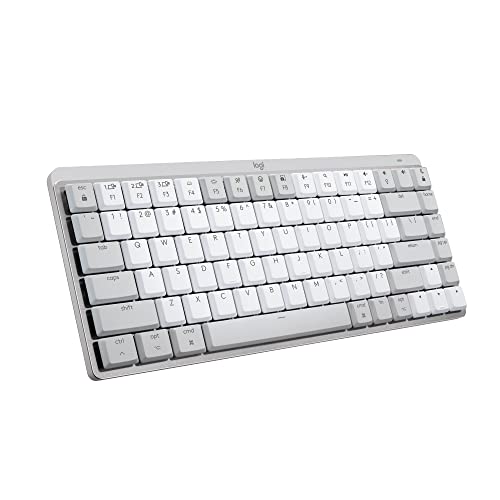
Logitech MX Mechanical Mini Mac Wireless Keyboard, Low-Profile (Pale Grey)
Buyers who want the MX Mechanical Mini Mac in a lighter finish
Our take Check price for Logitech MX Mechanical Mini Mac Wireless Keyboard, Low-Profile (Pale Grey) (opens in a new tab)

Best Budget Low-Profile Mechanical
Keychron B6 Pro Ultra-Thin Wireless Keyboard, Full-Size ZMK, Quiet Typing (Space Gray)
Budget-conscious buyers who still want a mechanical, full-size quiet keyboard
Our take Check price for Keychron B6 Pro Ultra-Thin Wireless Keyboard, Full-Size ZMK, Quiet Typing (Space Gray) (opens in a new tab)

Best Full-Size Wired Mechanical
Keychron C2 Full Size Wired Mechanical Keyboard, Brown Switch
Buyers who want an affordable full-size mechanical board and don't mind a wired connection
Our take Check price for Keychron C2 Full Size Wired Mechanical Keyboard, Brown Switch (opens in a new tab)

Quietest Pick (Non-Mechanical Low-Profile)
Logitech MX Keys S Wireless Keyboard, Low Profile Fluid Precise (Pale Grey)
Buyers who prioritize the quietest possible typing over a mechanical switch feel
Our take Check price for Logitech MX Keys S Wireless Keyboard, Low Profile Fluid Precise (Pale Grey) (opens in a new tab)

Quietest Pick, Graphite
Logitech MX Keys S Wireless Keyboard, Low Profile Fluid Precise (Graphite)
Buyers who want the quietest MX Keys S option in a darker finish
Our take Check price for Logitech MX Keys S Wireless Keyboard, Low Profile Fluid Precise (Graphite) (opens in a new tab)

Best Compact Quiet Non-Mechanical Pick
Logitech MX Keys Mini Minimalist Wireless Illuminated Keyboard (Graphite)
Small desks that want the quietest possible compact keyboard
Our take Check price for Logitech MX Keys Mini Minimalist Wireless Illuminated Keyboard (Graphite) (opens in a new tab)
Our Picks
Best Overall for Quiet Office Typing1 of 8
Logitech MX Mechanical Wireless Illuminated Keyboard, Tactile (Graphite) on Amazon (opens in a new tab)
The MX Mechanical uses genuine low-profile tactile mechanical switches tuned for quiet operation, which sidesteps the loud bottom-out thud that makes most mechanical keyboards a poor fit for a shared office.
Best for
- Buyers who want a mechanical, quiet, full-size keyboard for daily office typing
Why we like it
Backlit keys and a full-size layout round out a board built specifically for professional desks rather than gaming setups.
It pairs over Bluetooth or a USB receiver and runs on a rechargeable battery, so there's no dongle-hogging or cable clutter on a small desk. It costs more than a standard membrane keyboard, but the tactile mechanical feel is a real upgrade for anyone who types most of the day.
Backlit keys for low-light offices.
Key dimensions & specs
- Full-size layout, wireless (Bluetooth or Logi Bolt receiver)
- Low-profile tactile mechanical switches
- Backlit keys with auto-adjusting brightness
- Rechargeable battery
Pros
- Genuine mechanical switches tuned for quiet typing
- Backlit keys for low-light offices
- Wireless with a rechargeable battery
- Full-size layout for spreadsheet-heavy work
Cons
- Higher price than membrane office keyboards
- Not hot-swappable if a switch fails
- Full-size footprint takes up more desk space than a TKL board
Best Compact Mechanical2 of 8
Logitech MX Mechanical Mini Mac Wireless Keyboard, Low-Profile (Space Grey) on Amazon (opens in a new tab)
The Mini variant trims the number pad and drops the low-profile mechanical switches into a compact 75 percent layout, which frees up desk space for a mouse without giving up the quiet tactile feel of the full-size MX Mechanical.
Best for
- Mac desks that want a quiet compact mechanical keyboard without a number pad
Why we like it
It's built with Mac keycaps and shortcuts, so it needs no remapping on a Mac desktop.
Like the full-size version, it connects wirelessly and recharges via USB-C, and the smaller footprint makes it easier to fit next to a laptop stand or a second monitor arm on a compact desk.
Key dimensions & specs
- 75% compact layout, no number pad
- Low-profile tactile mechanical switches
- Mac-native keycaps and shortcuts
- Wireless, rechargeable via USB-C
Pros
- Compact footprint frees up desk space
- Genuine mechanical switches, quiet tactile feel
- Mac keycaps out of the box
- Wireless with rechargeable battery
Cons
- No number pad for spreadsheet-heavy work
- Premium price for a compact board
- Mac-first layout needs remapping for Windows use
Best Compact Mechanical, Pale Grey3 of 8
Logitech MX Mechanical Mini Mac Wireless Keyboard, Low-Profile (Pale Grey) on Amazon (opens in a new tab)
This is the same MX Mechanical Mini Mac hardware as the Space Grey pick above, in a Pale Grey finish that blends into a lighter desk setup.
Best for
- Buyers who want the MX Mechanical Mini Mac in a lighter finish
Why we like it
Low-profile tactile mechanical switches keep bottom-out noise down, and the 75 percent layout keeps the footprint small.
It's worth choosing this over the Space Grey version purely on color preference, since the switches, wireless connection, and Mac-native shortcuts are otherwise identical.
Genuine mechanical switches, quiet tactile feel.
Key dimensions & specs
- 75% compact layout, no number pad
- Low-profile tactile mechanical switches
- Mac-native keycaps and shortcuts
- Wireless, rechargeable via USB-C
Pros
- Lighter finish suits bright desk setups
- Genuine mechanical switches, quiet tactile feel
- Mac keycaps out of the box
- Same compact footprint as the Space Grey version
Cons
- No number pad for spreadsheet-heavy work
- Premium price for a compact board
- Lighter finish shows fingerprints more than darker colors
Best Budget Low-Profile Mechanical4 of 8
Keychron B6 Pro Ultra-Thin Wireless Keyboard, Full-Size ZMK, Quiet Typing (Space Gray) on Amazon (opens in a new tab)
Keychron built the B6 Pro specifically around quiet typing, pairing an ultra-thin low-profile mechanical design with ZMK firmware for custom keymaps.
Best for
- Budget-conscious buyers who still want a mechanical, full-size quiet keyboard
Why we like it
It keeps a full-size layout with a number pad, which is rare at this price for a low-profile mechanical board. 2, or a wired USB-C cable depending on what a given desk setup needs.
Key dimensions & specs
- Full-size layout with number pad
- Ultra-thin low-profile mechanical switches
- ZMK firmware, custom keymap support
- 2.4GHz / Bluetooth 5.2 / wired USB-C
Pros
- Most affordable true mechanical pick in this list
- Full-size layout with a number pad
- Marketed and tuned specifically for quiet typing
- Three connection modes for flexibility
Cons
- ZMK keymap customization has a learning curve
- Fewer keycap and switch customization options than hot-swap boards
- Slim profile means less finger travel than a taller mechanical board
Best Full-Size Wired Mechanical5 of 8
Keychron C2 Full Size Wired Mechanical Keyboard, Brown Switch on Amazon (opens in a new tab)
The Keychron C2 uses tactile brown switches, which land in the middle ground between the audible click of a blue switch and the near-silence of a dedicated silent switch, a reasonable compromise for a private office or a work-from-home desk rather than an open floor plan.
Best for
- Buyers who want an affordable full-size mechanical board and don't mind a wired connection
Why we like it
A full 104-key layout with a number pad covers spreadsheet work without needing a separate numpad.
It's a wired-only board with a USB-C braided cable, which trades wireless convenience for a stable connection and one less battery to manage on a busy desk.
Tactile brown switches are quieter than clicky blues.
Key dimensions & specs
- Full 104-key layout with number pad
- Tactile brown mechanical switches
- USB-C braided cable, wired only
- ABS retro color keycaps
Pros
- low-cost full-size mechanical keyboard
- Tactile brown switches are quieter than clicky blues
- Wired connection avoids battery management
- Compatible with Mac and Windows
Cons
- Wired only, no wireless option
- Brown switches are quieter than blues but not silent
- ABS keycaps wear shinier over time than PBT
Quietest Pick (Non-Mechanical Low-Profile)6 of 8
Logitech MX Keys S Wireless Keyboard, Low Profile Fluid Precise (Pale Grey) on Amazon (opens in a new tab)
This is worth being upfront about, the MX Keys S is not a mechanical keyboard.
Best for
- Buyers who prioritize the quietest possible typing over a mechanical switch feel
Why we like it
It uses Logitech's low-profile scissor switches, which is exactly why it's one of the quietest keyboards in this entire list. For a buyer whose top priority is silent typing over the mechanical feel, that trade-off is worth including here honestly rather than mislabeling it.
Backlit keys, a stable wireless connection, and a shape tuned for fast typing round out a keyboard built for exactly this office use case, quiet, all-day comfort, just not a mechanical switch underneath.
Key dimensions & specs
- Full-size layout with number pad
- Low-profile scissor switches (not mechanical)
- Backlit keys, auto-adjusting brightness
- Wireless, rechargeable battery
Pros
- One of the quietest keyboards in this list
- Comfortable low-profile scissor switches
- Backlit for low-light offices
- Long battery life on a single charge
Cons
- Not a mechanical keyboard despite the mechanical keyboard search intent
- No tactile mechanical bump for typists who prefer that feel
- Higher price than a typical membrane keyboard
Quietest Pick, Graphite7 of 8
Logitech MX Keys S Wireless Keyboard, Low Profile Fluid Precise (Graphite) on Amazon (opens in a new tab)
Same hardware as the Pale Grey MX Keys S above, in a darker Graphite finish for a matched dark desk setup.
Best for
- Buyers who want the quietest MX Keys S option in a darker finish
Why we like it
It's still a low-profile scissor-switch keyboard, not a mechanical one, and belongs in this list for the same reason, its near-silent typing sound.
The Graphite finish also hides fingerprints and smudges better than lighter colors, which matters on a keyboard that sees daily use in a shared office.
Darker finish hides smudges well.
Key dimensions & specs
- Full-size layout with number pad
- Low-profile scissor switches (not mechanical)
- Backlit keys, auto-adjusting brightness
- Wireless, rechargeable battery
Pros
- One of the quietest keyboards in this list
- Darker finish hides smudges well
- Comfortable low-profile scissor switches
- Long battery life on a single charge
Cons
- Not a mechanical keyboard despite the mechanical keyboard search intent
- No tactile mechanical bump for typists who prefer that feel
- Higher price than a typical membrane keyboard
Best Compact Quiet Non-Mechanical Pick8 of 8
Logitech MX Keys Mini Minimalist Wireless Illuminated Keyboard (Graphite) on Amazon (opens in a new tab)
The MX Keys Mini is the smallest and most affordable pick on this list, and like the MX Keys S above, it's built on quiet low-profile scissor switches rather than mechanical ones.
Best for
- Small desks that want the quietest possible compact keyboard
Why we like it
It's included here as an honest, compact option for a small desk where near-silent typing matters more than mechanical feel.
A minimalist 75 percent layout drops the number pad, and backlighting with auto-adjusting brightness rounds out a keyboard that's easy to slide next to a laptop on a shared desk.
Key dimensions & specs
- 75% compact layout, no number pad
- Low-profile scissor switches (not mechanical)
- Backlit keys, auto-adjusting brightness
- Wireless, rechargeable battery
Pros
- Smallest, most affordable pick in this list
- Near-silent scissor-switch typing
- Backlit for low-light use
- Compact footprint fits tight desks
Cons
- Not a mechanical keyboard despite the mechanical keyboard search intent
- No number pad
- Smaller keys than a full-size board, which some typists find cramped
How We Chose These Mechanical Keyboards for Quiet Typing and Office Use
Each pick was assessed across 5 criteria weighted for real-world use.
- Switch type and noise honesty
- Bottom-out noise, not just stem noise
- Weighed whether a keyboard's quietness comes only from a dampened switch stem or also accounts for the keycap-on-plate impact sound that a silent switch alone doesn't eliminate.
- Considered how each pick performs across different office contexts, an open-plan desk a meter from a coworker, a private office, and a home office on video calls, since "quiet enough" changes by setting.
- Build and layout for daily typing
- Compared full-size versus compact layouts, keycap material, and wireless versus wired connections for buyers typing most of the workday.
- Weighed switch quality and features against price, from the budget mechanical pick to the premium Mac-ready mechanical board.
What to Look for in a Mechanical Keyboard for Quiet Typing and Office Use
Key buying criteria so you get the right fit the first time.
Match switch type to your actual environment, not just gaming feel
Switch type determines feel, sound, and how disruptive the keyboard is to people around you, clicky switches feel satisfying to type on solo but produce an audible click on every keystroke that can be disruptive on a Zoom call or in a shared office, while linear switches are quieter and smoother, and tactile switches split the difference with a felt bump but no click.
This matters directly based on where you'll actually use the keyboard, a home office with video calls or a shared workspace calls for a different switch than a private gaming setup where clicky feedback is a feature, not a liability.
Check the specific switch name (not just "mechanical") and look up its actuation force and whether it's linear, tactile, or clicky before assuming any mechanical keyboard suits your environment.
Check hot-swappable sockets if you want to change switches later without soldering
A hot-swappable keyboard lets you physically remove and replace individual switches without any soldering, meaning you can try different switch types or replace a failed switch years later without needing to be a hobbyist with a soldering iron.
This matters directly if you're not fully certain which switch feel you'll prefer long-term, or if you want the option to upgrade switches later without replacing the whole keyboard.
Check the listing specifically for "hot-swappable" and the specific socket type (3-pin or 5-pin) it supports, since not every hot-swap socket accepts every switch type.
Consider keycap material for both feel and long-term durability
Keycap material affects both the tactile feel under your fingers and how well the keycaps resist shine and wear over years of typing, PBT plastic is generally more durable and resists the glossy shine that ABS plastic keycaps develop after months of oil and friction from typing.
This matters more for a keyboard you'll type on daily for years, less for occasional or gaming-only use where keycap longevity matters less.
Check the listing specifically for PBT versus ABS keycap material, since this detail is sometimes buried in the specs rather than featured prominently.
Weigh wireless convenience against connection latency for your actual use case
4GHz USB receiver, a real consideration for competitive gaming but largely unnoticeable for typing and general office work.
This matters more if you're specifically buying for fast-paced gaming, less for typing-focused office or home use where the latency difference is imperceptible.
4GHz dongle in addition to Bluetooth, and consider a wired connection specifically if competitive gaming performance matters.
Match keyboard layout and size to your actual desk space and workflow
Mechanical keyboards range from full-size boards with a number pad to compact tenkeyless (no number pad) and even smaller 60% layouts that omit the function row and arrow keys, and this size choice is a real tradeoff between desk space saved and keys available without a modifier combination.
This matters directly if you regularly use a number pad for data entry, a compact layout without one adds real friction, while someone who never touches the number pad gains meaningful desk space and a shorter reach to the mouse with a smaller layout.
Check the specific layout size and key count against your actual daily workflow, not just desk space alone.
How to Choose a Mechanical Keyboard for Quiet Typing and Office Use
| Clicky switches for tactile feedback | Keychron C2 Full Size Wired Mechanical Keyboard |
|---|---|
| Logitech MX Mechanical Wireless Illuminated Keyboard |
| Logitech MX Mechanical Mini Mac Wireless Keyboard |
- The lower-priced option in this comparison, worth checking its switch type against your typing environment.
- Logitech MX Mechanical Mini Mac Wireless Keyboard
- The higher-priced option, worth it if it offers real keycap or build-quality headroom above the cheaper pick.
Default to Keychron B6 Pro Ultra unless your specific needs call for the pricier pick.
Check each pick's listed keycap material (PBT vs ABS) against how long you plan to use it daily before buying, since PBT resists shine and wear better over years.
For Shared Office or Video Call Use Specifically
- Linear or tactile switches rather than clicky ones, to avoid disruptive noise on calls or in a shared space.
- You want hot-swappable switches and premium PBT keycaps for years of daily use, where Logitech MX Mechanical Mini Mac Wireless Keyboard's build quality gives real headroom over the cheaper picks.
- You just want to try the mechanical feel without a big investment, where Keychron B6 Pro Ultra covers the same job at a lower price.
Frequently Asked Questions
Are all the keyboards in this list actually mechanical?
No, and we say so directly in each product description. The Logitech MX Mechanical and MX Mechanical Mini Mac models, the Keychron B6 Pro, and the Keychron C2 use genuine mechanical switches. The Logitech MX Keys S and MX Keys Mini use low-profile scissor switches, not mechanical ones, and are included because they're among the quietest keyboards available, not because they match the mechanical keyboard label.
What actually makes a keyboard quiet, the switch or something else?
A silent switch dampens the internal stem noise on the way down, while a low-profile switch is quieter mainly because it has shorter travel, less distance for the keycap to fall before striking the plate. Neither one eliminates the keycap-on-plate bottom-out thud entirely, which is why a desk mat under the keyboard helps regardless of switch type.
Will a quiet mechanical keyboard still be picked up by my microphone on video calls?
It's possible, especially with a condenser microphone mounted close on a boom arm, even though a laptop's built-in mic usually won't catch the same typing. If quiet calls matter more than typing feel, mute yourself during typing-heavy stretches or lean toward the quietest picks in this list, the MX Keys S or MX Keys Mini.
Is a tactile brown switch quiet enough for an open-plan office?
It's quieter than a clicky blue switch but louder than a true silent or low-profile switch. In a private office it's usually fine, but in an open-plan layout with a coworker sitting within a meter or two, a low-profile mechanical pick or a scissor-switch board like the MX Keys S will draw less attention.
Can I mod any of these keyboards with foam to reduce noise further?
Not the picks in this list. Foam case modding, stuffing sound-absorbing foam inside the case to reduce hollow resonance, only works on hot-swappable keyboards with an accessible internal case, and none of the boards here are built that way. If deep noise customization matters to you, that's a reason to look at a separate hot-swappable mechanical board instead.
Which pick is best if I want a mechanical keyboard on a tight budget?
24 is the cheapest true mechanical pick in this list, and it's specifically marketed and tuned for quiet typing with a full-size layout including a number pad. 31 if you don't mind a wired-only connection.
Bottom Line
Best overall: Logitech MX Mechanical Wireless Illuminated Keyboard, Tactile (Graphite) — best overall for quiet office typing pick in this roundup. See the full verdicts above for every pick, with pros, cons and who each one suits.
Browse all mechanical keyboards for quiet typing and office use on Amazon — Prime-eligible options with current pricing.