
Buying Guide
The Best Mechanical Keyboards for Mac: Picks and Trade-offs
We looked at 8 mechanical keyboards for mac side by side, with the trade-offs that separate them and who each one suits.
By Jamie Cole, Lead Product Researcher
10 min read8 products evaluated
We may earn a commission from purchases made through links in this guide. Learn more.
A mechanical keyboard bought for a Mac needs more than a Bluetooth logo on the box. Mac keycap legends, correct Fn-row behavior, and Bluetooth version compatibility with older Mac models all affect whether a keyboard feels native on macOS or requires constant workarounds. The picks below are all confirmed Mac-compatible in their listings, ranging from Mac-native low-profile mechanical boards to cross-platform mechanical keyboards that support Mac out of the box.
Below are 8 mechanical keyboards we compared on Mac keycap support, switch type, connectivity, and build quality, based on real product specs rather than generic gaming-keyboard marketing, ranging from a $43 budget wired board to a $160 Mac-native compact mechanical keyboard.
Quick Picks
Our 8 recommendations at a glance. Tap a pick for the full verdict.

Best Overall for Mac
Logitech MX Mechanical Mini Mac Wireless Keyboard, Low-Profile (Space Grey)
Mac users who want zero setup friction and Mac-native shortcuts out of the box
Our take Check price for Logitech MX Mechanical Mini Mac Wireless Keyboard, Low-Profile (Space Grey) (opens in a new tab)
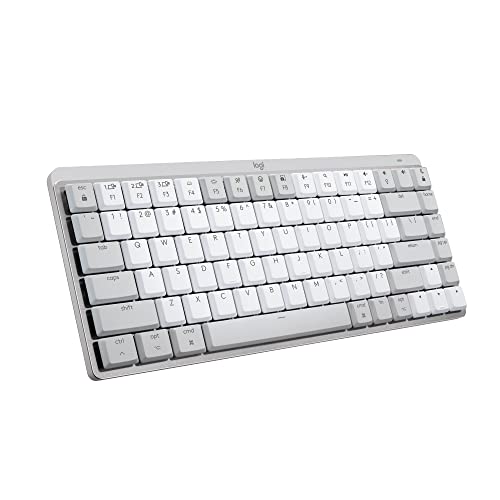
Best Overall for Mac, Pale Grey
Logitech MX Mechanical Mini Mac Wireless Keyboard, Low-Profile (Pale Grey)
Mac users who want the MX Mechanical Mini Mac in a lighter finish
Our take Check price for Logitech MX Mechanical Mini Mac Wireless Keyboard, Low-Profile (Pale Grey) (opens in a new tab)

Best Full-Size Alternative Layout
Keychron K4 96% Layout Wireless Bluetooth 5.1/Wired Mechanical Keyboard, Super Brown Switch
Buyers who want a full-function keyboard in a tighter footprint with Mac support
Our take Check price for Keychron K4 96% Layout Wireless Bluetooth 5.1/Wired Mechanical Keyboard, Super Brown Switch (opens in a new tab)

Best Low-Profile Ultra-Slim
Keychron K3 Version 2, 84 Keys Ultra-Slim Wireless/Wired Low-Profile Mechanical Keyboard, Brown Switch
Buyers who want a slim mechanical keyboard that visually matches a MacBook's height
Our take Check price for Keychron K3 Version 2, 84 Keys Ultra-Slim Wireless/Wired Low-Profile Mechanical Keyboard, Brown Switch (opens in a new tab)

Best Budget Full-Size Wired
Keychron C2 Full Size Wired Mechanical Keyboard, Compatible with Mac, Brown Switch
Budget buyers who want a full-size mechanical keyboard for a Mac desktop and don't need wireless
Our take Check price for Keychron C2 Full Size Wired Mechanical Keyboard, Compatible with Mac, Brown Switch (opens in a new tab)

Best Hall Effect / Rapid Trigger
Keychron K2 HE Rapid Trigger Wireless Custom Keyboard, Hall Effect Gateron Double-Rail Magnetic Switch
Buyers who want adjustable actuation and long-term switch durability on a Mac
Our take Check price for Keychron K2 HE Rapid Trigger Wireless Custom Keyboard, Hall Effect Gateron Double-Rail Magnetic Switch (opens in a new tab)

Best Hot-Swappable Customizable
Keychron V6 Max Wireless Custom Mechanical Keyboard, Hot-swappable Gateron Banana Switch
Buyers who want to customize or upgrade their switches over time on a Mac-compatible board
Our take Check price for Keychron V6 Max Wireless Custom Mechanical Keyboard, Hot-swappable Gateron Banana Switch (opens in a new tab)

Best Full-Size Hall Effect
Keychron K10 HE Hall Effect Keyboard Wireless, Magnetic Switch Hot Swappable, Rapid Trigger
Buyers who want a full-size, premium-build Hall effect keyboard confirmed to work on Mac
Our take Check price for Keychron K10 HE Hall Effect Keyboard Wireless, Magnetic Switch Hot Swappable, Rapid Trigger (opens in a new tab)
Our Picks
Best Overall for Mac1 of 8
Logitech MX Mechanical Mini Mac Wireless Keyboard, Low-Profile (Space Grey) on Amazon (opens in a new tab)
This is the only keyboard in this list built specifically for Mac from the ground up, with Mac keycap legends, correct media key shortcuts, and low-profile mechanical switches tuned for quiet, precise typing.
Best for
- Mac users who want zero setup friction and Mac-native shortcuts out of the box
Why we like it
There's no remapping or third-party software needed to get expected Mac shortcut behavior.
A compact 75 percent layout drops the number pad to save desk space, and it connects wirelessly with a rechargeable battery, making it a clean, native fit for a MacBook or Mac desktop setup.
Correct Fn-row and media key behavior without remapping.
Key dimensions & specs
- 75% compact layout, Mac-native keycaps
- Low-profile tactile mechanical switches
- Wireless, rechargeable via USB-C
- Correct Mac media key and Fn-row behavior out of the box
Pros
- Only Mac-native mechanical keyboard in this list
- Correct Fn-row and media key behavior without remapping
- Quiet, low-profile mechanical switches
- Compact footprint
Cons
- No number pad
- Premium price for a compact board
- Windows use requires remapping since it's Mac-first
Best Overall for Mac, Pale Grey2 of 8
Logitech MX Mechanical Mini Mac Wireless Keyboard, Low-Profile (Pale Grey) on Amazon (opens in a new tab)
Identical hardware to the Space Grey MX Mechanical Mini Mac above, in a lighter Pale Grey finish for buyers matching a bright desk setup.
Best for
- Mac users who want the MX Mechanical Mini Mac in a lighter finish
Why we like it
It carries the same Mac-native keycaps, correct shortcut behavior, and low-profile mechanical switches.
Choose this over the Space Grey version purely on color preference, since the switch type, connectivity, and Mac software behavior are otherwise the same.
Key dimensions & specs
- 75% compact layout, Mac-native keycaps
- Low-profile tactile mechanical switches
- Wireless, rechargeable via USB-C
- Correct Mac media key and Fn-row behavior out of the box
Pros
- Only Mac-native mechanical keyboard color option besides Space Grey
- Correct Fn-row and media key behavior without remapping
- Quiet, low-profile mechanical switches
- Lighter finish suits bright desk setups
Cons
- No number pad
- Premium price for a compact board
- Windows use requires remapping since it's Mac-first
Best Full-Size Alternative Layout3 of 8
Keychron K4 96% Layout Wireless Bluetooth 5.1/Wired Mechanical Keyboard, Super Brown Switch on Amazon (opens in a new tab)
The K4 packs a full 100-key layout, including arrow keys and a number pad, into a tighter 96 percent footprint than a traditional full-size board, and it explicitly supports Mac alongside Windows.
Best for
- Buyers who want a full-function keyboard in a tighter footprint with Mac support
Why we like it
Keychron Super Brown tactile switches give quiet-ish tactile feedback with white LED backlighting.
1 or wired USB, letting it pair with a MacBook wirelessly and switch back to wired when the battery runs low, without losing keyboard function either way.
Works over Bluetooth or wired connection.
Key dimensions & specs
- 96% layout with number pad and arrow keys
- Keychron Super Brown tactile mechanical switches
- Bluetooth 5.1 or wired USB
- White LED backlight
Pros
- Full 100-key function in a smaller 96% footprint
- Works over Bluetooth or wired connection
- Confirmed Mac and Windows compatibility
- White backlighting for low-light typing
Cons
- Not Mac-native, uses standard Windows-style modifier legends
- Bluetooth 5.1 needs a reasonably modern Mac to pair reliably
- No hot-swap switch sockets
Best Low-Profile Ultra-Slim4 of 8
Keychron K3 Version 2, 84 Keys Ultra-Slim Wireless/Wired Low-Profile Mechanical Keyboard, Brown Switch on Amazon (opens in a new tab)
The K3 V2 is Keychron's ultra-slim low-profile mechanical board, an 84-key layout that trims a number pad while keeping genuine mechanical switches under a thin, MacBook-like profile.
Best for
- Buyers who want a slim mechanical keyboard that visually matches a MacBook's height
Why we like it
It's explicitly listed as compatible with Mac and Windows.
White LED backlighting and both Bluetooth and wired USB connectivity round out a keyboard designed to sit visually close to a Mac laptop's own keyboard height, useful for buyers who dislike a tall keyboard next to a low laptop deck.
Key dimensions & specs
- 84-key compact layout, no number pad
- Low-profile mechanical Brown switches
- Bluetooth wireless or wired USB
- White LED backlight
Pros
- Ultra-slim profile matches a MacBook's low deck height
- Genuine low-profile mechanical switches
- Confirmed Mac and Windows compatibility
- Wireless or wired flexibility
Cons
- No number pad
- Not Mac-native, uses standard modifier legends
- Slimmer switches mean less key travel than a standard mechanical board
Best Budget Full-Size Wired5 of 8
Keychron C2 Full Size Wired Mechanical Keyboard, Compatible with Mac, Brown Switch on Amazon (opens in a new tab)
The C2 is the most affordable pick in this list, a full 104-key wired mechanical keyboard with tactile brown switches, explicitly listed as compatible with Mac.
Best for
- Budget buyers who want a full-size mechanical keyboard for a Mac desktop and don't need wireless
Why we like it
Its full-size layout with a number pad suits spreadsheet and finance work on a Mac desktop.
A USB-C braided cable delivers a stable wired connection, no Bluetooth pairing or battery to manage, which some Mac desktop users prefer for a primary keyboard that never needs charging.
Full-size layout with number pad.
Key dimensions & specs
- Full 104-key layout with number pad
- Tactile brown mechanical switches
- USB-C braided wired cable
- Compatible with Mac and Windows
Pros
- Most affordable pick in this list
- Full-size layout with number pad
- No battery to manage, always-on wired connection
- Confirmed Mac compatibility
Cons
- Wired only, no wireless option
- Not Mac-native, standard modifier legends
- ABS keycaps wear shinier over time than PBT
Best Hall Effect / Rapid Trigger6 of 8
Keychron K2 HE Rapid Trigger Wireless Custom Keyboard, Hall Effect Gateron Double-Rail Magnetic Switch on Amazon (opens in a new tab)
The K2 HE uses Hall effect magnetic switches rather than traditional mechanical contact switches, enabling adjustable actuation and Rapid Trigger response that a standard mechanical switch can't match, and it's explicitly listed as compatible with Mac, Windows, and Linux.
Best for
- Buyers who want adjustable actuation and long-term switch durability on a Mac
Why we like it
QMK support adds deep customization for buyers willing to configure it.
2, and the magnetic switch design is also more resistant to wear over time than a traditional mechanical switch, since there's no physical metal contact point to degrade.
Key dimensions & specs
- Compact layout, Hall effect magnetic switches
- Adjustable actuation, Rapid Trigger support
- 2.4GHz / Bluetooth 5.2, QMK compatible
- Compatible with Mac, Windows, and Linux
Pros
- Magnetic switches resist wear better than contact switches
- Adjustable actuation point per key
- Confirmed Mac, Windows, and Linux support
- QMK firmware for deep customization
Cons
- Higher price than standard mechanical picks
- QMK configuration has a learning curve
- Not Mac-native, standard modifier legends
Best Hot-Swappable Customizable7 of 8
Keychron V6 Max Wireless Custom Mechanical Keyboard, Hot-swappable Gateron Banana Switch on Amazon (opens in a new tab)
The V6 Max ships with hot-swappable Gateron Banana switches, meaning the switches themselves can be replaced without soldering if a buyer wants a different feel or a switch fails down the line.
Best for
- Buyers who want to customize or upgrade their switches over time on a Mac-compatible board
Why we like it
It's explicitly compatible with Mac, Windows, and Linux, and runs QMK firmware for full remapping.
4GHz Bluetooth connectivity rounds out a board aimed at buyers who want to tune their keyboard over time rather than commit to fixed switches on day one.
Confirmed Mac, Windows, and Linux support.
Key dimensions & specs
- Full-size layout with RGB backlighting
- Hot-swappable Gateron Banana mechanical switches
- 2.4GHz Bluetooth, QMK compatible
- Compatible with Mac, Windows, and Linux
Pros
- Hot-swappable switches for future customization
- Confirmed Mac, Windows, and Linux support
- Full-size layout with number pad
- QMK firmware for deep remapping
Cons
- Not Mac-native, standard modifier legends
- RGB backlighting drains battery faster on wireless
- Higher price than a fixed-switch board
Best Full-Size Hall Effect8 of 8
Keychron K10 HE Hall Effect Keyboard Wireless, Magnetic Switch Hot Swappable, Rapid Trigger on Amazon (opens in a new tab)
The K10 HE brings Hall effect magnetic switches and Rapid Trigger to a full-size layout with a number pad, and adds hot-swap sockets so the magnetic switches themselves can still be changed later.
Best for
- Buyers who want a full-size, premium-build Hall effect keyboard confirmed to work on Mac
Why we like it
It's explicitly listed as compatible with Mac, Windows, and Linux.
An aluminum and wood frame gives it a heavier, more premium build than the plastic-cased picks in this list, and full-size custom RGB rounds out a board built for buyers who want both spreadsheet-friendly layout and cutting-edge switch technology.
Key dimensions & specs
- Full-size layout with number pad
- Hot-swappable Hall effect magnetic switches
- Adjustable actuation, Rapid Trigger
- Aluminum and wood frame, custom RGB
Pros
- Full-size layout with number pad and Hall effect switches
- Hot-swappable despite using magnetic switches
- Premium aluminum and wood build
- Confirmed Mac, Windows, and Linux support
Cons
- Highest price in this list
- Heavier build takes up more desk space
- Not Mac-native, standard modifier legends
How We Chose These Mechanical Keyboards for Mac
Each pick was assessed across 5 criteria weighted for real-world use.
- Mac keycap legends and native shortcuts
- Checked whether each keyboard ships with genuine Mac keycaps and correct out-of-box shortcut behavior, versus standard Windows-legend keycaps that require manual remapping.
- Verified each listing explicitly states Mac compatibility rather than assuming a generic wireless keyboard will work correctly with macOS.
- Compared traditional mechanical, low-profile mechanical, and Hall effect magnetic switch types, since each has different feel, durability, and customization implications.
- 4GHz receiver support, and wired fallback options, since older Macs can have compatibility limits with newer Bluetooth versions.
- Weighed build quality, switch type, and Mac-specific features against price, from the budget wired pick to the Mac-native compact board.
What to Look for in a Mechanical Keyboard for Mac
Key buying criteria so you get the right fit the first time.
Match switch type to your actual environment, not just gaming feel
Switch type determines feel, sound, and how disruptive the keyboard is to people around you, clicky switches feel satisfying to type on solo but produce an audible click on every keystroke that can be disruptive on a Zoom call or in a shared office, while linear switches are quieter and smoother, and tactile switches split the difference with a felt bump but no click.
This matters directly based on where you'll actually use the keyboard, a home office with video calls or a shared workspace calls for a different switch than a private gaming setup where clicky feedback is a feature, not a liability.
Check the specific switch name (not just "mechanical") and look up its actuation force and whether it's linear, tactile, or clicky before assuming any mechanical keyboard suits your environment.
Check hot-swappable sockets if you want to change switches later without soldering
A hot-swappable keyboard lets you physically remove and replace individual switches without any soldering, meaning you can try different switch types or replace a failed switch years later without needing to be a hobbyist with a soldering iron.
This matters directly if you're not fully certain which switch feel you'll prefer long-term, or if you want the option to upgrade switches later without replacing the whole keyboard.
Check the listing specifically for "hot-swappable" and the specific socket type (3-pin or 5-pin) it supports, since not every hot-swap socket accepts every switch type.
Consider keycap material for both feel and long-term durability
Keycap material affects both the tactile feel under your fingers and how well the keycaps resist shine and wear over years of typing, PBT plastic is generally more durable and resists the glossy shine that ABS plastic keycaps develop after months of oil and friction from typing.
This matters more for a keyboard you'll type on daily for years, less for occasional or gaming-only use where keycap longevity matters less.
Check the listing specifically for PBT versus ABS keycap material, since this detail is sometimes buried in the specs rather than featured prominently.
Weigh wireless convenience against connection latency for your actual use case
4GHz USB receiver, a real consideration for competitive gaming but largely unnoticeable for typing and general office work.
This matters more if you're specifically buying for fast-paced gaming, less for typing-focused office or home use where the latency difference is imperceptible.
4GHz dongle in addition to Bluetooth, and consider a wired connection specifically if competitive gaming performance matters.
Match keyboard layout and size to your actual desk space and workflow
Mechanical keyboards range from full-size boards with a number pad to compact tenkeyless (no number pad) and even smaller 60% layouts that omit the function row and arrow keys, and this size choice is a real tradeoff between desk space saved and keys available without a modifier combination.
This matters directly if you regularly use a number pad for data entry, a compact layout without one adds real friction, while someone who never touches the number pad gains meaningful desk space and a shorter reach to the mouse with a smaller layout.
Check the specific layout size and key count against your actual daily workflow, not just desk space alone.
How to Choose a Mechanical Keyboard for Mac
By Rating Confidence: Highest Rated vs Most Reviewed
| Logitech MX Mechanical Mini Mac Wireless Keyboard | |
| Logitech MX Mechanical Mini Mac Wireless Keyboard |
| Keychron C2 Full Size Wired Mechanical Keyboard | |
| Logitech MX Mechanical Mini Mac Wireless Keyboard |
- Change switches later without soldering, worth it if you're unsure which switch feel you'll prefer. In this comparison: Keychron V6 Max Wireless Custom Mechanical Keyboard, Keychron K10 HE Hall Effect Keyboard Wireless.
- Simpler and usually cheaper, fine if you're confident in your switch choice. 1/Wired Mechanical Keyboard, Keychron K3 Version 2, Keychron C2 Full Size Wired Mechanical Keyboard, Keychron K2 HE Rapid Trigger Wireless Custom Keyboard.
Default to hot-swappable if you're not fully certain which switch type you'll prefer long-term.
Check each pick's listed keycap material (PBT vs ABS) against how long you plan to use it daily before buying, since PBT resists shine and wear better over years.
For Shared Office or Video Call Use Specifically
- Linear or tactile switches rather than clicky ones, to avoid disruptive noise on calls or in a shared space.
- You want hot-swappable switches and premium PBT keycaps for years of daily use, where Logitech MX Mechanical Mini Mac Wireless Keyboard's build quality gives real headroom over the cheaper picks.
- You just want to try the mechanical feel without a big investment, where Keychron C2 Full Size Wired Mechanical Keyboard covers the same job at a lower price.
Frequently Asked Questions
Which of these keyboards is truly built for Mac, not just compatible with it?
The Logitech MX Mechanical Mini Mac, in either Space Grey or Pale Grey, is the only pick in this list designed Mac-first, with genuine Mac keycaps and correct shortcut behavior out of the box. Every other pick is a cross-platform mechanical keyboard confirmed to work on Mac, but shipped with standard modifier key legends.
Why do F1-F12 act like media keys on my new mechanical keyboard on Mac?
This is expected macOS default behavior, not a keyboard malfunction. F1-F12 default to brightness, volume, and playback controls on Mac, the opposite of typical Windows default behavior. Hold Fn to get standard function-key behavior, or toggle the setting permanently in System Settings, Keyboard preferences.
Do I need Karabiner-Elements to use a non-Mac-native mechanical keyboard?
MacOS's built-in Modifier Keys tool in System Settings, Keyboard, handles most remapping needs, like swapping Command and Option, without installing anything. Karabiner-Elements, a free third-party tool, is worth adding only if you need more advanced remapping than the built-in tool offers.
Will an older Mac have Bluetooth pairing problems with these keyboards?
It's possible with pre-2017 Mac models, which run older Bluetooth versions than some newer keyboards expect. 4GHz USB receiver fallback, like the Keychron C2, K4, K3 V2, K2 HE, V6 Max, or K10 HE, rather than a Bluetooth-only keyboard.
Do Hall effect keyboards work differently on Apple Silicon versus Intel Macs?
Browser-based configuration tools for Hall effect keyboards like the K2 HE and K10 HE generally work the same on both Apple Silicon and Intel Macs. Some manufacturer desktop configurator apps have had less consistent support across the two architectures, so check current compatibility notes for your specific Mac chip if a keyboard relies on a native app rather than a browser tool.
Is a Mac-native keyboard worth the extra price over a cheaper cross-platform mechanical keyboard?
It depends on how much setup friction you're willing to tolerate. The MX Mechanical Mini Mac costs more than the Keychron C2 or K4, but needs zero remapping. A cross-platform pick like the C2 costs less and works fine on Mac after a short Fn-row and modifier key adjustment in System Settings, a one-time setup that many Mac users don't mind.
Bottom Line
Best overall: Logitech MX Mechanical Mini Mac Wireless Keyboard, Low-Profile (Space Grey) — best overall for mac pick in this roundup. See the full verdicts above for every pick, with pros, cons and who each one suits.
Browse all mechanical keyboards for mac on Amazon — Prime-eligible options with current pricing.