
Buying Guide
The Best LCD Writing Tablets Under $10: Our Picks
We looked at 4 LCD writing tablets under $10 side by side, with the trade-offs that separate them and who each one suits.
By Jamie Cole, Lead Product Researcher
6 min read4 products evaluated
We may earn a commission from purchases made through links in this guide. Learn more.
Under $10, LCD writing tablets almost always come as multi-packs rather than single units, since the base hardware, a pressure-sensitive LCD screen, a stylus, and a coin-cell battery, is cheap enough that brands bundle two or three at a time rather than selling one at a lower price point.
We compared this lineup on how many usable tablets you actually get per dollar, whether the lock button reliably protects written content from accidental erasure, and specific extras like magnets or a kickstand feature that add real value without pushing the price up.
Quick Picks
Our 4 recommendations at a glance. Tap a pick for the full verdict.

Best Overall
TIQUS 9.25 Inch LCD Writing Tablet (2-Pack)
Buyers who want the largest screen at this price with reliable lock-button protection
Our take Check price for TIQUS 9.25 Inch LCD Writing Tablet (2-Pack) (opens in a new tab)

Best for Fridge Use
TIQUS 8.5 Inch Magnetic LCD Writing Tablet (2-Pack)
Buyers who want a magnetic tablet for a fridge message board or family reminders
Our take Check price for TIQUS 8.5 Inch Magnetic LCD Writing Tablet (2-Pack) (opens in a new tab)

Best Multi-Pack Value
TIQUS 8.5 Inch LCD Writing Tablet (3-Pack)
Buyers who want the lowest per-unit cost across multiple tablets
Our take Check price for TIQUS 8.5 Inch LCD Writing Tablet (3-Pack) (opens in a new tab)
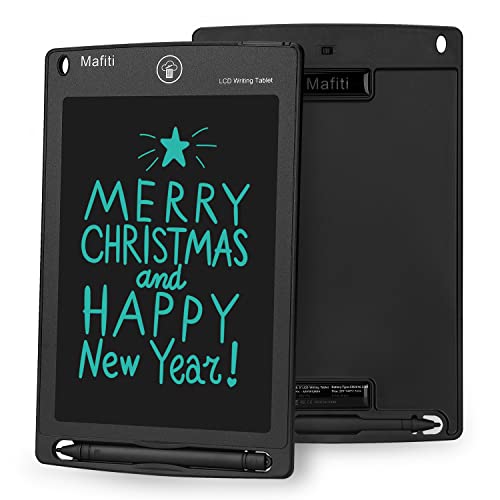
Best Kickstand Feature
Mafiti LCD Writing Tablet 8.5 Inch
Buyers who want the lowest single-tablet price with a display kickstand feature
Our take Check price for Mafiti LCD Writing Tablet 8.5 Inch (opens in a new tab)
Our Picks
Best Overall1 of 4
TIQUS 9.25 Inch LCD Writing Tablet (2-Pack) on Amazon (opens in a new tab)
5 inch tablets that dominate this price range, while still including the lock button that keeps handwriting visible until you're ready to erase it.
Best for
- Buyers who want the largest screen at this price with reliable lock-button protection
Why we like it
TIQUS specifically markets this as an upgraded version over their older tablets, with a brighter screen and thicker line rendering that makes handwriting easier to read at a glance, and the listing notes finger-writing works in addition to the included stylus, a small but useful flexibility.
Best for buyers who want the largest screen size available at this price point along with reliable lock-button protection.
Key dimensions & specs
- 9.25" LCD screen, 2-pack included
- Lock button preserves handwriting until erased
- Works with included stylus or finger
Pros
- Largest screen size in this under $10 comparison
- Lock button reliably protects content from accidental erasure
- Works with a finger in addition to the included stylus
Cons
- Listing states it's not intended for children under 15
- No stated battery replacement instructions in the listing
Best for Fridge Use2 of 4
TIQUS 8.5 Inch Magnetic LCD Writing Tablet (2-Pack) on Amazon (opens in a new tab)
This pack's standout feature is two built-in magnets on the back of each tablet, letting you stick it directly onto a refrigerator or any other iron surface, a genuine convenience for a family message board or grocery list that none of the other picks in this comparison specifically offer.
Best for
- Buyers who want a magnetic tablet for a fridge message board or family reminders
Why we like it
6cm thick, it's among the thinnest options here, and the listing specifically notes the writing feel is designed to mimic real pen-on-paper resistance rather than feeling slick or unresponsive, a detail worth knowing if you've been disappointed by cheaper tablets before.
Best for buyers who specifically want to mount a writing tablet on a fridge or other magnetic surface for family notes and reminders.
Key dimensions & specs
- 8.5" LCD screen, 2-pack included
- 2 built-in magnets per tablet for fridge mounting
- 0.6cm thin profile, lock function included
Pros
- Built-in magnets let you stick it directly to a fridge or metal surface
- Among the thinnest tablets in this comparison
- Writing feel specifically designed to mimic real paper resistance
Cons
- Single-color handwriting only, less vibrant than colorful kids' tablets
- Not intended for children under 15 per the listing
Best Multi-Pack Value3 of 4
TIQUS 8.5 Inch LCD Writing Tablet (3-Pack) on Amazon (opens in a new tab)
33 per tablet, making it a practical choice if you want to place a writing tablet in multiple rooms or share them among family members.
Best for
- Buyers who want the lowest per-unit cost across multiple tablets
Why we like it
Like the other TIQUS picks in this comparison, it includes a lock button to preserve handwriting and works with either the included stylus or a bare finger, keeping the core functionality consistent across TIQUS's different pack sizes and configurations.
Best for buyers who want the lowest per-unit cost and plan to use multiple tablets across different rooms or family members.
Key dimensions & specs
- 8.5" LCD screen, 3-pack included
- Lowest per-unit price in this comparison
- Lock button, works with stylus or finger
Pros
- Lowest effective per-unit price in this comparison
- Three tablets cover multiple rooms or family members
- Consistent lock-button and finger-writing functionality
Cons
- Same 8.5" screen size as the base TIQUS lineup, not the larger 9.25" option
- Not intended for children under 15 per the listing
Best Kickstand Feature4 of 4
Mafiti LCD Writing Tablet 8.5 Inch on Amazon (opens in a new tab)
At the lowest total price in this comparison for a single tablet, this Mafiti pick's stylus doubles as a kickstand, propping the tablet up to display a written message to family or coworkers without needing to hold it, a specific feature the multi-pack TIQUS options don't include.
Best for
- Buyers who want the lowest single-tablet price with a display kickstand feature
Why we like it
Its battery is a user-replaceable CR2016 coin cell rated for over 100,000 writes and erases, and the listing specifically states the update version includes thicker writing lines than earlier Mafiti tablets for easier readability at a glance.
Best for buyers who want the single lowest price here and specifically like the idea of propping up a written note for others to see.
Key dimensions & specs
- 8.5" LCD screen, single tablet
- Stylus doubles as a kickstand for display
- User-replaceable CR2016 coin-cell battery
Pros
- Lowest single-tablet price in this comparison
- Stylus kickstand feature lets you display messages hands-free
- User-replaceable battery rated for 100,000+ writes
Cons
- Only one tablet included versus the multi-packs above
- No magnets or lock button features found on some pricier picks
How We Chose These LCD Writing Tablets Under $10
Each pick was assessed across 5 criteria weighted for real-world use.
- Per-Unit Cost Across Pack Sizes
- Calculated the effective per-tablet price across single units and multi-packs, since pack size varies significantly at this price point.
- Checked which listings specifically describe a lock function to prevent accidental erasure, a common frustration with cheaper LCD tablets.
- Noted specific added features like built-in magnets or a kickstand-capable stylus that differentiate otherwise similar tablets at this price.
- Compared stated battery types and whether the listing describes user-replaceable batteries versus a sealed, non-replaceable design.
- Noted listings that specifically state an intended minimum age, since some tablets at this price are marketed toward adults rather than young children.
What to Look for in an LCD Writing Tablet Under $10
Key buying criteria so you get the right fit the first time.
Calculate the Real Per-Unit Price, Not Just the Listed Total
At this price point, a 2-pack or 3-pack listed at roughly the same total price as a single tablet elsewhere is a meaningfully better deal per unit, but it's easy to compare listings by total price alone without dividing by pack count. 99 single tablet are very different values despite the identical sticker price.
A Lock Button Prevents a Common Frustration
Without a lock function, an LCD writing tablet's erase button can be pressed accidentally, wiping out a note or drawing you wanted to keep, since these tablets have no way to save or undo content once erased. Every tablet in this comparison includes a stated lock button, but this feature isn't universal across all cheap LCD tablets on the market, so specifically confirm the listing mentions a lock switch or button before buying if you plan to write something you want to keep visible for a while.
Coin-Cell Batteries Are Cheap and Easy to Replace, But Confirm It's User-Replaceable
Most LCD writing tablets at this price use a small coin-cell battery (commonly CR2016 or CR2032) that costs only a couple of dollars to replace and lasts through tens of thousands of write-and-erase cycles. Some listings, like the Mafiti pick in this comparison, explicitly state the battery type and confirm it's user-replaceable, while others don't mention this detail at all, worth checking if you want assurance the tablet won't become useless once its factory battery eventually dies.
A Magnetic Back Adds Real Utility for Specific Placements
A tablet with built-in magnets, like the TIQUS Magnetic pick in this comparison, can stick directly to a refrigerator or any other metal surface without needing a separate mounting solution, useful for a kitchen message board or shared family to-do list. If you don't plan to mount the tablet anywhere magnetic, like a countertop stand or a bag for travel use, this feature adds no practical benefit, so match this specific feature to your actual intended placement.
Age Suitability Notices Reflect Small Parts and Battery Access, Not Just Marketing Caution
Several listings in this comparison specifically state the product isn't intended for children under 15, generally reflecting concerns about small replaceable parts like the coin-cell battery or stylus being a choking hazard, rather than the writing tablet itself being unsafe to operate. If you're buying specifically for a young child, look instead for listings explicitly marketed toward younger age ranges with child-safe battery compartments, rather than assuming any LCD writing tablet is suitable regardless of the stated age guidance.
How to Choose an LCD Writing Tablet Under $10
| The largest screen for note-taking | 25 Inch LCD Writing Tablet (2-Pack) |
|---|---|
| A fridge-mounted family message board | 5 Inch Magnetic LCD Writing Tablet (2-Pack) |
| The lowest cost per tablet across multiple units | 5 Inch LCD Writing Tablet (3-Pack) |
| Under $7 for a single tablet | |
|---|---|
| Under $10 for a multi-pack |
- Lower total cost if you only need one tablet, with a bonus kickstand feature for display, but no backup unit if it's lost or fails.
- Multi-Pack (TIQUS 2-Pack or 3-Pack)
- Slightly higher total cost but a much lower per-unit price, plus a spare or a second tablet for a different room or family member.
If you're buying for a single desk or bag, the Mafiti single tablet saves the most. If you want tablets in multiple locations, a TIQUS pack delivers better per-unit value.
| 5 Inch Magnetic LCD Writing Tablet | |
| A kickstand to display written notes |
For Households With Multiple Family Members Specifically
- A multi-pack that gives each family member or room its own tablet, rather than sharing a single unit.
- 5 Inch 3-Pack delivers the lowest per-unit cost specifically for spreading tablets across multiple people or rooms.
- You want a magnetic mounting option for a kitchen or office, where the TIQUS Magnetic 2-Pack is the only pick here with this specific feature.
- A single basic tablet covers your needs, where the Mafiti LCD Writing Tablet delivers the lowest total price in this comparison.
Frequently Asked Questions
Can I use these LCD writing tablets without the included stylus?
25 Inch and TIQUS Magnetic picks, specifically state that finger-writing works in addition to the included stylus, useful if you misplace the stylus.
How long does the battery in a sub-$10 LCD writing tablet actually last?
Most tablets at this price use a coin-cell battery rated for 100,000 or more write-and-erase cycles, which for typical daily use translates to many months or even years before needing replacement.
Is the TIQUS 3-pack actually the same quality tablet as the TIQUS 2-pack options, just more units?
5") and the presence of magnets on the magnetic variant.
Will the magnetic version's magnets damage my refrigerator or leave marks?
Standard consumer-grade magnets used on products like this are designed for safe use on refrigerators and other metal surfaces without causing damage, similar to typical fridge magnets, though it's still good practice to avoid dragging it across delicate painted surfaces repeatedly.
Can I write in different colors on these budget LCD writing tablets?
No, the tablets in this comparison display single-color handwriting (typically a blue-green or dark line), not the multi-color displays found on some pricier kids' doodle boards marketed separately.
Are these tablets suitable for taking notes I need to keep long-term?
No, LCD writing tablets like these are designed for temporary notes that get erased and rewritten repeatedly; they have no way to save, export, or store your writing digitally, so use a phone camera to photograph anything you want to keep permanently.
Bottom Line
Best overall: TIQUS 9.25 Inch LCD Writing Tablet (2-Pack) — best overall pick in this roundup. See the full verdicts above for every pick, with pros, cons and who each one suits.
Browse all lcd writing tablets under $10 on Amazon — Prime-eligible options with current pricing.