
Buying Guide
The Best Laser Engravers for Wood: Picks and Trade-offs
We looked at 8 laser engravers for wood side by side, with the trade-offs that separate them and who each one suits.
By Jamie Cole, Lead Product Researcher
13 min read8 products evaluated
We may earn a commission from purchases made through links in this guide. Learn more.
Wood cutting is the toughest real-world test for a diode laser engraver: it produces more smoke, char, and fire risk than acrylic or leather, and two machines rated at the same wattage often quote very different actual cutting depths.
We compared this lineup specifically on stated wood cutting depth, smoke and fire containment, and bed size against real wood project sizes, cutting boards, sign blanks, and cylindrical pieces, rather than ranking by wattage alone.
Quick Picks
Our 8 recommendations at a glance. Tap a pick for the full verdict.

Best Overall for Wood
Creality Laser Engraver 10W Output, 72W
Buyers cutting full-size wood sign blanks and cutting boards who have a ventilated space set up already
Our take Check price for Creality Laser Engraver 10W Output, 72W (opens in a new tab)

Best Large Workspace
Creality Falcon 10W Laser Engraver, 15.7x16.3in
Buyers cutting thicker wood boards up to 12mm who want a slightly larger bed than the standard 10W Creality model
Our take Check price for Creality Falcon 10W Laser Engraver, 15.7x16.3in (opens in a new tab)

Best Enclosed for Wood
Woxcker Laser Engraver 10W, 300mm Enclosed
Buyers doing longer wood cutting sessions who want physical fire-safety hardware, not just an open frame and a fire extinguisher nearby
Our take Check price for Woxcker Laser Engraver 10W, 300mm Enclosed (opens in a new tab)

Best for Beginners on Wood
Carverall K15 Pro Laser Engraver 10W
First-time wood engravers who want a verified cutting depth and app-based design instead of learning LightBurn from scratch
Our take Check price for Carverall K15 Pro Laser Engraver 10W (opens in a new tab)

Best for Large Panels
LONGER Laser Engraver Ray5 10W, 60W
Buyers cutting the thickest and largest wood panels in this comparison who have the shop space for a 400x400mm machine
Our take Check price for LONGER Laser Engraver Ray5 10W, 60W (opens in a new tab)

Best with Rotary Attachment
Algolaser 10W Laser Engraver and Cutter with Rotary Roller
Buyers making cylindrical wood items like mugs, rolling pins, or turned pieces that a flat-bed-only machine can't engrave evenly
Our take Check price for Algolaser 10W Laser Engraver and Cutter with Rotary Roller (opens in a new tab)
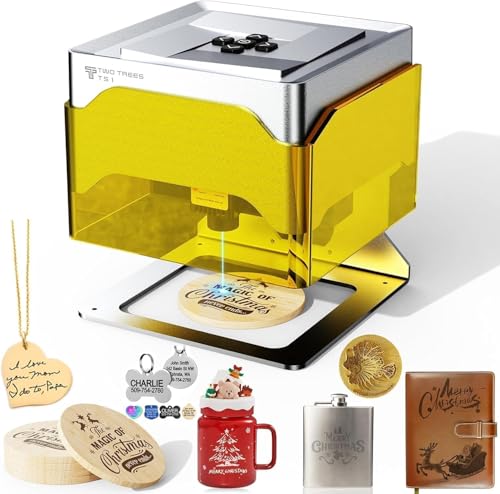
Best Compact for Small Wood Pieces
Twotrees TS1 Mini Laser Engraver, Enclosed
Buyers making small wood crafts like coasters and keychains who want an enclosed, zero-assembly machine
Our take Check price for Twotrees TS1 Mini Laser Engraver, Enclosed (opens in a new tab)

Best Budget for Wood
Artilume Foldable Laser Engraver T1 7W
Budget buyers who want basic wood-sign cutting and detail engraving without the cost of a full 10W machine
Our take Check price for Artilume Foldable Laser Engraver T1 7W (opens in a new tab)
| Pick | Best for | Key spec | Price |
|---|---|---|---|
| Buyers cutting full-size wood sign blanks and cutting boards who have a ventilated space set up already | 10W output, 72W machine power, cuts 5mm basswood in one pass | Check price for Creality Laser Engraver 10W Output, 72W (opens in a new tab) |
| Buyers cutting thicker wood boards up to 12mm who want a slightly larger bed than the standard 10W Creality model | 10W output, 72W machine power, rated for 12mm wood boards | Check price for Creality Falcon 10W Laser Engraver, 15.7x16.3in (opens in a new tab) |
| Buyers doing longer wood cutting sessions who want physical fire-safety hardware, not just an open frame and a fire extinguisher nearby | 10W output, fully enclosed, flame sensor + lid interlock | Check price for Woxcker Laser Engraver 10W, 300mm Enclosed (opens in a new tab) |
| First-time wood engravers who want a verified cutting depth and app-based design instead of learning LightBurn from scratch | Verified 10.36-10.58W output, dual-fan cooling, cuts 12mm plywood | Check price for Carverall K15 Pro Laser Engraver 10W (opens in a new tab) |
| Buyers cutting the thickest and largest wood panels in this comparison who have the shop space for a 400x400mm machine | 10W laser, rated to cut 0.8in (20mm) wood | Check price for LONGER Laser Engraver Ray5 10W, 60W (opens in a new tab) |
| Buyers making cylindrical wood items like mugs, rolling pins, or turned pieces that a flat-bed-only machine can't engrave evenly | 10W laser, includes rotary roller + riser kit | Check price for Algolaser 10W Laser Engraver and Cutter with Rotary Roller (opens in a new tab) |
| Buyers making small wood crafts like coasters and keychains who want an enclosed, zero-assembly machine | 3W adjustable laser, fully enclosed housing, no assembly | Check price for Twotrees TS1 Mini Laser Engraver, Enclosed (opens in a new tab) |
| Budget buyers who want basic wood-sign cutting and detail engraving without the cost of a full 10W machine | 7W diode output, cuts up to 4mm basswood (multi-pass) | Check price for Artilume Foldable Laser Engraver T1 7W (opens in a new tab) |
Our Picks
Best Overall for Wood1 of 8
Creality Laser Engraver 10W Output, 72W on Amazon (opens in a new tab)
Creality rates this at a genuine 10W output behind a 72,000mW module, enough to cut a 5mm basswood board in one pass rather than the two or three passes a weaker diode laser needs on the same board.
Best for
- Buyers cutting full-size wood sign blanks and cutting boards who have a ventilated space set up already
Why we like it
That single-pass capability matters directly for wood work: fewer passes means less char buildup along the cut edge and a cleaner finish without extra sanding.
It runs on LightBurn or the free LaserGRBL, and assembles in 10-20 minutes with a tool-free focus plate.
Key dimensions & specs
- 10W output, 72W machine power, cuts 5mm basswood in one pass
- 17" x 16" open-frame bed
- 0.06mm spot, 0.004in accuracy, 10,000mm/min
- LightBurn and LaserGRBL compatible
Pros
- One-pass cutting on 5mm basswood keeps edges cleaner
- 17x16in bed fits full cutting boards and sign blanks
- Steel rail guides hold accuracy at higher cutting speeds
Cons
- Open frame needs separate ventilation for wood smoke and char
- No enclosure means sawdust and offcuts land directly on the machine bed
Best Large Workspace2 of 8
Creality Falcon 10W Laser Engraver, 15.7x16.3in on Amazon (opens in a new tab)
3", and Creality specifically rates it for cutting 12mm wood boards, thicker than the 5mm figure quoted on comparable machines in this power class.
Best for
- Buyers cutting thicker wood boards up to 12mm who want a slightly larger bed than the standard 10W Creality model
Why we like it
At a stated 10,000mm/min work speed, larger wood panels and multi-piece batch jobs move faster than on slower open-frame competitors, and it's rated across 200-plus materials beyond wood, including leather and acrylic, for shops that mix media. It supports both LightBurn and offline SD-card operation.
Key dimensions & specs
- 10W output, 72W machine power, rated for 12mm wood boards
- 15.7" x 16.3" open-frame bed
- 0.06mm spot, 10,000mm/min, 200+ rated materials
- LightBurn compatible, offline SD card operation
Pros
- 12mm wood cutting depth is deeper than most 10W diode machines quote
- Slightly larger bed than its sibling model fits bigger panels
- Offline SD card operation works without a connected computer
Cons
- Open frame still requires the buyer's own ventilation setup
- Near-identical specs and price to the standard Creality 10W model can make the choice unclear
Best Enclosed for Wood3 of 8
Woxcker Laser Engraver 10W, 300mm Enclosed on Amazon (opens in a new tab)
Wood cutting produces the most smoke and stray sparks of any common laser material, and the Woxcker's fully enclosed 360-degree cover with a lid interlock is built specifically to contain that during longer cutting runs.
Best for
- Buyers doing longer wood cutting sessions who want physical fire-safety hardware, not just an open frame and a fire extinguisher nearby
Why we like it
A built-in flame sensor halts the job automatically if heat spikes beyond normal engraving levels, which matters more on wood than on acrylic or leather given wood's higher ignition risk.
01mm compressed focus point produces cleaner detail work on wood grain than a wider, uncompressed spot. It connects over Wi-Fi, USB, app, or offline TF card, and works with LightBurn, LaserGRBL, and Cutlabx.
Key dimensions & specs
- 10W output, fully enclosed, flame sensor + lid interlock
- 300mm x 300mm bed, 0.01mm compressed focus
- 20,000mm/min max speed
- WiFi/USB/app/TF card, LightBurn/LaserGRBL/Cutlabx compatible
Pros
- Flame sensor is a genuine added safeguard for wood's higher fire risk
- Enclosed design contains wood smoke and sparks during long cuts
- 20,000mm/min speed is roughly double comparable open-frame machines
Cons
- 300mm bed is smaller than the open-frame options in this lineup
- Higher price than open-frame machines with similar cutting power
Best for Beginners on Wood4 of 8
Carverall K15 Pro Laser Engraver 10W on Amazon (opens in a new tab)
58W output on this module, and rates it to cleanly cut 12mm plywood, a useful figure for anyone starting out with wood projects and unsure what cutting depth a given wattage actually delivers.
Best for
- First-time wood engravers who want a verified cutting depth and app-based design instead of learning LightBurn from scratch
Why we like it
The dual-fan cooling system is built to reduce heat buildup by half versus a single-fan design, which matters for wood cutting jobs that often run longer than simple engraving.
The free CutLabX app handles design from a phone or tablet, including AI-generated designs from a text prompt or photo, cutting out the LightBurn learning curve for a first wood-cutting machine. 9" bed is sized for coasters, small signs, and jewelry blanks rather than full panels.
Key dimensions & specs
- Verified 10.36-10.58W output, dual-fan cooling, cuts 12mm plywood
- 11.8" x 7.9" (A4) bed
- 0.01mm precision, 15,000mm/min
- CutLabX free app, offline TF card control
Pros
- Verified 12mm plywood cutting depth removes guesswork on power
- Dual-fan cooling helps on longer wood-cutting runs specifically
- CutLabX app skips the LightBurn learning curve entirely
Cons
- 11.8x7.9in bed limits it to small wood pieces, not full panels
- Extra heightening columns are needed separately for taller wood blanks
Best for Large Panels5 of 8
LONGER Laser Engraver Ray5 10W, 60W on Amazon (opens in a new tab)
8in (roughly 20mm) wood cutting depth, deep enough for thick shelving stock and butcher-block style panels most diode engravers can't touch.
Best for
- Buyers cutting the thickest and largest wood panels in this comparison who have the shop space for a 400x400mm machine
Why we like it
5" touch screen runs simple engraving jobs without a connected laptop, useful for repeat wood-sign batches once a design is saved, and the 240MHz ESP32 controller adds motion and heat protection along with a hidden active cooling system built for longer wood-cutting sessions. It connects over USB, TF card, Wi-Fi, or app, plus LightBurn and LaserGRBL.
Key dimensions & specs
- 10W laser, rated to cut 0.8in (20mm) wood
- 400mm x 400mm bed, largest in this lineup
- 3.5in touchscreen, 240MHz ESP32 controller
- 0.06mm spot, 10,000mm/min, LightBurn/LaserGRBL compatible
Pros
- 0.8in rated wood cutting depth is the deepest in this comparison
- 400x400mm bed fits large panels without tiling smaller cuts
- Touchscreen runs saved jobs without a laptop connected
Cons
- Largest footprint here needs a dedicated shop or garage space
- Deeper wood cuts still typically need multiple passes at this power
Best with Rotary Attachment6 of 8
Algolaser 10W Laser Engraver and Cutter with Rotary Roller on Amazon (opens in a new tab)
The included rotary roller and riser kit is the differentiator here: cylindrical wood pieces like rolling pins, wooden mugs, and turned bowls need a rotary attachment to engrave evenly around the curve, and most machines in this lineup don't include one.
Best for
- Buyers making cylindrical wood items like mugs, rolling pins, or turned pieces that a flat-bed-only machine can't engrave evenly
Why we like it
The raised riser base also accommodates thicker flat stock than a standard bed height allows.
5" touchscreen with Algolaser's AlgoOS system lets simple jobs preview and run without a connected computer, and the 10,000mW laser cuts and engraves at up to 12,000mm/min on wood, coated metal, leather, and acrylic. It's built to Class 1 safety standards with flame detection, an emergency stop, and dual-lock authorization, and connects over Wi-Fi, USB, TF card, or app, compatible with LightBurn and LaserGRBL.
Key dimensions & specs
- 10W laser, includes rotary roller + riser kit
- 3.5in touchscreen, AlgoOS offline operation
- 12,000mm/min, Class 1 safety with flame detection
- WiFi/USB/TF card/app, LightBurn and LaserGRBL compatible
Pros
- Included rotary roller handles cylindrical wood pieces most machines here can't
- Riser base accommodates thicker flat stock than the standard bed height
- Touchscreen with AlgoOS runs jobs without a connected computer
Cons
- Higher price reflects the rotary attachment most buyers may not need
- Standard flat bed is smaller than the largest open-frame options here
Best Compact for Small Wood Pieces7 of 8
Twotrees TS1 Mini Laser Engraver, Enclosed on Amazon (opens in a new tab)
For small wood crafts, coasters, keychains, and thin plywood pieces, the TS1 covers the job with a fully enclosed acrylic housing and zero assembly required beyond unboxing, aimed at supervised classroom and family use.
Best for
- Buyers making small wood crafts like coasters and keychains who want an enclosed, zero-assembly machine
Why we like it
1mm positioning accuracy across an 80mm x 80mm bed.
At roughly 1kg and 157mm x 157mm x 167mm, it stores easily between projects, and control runs through the MKSLaser Bluetooth app or a wired LightBurn connection. It's rated for plywood, MDF, bamboo, paper, and leather, all common small-project wood-adjacent materials.
Key dimensions & specs
- 3W adjustable laser, fully enclosed housing, no assembly
- 80mm x 80mm bed, rated for plywood, MDF, bamboo
- 0.1mm positioning accuracy, up to 3000mm/min
- Bluetooth app (MKSLaser) or USB with LightBurn
Pros
- Fully enclosed housing suits supervised classroom wood-craft use
- No assembly required, ready to engrave out of the box
- Compact 1kg build stores easily between small projects
Cons
- 80mm x 80mm bed limits it to small wood pieces only
- 3W power engraves but does not cleanly cut thin plywood
Best Budget for Wood8 of 8
Artilume Foldable Laser Engraver T1 7W on Amazon (opens in a new tab)
The T1 sits between the small enclosed engravers and the full-power cutting machines in this lineup: a 7W diode strong enough to cut thin basswood (up to 4mm) across multiple passes, while staying at the lowest price point here.
Best for
- Budget buyers who want basic wood-sign cutting and detail engraving without the cost of a full 10W machine
Why we like it
01mm accuracy, aimed at detailed wood-sign text and logo work rather than deep cutting.
The 200mm x 150mm bed covers small signs and wood coasters, and the frame folds flat for storage, a genuine space-saver most rigid-frame engravers don't offer. Control runs from a smartphone app for simple jobs or LightBurn and GRBL for advanced batch work.
Key dimensions & specs
- 7W diode output, cuts up to 4mm basswood (multi-pass)
- 200mm x 150mm bed, foldable frame
- 0.01mm precision
- Smartphone app or LightBurn/GRBL
Pros
- Lowest price in this lineup while still cutting thin wood
- Foldable frame is a genuine storage advantage over rigid designs
- 0.01mm precision suits detailed wood-sign text and logos
Cons
- 4mm cutting depth requires multiple passes, unlike the 10W machines here
- 200x150mm bed is one of the smaller working areas in this lineup
How We Chose These Laser Engravers for Wood
Each pick was assessed across 5 criteria weighted for real-world use.
- Compared each listing's specifically stated wood cutting depth (in mm or inches at a given pass count) rather than assuming a higher wattage figure automatically translates to deeper cuts, since machines at the same claimed power quoted different real cutting depths.
- Checked for enclosure design, flame sensors, and ventilation compatibility specifically for wood cutting, which produces more smoke, char, and fire risk than acrylic or leather engraving on the same machine.
- Bed Size vs Real Wood Project Sizes
- Matched working area against common wood project dimensions (cutting boards, sign blanks, coasters, cylindrical pieces) rather than ranking bed size alone, since a rotary attachment matters more than flat bed size for cylindrical wood items.
- Verified whether each machine supports offline SD/TF card operation or a phone app for batch wood-sign jobs, versus requiring a permanently connected computer running LightBurn.
- Weighed verified (not inflated) power claims and assembly complexity for buyers new to wood cutting specifically, since a first wood project carries more trial-and-error risk than an experienced user's batch run.
What to Look for in a Laser Engraver for Wood
Key buying criteria so you get the right fit the first time.
Rated Wood Cutting Depth, Not Just Wattage
Wattage alone doesn't predict how deep a machine cuts wood in one pass; look specifically for a stated cutting depth figure like 5mm, 12mm, or 20mm, since two 10W-rated machines in this lineup quote different maximum wood thicknesses. A machine that only lists general power without a cutting-depth figure is harder to plan a project around, since the buyer has to test rather than trust the spec sheet.
Smoke, Char, and Fire Containment
Wood cutting produces more visible smoke and char buildup than acrylic or leather work on the same machine, and carries a real fire risk during longer cuts. A flame sensor that halts the job automatically, or a fully enclosed housing that contains sparks, is worth prioritizing for wood specifically even if it costs more or reduces available bed size, since retrofitting containment after a fire incident isn't an option.
Bed Size Matched to Real Wood Projects
Match the working area to actual planned wood projects rather than the largest available bed: cutting boards and sign blanks need 16in-plus, small coasters and keychains fit an 8in bed comfortably, and cylindrical items like mugs or rolling pins need a rotary attachment regardless of flat-bed size. Buying a larger bed than projects require mostly adds footprint and cost without practical benefit for wood work specifically.
Multiple Passes vs Single-Pass Cutting
Lower-power machines can still cut wood, but require two or more passes at the same settings, which adds real project time and can leave more visible char along the edge than a single deeper pass. Check whether the listed cutting depth assumes one pass or several before comparing two machines at similar prices, since a 5mm single-pass rating and a 5mm multi-pass rating are not equivalent in practice.
Software and Offline Batch Operation
Wood sign and craft work often means running the same design repeatedly across multiple blanks, so offline SD/TF card operation or a saved-job touchscreen workflow matters more here than for one-off engraving. A phone app with AI design generation from a photo also removes the need to learn vector design software just to start a first wood project.
How to Choose a Laser Engraver for Wood
By Wood Cutting Depth Needed
| LONGER Laser Engraver Ray5 10W, 60W | |
| Up to 12mm plywood or boards | 3in or Carverall K15 Pro Laser Engraver 10W |
| Up to 5mm basswood, single pass | Creality Laser Engraver 10W Output, 72W |
| Thin (4mm or less) basswood, multi-pass | Artilume Foldable Laser Engraver T1 7W |
| Lowest price, thin wood only | Artilume Foldable Laser Engraver T1 7W |
|---|---|
| Mid-range, best overall wood value | Creality Laser Engraver 10W Output, 72W |
| Higher budget, enclosed fire safety | Woxcker Laser Engraver 10W, 300mm Enclosed |
Open Frame vs Enclosed for Wood Cutting
- Creality 72W, Creality Falcon, LONGER Ray5)
- More cutting power and larger beds for the price, but wood smoke, sawdust, and stray sparks are fully the buyer's responsibility to contain and ventilate.
- Contains wood smoke and sparks and, in Woxcker's case, adds a flame sensor specifically for wood's higher fire risk, at a smaller bed size or lower cutting power.
For longer wood-cutting sessions specifically, an enclosed design with a flame sensor is worth the tradeoff over an open frame's larger bed.
Flat Panels vs Cylindrical Wood Pieces
| Creality Laser Engraver 10W Output, 72W | |
| Rolling pins, mugs, turned cylindrical pieces | Algolaser 10W Laser Engraver and Cutter with Rotary Roller |
For Beginners Cutting Wood Specifically
- A specifically stated wood cutting depth (not just wattage), dual-fan cooling for longer runs, and app-based design so the first project doesn't also require learning LightBurn.
- Carverall K15 Pro Laser Engraver 10W states a verified cutting depth of 12mm plywood and runs entirely from the free CutLabX phone app.
- You're cutting thick panels regularly (LONGER Ray5's 20mm rated depth) or need a rotary attachment for cylindrical wood pieces (Algolaser's included roller kit).
- Projects are small wood crafts like coasters and keychains, where Twotrees TS1 Mini Laser Engraver, Enclosed or the budget-tier Artilume T1 7W cover the job.
Frequently Asked Questions
What laser power do I need to cut wood?
A 5-10W diode laser cuts thin basswood (3-5mm) in a single pass and thicker plywood (up to 12-20mm) in multiple passes or on higher-rated machines; below 5W, most diode lasers can engrave wood surfaces but struggle to cut through even thin stock.
Does a laser engraver leave burn marks on wood?
Yes, some char along the cut edge is normal with diode laser cutting; the depth of char depends on power, speed, and number of passes. Lower speed and higher power in a single pass generally leaves less visible char than multiple slow passes.
Can I engrave curved or cylindrical wood pieces like mugs?
Only with a rotary roller attachment, which rotates the cylindrical piece in sync with the laser head; a flat-bed-only machine cannot evenly engrave a curved wood surface without one, regardless of bed size.
Do I need ventilation even with an enclosed laser engraver?
An enclosure contains smoke and sparks during the cutting process, but the machine still needs to vent that smoke outside or through a filter; enclosure alone does not eliminate the need for ventilation on wood specifically, which produces more particulate than acrylic or leather.
What wood types work best with a diode laser engraver?
Basswood, birch plywood, and MDF cut and engrave most predictably due to consistent density; hardwoods like oak or walnut engrave well but cut more slowly and may need multiple passes even on a 10W machine, and resinous woods like pine can produce more visible char.
Bottom Line
Best overall: Creality Laser Engraver 10W Output, 72W — best overall for wood pick in this roundup. See the full verdicts above for every pick, with pros, cons and who each one suits.
Browse all laser engravers for wood on Amazon — Prime-eligible options with current pricing.