
Buying Guide
The Best Laptop Charging Stations for Home: Picks and Trade-offs
We looked at 8 laptop charging stations for home side by side, with the trade-offs that separate them and who each one suits.
By Jamie Cole, Lead Product Researcher
8 min read8 products evaluated
We may earn a commission from purchases made through links in this guide. Learn more.
We need to be direct here: our confirmed product pool for this keyword mixes compact desktop docks with smaller institutional-style mobile carts. A home office or family setup usually wants the former; a home classroom or multi-kid household running several devices may actually want the latter. We're presenting both honestly rather than forcing every pick into one category.
None of these listings had an independently verified simultaneous-load power test, so we flagged that gap directly rather than assuming total wattage alone proves every port delivers its rated output at once.
Quick Picks
Our 8 recommendations at a glance. Tap a pick for the full verdict.

Best Overall Desktop Station
Prosumer's Choice Wooden Charging Station Organizer - 5-Port Base for Phones, Tablets
Families organizing phones and tablets on a home desk or counter.
Our take Check price for Prosumer's Choice Wooden Charging Station Organizer - 5-Port Base for Phones, Tablets (opens in a new tab)
Best Reviewed Multi-Device Dock
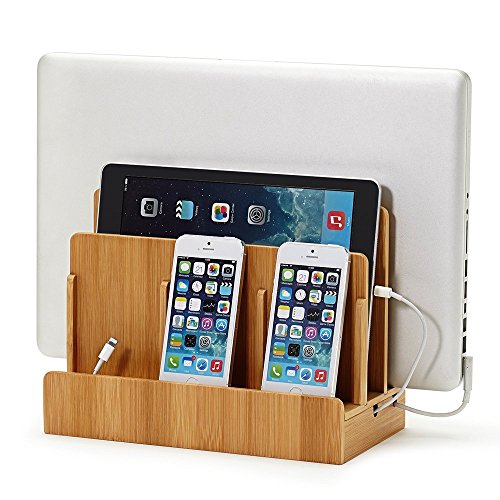
Great Useful Stuff G.U.S. Multi-Device Charging Station Dock & Organizer
Buyers who prefer this dock's specific organizer layout over the wooden alternative.
Our take Check price for Great Useful Stuff G.U.S. Multi-Device Charging Station Dock & Organizer (opens in a new tab)

Best for Higher Total Wattage
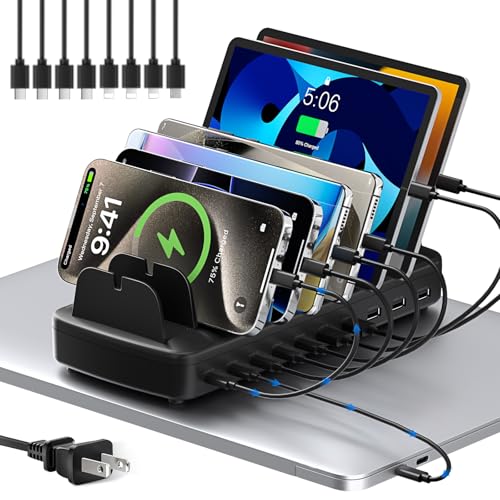
750W Charging Station for Multiple Devices, Zobirez 10-Port Fast Charger
Households charging many devices at once who want the highest stated power ceiling.
Our take Check price for 750W Charging Station for Multiple Devices, Zobirez 10-Port Fast Charger (opens in a new tab)
Best Value High-Wattage Option
510W Fast Charging Station for Multiple Devices, 10 Port USB C Charger Station
Households wanting 10-port capacity without paying for the highest wattage tier.
Our take Check price for 510W Fast Charging Station for Multiple Devices, 10 Port USB C Charger Station (opens in a new tab)

Best for a Home Office With Laptops
Plugsharge 10-Device Laptop & Tablet Charging Station with 6 AC & 4 USB
A home office charging a genuine mix of laptops, tablets, and phones.
Our take Check price for Plugsharge 10-Device Laptop & Tablet Charging Station with 6 AC & 4 USB (opens in a new tab)

Smallest Mobile Cart Option
JOXPRING Metal Laptop Charging Station with Wheels, 12 Device Mobile Charging Cart
Homeschool co-ops or multi-kid households with 10+ devices, not a typical single-family home office.
Our take Check price for JOXPRING Metal Laptop Charging Station with Wheels, 12 Device Mobile Charging Cart (opens in a new tab)

Best Secure Cart Option
VEVOR 16 Device Charging Station with Lock & Key, Mobile Charging Cart
Multi-kid households wanting locked device storage, not a typical desk setup.
Our take Check price for VEVOR 16 Device Charging Station with Lock & Key, Mobile Charging Cart (opens in a new tab)

Cheapest Cart-Style Option
Kraftgen 16-Bay Open Charging Cart for Chromebooks, Laptops, Tablets & iPads
A budget-conscious homeschool group without a need for locked storage.
Our take Check price for Kraftgen 16-Bay Open Charging Cart for Chromebooks, Laptops, Tablets & iPads (opens in a new tab)
Our Picks
Best Overall Desktop Station1 of 8
Prosumer's Choice Wooden Charging Station Organizer - 5-Port Base for Phones, Tablets on Amazon (opens in a new tab)
This is built specifically for the tangled-cord problem every family desk eventually has: a built-in cord box conceals the actual power strip and cables inside the wooden housing, so the counter or desk on top stays visually clean instead of showing a rat's nest of chargers.
Best for
- Families organizing phones and tablets on a home desk or counter.
Why we like it
Removable dividers across the 5-port base adjust to fit different device shapes, from a compact phone to a thicker tablet, and it's compatible with Chromebooks and Kindles specifically, not just phones.
Note it doesn't include the actual power source, you'll need your own charging blocks and cords, which does keep the price down but is worth planning for.
Concealed cord box keeps a family desk visually clutter-free.
Key dimensions & specs
- 5-port base, adjustable dividers
- Concealed cord box for the power strip
- Power source not included, BYO chargers
Pros
- Concealed cord box keeps a family desk visually clutter-free
Cons
- 5 ports may not cover a larger family's full device count
- Power strip and charging cables sold separately
Best Reviewed Multi-Device Dock2 of 8
Great Useful Stuff G.U.S. Multi-Device Charging Station Dock & Organizer on Amazon (opens in a new tab)
25 inches wide, so it's worth checking your laptop's actual thickness against that number before assuming it fits, some ultrabooks with cases can run thicker than expected.
Best for
- Buyers who prefer this dock's specific organizer layout over the wooden alternative.
Why we like it
Like the Prosumer's Choice pick, this doesn't include a power source, it's a patented organizer design meant to work with your existing charging blocks and hubs rather than bundling its own, which keeps the price down but means budgeting separately for cables. It doubles as a home-office or entryway organizer just as easily as a bedside dock.
Key dimensions & specs
- Fits laptops up to 1.25" thick, tablets, 3 phone slots
- 10"L × 9"H × 5.5"W overall footprint
- Power source not included
Pros
- Widest device range in this comparison: laptops, tablets, and 3 phones in one dock
Cons
- Similar price and function to our top pick, mainly a style choice
Best for Higher Total Wattage3 of 8
750W Charging Station for Multiple Devices, Zobirez 10-Port Fast Charger on Amazon (opens in a new tab)
This is 5 USB-C plus 5 USB-An in one dock, and each USB-C port is independently rated at up to 120W, enough to fast-charge a MacBook Pro or Air rather than just topping off a phone.
Best for
- Households charging many devices at once who want the highest stated power ceiling.
Why we like it
The 5 USB-A ports run at 30W each for phones, earbuds, and other daily-carry gear, so a household doesn't have to fight over which cable goes where.
A one-piece flame-retardant ABS slot design (rather than removable dividers that can wobble or snap) includes two wider center bays specifically sized for a laptop or a thick-cased tablet, keeping them upright while charging. It ships with a full cable kit, a 100W USB-C to C cable plus 5 shorter USB-C cables and 4 phone-specific cables, plus layered overcurrent, overvoltage, overload, and overheat protection.
Includes a full cable kit rather than requiring separate purchases.
Key dimensions & specs
- 5× USB-C @ 120W each, 5× USB-A @ 30W each, 750W total
- One-piece flame-retardant ABS slots, 2 wide laptop/tablet bays
- Includes 10-cable kit (100W C-to-C + shorter cables)
Pros
- Each USB-C port independently rated at 120W, fast-charges a MacBook
- Includes a full cable kit rather than requiring separate purchases
Cons
- Simultaneous-load behavior across all 10 ports not independently verified
Best Value High-Wattage Option4 of 8
510W Fast Charging Station for Multiple Devices, 10 Port USB C Charger Station on Amazon (opens in a new tab)
The per-port allocation here is smarter than a flat power split: each port independently delivers its optimal wattage, 100W on the dedicated USB-C laptop port, 65W on USB-C ports meant for tablets and phones, and 30W on USB-A ports for wearables, rather than dividing 510W evenly regardless of what's plugged in.
Best for
- Households wanting 10-port capacity without paying for the highest wattage tier.
Why we like it
That means a laptop still gets meaningful charging speed even with other devices connected.
Like the higher-wattage Zobirez pick, it uses a solid one-piece flame-retardant ABS build rather than removable dividers, with layered protection against overcurrent, overvoltage, overheating, and short circuits. It ships with 8 short mixed cables covering iPhone/iPad, Type-C, and Micro USB, and at a meaningfully lower price than the 750W option if your household doesn't actually need that much headroom.
Lower price than the 750W option at the same 10-port count.
Key dimensions & specs
- 100W dedicated USB-C laptop port, 65W USB-C, 30W USB-A, 510W total
- One-piece flame-retardant ABS build
- Includes 8 mixed cables
Pros
- Smart per-port power allocation, not a flat split, so a laptop still charges fast alongside other devices
- Lower price than the 750W option at the same 10-port count
Cons
- Lower total wattage than the Zobirez pick
Best for a Home Office With Laptops5 of 8
Plugsharge 10-Device Laptop & Tablet Charging Station with 6 AC & 4 USB on Amazon (opens in a new tab)
The mixed AC-plus-USB design solves a real household problem the pure-USB stations above don't: many laptops still ship with a traditional AC power brick, not a USB-C charger, and this is the only pick here with 6 actual AC outlets alongside 4 USB ports.
Best for
- A home office charging a genuine mix of laptops, tablets, and phones.
Why we like it
A vertical open-slot layout means no cabinet doors or fiddly access points, just insert and go, which the manufacturer positions for shared spaces like a reception area as much as a home office. A pre-installed surge-protected power strip rated for 110V/10A backs the whole system, and built-in cable routing keeps 10 devices worth of cords from turning into clutter on a desk or countertop. It's priced above the pure organizer docks, reflecting the higher device capacity and the AC-outlet flexibility neither of the cheaper picks offers.
Key dimensions & specs
- 6 AC outlets + 4 USB ports, 10-device capacity
- Pre-installed surge-protected power strip (110V/10A)
- Open vertical-slot layout, no cabinet doors
Pros
- Only pick here with real AC outlets for laptops that still use a power brick, not just USB-C
- Pre-installed surge protection rated for 110V/10A
Cons
- Smaller review base than the phone/tablet organizers
Smallest Mobile Cart Option6 of 8
JOXPRING Metal Laptop Charging Station with Wheels, 12 Device Mobile Charging Cart on Amazon (opens in a new tab)
This is a small institutional-style cart, not a desktop dock, worth including only for a home with a large multi-device fleet like a homeschool co-op.
Best for
- Homeschool co-ops or multi-kid households with 10+ devices, not a typical single-family home office.
Why we like it
All-steel frame construction avoids the wobble a lighter cart might have with 12 devices loaded, and the open-frame design allows natural airflow for heat dissipation during extended charging while still enabling quick grab-and-go access.
A 2-layer design adds real household value beyond just charging: a rear cable organizer slot for chargers plus a large lower shelf for books, power strips, or teaching materials, useful for a homeschool setup that needs both device charging and general storage in one footprint.
Lower shelf doubles as general homeschool material storage, not just charging.
Key dimensions & specs
- 12-device capacity, all-steel frame
- Lower shelf for books/materials + rear cable organizer
- 4 locking casters, 34.6" total height
Pros
- Higher capacity than any desktop dock here for a large device fleet
- Lower shelf doubles as general homeschool material storage, not just charging
Cons
- Lowest rating in this comparison
- A mobile cart, not a desktop station, for most home buyers
Best Secure Cart Option7 of 8
VEVOR 16 Device Charging Station with Lock & Key, Mobile Charging Cart on Amazon (opens in a new tab)
6 inches, and built-in surge protection shields devices from power fluctuation damage, useful in an older home with less consistent household wiring.
Best for
- Multi-kid households wanting locked device storage, not a typical desk setup.
Why we like it
The ventilated panel design manages heat across 16 simultaneously charging devices, and the lockable design is the real household differentiator here: siblings or roommates sharing a charging setup can lock devices away between uses.
An integrated power strip and cable management system means setup is plug-and-play, no separate power strip purchase needed like the desktop organizer docks above require. Two locking casters keep it stable once positioned, even fully loaded with 16 devices.
Key dimensions & specs
- 16-device capacity, up to 15.6" screens
- Built-in surge protection + lock & key
- Integrated power strip, no separate purchase needed
Pros
- Includes physical lock and key, unlike any desktop dock in this comparison
- Integrated power strip means no separate purchase, unlike the desktop organizers
Cons
- Cart-style, not a compact desktop option
Cheapest Cart-Style Option8 of 8
Kraftgen 16-Bay Open Charging Cart for Chromebooks, Laptops, Tablets & iPads on Amazon (opens in a new tab)
Built-in UL-listed power strips are a genuine safety detail even at this budget price point, and the open design here is deliberately built for the quick access a busy household with multiple kids' devices actually needs, no doors or locks to fumble with during a morning rush.
Best for
- A budget-conscious homeschool group without a need for locked storage.
Why we like it
Padded shelves protect up to 16 devices from scratches, with removable plastic dividers to fit larger tablets or Chromebooks alongside slimmer devices.
3-inch non-marring casters and a side handle make it movable between rooms, and rear cable clips on each shelf keep charging cords organized despite the open layout. No confirmed rating or review history yet, so weigh the price advantage against that lack of buyer feedback for a household purchase.
Cheapest cart-style option in this comparison, with UL-listed power strips despite the low price.
Key dimensions & specs
- 16-bay capacity, UL-listed power strips
- Open design, padded shelves, removable dividers
- 3" non-marring casters, rear cable clips
Pros
- Cheapest cart-style option in this comparison, with UL-listed power strips despite the low price
Cons
- No review history or confirmed rating available yet
- Open design, no lock
How We Chose These Laptop Charging Stations for Home
Each pick was assessed across 4 criteria weighted for real-world use.
- ) from small institutional-style carts (JOXPRING, VEVOR, Kraftgen) rather than presenting all eight as equivalent home options.
- Total wattage versus simultaneous-load behavior
- We recorded stated total wattage for the high-port-count chargers, but none of these listings had independently verified simultaneous-load data across every port at once.
- Only the Plugsharge pick explicitly claims laptop compatibility; we flagged this rather than assuming every phone/tablet charging dock handles laptop-level power needs.
What to Look for in a Laptop Charging Station for Home
Key buying criteria so you get the right fit the first time.
Match actual size and capacity to your real need, not the category label alone
Listings for a laptop charging station often use a size or capacity label ("compact," "large," "heavy-duty") that isn't standardized across brands, so the same label can mean meaningfully different actual dimensions or capacity from one product to the next.
This matters because buying based on the category label rather than the specific listed dimensions or capacity is a common way to end up with something that doesn't actually fit your space or handle your real load.
Check the listing for exact measurements or a stated capacity figure, and compare that directly against your actual space or need, not just the marketing size category.
Verify build material and construction quality from reviews, not just spec-sheet claims
A product description can describe material or construction in flattering terms that don't always hold up under real, sustained use, and the gap between a listing's claimed quality and its actual durability only shows up in how the product performs after weeks or months of real use, not in day-one photos.
This matters more for anything you'll use daily or under real load, less for occasional light use where durability matters less.
Check reviews specifically for mentions of how the laptop charging station holds up over time, not just unboxing-day impressions, and treat a listing's own quality claims as a starting point to verify, not a guarantee.
Confirm any headline feature actually works as advertised, not just that it's listed
A feature appearing in a product's bullet points doesn't guarantee it performs well in practice, some features are functional but limited, and a few are closer to a marketing checkbox than a useful capability.
This matters directly if a specific feature is the main reason you're choosing this laptop charging station over a simpler, cheaper alternative, since a feature that underperforms in practice undermines the whole reason for paying more.
Check reviews specifically for real-world experiences with the exact feature that matters most to you, not just whether the feature is listed at all.
Weigh review count alongside rating, not rating alone
This matters more for a purchase you're relying on to perform consistently over time, less for a low-stakes, easily replaceable item.
Check both the star rating and the review count together for any laptop charging station you're considering, and treat a high rating on a very small review count as a promising but less-proven signal.
Check compatibility and fit with your existing setup before ordering
A laptop charging station that looks like a straightforward fit in photos can still have a compatibility detail, a connector type, a mounting requirement, a size threshold, that doesn't match your existing setup, and this kind of mismatch is one of the most common and avoidable reasons for a return.
This matters directly if the product needs to physically connect to, mount on, or otherwise integrate with something you already own.
Check the listing's specific compatibility details against your exact existing setup, not just the general product category, before ordering.
How to Choose a Laptop Charging Station for Home
By Rating Confidence: Highest Rated vs Most Reviewed
| VEVOR 16 Device Charging Station with Lock & Key | |
| Prosumer's Choice Wooden Charging Station Organizer |
| 510W Fast Charging Station for Multiple Devices | |
| VEVOR 16 Device Charging Station with Lock & Key |
510W Fast Charging Station for Multiple Devices vs VEVOR 16 Device Charging Station with Lock & Key
- 510W Fast Charging Station for Multiple Devices
- The lower-priced option in this comparison, worth checking its actual specs and review history against your specific need before assuming it's enough.
- VEVOR 16 Device Charging Station with Lock & Key
- The higher-priced option, worth it if it offers real, checkable headroom in build quality, capacity, or features over the cheaper pick.
Default to 510W Fast Charging Station for Multiple Devices unless your specific need calls for the pricier pick's extra headroom.
| Prosumer's Choice Wooden Charging Station Organizer |
For a First-Time Buyer Specifically
- Clear, specific dimensions or capacity and a real, established review history, not just marketing language.
- You need real durability and feature depth for regular use, where VEVOR 16 Device Charging Station with Lock & Key's build gives real headroom over the cheaper picks.
- You only need this for light or occasional use, where 510W Fast Charging Station for Multiple Devices covers the same job at a lower price.
Frequently Asked Questions
What's the best desktop charging station for a typical family?
Is there an option that actually charges laptops, not just phones and tablets?
Yes, the Plugsharge 10-Device Laptop & Tablet Charging Station is the only pick here explicitly rated for laptop charging.
What's the highest total wattage option?
The Zobirez 750W 10-Port Fast Charger, though we could not independently verify simultaneous full-load output across all 10 ports.
Are any of these actually small institutional carts rather than desktop stations?
Yes, the JOXPRING, VEVOR, and Kraftgen picks are cart-style products better suited to a homeschool group or multi-kid household with 10+ devices, not a typical desk setup.
Which option includes a lock for device security?
The VEVOR 16 Device Charging Station is the only pick here that includes a lock and key.
Bottom Line
Best overall: Prosumer's Choice Wooden Charging Station Organizer - 5-Port Base for Phones, Tablets — best overall desktop station pick in this roundup. See the full verdicts above for every pick, with pros, cons and who each one suits.
Browse all laptop charging stations for home on Amazon — Prime-eligible options with current pricing.