
Buying Guide
The Best Laptop Charging Carts for Schools: Our Picks
We looked at 8 laptop charging carts for schools side by side, with the trade-offs that separate them and who each one suits.
By Jamie Cole, Lead Product Researcher
8 min read8 products evaluated
We may earn a commission from purchases made through links in this guide. Learn more.
A school deployment is broader than one classroom: it needs a cart design a district can standardize across multiple rooms, with predictable service and replacement parts.
None of these listings had independently verified district-level compatibility data across multiple device models, so we're flagging that as something to confirm directly with the seller before a multi-room rollout.
Quick Picks
Our 8 recommendations at a glance. Tap a pick for the full verdict.

Best for District-Wide Deployment
Tripp Lite 42-Port AC Mobile Charging Cart Storage Station for Chromebooks, iPads
Districts standardizing hardware and service across multiple buildings.
Our take Check price for Tripp Lite 42-Port AC Mobile Charging Cart Storage Station for Chromebooks, iPads (opens in a new tab)

Best for Department-Level Standardization
Pearington 30 Device Mobile Charging/Storage Cart for iPads, Tablets, Laptop
Standardizing carts within a single grade level or department.
Our take Check price for Pearington 30 Device Mobile Charging/Storage Cart for iPads, Tablets, Laptop (opens in a new tab)

Best Reviewed for Classroom Standardization
Meteteel Fully Assembled 20 Device Laptop Charging Cart for School (Black)
Standardizing across multiple classrooms without added assembly labor.
Our take Check price for Meteteel Fully Assembled 20 Device Laptop Charging Cart for School (Black) (opens in a new tab)

Same Proven Design, 18-Device
Meteteel Fully Assembled 18 Device Laptop Charging Cart for School (Black)
Schools with class sizes closer to 18 students standardizing on one manufacturer.
Our take Check price for Meteteel Fully Assembled 18 Device Laptop Charging Cart for School (Black) (opens in a new tab)

Best Purpose-Built for K-12
POCHAR 30 Devices 14'' Screen Laptop Charging Cart for K-12 Classrooms
K-12 schools standardizing on a 14-inch device fleet at a moderate price.
Our take Check price for POCHAR 30 Devices 14'' Screen Laptop Charging Cart for K-12 Classrooms (opens in a new tab)
Best for Mixed-Device Fleets
POCHAR 30 Unit Device Charging Station for Chromebook, iPad, 14'' Laptop
Schools with mixed device fleets across departments.
Our take Check price for POCHAR 30 Unit Device Charging Station for Chromebook, iPad, 14'' Laptop (opens in a new tab)
Alternative 30-Bay Option
ALT Technology 30-Bay Mobile School Charging Cart Station for Chromebook, Tablet
Schools comparison-shopping 30-bay carts before committing to a district standard.
Our take Check price for ALT Technology 30-Bay Mobile School Charging Cart Station for Chromebook, Tablet (opens in a new tab)

Cheapest, Smallest Scale
Kraftgen 16-Bay Open Charging Cart for Chromebooks, Laptops, Tablets & iPads
A small pilot classroom set before a larger, more expensive commitment.
Our take Check price for Kraftgen 16-Bay Open Charging Cart for Chromebooks, Laptops, Tablets & iPads (opens in a new tab)
Our Picks
Best for District-Wide Deployment1 of 8
Tripp Lite 42-Port AC Mobile Charging Cart Storage Station for Chromebooks, iPads on Amazon (opens in a new tab)
For a district standardizing hardware across several buildings, this is built with that scale in mind: 42 NEMA 5-15R outlets on smart timed charging zones, with LED indicators showing which zone is active, so IT staff can diagnose a dead outlet at a glance instead of testing all 42 individually.
Best for
- Districts standardizing hardware and service across multiple buildings.
Why we like it
The in-cabinet RJ45 jack lets you run networking equipment (a router or hotspot) stored alongside the devices, useful for a district piloting device provisioning at the cart level.
A 2-year limited warranty backed by Chicago-based tech support is the real differentiator for a district-scale purchase: when you're deploying multiples of the same cart across buildings, having an actual support line beats hoping a no-name seller responds to a warranty claim.
Timed charging zones simplify IT troubleshooting across 42 outlets. Both are worth keeping in mind before deciding.
Key dimensions & specs
- 42 outlets, 1,440W, timed charging zones with LED status
- In-cabinet RJ45 Ethernet jack
- 2-year warranty + dedicated tech support line
Pros
- Dedicated tech support line, valuable for district-scale multi-unit deployment
- Timed charging zones simplify IT troubleshooting across 42 outlets
Cons
- Very limited review history on this specific listing
- Highest price by a wide margin
Best for Department-Level Standardization2 of 8
Pearington 30 Device Mobile Charging/Storage Cart for iPads, Tablets, Laptop on Amazon (opens in a new tab)
This actually charges more than it stores: 30 padded bays plus 2 bonus outlets mean 32 devices can be plugged in simultaneously while 30 stay securely locked, which matters for a department managing slightly more devices than bays.
Best for
- Standardizing carts within a single grade level or department.
Why we like it
5W inches for screens up to 13 inches, with dedicated charger baskets and cable slots in the dividers to keep 30 cords from turning into a knot.
Full assembly is required, a real labor cost if a department is standardizing on several units at once, but front and back doors both open completely for full access to both devices and the cabling behind them, which speeds up troubleshooting during a busy department rollout.
Key dimensions & specs
- 30 bays + 2 bonus outlets (32 charged, 30 stored/locked)
- 13" screen slots, cable management in dividers
- Full assembly required
Pros
- 32 simultaneous charging outlets while only 30 devices occupy locked storage
- Full front/back door access speeds up troubleshooting across multiple department units
Cons
- Usable slot depth not independently confirmed across device types
Best Reviewed for Classroom Standardization3 of 8
Meteteel Fully Assembled 20 Device Laptop Charging Cart for School (Black) on Amazon (opens in a new tab)
Standardizing across several classrooms means the setup labor multiplies with every cart, and this ships 95% assembled, attach the wheels, cord wrap, and handle, so a school deploying five or ten of these isn't losing a day to assembly.
Best for
- Standardizing across multiple classrooms without added assembly labor.
Why we like it
Both front and back doors lock independently, and the American-style ventilated steel frame is built specifically to avoid heat buildup when all 20 slots are charging at once.
That said, lower capacity than the 30-device options.
Key dimensions & specs
- 95% pre-assembled, minimal per-unit setup labor
- 20-device capacity, independently locking front/back doors
- Ventilated steel frame, American-style airflow design
Pros
- 95% pre-assembled, minimizes labor when deploying multiple carts for standardization
Cons
- Lower capacity than the 30-device options
Same Proven Design, 18-Device4 of 8
Meteteel Fully Assembled 18 Device Laptop Charging Cart for School (Black) on Amazon (opens in a new tab)
Buildings rarely have uniform class sizes, and this sibling to the 20-device Meteteel cart runs on the exact same assembly promise (attach handle, cord organizer, wheels) while fitting rosters closer to 18 students, drawing power from a single wall outlet despite the 18-device load.
Best for
- Schools with class sizes closer to 18 students standardizing on one manufacturer.
Why we like it
Security and cooling match the 20-device version exactly: key locks with surge and ground protection on both doors, plus zig-zag cable dividers and a star-pattern ventilated panel for heat dissipation. Standardizing on both the 18- and 20-device sizes from the same manufacturer keeps parts and service identical across rooms with different rosters.
Key dimensions & specs
- 18-device capacity, single wall outlet draw
- Up to 14", 1.4" thick devices
- Same lock/surge/ventilation design as the 20-device sibling
Pros
- Same manufacturer and assembly process as the 20-device pick, simplifying multi-room standardization
- Runs 18 devices off one wall outlet
Cons
- Two fewer bays than the 20-device version
Best Purpose-Built for K-125 of 8
POCHAR 30 Devices 14'' Screen Laptop Charging Cart for K-12 Classrooms on Amazon (opens in a new tab)
The open-back design is a deliberate K-12 engineering choice: rather than a sealed rear panel, it allows superior airflow that prevents power adapters from overheating across 30 simultaneous devices, and it also stops bulky charging cables from blocking the rear door, a common complaint with fully enclosed carts.
Best for
- K-12 schools standardizing on a 14-inch device fleet at a moderate price.
Why we like it
That same open design also speeds up initial setup and any future maintenance.
A built-in circuit breaker plus grounding protection covers unsupervised overnight charging, a real requirement for K-12 device carts left plugged in after hours, and it ships flat-packed for compact storage before assembly. Two of four casters lock to keep it stationary during charging or device checkout between periods.
Circuit breaker protection rated for unsupervised overnight use.
Key dimensions & specs
- 30-device capacity, 14" screens, open-back cooling design
- Circuit breaker + grounding protection for unattended overnight charging
- Flat-pack shipping
Pros
- Open-back design specifically solves overheating and cable-blocking issues common in sealed K-12 carts
- Circuit breaker protection rated for unsupervised overnight use
Cons
- Thinner review base than the Meteteel or Pearington picks
Best for Mixed-Device Fleets6 of 8
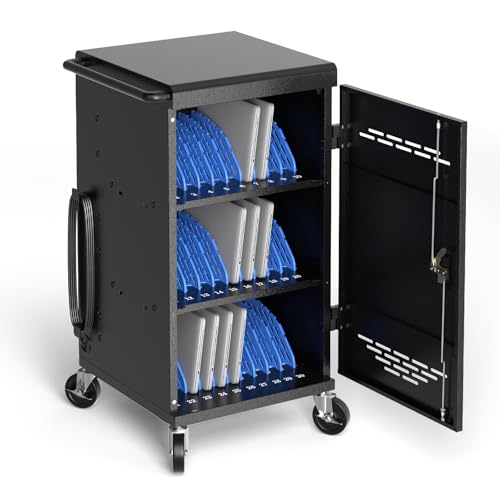
POCHAR 30 Unit Device Charging Station for Chromebook, iPad, 14'' Laptop on Amazon (opens in a new tab)
5 inches thick, this is built for a school where different grade levels or departments run different device types under one roof.
Best for
- Schools with mixed device fleets across departments.
Why we like it
Front and rear locks each ship with 2 keys, 4 total, useful when a school wants both a teacher-level key and an IT admin key for the same cart rather than sharing one.
Both doors are fully removable rather than just openable, for complete access during wiring changes, and a detachable zig-zag cable frame plus dedicated wire holder tackle the tangle problem across 30 cords. Numbers printed on the front of each bay make daily device return meaningfully faster for a teacher managing an entire class transition.
The standout detail is that numbered bays speed up daily class-period device return. Balancing that out, mixed-load slot behavior not independently confirmed.
Key dimensions & specs
- 30-device capacity, up to 14", 1.5" thick, mixed-fleet rated
- 4 keys total (2 per lock)
- Numbered bays, fully removable doors
Pros
- 4 keys across dual locks supports separate teacher/IT admin access
- Numbered bays speed up daily class-period device return
Cons
- Mixed-load slot behavior not independently confirmed
Alternative 30-Bay Option7 of 8
ALT Technology 30-Bay Mobile School Charging Cart Station for Chromebook, Tablet on Amazon (opens in a new tab)
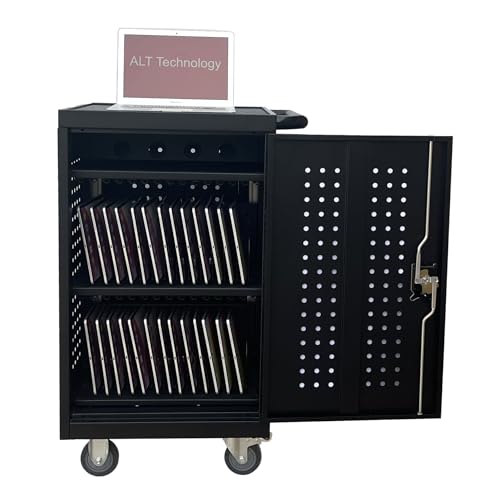
This actually charges 32 devices across two padded inside shelves, with a separate top shelf specifically for cables and adapters rather than mixing them in with the devices themselves, a layout choice that keeps the charging bays free of clutter.
Best for
- Schools comparison-shopping 30-bay carts before committing to a district standard.
Why we like it
UL-approved power strips inside the cabinet cover the safety-certification requirement many schools specifically look for during procurement.
Rubber-coated dividers and soft shelf padding protect devices from scratches, and non-marring 4-inch casters plus a comfortable side handle make it movable between rooms. 5" for laptops up to 14 inches, with the full cart at roughly 21" wide by 39" tall.
Separate top shelf keeps cables/adapters out of the charging bays.
Key dimensions & specs
- 32-device capacity across 2 shelves + separate cable shelf
- UL-approved power strips
- Slot: 1"×14"×10.5", fits up to 14" laptops
Pros
- UL-approved power strips meet many districts' procurement safety requirements
- Separate top shelf keeps cables/adapters out of the charging bays
Cons
- Lowest rating in this comparison
Cheapest, Smallest Scale8 of 8
Kraftgen 16-Bay Open Charging Cart for Chromebooks, Laptops, Tablets & iPads on Amazon (opens in a new tab)
Built-in UL-listed power strips satisfy the same safety-certification checkbox as the pricier ALT Technology cart, at a fraction of the price, though at 16 bays this fits a small pilot classroom set rather than a full building rollout.
Best for
- A small pilot classroom set before a larger, more expensive commitment.
Why we like it
The open design is specifically built for quick access during task-switching, with 3-inch non-marring casters and a side handle for effortless movement.
Removable plastic dividers reposition to fit larger devices, and padded shelves protect against scratches and impact damage. Built-in plastic cable clips at the rear of each shelf keep cords organized during charging, a small detail that keeps a 16-device open cart from becoming a wire tangle despite its budget price.
Lowest price in this comparison, with UL-listed power strips despite the low cost. Both are worth keeping in mind before deciding.
Key dimensions & specs
- 16-device capacity, UL-listed power strips
- Open design, 3" non-marring casters
- Removable dividers, rear cable clips
Pros
- Lowest price in this comparison, with UL-listed power strips despite the low cost
Cons
- No review history or confirmed rating available yet
- Open design, no locking storage
How We Chose These Laptop Charging Carts for Schools
Each pick was assessed across 4 criteria weighted for real-world use.
- Standardization potential across multiple rooms
- We weighed whether a manufacturer offers matching capacity tiers (like Meteteel's 18- and 20-device siblings) that let a school mix class sizes without abandoning one brand for parts and service.
- Where a listing explicitly claims Chromebook, iPad, and laptop compatibility, we noted it as a real school-relevant feature rather than assuming any 30-device cart handles a mixed fleet identically.
- Price scaled against district versus single-classroom budgets
- We separated enterprise-tier pricing (Tripp Lite) from single-classroom budgets (Kraftgen, POCHAR) since these serve different procurement scales.
What to Look for in a Laptop Charging Cart for Schools
Key buying criteria so you get the right fit the first time.
Verify actual bay geometry, not just the stated device count
A cart's marketed device count is measured with thin devices packed edge to edge with dividers removed or minimized, real laptops with thicker chassis, protective cases, or non-standard shapes often don't fit at the stated count once you actually load them, especially once charging cables and adjustable dividers are factored in.
This mismatch matters directly for a school or office buying to a specific fleet size, since discovering the real capacity is lower than advertised after purchase means either overcrowding bays or leaving devices unstored.
Check reviews specifically for mentions of the actual devices that fit, ideally from buyers using a similar laptop model or size to yours, rather than trusting the headline device count alone.
Understand the charging architecture and whether it can overload a circuit
A cart wired with simple AC pass-through outlets delivers full power to every outlet simultaneously, which can trip a circuit breaker if all bays are loaded and drawing power at once, while a cart with timed or zoned charging cycles devices through groups to stay within a safe total wattage draw.
This distinction matters a great deal at higher device counts, a 10-device cart drawing simultaneous full power is rarely an issue, but a 30 or 42-device cart without smart charging management is a real electrical risk on a standard household or classroom circuit.
Check the listing for total rated wattage and whether it explicitly mentions zoned or timed charging, not just the outlet count, especially for carts storing 20 or more devices.
Consider USB-C versus AC outlet charging for your specific device fleet
USB-C charging ports deliver power directly without needing each device's own separate power brick, simplifying cable management, but the actual charging wattage per port varies significantly between carts and isn't always disclosed, while AC outlet-based carts work with any device's own charger but require storing and managing that many separate power bricks inside the cart.
This matters directly for a mixed device fleet, a cart built around USB-C works cleanly for a uniform USB-C laptop or Chromebook fleet, but forces older or non-USB-C devices to use adapters or simply won't accommodate them.
Check whether the cart's charging ports match your actual device fleet's charging standard, and look for the specific per-port wattage rather than assuming USB-C alone means adequate charging speed.
Weigh loaded mobility and floor footprint against your actual space and routes
A cart that's easy to wheel around empty can behave very differently once loaded with 20-40 devices worth of weight, caster quality, wheel size, and overall build sturdiness matter more under real load, especially over thresholds, carpet transitions, or elevators.
This is worth checking before buying if the cart will regularly move between rooms or floors rather than stay parked in one spot, since a cart that's hard to maneuver loaded becomes a daily friction point.
Check reviews specifically for mentions of loaded mobility and caster durability over time, not just how it moves in an unboxing video with the cart empty.
Factor in locking security if the cart stores devices unattended
A cart's stated "lockable" feature can mean anything from a genuine keyed lock on a solid door to a simple latch that mostly deters casual access, and the actual security level matters a great deal if the cart will store expensive devices unattended overnight or in a semi-public space like a school hallway or shared office.
This is worth verifying directly rather than assuming any cart labeled "lockable" provides equivalent security, since a determined attempt at access can defeat a basic latch far more easily than a genuine keyed lock on a solid metal door.
Check the listing and reviews specifically for the lock mechanism type and door material, not just whether the word "lockable" appears in the title.
How to Choose a Laptop Charging Cart for Schools
By Rating Confidence: Highest Rated vs Most Reviewed
| Meteteel Fully Assembled 20 Device Laptop Charging Cart for School |
| Pearington 30 Device Mobile Charging/Storage Cart for iPads |
Lockable Security vs Open Access
- Real security for devices stored unattended in a semi-public space. In this comparison: Pearington 30 Device Mobile Charging/Storage Cart for iPads, Meteteel Fully Assembled 20 Device Laptop Charging Cart for School, Meteteel Fully Assembled 18 Device Laptop Charging Cart for School, POCHAR 30 Devices 14'' Screen Laptop Charging Cart for K, POCHAR 30 Unit Device Charging Station for Chromebook.
- Faster to grab devices from, fine for a supervised or private space. In this comparison: Tripp Lite 42, ALT Technology 30, Kraftgen 16.
Default to a locking cart unless the space is always supervised or private.
| In-cabinet Ethernet for a router or hotspot | |
|---|---|
| Pearington 30 Device Mobile Charging/Storage Cart for iPads |
For a School or Classroom Fleet Specifically
- Confirmed bay geometry for your actual laptop model, zoned or timed charging for larger fleets, and a genuine locking door for unattended storage.
- You're managing a larger fleet needing safe zoned charging and genuine security, where Pearington 30 Device Mobile Charging/Storage Cart for iPads's higher price buys real capacity and reliability headroom over the cheaper picks.
- You're storing a small number of devices with simple charging needs, where Tripp Lite 42 covers the same job at a lower price.
Frequently Asked Questions
What's the best cart for a full district deployment?
Is there an option built specifically for K-12 classrooms?
Yes, the POCHAR 30 Devices Laptop Charging Cart for K-12 Classrooms is explicitly marketed for that use case.
Can one cart handle Chromebooks, iPads, and laptops together?
The POCHAR 30 Unit Device Charging Station explicitly claims mixed-fleet compatibility, though we could not independently confirm slot behavior with all three device types loaded simultaneously.
What's the cheapest option for a small pilot classroom?
99, though it has no review history in our data yet.
Should I standardize on one manufacturer across a building?
It can simplify parts and service.
Bottom Line
Best overall: Tripp Lite 42-Port AC Mobile Charging Cart Storage Station for Chromebooks, iPads — best for district-wide deployment pick in this roundup. See the full verdicts above for every pick, with pros, cons and who each one suits.
Browse all laptop charging carts for schools on Amazon — Prime-eligible options with current pricing.