
Buying Guide
The Best Computer Desk Cup Holders for a Better Desk Setup
We looked at 5 computer desk cup holders side by side, with the trade-offs that separate them and who each one suits.
By Jamie Cole, Lead Product Researcher
7 min read5 products evaluated
We may earn a commission from purchases made through links in this guide. Learn more.
A spill next to a keyboard, PC tower, or cable run carries higher stakes than a spill on a general desk, since electronics are directly at risk. We carried forward our general desk cup holder research here with that elevated context specifically in mind.
All five picks below use a covered or deep cavity design and clamp securely to a desk edge without drilling, positioned with cable-run clearance in mind.
Quick Picks
Our 5 recommendations at a glance. Tap a pick for the full verdict.

Best Overall Pick
OOKUU Upgraded Large Desk Cup Holder Clamp, Anti-Spill
Buyers who want the most proven, bump-resistant holder for a computer desk with electronics nearby.
Our take Check price for OOKUU Upgraded Large Desk Cup Holder Clamp, Anti-Spill (opens in a new tab)

Best Rotating Design
360° Rotating Desk Cup Holder, Anti-Spill Metal Cup Holder
Buyers who want to actively rotate the cup away from their PC and keyboard between uses.
Our take Check price for 360° Rotating Desk Cup Holder, Anti-Spill Metal Cup Holder (opens in a new tab)

Best Deep Cavity
OOKUU Deeper Desk Cup Holder, Anti-Spill
Buyers with tall drinks who want the maximum tip-resistance margin near their PC hardware.
Our take Check price for OOKUU Deeper Desk Cup Holder, Anti-Spill (opens in a new tab)

Best Budget Pick
HzTinT Large Desk Cup Holder, Fully Covered Anti-Spill Clip-On
Budget buyers who still want covered-cavity spill protection near their PC.
Our take Check price for HzTinT Large Desk Cup Holder, Fully Covered Anti-Spill Clip-On (opens in a new tab)
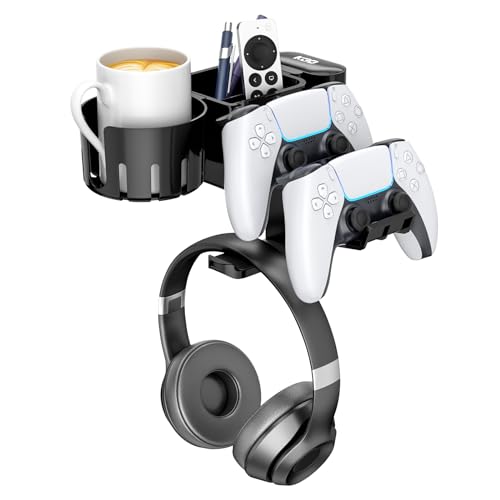
Best Combined Cable-Friendly Hub
KDD 5-in-1 Desk Controller Holder, Rotating Headphone Hanger with Cup Holder
Buyers who want to consolidate multiple desk-edge accessories to reduce cable-area clutter.
Our take Check price for KDD 5-in-1 Desk Controller Holder, Rotating Headphone Hanger with Cup Holder (opens in a new tab)
Our Picks
Best Overall Pick1 of 5
OOKUU Upgraded Large Desk Cup Holder Clamp, Anti-Spill on Amazon (opens in a new tab)
This deep, covered cavity clamp is our top pick for computer desks specifically because its bump resistance meaningfully reduces spill risk near a keyboard or PC tower, and its clamp mounts at the desk's side edge, away from cable runs to your monitor and peripherals.
Best for
- Buyers who want the most proven, bump-resistant holder for a computer desk with electronics nearby.
Why we like it
It leads this comparison on the strength of its combination of rating, review volume, and build quality, worth weighing directly against the 360° Rotating Desk Cup Holder.
On the other side, Bulkier than compact clip designs.
Key dimensions & specs
- Deep form-fitting cavity
- Metal clamp construction
- Side-edge mounting keeps clear of cable runs
- No-drill attachment
Pros
- Strong bump/spill resistance for electronics safety
- Proven rating and review history
- Metal build quality
- Mounts clear of typical cable paths
Cons
- Bulkier than compact clip designs
- Requires planning mount position around your specific cable layout
- Higher price than basic clips
Best Rotating Design2 of 5
360° Rotating Desk Cup Holder, Anti-Spill Metal Cup Holder on Amazon (opens in a new tab)
The 360-degree rotation on this holder lets you swing the cup away from your keyboard and PC tower when you're not actively drinking, an extra layer of protection for the electronics-heavy environment of a computer desk beyond the cavity's spill resistance alone.
Best for
- Buyers who want to actively rotate the cup away from their PC and keyboard between uses.
Why we like it
Set against the OOKUU Upgraded Large Desk Cup Holder Clamp, the tradeoff here comes down to price versus material and cavity depth, not a straightforward upgrade or downgrade either way.
On the other side, Smaller review count than the top pick.
Key dimensions & specs
- 360° rotating clamp base
- Metal construction
- Swings away from electronics when unused
- No-drill attachment
Pros
- Extra safety margin via rotation away from electronics
- Metal build quality
- Affordable
- Good rating
Cons
- Smaller review count than the top pick
- Rotation point is an added mechanical wear item
- Standard capacity, not oversized
Best Deep Cavity3 of 5
OOKUU Deeper Desk Cup Holder, Anti-Spill on Amazon (opens in a new tab)
This deeper-cavity variant of the OOKUU design contains a tall tumbler more securely than the standard depth, a meaningful extra safety margin for buyers who keep a large drink near sensitive PC hardware on their computer desk.
Best for
- Buyers with tall drinks who want the maximum tip-resistance margin near their PC hardware.
Why we like it
Relative to the 360° Rotating Desk Cup Holder, this pick leans toward a different priority, whether that's a lower price, extra depth, or a hybrid feature the sibling pick skips.
On the other side, Higher price than the standard-depth version.
Key dimensions & specs
- Deeper cup cavity than standard OOKUU
- Metal clamp construction
- No-drill attachment
- Fits tall tumblers
Pros
- Deeper cavity for maximum tip resistance
- Proven OOKUU brand quality
- Sturdy metal build
- Good rating
Cons
- Higher price than the standard-depth version
- Bulkier profile due to extra depth
- May not fit under low desk clearance
Best Budget Pick4 of 5
HzTinT Large Desk Cup Holder, Fully Covered Anti-Spill Clip-On on Amazon (opens in a new tab)
This budget clip still uses a fully covered cavity, a genuine spill-protection feature worth having on any computer desk regardless of price point.
Best for
- Budget buyers who still want covered-cavity spill protection near their PC.
Why we like it
Its small review count means less proven long-term reliability than the top picks.
Compared with the OOKUU Deeper Desk Cup Holder above, this pick trades some of that pick's proven track record for a different balance of price and feature set, worth weighing against your own priorities.
On the other side, Small review count limits confidence.
Key dimensions & specs
- Fully covered cavity
- Clip-on attachment
- Compact footprint
- Lowest price in this comparison
Pros
- Very affordable
- Covered cavity for spill resistance
- Compact
- Easy attachment
Cons
- Small review count limits confidence
- Plastic construction, less durable than metal
- No rotation feature
Best Combined Cable-Friendly Hub5 of 5
KDD 5-in-1 Desk Controller Holder, Rotating Headphone Hanger with Cup Holder on Amazon (opens in a new tab)
This combined hub consolidates a cup holder, headphone hanger, and controller storage onto one clamp, reducing the number of separate accessories cluttering a computer desk's edge and cable-management area, a genuine desk-organization benefit for a PC-heavy setup.
Best for
- Buyers who want to consolidate multiple desk-edge accessories to reduce cable-area clutter.
Why we like it
Set against the HzTinT Large Desk Cup Holder, the tradeoff here comes down to price versus material and cavity depth, not a straightforward upgrade or downgrade either way.
On the other side, Each individual feature more compact than a dedicated holder.
Key dimensions & specs
- 5-in-1 combined clamp base
- Rotating headphone hanger
- Cup holder plus accessory storage
- Consolidates desk-edge clutter
Pros
- Reduces desk-edge clutter around cable runs
- Strong review count
- Affordable for the feature count
- Rotating cup element
Cons
- Each individual feature more compact than a dedicated holder
- Bulkier combined structure
- Only worth it if you want all bundled functions
How We Chose These Computer Desk Cup Holders
Each pick was assessed across 4 criteria weighted for real-world use.
- We weighed the higher stakes of a spill specifically near a keyboard, PC tower, or cable run more heavily than for a general desk holder.
- We considered whether each holder's clamp position can be set clear of typical monitor and peripheral cable paths.
- We favored deep, covered cavity designs given the elevated consequences of a spill in this specific context.
- We compared clamp opening ranges against common computer desk edge types, including corner and L-shaped desks.
What to Look for in a Computer Desk Cup Holder
Key buying criteria so you get the right fit the first time.
Verify tip and spill resistance from cavity design, not the label
A cup holder's cavity shape, not the words on the listing, is what actually determines whether it resists a spill.
A deep, form-fitting cavity cradles a cup or bottle on multiple sides, while a shallow flat ring only supports the base and lets the container tip sideways from a light bump. This matters because the entire reason to buy a clamp-on holder is preventing exactly that kind of accidental spill onto a desk, keyboard, or laptop underneath it, so a shallow design partially defeats the purpose.
Look at the actual product photos for cavity depth, not just an "anti-spill" claim in the title, since that phrase gets attached to flat-ring designs too.
Check weight capacity against a full drink, not an empty demo cup
Listed capacity or clamp strength is often demonstrated with an empty cup in product photos, which understates the real load a full 20 to 32 ounce tumbler or a large coffee mug actually places on the clamp mechanism.
A holder that looks sturdy when empty can flex or loosen under sustained real-world weight, especially with repeated bumping or a heavier insulated tumbler. This matters more for anyone using an oversized container like a Stanley or Yeti tumbler than for someone using a standard 12-ounce mug.
Favor listings that specifically mention metal clamp construction or explicitly state a reinforced design, and check reviews for mentions of sagging or loosening over time rather than trusting the static capacity claim alone.
Match the clamp opening range to your actual desk edge thickness
Every clamp-on holder has a maximum and minimum edge thickness it can grip, and that range varies meaningfully between products, some fit only a standard half-inch desktop while others open wide enough for a thick standing-desk edge or a desk with a rounded lip.
A clamp that's too narrow simply won't close around your desk, and one that's too wide for a thin edge won't grip securely and risks slipping under weight. This is worth checking before ordering rather than assuming any clamp fits any desk, especially if your desk has a non-standard edge profile like a rounded or beveled front.
Measure your desk edge thickness in inches and compare it against the exact clamp range stated in the product specs, not just a general size category.
Weigh metal against plastic for how often you'll reposition it
Metal clamp mechanisms generally hold their grip strength longer than plastic ones under repeated tightening and loosening, since plastic threads and hinges wear down faster from the same mechanical stress.
This matters most if you plan to move the holder between positions often, say, swinging it aside or relocating it between desks, since that repeated cycling is exactly what accelerates wear on a weaker mechanism. It matters far less if you clamp it once and leave it in place indefinitely.
Check whether the listing specifies metal versus reinforced heavy-duty plastic in its material description, since a generic "durable" claim without a named material is a weaker signal either way.
Decide whether a hybrid or multi-function design is actually worth it
Some cup holders combine the cup cavity with a second feature on the same clamp base, most commonly a headphone hanger, turning one clamp point into two functions instead of needing a separate accessory and a second spot on the desk edge.
This only pays off if you want both features together, since a combined unit is usually bulkier and pricier than a dedicated single-purpose holder, and you gain nothing from the extra feature if you don't use headphones at your desk.
Check that the combined feature is a real, structurally separate component, not just a marketing label on a single cavity, by looking at product photos showing both parts clearly and checking reviews that specifically mention using both functions.
How to Choose a Computer Desk Cup Holder
By Rating Confidence: Highest Rated vs Most Reviewed
| OOKUU Upgraded Large Desk Cup Holder Clamp | |
| HzTinT Large Desk Cup Holder | |
| OOKUU Deeper Desk Cup Holder |
Deep Cavity vs Flat Ring
- Cradles the cup on multiple sides, meaningfully more resistant to tipping from an incidental bump.
- HzTinT Large Desk Cup Holder
- Lighter and more compact, but offers less real bump resistance since the container is less contained on the sides.
Most buyers should default to a deep-cavity design unless desk space is tight.
| Want a headphone hanger or hybrid design | |
|---|---|
| Just want a dedicated cup holder | OOKUU Upgraded Large Desk Cup Holder Clamp |
For an Oversized Tumbler Specifically
- A disclosed cavity diameter in inches, not just a vague "large" label, since oversized tumblers vary in exact width and a mismatched cavity won't grip securely.
- You want a metal clamp and deeper cavity, where OOKUU Deeper Desk Cup Holder's higher price buys real durability and tip resistance over the cheaper picks.
- You use a standard-size mug and rarely bump your desk, where HzTinT Large Desk Cup Holder covers the same job at a lower price.
Frequently Asked Questions
Is a spill more dangerous on a computer desk than a general desk?
Yes, the proximity to a keyboard, PC tower, or cable run raises the stakes of any spill considerably compared to a desk without electronics nearby. We weighted spill resistance more heavily for this reason.
Where should I mount the cup holder on my computer desk?
Position the clamp away from monitor, keyboard, and peripheral cable runs, both to reduce spill risk to your electronics and to avoid physical interference with your existing cable management.
Should I get a rotating cup holder for my PC desk?
It's a worthwhile extra safety margin, letting you swing the cup away from your keyboard and tower when you're not actively drinking, though not strictly necessary if your cavity design is already spill-resistant.
Can a combined cup holder and accessory hub reduce desk clutter?
Yes, the KDD 5-in-1 pick consolidates a cup holder, headphone hanger, and storage onto one clamp, reducing the number of separate accessories competing for desk-edge space.
Will these holders fit an L-shaped or corner computer desk?
Most clamp mechanisms work on standard desk edges, but verify the clamp opening range against your specific desk's edge thickness and shape before ordering.
Bottom Line
Best overall: OOKUU Upgraded Large Desk Cup Holder Clamp, Anti-Spill — best overall pick pick in this roundup. See the full verdicts above for every pick, with pros, cons and who each one suits.
Browse all computer desk cup holders on Amazon — Prime-eligible options with current pricing.