
Buying Guide
The Best Cable Management Boxes Under $30, Compared
We looked at 6 cable management boxes under $30 side by side, with the trade-offs that separate them and who each one suits.
By Jamie Cole, Lead Product Researcher
9 min read6 products evaluated
We may earn a commission from purchases made through links in this guide. Learn more.
"Cable management box" actually covers two different products: an enclosed box that hides a power strip and its plugged-in cords on the floor or desktop, and an open metal tray that clamps under the desk to route cables along the underside, keeping them off the floor entirely.
We compared both types here since which one solves your actual clutter problem depends on where your mess lives, a tangle of cords behind the desk on the floor calls for a different product than cables dangling visibly under the desktop surface.
Quick Picks
Our 6 recommendations at a glance. Tap a pick for the full verdict.

Best Value Tray
Cinati Under Desk Cable Management Tray, White
Buyers who want the cheapest no-drill way to route cables under their desk
Our take Check price for Cinati Under Desk Cable Management Tray, White (opens in a new tab)
Best for Hiding a Power Strip
Naeety Cable Management Box, Large Cord Organizer
Buyers whose main clutter problem is a visible power strip and cord tangle, not under-desk cable routing
Our take Check price for Naeety Cable Management Box, Large Cord Organizer (opens in a new tab)
Best Compact Tray
GZOKMOG Under Desk Cable Management Tray, 15.75"
Buyers with a smaller desk who need a shorter tray rather than full desk-width coverage
Our take Check price for GZOKMOG Under Desk Cable Management Tray, 15.75" (opens in a new tab)

Best with Clamp Mount
Under Desk Cable Management Tray, Metal Mesh, 2-Hole Clamp Mount
Buyers bundling multiple power adapters who want airflow rather than a fully enclosed tray
Our take Check price for Under Desk Cable Management Tray, Metal Mesh, 2-Hole Clamp Mount (opens in a new tab)
Best for Dual Setups
Cinati Under Desk Cable Management Tray, Black
Buyers with a dark desk finish who want the same tray design in a matching color
Our take Check price for Cinati Under Desk Cable Management Tray, Black (opens in a new tab)

Best Dual-Unit Value
Delamu 2-Pack Metal Under Desk Cable Management Tray
Buyers with a wide desk needing two mounting points or managing two separate workstations
Our take Check price for Delamu 2-Pack Metal Under Desk Cable Management Tray (opens in a new tab)
Our Picks
Best Value Tray1 of 6
Cinati Under Desk Cable Management Tray, White on Amazon (opens in a new tab)
Cinati's tray mounts with a clamp system that requires no drilling into your desk, and is the cheapest capable pick in this comparison, explicitly marketed as leaving no damage to the desk surface when removed.
Best for
- Buyers who want the cheapest no-drill way to route cables under their desk
Why we like it
Against the enclosed Naeety box below, this stays open underneath rather than fully hiding cables from view, but it costs roughly 40 percent less and takes up no desktop or floor footprint at all.
Best for buyers who want the cheapest way to route cables along the underside of their desk without drilling any mounting holes.
Key dimensions & specs
- No-drill clamp mount
- White finish
- Cheapest pick in this comparison
Pros
- No drilling required to install
- Cheapest pick in this comparison
- No damage to desk when removed
Cons
- Open design doesn't fully hide cables from view
- White finish shows dust more than darker options
Best for Hiding a Power Strip2 of 6
Naeety Cable Management Box, Large Cord Organizer on Amazon (opens in a new tab)
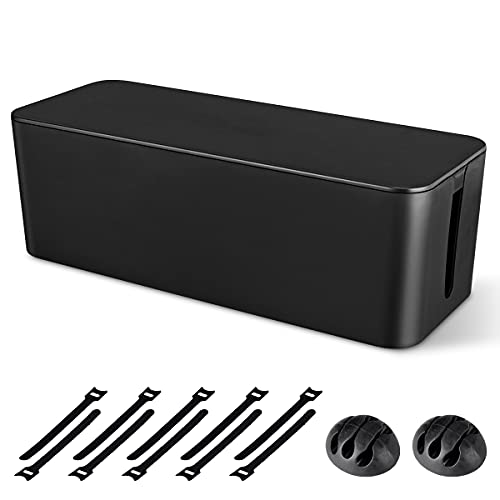
Naeety is a genuine enclosed box rather than an open tray, specifically sized to hide a power strip and its plugged-in cords completely from view, sitting on the floor or a shelf rather than clamping to the desk itself.
Best for
- Buyers whose main clutter problem is a visible power strip and cord tangle, not under-desk cable routing
Why we like it
Against the tray-style picks in this comparison, this solves a different problem: a visible tangle of cords around a power strip, rather than cables hanging visibly beneath the desktop surface.
Best for buyers whose main clutter problem is a visible power strip and cord tangle on the floor or a shelf, rather than cables hanging under the desk itself.
Key dimensions & specs
- Large enclosed box design
- Hides power strip and cords completely
- Sits on floor or shelf, no mounting needed
Pros
- Fully hides a power strip from view
- No mounting or drilling needed
- Large capacity for multiple cords
Cons
- Takes up floor or shelf space rather than mounting under desk
- Doesn't route cables along the desk's underside
Best Compact Tray3 of 6
GZOKMOG Under Desk Cable Management Tray, 15.75" on Amazon (opens in a new tab)
75 inches, this is a shorter tray built for smaller desks or a single cluster of cables rather than routing a full desk's width of cords, using the same no-drill clamp mounting as the cheaper Cinati pick.
Best for
- Buyers with a smaller desk who need a shorter tray rather than full desk-width coverage
Why we like it
Against longer trays in this comparison, the shorter length means less coverage, but it's a better fit for a compact desk where a full-length tray would be unnecessarily long.
Best for buyers with a smaller desk or a single concentrated cable cluster who don't need a full-width tray.
Key dimensions & specs
- 15.75-inch length, no-drill clamp mount
- Compact size for smaller desks
- Metal tray construction
Pros
- Compact length fits smaller desks well
- No-drill clamp installation
- Affordable middle-ground price
Cons
- Shorter coverage than full-width trays
- Won't span a large desk's full width alone
Best with Clamp Mount4 of 6
Under Desk Cable Management Tray, Metal Mesh, 2-Hole Clamp Mount on Amazon (opens in a new tab)
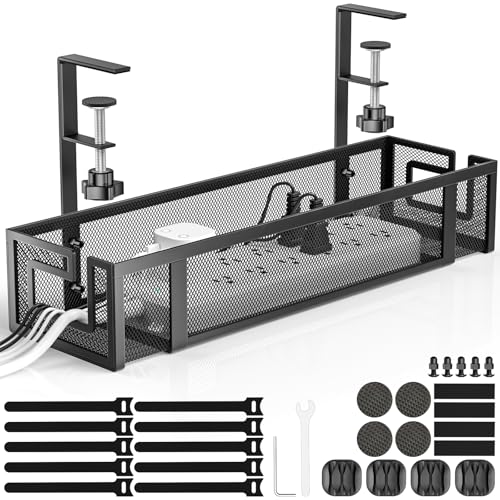
This tray uses a metal mesh design with a 2-hole clamp mount, allowing airflow around bundled cables to reduce heat buildup around power adapters, a detail the solid-bottom trays in this comparison don't offer.
Best for
- Buyers bundling multiple power adapters who want airflow rather than a fully enclosed tray
Why we like it
Against the solid Cinati tray, the mesh design trades a fully enclosed look for that airflow benefit, worth considering if you're bundling multiple power bricks that generate noticeable heat.
Best for buyers bundling several power adapters or bricks together who want airflow around them rather than a fully enclosed solid tray.
Key dimensions & specs
- Metal mesh design, 2-hole clamp mount
- Allows airflow around bundled cables
- No-drill installation
Pros
- Mesh design allows heat to dissipate
- No-drill 2-hole clamp mount
- Affordable price point
Cons
- Mesh design shows cables more than a solid tray
- 2-hole mount may need more careful alignment than single-clamp designs
Best for Dual Setups5 of 6
Cinati Under Desk Cable Management Tray, Black on Amazon (opens in a new tab)
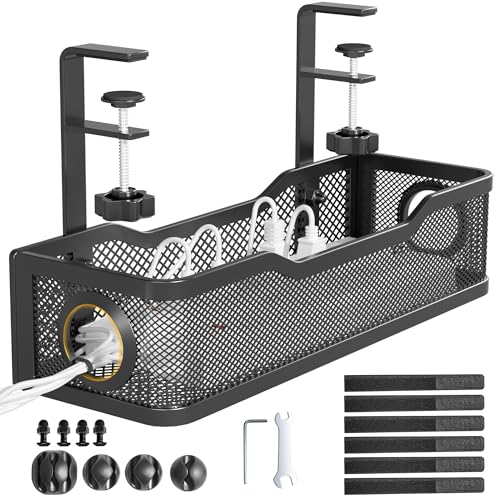
This is the black finish version of the same Cinati tray design as the white pick above the same no-drill clamp mount and no-damage-to-desk claim, at a few dollars more, likely reflecting a different manufacturing run or listing rather than a functional difference.
Best for
- Buyers with a dark desk finish who want the same tray design in a matching color
Why we like it
Against the white version, black is the more common choice for matching darker desk finishes and hiding dust better over time.
Best for buyers with a dark-finished desk who want the same proven no-drill tray design as the cheaper white version, just in a matching color.
Key dimensions & specs
- No-drill clamp mount
- Black finish
- Same core design as the white Cinati tray
Pros
- Matches dark desk finishes better than white
- Same proven no-drill mounting design
- Hides dust better than the white version
Cons
- Costs more than the identical white version
- No functional difference beyond color
Best Dual-Unit Value6 of 6
Delamu 2-Pack Metal Under Desk Cable Management Tray on Amazon (opens in a new tab)
75-inch U-channel trays, meaning you can mount one on each side of a wide desk or dedicate a second unit to a separate workstation, all for less than buying two single trays separately from most competitors here.
Best for
- Buyers with a wide desk needing two mounting points or managing two separate workstations
Why we like it
Against buying two of the single-unit GZOKMOG trays above, Delamu's 2-pack works out to a lower per-unit cost while including additional mounting accessories in the box.
Best for buyers with a wide desk needing two mounting points, or anyone setting up cable management for two separate desks at once.
Key dimensions & specs
- 2-pack, 15.75" U-channel trays each
- Includes various mounting accessories
- Lower per-unit cost than buying two separately
Pros
- Two trays for less than buying two separately
- Includes extra mounting accessories
- Covers a wide desk or two separate desks
Cons
- Priciest single purchase in this comparison
- Overkill if you only need one mounting point
How We Chose These Cable Management Boxes Under $30
Each pick was assessed across 5 criteria weighted for real-world use.
- We distinguished enclosed cable-hiding boxes from open under-desk clamp-mount trays, since these solve different clutter problems despite sharing a category name.
- For tray-style picks, we confirmed no-drill clamp mounting and checked for any stated desk-damage claims, since drilling into a desk is a real, sometimes unwanted commitment.
- We compared stated tray length and box capacity against typical desk widths and cable bundle sizes, since a tray too short for your desk leaves cables unmanaged at the ends.
- We noted which trays use a mesh design allowing heat to dissipate around bundled power adapters versus a fully solid, enclosed design.
- Every pick had to be in stock and priced at or under $30 on the date this guide was checked; products that only hit this tier during a temporary sale were excluded.
What to Look for in a Cable Management Box Under $30
Key buying criteria so you get the right fit the first time.
Identify which specific clutter problem you're actually solving
"Cable management box" covers two different products that solve different problems: an enclosed box that hides a power strip and its plugged-in cords, typically sitting on the floor or a shelf, and an open metal tray that clamps to the underside of your desk to route cables along it. Buying a floor-sitting enclosed box won't help if your actual clutter is cables hanging visibly beneath your desktop, and a clamp-on tray won't hide a tangled power strip sitting on the floor behind your desk. Look at where your actual mess lives before choosing between these two product types, since they aren't interchangeable despite sharing a category name.
Confirm a tray mounts without drilling if you don't want to damage your desk
Most under-desk cable trays in this price range use a clamp-based mounting system specifically designed to avoid drilling any holes into the desk surface, an important detail if you're renting your space, using a desk you don't want to permanently modify, or simply prefer not to drill. Some listings explicitly state a "no damage to desk" claim when the clamp is removed, which is worth checking for directly rather than assuming all clamp-mount trays are equally gentle on the desk surface. If your desk has an unusually thick or unusually thin edge, also check the clamp's stated compatible thickness range before assuming any clamp fits any desk edge.
Measure your desk's width against the tray's stated length
Under-desk cable trays come in different lengths, and a tray significantly shorter than your desk's width leaves cables unmanaged past the tray's edges, which can undercut the whole point of buying one in the first place. 75 inches up to full desk-width options, and a 2-pack option exists specifically for buyers who need to cover a wider desk with two shorter trays mounted side by side. Measure your desk's actual width at the point you plan to mount cable management, then compare it against the specific tray's stated length rather than assuming any tray covers any desk.
Consider airflow if you're bundling multiple power adapters together
Power adapters and bricks generate heat during normal use, and bundling several of them together inside a fully enclosed, solid-bottomed tray or box can trap that heat with nowhere to dissipate, a genuine concern if you're routing several laptop chargers, monitor power supplies, and similar adapters through the same tray. A mesh or ventilated tray design allows heat to escape more readily than a solid design, at the tradeoff of showing the cables and adapters inside more visibly than a fully enclosed option. If you're only routing a couple of thin charging cables with no bulky adapters, this consideration matters less; if you're bundling several power bricks, prioritize a ventilated design.
Decide whether color or finish actually matters for your specific desk
Several trays in this comparison are functionally identical aside from their color option (commonly white or black), and choosing based on which matches your desk's finish is a reasonable aesthetic consideration, though it typically comes with a small price difference between otherwise identical products. A darker finish also tends to show accumulated dust less visibly over time than a lighter one, a minor but real practical consideration if you don't clean under your desk often. If the exact color doesn't matter to you, check whether one color option is priced lower than the other for the same underlying tray design before choosing based on price alone.
How to Choose a Cable Management Box Under $30
| Cinati Under Desk Cable Management Tray, White | |
| To hide a power strip completely | Naeety Cable Management Box, Large Cord Organizer |
| Airflow around bundled power adapters | Under Desk Cable Management Tray, Metal Mesh |
| Two mounting points or two desks | Delamu 2-Pack Metal Under Desk Cable Management Tray |
Enclosed Box vs Open Tray
- Fully hides a power strip and cords from view, sitting on the floor or a shelf rather than mounting to the desk itself.
- Open under-desk tray (Cinati, GZOKMOG, mesh, Delamu)
- Routes cables along the desk's underside using a no-drill clamp mount, keeping them off the floor but still visible from certain angles.
Match the product to where your actual clutter lives: a floor-level power strip tangle calls for an enclosed box, while cables hanging visibly under the desktop call for a clamp-on tray.
| A smaller or compact desk | |
|---|---|
| A wide desk needing two mounting points | Delamu 2-Pack Metal Under Desk Cable Management Tray |
For Multiple Power Adapters Specifically
- A mesh or ventilated tray design rather than a fully solid one, since bundled power bricks generate heat that needs somewhere to dissipate.
- The metal mesh tray with 2-hole clamp mount is specifically built with this airflow consideration in mind.
- 99) covers two mounting points for less than buying two single trays separately.
- 44) covers that core need at the lowest price here.
Frequently Asked Questions
What's the difference between a cable management box and an under-desk cable tray?
A cable management box is a fully enclosed container that hides a power strip and cords, typically sitting on the floor or a shelf. An under-desk cable tray is an open tray that clamps to the underside of your desk to route cables along it, keeping them off the floor but still partially visible. These solve different clutter problems, so choose based on where your actual mess is located.
Will a clamp-on tray damage my desk when I remove it later?
Most clamp-mount trays in this price range are specifically designed to avoid damaging the desk surface, and some listings explicitly state this as a feature. Check the specific listing for a stated "no damage" claim rather than assuming all clamp mounts are equally gentle, especially on delicate or finished desk surfaces.
How do I know if a tray is long enough for my desk?
Measure your desk's actual width at the point you plan to mount the tray, then compare it against the specific product's stated length. If your desk is wider than any single tray option, consider a 2-pack to cover the full width with two shorter trays.
Does a mesh tray hide cables as well as a solid one?
A mesh design shows the cables and any bundled power adapters inside more visibly than a fully solid tray, since it's built with visible gaps for airflow. If fully hiding cables from view matters more to you than heat dissipation, a solid tray design is the better fit.
Can I fit multiple laptop chargers and power adapters in one tray?
Most trays in this comparison can physically hold several bundled adapters, but a fully enclosed solid design can trap heat from multiple bricks generating warmth simultaneously. A mesh or ventilated tray design allows that heat to dissipate more readily if you're bundling several adapters together.
Is a 2-pack of trays a better deal than buying two single trays?
Generally yes, a 2-pack typically works out to a lower cost per tray than purchasing two individual single-unit trays separately, and often includes extra mounting accessories in the box. This makes sense specifically if you have a wide desk needing two mounting points or you're setting up cable management for two separate workstations.
Bottom Line
Best overall: Cinati Under Desk Cable Management Tray, White — best value tray pick in this roundup. See the full verdicts above for every pick, with pros, cons and who each one suits.
Browse all cable management boxes under $30 on Amazon — Prime-eligible options with current pricing.