
Buying Guide
The Best Budget USB4 Docks for a Better Desk Setup
We looked at 4 budget USB4 docks side by side, with the trade-offs that separate them and who each one suits.
By Jamie Cole, Lead Product Researcher
8 min read4 products evaluated
We may earn a commission from purchases made through links in this guide. Learn more.
Budget USB-C docks under $50 deliver useful multi-port expansion, but several listings specifically require your laptop's USB-C port to support Thunderbolt 3/4 or DisplayPort Alt Mode for video output, a requirement not every budget or older laptop actually meets.
We compared this lineup on named laptop compatibility, whether the power adapter is included, and screen-lock privacy features, since one listing specifically requires a full-functional USB-C port and won't display video on a data-and-charging-only USB-C port.
Quick Picks
Our 4 recommendations at a glance. Tap a pick for the full verdict.

Best Overall
MOKiN USB C Docking Station, Dual Monitor 2 HDMI
Buyers who want a screen-lock privacy feature with dual 4K display support at a low price
Our take Check price for MOKiN USB C Docking Station, Dual Monitor 2 HDMI (opens in a new tab)

Best Named Laptop Compatibility
USB C Laptop Docking Station, 14-in-1 Multiport Adapter
Buyers who want to verify their exact laptop model against a detailed compatibility list
Our take Check price for USB C Laptop Docking Station, 14-in-1 Multiport Adapter (opens in a new tab)
Best for Gaming Handhelds and Consoles
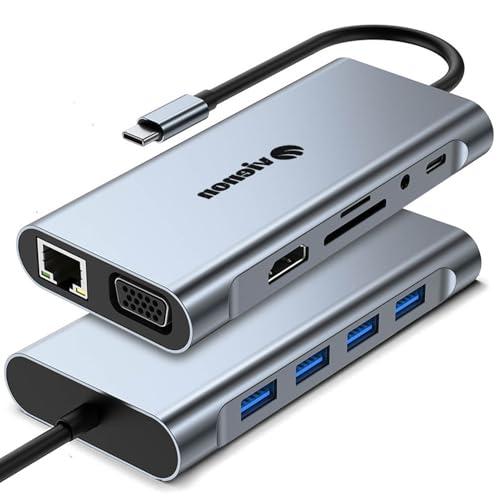
11-in-1 USB C Hub with VGA and Ethernet
Buyers who want the lowest price with confirmed gaming handheld and console compatibility
Our take Check price for 11-in-1 USB C Hub with VGA and Ethernet (opens in a new tab)

Best Detachable Design
Anker Nano Laptop Docking Station, 13-in-1 with Detachable Hub
Buyers who want a detachable dock-plus-hub design and are willing to spend a bit more for completeness
Our take Check price for Anker Nano Laptop Docking Station, 13-in-1 with Detachable Hub (opens in a new tab)
Our Picks
Best Overall1 of 4
MOKiN USB C Docking Station, Dual Monitor 2 HDMI on Amazon (opens in a new tab)
This dock's screen lock button is a distinct privacy feature at this price point, letting you short-press to instantly turn off connected screens to protect sensitive information at a moment's notice.
Best for
- Buyers who want a screen-lock privacy feature with dual 4K display support at a low price
Why we like it
Its listing specifically states compatibility requires a laptop with Thunderbolt 3/4 or a full-functional USB-C port, a clear disclosure of the real requirement rather than a vague 'USB-C compatible' claim.
Compared to the pricier picks below, this one's 13-in-1 port design still includes dual 4K@60Hz display support, a 1000Mbps RJ45 Ethernet port, and multiple 5Gbps USB ports, delivering fast connectivity at a budget price. Its 100W PD charging port requires a separately purchased 100W adapter, which the listing transparently discloses is not included.
Best for buyers who want a screen-lock privacy feature with dual 4K display support at a low price.
Key dimensions & specs
- 13-in-1 design, dual 4K@60Hz HDMI
- Screen lock button, 1000Mbps RJ45 Ethernet
- 100W PD (adapter not included)
Pros
- Screen lock button provides genuine privacy protection
- Dual 4K@60Hz display support at a budget price
- Clear disclosure that Thunderbolt 3/4 or full-function USB-C is required
Cons
- 100W power adapter not included, adding to total cost
- macOS limited to mirrored display mode only
Best Named Laptop Compatibility2 of 4
USB C Laptop Docking Station, 14-in-1 Multiport Adapter on Amazon (opens in a new tab)
This dock's listing includes an unusually specific list of confirmed compatible laptop models, naming Dell Latitude 5420/5430/5520/5530/7530/7420/7480/7400, Dell Inspiron, Vostro, XPS 13/15/17, HP EliteBook Zbook G7/G8, HP ProBook, and Lenovo ThinkPad T14/T490/Yoga, a useful checklist for confirming compatibility before buying.
Best for
- Buyers who want to verify their exact laptop model against a detailed compatibility list
Why we like it
Its triple-display support for Windows scales from 4K@60Hz single-display down to 1080p triple-display combinations.
Compared to the MOKiN pick above, this one supports Thunderbolt 3/4/5, USB-C, and Type-C connections broadly while explicitly stating it does not support using a converter, a specific limitation worth noting. Its dual 10Gbps USB-A ports plus a dedicated SD/TF card reader round out fast, versatile connectivity.
Best for buyers who want to check their exact laptop model against a detailed, named compatibility list before purchasing.
Key dimensions & specs
- 14-in-1 design, triple display support (Windows)
- Named compatibility: Dell, HP, Lenovo, Surface models
- 10Gbps USB-A ports, SD/TF card reader
Pros
- Unusually detailed named laptop model compatibility list
- Triple display support for Windows systems
- 10Gbps USB-A ports plus fast card reader
Cons
- Explicitly does not support using a converter
- MacBook laptops limited to identical mirrored images across monitors
Best for Gaming Handhelds and Consoles3 of 4
11-in-1 USB C Hub with VGA and Ethernet on Amazon (opens in a new tab)
This hub is the lowest price in this comparison by a wide margin, still delivering an 11-in-1 port set including 4K HDMI, RJ45 Ethernet, 1080p VGA, and an SD/Micro SD card reader supporting cards up to 2TB at 104MB/s.
Best for
- Buyers who want the lowest price with confirmed gaming handheld and console compatibility
Why we like it
Its listing specifically confirms compatibility with Switch, Steam Deck, ROG Ally, and other gaming consoles, a distinct use case beyond just laptop docking.
Compared to the MOKiN and multiport picks above, this one's VGA port adds legacy display compatibility for older monitors and projectors, though its Ethernet port is limited to 10/100Mbps rather than Gigabit speeds. Its aluminum construction and specifically confirmed MacBook, iMac, and Chromebook compatibility broaden its practical use across different device types.
Best for buyers who want the lowest possible price with confirmed gaming handheld and console compatibility.
Key dimensions & specs
- 11-in-1 design, 4K HDMI + 1080p VGA
- 10/100Mbps Ethernet, SD/Micro SD up to 2TB
- Confirmed compatibility with Switch, Steam Deck, ROG Ally
Pros
- Lowest price in this comparison by a wide margin
- Confirmed compatibility with gaming handhelds and consoles
- VGA port adds legacy display support other picks lack
Cons
- Ethernet limited to 10/100Mbps, not Gigabit speed
- 100W charging port does not support simultaneous data transfer
Best Detachable Design4 of 4
Anker Nano Laptop Docking Station, 13-in-1 with Detachable Hub on Amazon (opens in a new tab)
This dock's detachable 2-in-1 design lets a 6-in-1 portable hub snap off the larger 13-in-1 desktop docking station for on-the-go use, a versatile design that replaces two separate devices for home and travel needs.
Best for
- Buyers who want a detachable dock-plus-hub design and are willing to spend a bit more for completeness
Why we like it
Its triple display support connects up to 3 monitors via 2 HDMI ports and 1 DisplayPort, scaling from 4K@60Hz single display down to triple 1080p configurations.
Compared to the more budget-focused picks above, this one is priced meaningfully higher but includes confirmed cross-brand compatibility across Dell, Lenovo, and HP laptops plus a complete package with the 140W power adapter, cable, and 18-month warranty included. Its 100W laptop charging plus 10Gbps data transfer round out fast, complete connectivity.
Best for buyers who want the flexibility of a detachable dock-plus-hub design and are willing to spend more for a complete package.
Key dimensions & specs
- Detachable 13-in-1 dock + 6-in-1 portable hub
- Triple display: 2x HDMI + 1x DisplayPort
- 100W charging, 140W adapter included
Pros
- Detachable design replaces both a desk dock and travel hub
- Complete package includes power adapter and 18-month warranty
- Confirmed compatibility across Dell, Lenovo, and HP brands
Cons
- Highest price in this comparison by a significant margin
- Requires an active laptop connection for all ports to activate
How We Chose These Budget USB4 Docks
Each pick was assessed across 5 criteria weighted for real-world use.
- Compared how specifically each listing discloses confirmed compatible laptop brands and models.
- Compared docks that include a power adapter against those requiring a separate purchase.
- Compared dual and triple display support across all four picks.
- Legacy and Gaming Device Support
- Compared VGA legacy display support and confirmed gaming handheld compatibility.
- Price Relative to Feature Set
- Compared price against port count, display support, and included accessories.
What to Look for in a Budget USB4 Dock
Key buying criteria so you get the right fit the first time.
Budget Docks Often Require Thunderbolt or Full-Function USB-C, Not Just Any USB-C Port
The MOKiN pick's listing specifically states compatibility requires a laptop with Thunderbolt 3/4 or a full-functional USB-C port, a real requirement that many budget or older laptops with data-and-charging-only USB-C ports simply don't meet, regardless of how affordable the dock itself is. This matters significantly if you're not certain your laptop's USB-C port supports video output, where purchasing any of these docks without confirming this first risks a non-functional display connection, and matters less if you've already verified your laptop has full-featured USB-C or Thunderbolt. Check your specific laptop's exact USB-C port specifications for confirmed DisplayPort Alt Mode or Thunderbolt support before purchasing any of these budget docks, since a physically fitting cable doesn't guarantee video will work.
An Unusually Detailed Named Compatibility List Is More Trustworthy Than a Vague Universal Claim
The 14-in-1 multiport pick's listing specifically names over a dozen exact laptop models across Dell, HP, and Lenovo, including specific ThinkPad and Latitude generations, a more useful and verifiable compatibility disclosure than a generic 'works with all USB-C laptops' claim that doesn't specify which exact models were actually tested. This matters if you own one of these exact named models, where confirmed compatibility gives real assurance, and matters less if your laptop isn't on the list, where compatibility becomes an educated guess rather than a confirmed fact. Look for a dock's specifically named list of confirmed compatible laptop models rather than accepting vague 'universal compatibility' language at face value.
A Missing Power Adapter Is a Real Additional Cost That Should Factor Into Budget Comparisons
The MOKiN pick's listing specifically discloses that the package contains only the product, user manual, and two cables, with the charger not included, meaning the dock's low sticker price doesn't reflect the true total cost if you don't already own a compatible 100W USB-C power adapter. This matters when comparing prices across budget docks, where a slightly pricier dock that includes a power adapter (like the Anker Nano) might actually cost less in total than a cheaper dock plus a separately purchased adapter, and matters less if you already own a suitable charger. Factor in the cost of a separately purchased power adapter when comparing a budget dock's sticker price against a pricier dock that includes one in the box.
VGA Support Extends Compatibility to Legacy Displays and Older Projectors That Modern Docks Skip
The 11-in-1 USB C Hub's inclusion of a 1080p VGA port is a distinct feature among these four picks, letting you connect to older monitors, TVs, or projectors that only accept VGA input, a connector type increasingly rare on newer, more expensive docks that focus exclusively on HDMI and DisplayPort. This matters if you regularly need to connect to older display hardware, particularly in older classrooms, conference rooms, or home setups with legacy monitors, and matters less if all your displays are modern HDMI or DisplayPort equipped. Check specifically for VGA port inclusion if legacy display compatibility is a real requirement for your specific setup, since most modern docks in this price range have dropped VGA support entirely.
Confirmed Gaming Handheld and Console Compatibility Is a Genuine, Distinct Selling Point Worth Checking For
The 11-in-1 USB C Hub specifically confirms compatibility with the Nintendo Switch, Steam Deck, ROG Ally, and other gaming consoles, a useful disclosure if you're shopping for a dock to use with a handheld gaming device rather than a traditional laptop, since not every budget dock explicitly tests or confirms this compatibility. This matters if you specifically want to dock a gaming handheld to a TV or monitor, and matters less if you're exclusively using the dock with a traditional laptop. Check whether a budget dock specifically confirms compatibility with your exact gaming handheld or console model if that's your primary intended use case, rather than assuming any USB-C dock will work identically well for gaming devices.
How to Choose a Budget USB4 Dock
| A screen-lock privacy feature with dual 4K support | MOKiN USB C Docking Station |
|---|---|
| To verify your exact laptop model against a detailed list | USB C Laptop Docking Station, 14-in-1 |
| The lowest price with gaming handheld compatibility | 11-in-1 USB C Hub with VGA |
| Anker Nano Laptop Docking Station |
Ultra-Budget Simple Hub vs Complete Docking Package
- Ultra-budget simple hub (11-in-1 with VGA)
- Delivers essential ports and legacy VGA support at the lowest possible price, without an included power adapter or detachable design.
- Complete docking package (Anker Nano)
- Includes the power adapter, cable, and warranty in one complete package, at a meaningfully higher price for that completeness.
If budget is your top priority and you already own compatible cables and a power adapter, the 11-in-1 hub delivers real value. If you want everything included and ready to use out of the box, the Anker Nano's higher price reflects that completeness.
| Gaming handheld or console (Steam Deck, ROG Ally) | 11-in-1 USB C Hub with VGA |
|---|---|
| Named Dell, HP, or Lenovo business laptop | USB C Laptop Docking Station, 14-in-1 |
For Shared or Public Workspaces Specifically
- A dock with a screen-lock or privacy button, so you can instantly hide sensitive information on your screens when stepping away from a shared or public desk.
- The MOKiN pick specifically includes a screen lock button that turns off connected screens with a short press.
- 88, the lowest price in this comparison.
Frequently Asked Questions
Will these budget docks work with any laptop that has a USB-C port?
Not necessarily; several of these picks specifically require your laptop's USB-C port to support Thunderbolt 3/4 or full-function DisplayPort Alt Mode, so confirming your exact laptop's USB-C port capabilities before purchase is essential to avoid a non-functional display connection.
What's the most common mistake buyers make when choosing a budget USB4 dock?
Assuming any budget dock's low price makes it a great deal without checking whether a separate power adapter is required and not included, which can add a meaningful hidden cost that changes the actual value comparison between similarly priced options.
Is the Anker Nano worth the significant price premium over the cheaper picks for basic use?
If you only need basic dual-display docking without traveling, the cheaper MOKiN or 14-in-1 picks deliver similar core functionality for much less, but if you want a detachable travel hub plus a complete included package, the Anker Nano's premium reflects that added convenience and completeness.
Can I use the 11-in-1 USB C Hub with my Steam Deck?
Yes, the listing specifically confirms compatibility with Steam Deck, ROG Ally, Nintendo Switch, and other gaming consoles, making it a suitable budget option for docking a gaming handheld to a TV or monitor.
How do I know if my Dell or HP laptop is compatible with the 14-in-1 docking station?
Check the listing's specifically named compatible model list, which includes exact Dell Latitude, Inspiron, Vostro, and XPS models, plus HP EliteBook, Zbook, and ProBook lines, against your exact laptop model before purchase.
Do any of these budget docks include the power adapter needed for full charging speed?
The Anker Nano specifically includes a 140W power adapter in its complete package, while the MOKiN, 14-in-1, and 11-in-1 picks all specifically note the charger is not included, requiring a separate purchase to achieve their stated maximum charging wattage.
Bottom Line
Best overall: MOKiN USB C Docking Station, Dual Monitor 2 HDMI — best overall pick in this roundup. See the full verdicts above for every pick, with pros, cons and who each one suits.
Browse all budget usb4 docks on Amazon — Prime-eligible options with current pricing.