
Buying Guide
The Best 4K Webcams for a Better Desk Setup
We looked at 8 4K webcams side by side, with the trade-offs that separate them and who each one suits.
By Jamie Cole, Lead Product Researcher
10 min read8 products evaluated
We may earn a commission from purchases made through links in this guide. Learn more.
Most video calls on Zoom, Teams, or Meet cap the stream at 1080p by default, so a 4K webcam mainly pays off for local recording, 4K streaming, or content creation rather than everyday meetings. Sensor size, not just resolution, ends up mattering more for real-world video quality, a larger sensor handles low light and depth of field better than a smaller high-megapixel one.
Quick Picks
Our 8 recommendations at a glance. Tap a pick for the full verdict.

Best Overall
Logitech MX Brio Ultra HD 4K Webcam (Graphite)
Buyers who actually record or stream in 4K, not just take video calls
Our take Check price for Logitech MX Brio Ultra HD 4K Webcam (Graphite) (opens in a new tab)

Best for Streaming
Logitech Brio Ultra 4K HD Webcam (Black)
Streamers who want true 4K output without the MX Brio's price tag
Our take Check price for Logitech Brio Ultra 4K HD Webcam (Black) (opens in a new tab)

Best Budget 4K
EMEET C960 4K Webcam
Budget buyers who want to try 4K without a premium price
Our take Check price for EMEET C960 4K Webcam (opens in a new tab)

Best Large Sensor
Razer Kiyo Pro Ultra 4K Webcam
Serious streamers and content creators who want the best low-light sensor here
Our take Check price for Razer Kiyo Pro Ultra 4K Webcam (opens in a new tab)

Best Renewed Premium
Elgato Facecam Pro, True 4K60 Webcam (Renewed)
Buyers who want true 4K60 fps without paying full retail
Our take Check price for Elgato Facecam Pro, True 4K60 Webcam (Renewed) (opens in a new tab)
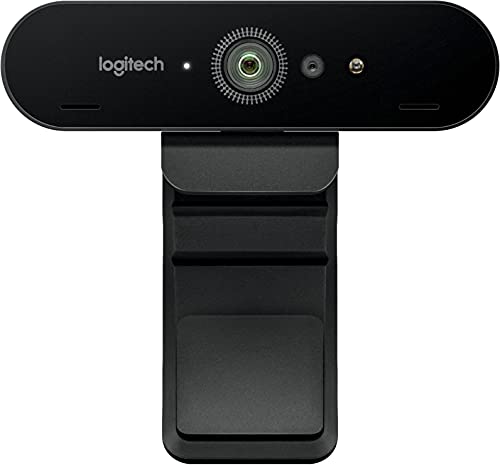
Best Renewed Value
Logitech 4K Pro Webcam (Renewed)
Buyers who want genuine 4K and HDR without paying premium prices
Our take Check price for Logitech 4K Pro Webcam (Renewed) (opens in a new tab)

Honest Budget Alternative (1080p, Not 4K)
Logitech C920S HD Pro Webcam (1080p)
Buyers who read the specs above and realize they only need 1080p for meetings
Our take Check price for Logitech C920S HD Pro Webcam (1080p) (opens in a new tab)

Best for Apple Displays
Logitech 4K PRO Magnetic Webcam for Apple Pro Display XDR
Apple Pro Display XDR owners who want a stable magnetic-mount 4K webcam
Our take Check price for Logitech 4K PRO Magnetic Webcam for Apple Pro Display XDR (opens in a new tab)
Our Picks
Best Overall1 of 8
Logitech MX Brio Ultra HD 4K Webcam (Graphite) on Amazon (opens in a new tab)
The MX Brio is built for collaboration and streaming with genuine 4K capture and auto light correction that adapts to a bright window or a dim home office.
Best for
- Buyers who actually record or stream in 4K, not just take video calls
Why we like it
It's the most well-rounded pick here for anyone who actually records or streams in 4K rather than just taking 1080p video calls. Remember that most meeting platforms cap at 1080p regardless of the camera, so the 4K capability mainly shows up when you're recording locally or streaming to a platform that supports higher resolution. It includes a privacy shutter, an important feature that's easy to overlook when comparing specs.
Key dimensions & specs
- True 4K UHD capture
- Auto light correction
- Built-in privacy shutter
- USB-C connection
- Wide diagonal field of view
Pros
- True 4K capture for recording and compatible streaming platforms
- Auto light correction handles mixed lighting well
- Privacy shutter included
- USB-C for modern laptops
Cons
- Most expensive picks in this list at $194.99
- 4K benefit is wasted on standard 1080p-capped meetings
- Needs USB 3.0 bandwidth for full 4K output
Best for Streaming2 of 8
Logitech Brio Ultra 4K HD Webcam (Black) on Amazon (opens in a new tab)
The Brio Ultra targets streamers and meeting hosts who want true 4K resolution without stepping up to the MX Brio's price.
Best for
- Streamers who want true 4K output without the MX Brio's price tag
Why we like it
It captures well across a range of lighting conditions and works reliably with OBS and other streaming software.
A 4K stream needs solid upload bandwidth to avoid the webcam auto-downscaling mid-stream, worth checking your connection before assuming you'll get full resolution output. Sharing a USB hub with an external SSD or capture card can also cause bandwidth conflicts that show up as dropped frames.
Reliable OBS and streaming software compatibility.
Key dimensions & specs
- True 4K resolution
- Wide field of view
- USB 3.0 connection required for full 4K
- Works with OBS and major streaming software
- Auto-adjusting light correction
Pros
- True 4K resolution at a lower price than the MX Brio
- Reliable OBS and streaming software compatibility
- Good performance across varied lighting
- Wide field of view
Cons
- Needs a stable upload connection for full 4K streaming
- USB 3.0 bandwidth required, conflicts possible on a shared hub
- Still overkill for standard 1080p-capped meetings
Best Budget 4K3 of 8
EMEET C960 4K Webcam on Amazon (opens in a new tab)
The C960 brings a 4K CMOS sensor with PDAF autofocus and dual omnidirectional mics to a budget price point, well under half of most other 4K webcams in this list.
Best for
- Budget buyers who want to try 4K without a premium price
Why we like it
It includes auto light correction and a 73 degree field of view for typical desk video calls.
At this price the sensor is smaller than the premium picks, so expect noticeably softer detail and weaker low-light performance than the Logitech or Razer options above, even though the resolution number matches. It's a reasonable entry point if you want to try 4K without committing to a premium price.
Key dimensions & specs
- 4K UHD CMOS sensor
- PDAF auto focus
- Dual omnidirectional microphones
- 73° field of view
- Built-in privacy cover
Pros
- Lowest price of any true 4K webcam here
- PDAF autofocus keeps subjects sharp
- Privacy cover included
- Works with Zoom, Teams, Skype, Google Meet
Cons
- Smaller sensor than premium picks, softer detail
- Weaker low-light performance despite matching 4K resolution
- Dual mics are no substitute for a dedicated USB microphone
Best Large Sensor4 of 8
Razer Kiyo Pro Ultra 4K Webcam on Amazon (opens in a new tab)
The Kiyo Pro Ultra is built around a large sensor, the spec that actually drives low-light performance and natural depth of field, more than resolution alone.
Best for
- Serious streamers and content creators who want the best low-light sensor here
Why we like it
It includes a built-in microphone and shutter, and DSLR-style manual controls for buyers who want to fine-tune exposure and focus themselves. It's the most expensive pick in this list, positioned for serious content creators and streamers rather than everyday video calls. Its large sensor is the clearest example in this guide of why sensor size deserves more attention than the resolution number alone. DSLR-style manual controls for serious content creators.
Key dimensions & specs
- 4K resolution with large sensor
- Auto light correction
- Built-in mic and shutter
- DSLR-style manual controls
- Works with OBS, Xsplit, Zoom, Teams
Pros
- Large sensor delivers the best low-light performance in this list
- DSLR-style manual controls for serious content creators
- Built-in shutter and mic
- Pro-grade streaming and recording software compatibility
Cons
- Highest price in this list at $399.99
- Overkill for standard video calls
- Manual controls have a learning curve for casual users
Best Renewed Premium5 of 8
Elgato Facecam Pro, True 4K60 Webcam (Renewed) on Amazon (opens in a new tab)
The Facecam Pro supports true 4K at 60fps, a demanding spec for both the camera and your USB bandwidth, plus advanced light correction and DSLR-style controls.
Best for
- Buyers who want true 4K60 fps without paying full retail
Why we like it
Buying it renewed brings a premium 4K60 webcam down from its full retail price.
0 port without bandwidth-sharing devices, or the camera will auto-downscale mid-session. As with any renewed electronics, confirm the seller's return window before committing.
DSLR-style controls for fine-tuned image quality.
Key dimensions & specs
- True 4K60 resolution
- Advanced light correction
- DSLR-style manual controls
- Wide angle lens
- Renewed/refurbished condition
Pros
- True 4K60 fps, higher frame rate than most picks here
- DSLR-style controls for fine-tuned image quality
- Lower price than buying new
- Works with OBS, Teams, Zoom, PC and Mac
Cons
- Renewed condition means checking the return policy closely
- 4K60 needs strong bandwidth and a dedicated USB 3.0 port
- Still expensive even at the renewed price
Best Renewed Value6 of 8
Logitech 4K Pro Webcam (Renewed) on Amazon (opens in a new tab)
This renewed Logitech 4K Pro captures 4K at 30fps with autofocus, a 90 degree diagonal field of view, and RightLight 3 HDR for handling mixed lighting, all at a noticeably lower price than the newer MX Brio.
Best for
- Buyers who want genuine 4K and HDR without paying premium prices
Why we like it
Five times digital zoom adds some framing flexibility without moving the camera itself.
As with any renewed device, check the seller's return window before purchasing. This is a reasonable middle ground for buyers who want genuine 4K and HDR handling without the premium MX Brio or Kiyo Pro Ultra price tags.
Key dimensions & specs
- 4K resolution at 30fps
- Auto focus
- 90° diagonal field of view
- 5x digital zoom
- RightLight 3 with HDR
Pros
- True 4K at a mid-range renewed price
- RightLight 3 HDR handles mixed lighting well
- Wide 90° field of view
- 5x digital zoom for framing flexibility
Cons
- Renewed condition means checking the return policy closely
- 30fps only, not the 60fps of the Facecam Pro
- No built-in privacy shutter mentioned in the listing
Honest Budget Alternative (1080p, Not 4K)7 of 8
Logitech C920S HD Pro Webcam (1080p) on Amazon (opens in a new tab)
To be upfront, the C920S captures at 1080p, not 4K, and it's included here as an honest budget alternative because most video calls cap at 1080p by default anyway.
Best for
- Buyers who read the specs above and realize they only need 1080p for meetings
Why we like it
If your actual use case is Zoom or Teams meetings rather than 4K recording or streaming, this camera delivers clear stereo audio and reliable 30fps video at a fraction of a true 4K webcam's price.
It includes a built-in privacy shutter and stereo microphones, and its long track record makes it a low-risk pick for anyone who realizes, after reading the specs above, that they don't actually need 4K.
1080p is enough for the vast majority of video call platforms.
Key dimensions & specs
- 1080p resolution at 30fps
- Built-in stereo microphones
- Privacy shutter
- Clip-mount design
- Widely compatible with video call software
Pros
- Lowest price in this list by a wide margin
- 1080p is enough for the vast majority of video call platforms
- Clear stereo audio built in
- Long-established, reliable pick
Cons
- Not actually 4K, despite sitting in this comparison for context
- No autofocus tracking or HDR light correction
- Smaller sensor than the true 4K picks
Best for Apple Displays8 of 8
Logitech 4K PRO Magnetic Webcam for Apple Pro Display XDR on Amazon (opens in a new tab)
This 4K webcam ships with a magnetic mount purpose-built for the Apple Pro Display XDR, avoiding the wobbly clip-on mounting that a heavier 4K webcam can suffer on a thin laptop lid or curved monitor edge.
Best for
- Apple Pro Display XDR owners who want a stable magnetic-mount 4K webcam
Why we like it
Genuine mounting stability matters more than most buyers expect once a camera has real weight to it.
If you don't own a Pro Display XDR, this magnetic mount won't attach the same way, so this pick is specifically for that display rather than a general-purpose 4K webcam. For Apple Pro Display XDR owners, it solves a mounting problem none of the clip-on picks in this list address.
Key dimensions & specs
- 4K resolution
- Magnetic mount for Apple Pro Display XDR
- Stable mounting, no clip-on wobble
- Compact form factor
- USB connection
Pros
- Purpose-built magnetic mount avoids clip-on wobble
- True 4K resolution
- Compact and unobtrusive on the display bezel
- Solves a mounting problem specific to a heavy webcam
Cons
- Magnetic mount only works with the Pro Display XDR specifically
- Not a general-purpose mounting solution
- Limited usefulness outside its intended display
How We Chose These 4K Webcams
Each pick was assessed across 5 criteria weighted for real-world use.
- Verified whether each listing delivers true 4K capture and flagged the one 1080p pick in this list honestly rather than folding it in as 4K.
- Sensor size and low-light handling
- Weighed sensor size and light correction features against resolution alone, since a larger sensor drives real-world image quality more than the megapixel count.
- 0 requirements and noted where a shared hub or weak upload connection could force the camera to auto-downscale.
- Considered how each webcam mounts, standard clip, magnetic, or tripod-compatible, since a heavier 4K camera can wobble on a thin laptop lid.
- Privacy and value for price
- Weighed privacy shutter presence and included features against price, from the budget 4K pick up through the large-sensor pro camera.
What to Look for in a 4K Webcam
Key buying criteria so you get the right fit the first time.
Match actual size and capacity to your real need, not the category label alone
Listings for a webcam 4k often use a size or capacity label ("compact," "large," "heavy-duty") that isn't standardized across brands, so the same label can mean meaningfully different actual dimensions or capacity from one product to the next.
This matters because buying based on the category label rather than the specific listed dimensions or capacity is a common way to end up with something that doesn't actually fit your space or handle your real load.
Check the listing for exact measurements or a stated capacity figure, and compare that directly against your actual space or need, not just the marketing size category.
Verify build material and construction quality from reviews, not just spec-sheet claims
A product description can describe material or construction in flattering terms that don't always hold up under real, sustained use, and the gap between a listing's claimed quality and its actual durability only shows up in how the product performs after weeks or months of real use, not in day-one photos.
This matters more for anything you'll use daily or under real load, less for occasional light use where durability matters less.
Check reviews specifically for mentions of how the webcam 4k holds up over time, not just unboxing-day impressions, and treat a listing's own quality claims as a starting point to verify, not a guarantee.
Confirm any headline feature actually works as advertised, not just that it's listed
A feature appearing in a product's bullet points doesn't guarantee it performs well in practice, some features are functional but limited, and a few are closer to a marketing checkbox than a useful capability.
This matters directly if a specific feature is the main reason you're choosing this webcam 4k over a simpler, cheaper alternative, since a feature that underperforms in practice undermines the whole reason for paying more.
Check reviews specifically for real-world experiences with the exact feature that matters most to you, not just whether the feature is listed at all.
Weigh review count alongside rating, not rating alone
This matters more for a purchase you're relying on to perform consistently over time, less for a low-stakes, easily replaceable item.
Check both the star rating and the review count together for any webcam 4k you're considering, and treat a high rating on a very small review count as a promising but less-proven signal.
Check compatibility and fit with your existing setup before ordering
A webcam 4k that looks like a straightforward fit in photos can still have a compatibility detail, a connector type, a mounting requirement, a size threshold, that doesn't match your existing setup, and this kind of mismatch is one of the most common and avoidable reasons for a return.
This matters directly if the product needs to physically connect to, mount on, or otherwise integrate with something you already own.
Check the listing's specific compatibility details against your exact existing setup, not just the general product category, before ordering.
How to Choose a 4K Webcam
By Rating Confidence: Highest Rated vs Most Reviewed
| Logitech MX Brio Ultra HD 4K Webcam | |
| Logitech MX Brio Ultra HD 4K Webcam |
| Razer Kiyo Pro Ultra 4K Webcam |
EMEET C960 4K Webcam vs Razer Kiyo Pro Ultra 4K Webcam
- The lower-priced option in this comparison, worth checking its actual specs and review history against your specific need before assuming it's enough.
- Razer Kiyo Pro Ultra 4K Webcam
- The higher-priced option, worth it if it offers real, checkable headroom in build quality, capacity, or features over the cheaper pick.
Default to EMEET C960 4K Webcam unless your specific need calls for the pricier pick's extra headroom.
| Logitech MX Brio Ultra HD 4K Webcam |
For a First-Time Buyer Specifically
- Clear, specific dimensions or capacity and a real, established review history, not just marketing language.
- You need real durability and feature depth for regular use, where Razer Kiyo Pro Ultra 4K Webcam's build gives real headroom over the cheaper picks.
- You only need this for light or occasional use, where EMEET C960 4K Webcam covers the same job at a lower price.
Frequently Asked Questions
Do I actually need a 4K webcam for video calls?
Zoom, Teams, and Google Meet all cap video quality at 1080p by default regardless of the camera, so a 4K webcam mainly benefits local recording or streaming to a platform that supports higher resolution. If meetings are your only use case, a 1080p pick like the Logitech C920S will look identical on the call.
Why does sensor size matter more than resolution?
A larger sensor captures more light per pixel, which improves low-light performance and produces a more natural depth of field than a smaller sensor at the same resolution. Two 4K webcams can look noticeably different in real-world video because of sensor size differences that resolution alone doesn't reveal.
Why does my 4K webcam look blurry or downscale during a stream?
This is usually a bandwidth issue, either your internet upload speed can't sustain 4K, or the webcam is sharing a USB hub with another bandwidth-heavy device like an external SSD or capture card. 0 port and check your actual upload speed before troubleshooting further.
Do background removal and auto-framing features run on the webcam or my computer?
They run on your computer's processor, not on the webcam itself. This means the quality and smoothness of AI features like background blur or auto-framing depends on your computer's processing power, not which webcam you buy, even a premium 4K webcam won't fix a weak laptop CPU.
Is it worth buying a 1080p webcam instead of a 4K one?
Yes, if your main use case is standard video calls. Since most meeting platforms cap at 1080p anyway, a webcam like the Logitech C920S delivers the same practical call quality as a 4K webcam for a fraction of the price. Save the 4K upgrade for when you're actually recording or streaming in higher resolution.
Does a privacy shutter matter on a webcam?
Yes, it's a simple physical feature that's easy to overlook while comparing resolution and sensor specs, but it gives a genuine, hardware-level guarantee that the camera isn't capturing video, unlike a software toggle. Several picks in this list, including the MX Brio and EMEET C960, include one built in.
Bottom Line
Best overall: Logitech MX Brio Ultra HD 4K Webcam (Graphite) — best overall pick in this roundup. See the full verdicts above for every pick, with pros, cons and who each one suits.
Browse all 4k webcams on Amazon — Prime-eligible options with current pricing.