
Buying Guide
The Best 4K Projectors Under $200: Picks and Trade-offs
We looked at 4 4K projectors under $200 side by side, with the trade-offs that separate them and who each one suits.
By Jamie Cole, Lead Product Researcher
9 min read4 products evaluated
We may earn a commission from purchases made through links in this guide. Learn more.
Under $200, every '4K projector' actually has a native 1080P display panel that decodes and downscales 4K source content rather than physically projecting 4K resolution, and understanding this distinction matters more than comparing marketing claims.
We compared this lineup on stated ANSI brightness, built-in streaming app access, and auto-calibration features, since these budget projectors compete primarily on picture brightness and setup convenience rather than genuine resolution differences.
Quick Picks
Our 4 recommendations at a glance. Tap a pick for the full verdict.

Best Overall
Outdoor Projector with Netflix Built-in, 3500 Brightness 4K Support
Buyers who want officially licensed Netflix with the highest stated brightness
Our take Check price for Outdoor Projector with Netflix Built-in, 3500 Brightness 4K Support (opens in a new tab)

Best App Selection
X6 Native 1080P Smart Projector, AI Voice Assist
Buyers who want the broadest streaming app selection and quietest operation
Our take Check price for X6 Native 1080P Smart Projector, AI Voice Assist (opens in a new tab)

Best Built-In Speakers
Magcubic 4K Smart Projector, 800 ANSI Native 1080P
Buyers who want more powerful built-in audio without external speakers
Our take Check price for Magcubic 4K Smart Projector, 800 ANSI Native 1080P (opens in a new tab)
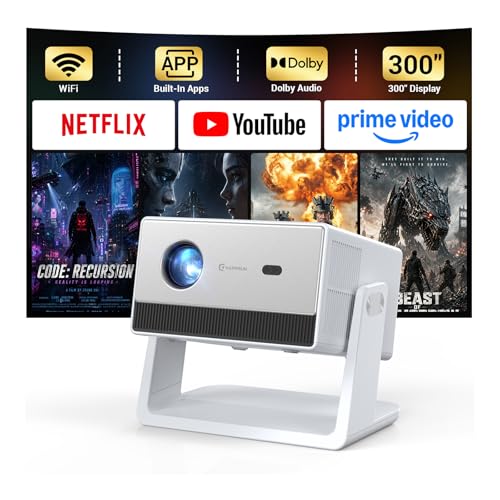
Best Budget Pick
HAPPRUN 1500 ANSI 4K Decoding Outdoor Projector
Buyers who want the lowest price with solid streaming and audio
Our take Check price for HAPPRUN 1500 ANSI 4K Decoding Outdoor Projector (opens in a new tab)
Our Picks
Best Overall1 of 4
Outdoor Projector with Netflix Built-in, 3500 Brightness 4K Support on Amazon (opens in a new tab)
This projector's officially licensed Netflix app is built in, letting you stream directly without a Fire Stick or dongle, a real convenience the other picks in this comparison achieve through a more generic app store instead.
Best for
- Buyers who want officially licensed Netflix with the highest stated brightness
Why we like it
Its 3500 ANSI lumens rating is the highest stated brightness in this tier, backed by true native 1080P resolution with 4K decoding and HDR10 support.
Compared to the X6 pick below, this one adds a 360-degree rotatable gimbal stand specifically designed for ceiling, wall, or tent projection at any angle, and its LED engine is rated for up to 150,000 hours of use backed by a 2-year manufacturer protection. Dual auto temperature control systems keep operation stable during extended sessions.
Best for buyers who want officially licensed Netflix with the highest stated brightness in this tier.
Key dimensions & specs
- Native 1080P, 4K decoding, 3500 ANSI lumens
- Officially licensed Netflix built-in
- 360 degree rotatable gimbal stand
Pros
- Officially licensed Netflix works without an external streaming device
- Highest stated brightness in this comparison at 3500 ANSI lumens
- 150,000 hour LED engine backed by 2-year protection
Cons
- Native resolution remains 1080P despite 4K decoding support
- Auto focus requires the unit sit within 15 degrees of level
Best App Selection2 of 4
X6 Native 1080P Smart Projector, AI Voice Assist on Amazon (opens in a new tab)
0 operating system comes pre-installed with Netflix, YouTube, Disney+, and Prime Video, plus access to over 1,000 additional apps through the built-in Play Store, the broadest app ecosystem in this comparison.
Best for
- Buyers who want the broadest streaming app selection and quietest operation
Why we like it
Its under 28 DB cooling system runs specifically quieter than comparable projectors, avoiding distractions during quiet on-screen moments.
Compared to the GRR962P4 pick above, this one adds a smart voice remote with air mouse and QWERTY keyboard functionality alongside a dedicated smartphone remote app, giving you multiple control methods. 4 lets you use it as a standalone Bluetooth speaker in addition to its projection function.
Best for buyers who want the broadest streaming app selection with the quietest operation.
Key dimensions & specs
- Native 1080P, 4K/8K decoding, 800 ANSI lumens
- Android 14.0 OS, 1000+ apps
- Under 28 DB cooling system
Pros
- Broadest app ecosystem with 1000+ apps via built-in Play Store
- Quietest cooling system in this comparison at under 28 DB
- Multiple remote control options including voice and air mouse
Cons
- Lower stated brightness than the GRR962P4 pick's 3500 ANSI lumens
- Smart remote requires batteries not included in the box
Best Built-In Speakers3 of 4
Magcubic 4K Smart Projector, 800 ANSI Native 1080P on Amazon (opens in a new tab)
This projector's built-in 15W high-fidelity stereo speaker delivers more powerful audio than the smaller speaker setups typical at this price point, meaning it's less likely you'll need external speakers for casual movie nights.
Best for
- Buyers who want more powerful built-in audio without external speakers
Why we like it
Its built-in TV stick module provides instant access to YouTube and over 10,000 streaming apps without needing a separate dongle.
Compared to the X6 pick above, this one adds dynamic obstacle avoidance that automatically adjusts the image to avoid interference from objects in the projection path, a specific auto-calibration feature not every budget projector includes. Four standard 1/4 inch mounting holes on the bottom make it compatible with most tripods, desktop brackets, and ceiling mounts.
Best for buyers who want a more powerful built-in speaker without needing external audio equipment.
Key dimensions & specs
- Native 1080P, 4K decoding, 800 ANSI lumens
- 15W built-in stereo speaker
- Dynamic obstacle avoidance, standard mounting holes
Pros
- More powerful 15W built-in speaker than typical budget projectors
- Dynamic obstacle avoidance adjusts for objects in the projection path
- Standard 1/4 inch mounting holes work with common tripods and brackets
Cons
- Lower stated brightness than the GRR962P4 or X6 picks
- 3 second setup claim is slower than some faster-calibrating competitors
Best Budget Pick4 of 4
HAPPRUN 1500 ANSI 4K Decoding Outdoor Projector on Amazon (opens in a new tab)
2 million videos across Netflix, YouTube, and Prime Video without any extra equipment, delivering solid content access at the lowest price in this comparison.
Best for
- Buyers who want the lowest price with solid streaming and audio
Why we like it
Its 2x10W built-in speakers support Dolby Audio, providing clear dialogue and rich bass without external speakers required.
Compared to the Magcubic pick above, this one prioritizes a lower price point while still delivering 1500 ANSI lumens brightness and a 300 inch maximum screen size with 50% zoom flexibility. Manual focus paired with auto keystone correction gives you fine control over sharpness while still simplifying initial setup.
Best for buyers who want the lowest price with solid built-in streaming and Dolby Audio support.
Key dimensions & specs
- 4K decoding, 1500 ANSI lumens
- 2x10W speakers, Dolby Audio
- Manual focus, auto keystone correction
Pros
- Cheapest pick in this comparison at $139.97
- Dolby Audio built-in speakers deliver clear, rich sound
- 300 inch maximum screen size with 50% zoom flexibility
Cons
- Requires manual focus rather than fully automatic focus
- Ceiling projection specifically requires manual keystone adjustment
How We Chose These 4K Projectors Under $200
Each pick was assessed across 5 criteria weighted for real-world use.
- Native Resolution vs 4K Decoding
- Verified whether each pick has a genuine native 4K panel or a 1080P panel decoding 4K source content.
- Compared stated ANSI lumens figures across the lineup, from 800 to 3500.
- Compared built-in app ecosystems and officially licensed streaming service access.
- Compared auto focus, keystone correction, and obstacle avoidance across all four picks.
- Compared built-in speaker wattage and audio technology support.
What to Look for in a 4K Projector Under $200
Key buying criteria so you get the right fit the first time.
Every '4K Projector' Under $200 Has a Native 1080P Panel, Not a Genuine 4K Display
All four picks in this comparison state native 1080P resolution with 4K decoding support, meaning the projector's actual light-projecting chip only has 1080P worth of pixels, and any 4K content you feed it gets processed and downscaled to display at 1080P, a real technical distinction from a genuine native 4K panel that physically has four times as many pixels. This matters because the marketing term '4K projector' or '4K support' at this price point never means what it implies for image sharpness, and buyers expecting true 4K detail will be disappointed regardless of which budget pick they choose. Understand that '4K decoding' or '4K support' at this tier means the projector accepts and processes 4K source files, not that it displays them at native 4K resolution, before comparing based on resolution claims alone.
ANSI Lumens Is a Standardized Brightness Measurement Worth Comparing Directly, Unlike Generic 'Lumens' Claims
ANSI lumens is measured using a standardized industry testing method across multiple points on the screen, making it a more reliable, comparable figure than a generic 'lumens' number that manufacturers can measure using less rigorous or standardized methods, sometimes inflating the perceived brightness. This matters because the picks in this comparison specifically state ANSI lumens (ranging from 800 to 3500), giving you comparable figures, unlike listings elsewhere in the broader market that cite unqualified lumens numbers that don't reflect real-world brightness as accurately. Prioritize projectors with a stated ANSI lumens figure over ones citing only generic lumens, and treat the ANSI number as the more trustworthy basis for brightness comparison.
Officially Licensed Streaming Apps Differ From Generic App Store Access in Reliability and Update Support
The Netflix Built-in pick specifically states its Netflix access is officially licensed, meaning the app is directly supported and updated by Netflix through a formal partnership, while a generic Android app store installation of Netflix (or a similar streaming app) on other budget projectors can sometimes break with app updates or lack official support if issues arise. This matters if you specifically prioritize Netflix as your primary streaming service, where official licensing provides more assurance of long-term compatibility and support. Check whether a listing specifically states 'officially licensed' for a particular streaming service you care about, rather than assuming any projector with a general app store provides equally reliable access to that same service.
Dynamic Obstacle Avoidance Solves a Real Setup Problem in Rooms With Furniture or Decor Between Projector and Screen
The Magcubic pick's dynamic obstacle avoidance feature automatically adjusts the projected image to avoid interference from objects positioned between the projector and the screen or wall, a useful feature if your room layout doesn't offer a completely clear line of sight. This matters more in smaller rooms or unconventional layouts where furniture, light fixtures, or decor might partially obstruct the projection path, and matters less in a dedicated, clear home theater setup with no obstacles. Consider your actual room layout and whether obstacles interfere with your intended projection path before treating this feature as a meaningful differentiator over a simpler auto-focus-only design.
Manual Focus Requires More Setup Effort Than Auto Focus but Can Offer More Precise Control in Practice
The HAPPRUN pick specifically uses manual focus rather than the automatic focus systems on the other three picks in this comparison, meaning you'll need to physically adjust the lens for sharpness each time you reposition the projector, a real tradeoff for its lower price point. This matters if you plan to move the projector between locations frequently, where auto focus saves meaningful setup time, and matters less if the projector will stay in one fixed position most of the time, where a one-time manual focus adjustment is a minor inconvenience. Consider how often you'll reposition the projector before deciding whether auto focus is worth paying more for over manual focus.
How to Choose a 4K Projector Under $200
| Officially licensed Netflix with the highest brightness | Outdoor Projector with Netflix Built-in, 3500 Brightness 4K Support |
|---|---|
| The broadest streaming app selection and quietest operation | X6 Native 1080P Smart Projector, AI Voice Assist |
| More powerful built-in audio without external speakers | Magcubic 4K Smart Projector, 800 ANSI Native 1080P |
| The lowest price with solid streaming and audio | HAPPRUN 1500 ANSI 4K Decoding Outdoor Projector |
High Brightness vs Broad App Selection
- High brightness (Netflix Built-in, 3500 ANSI)
- Prioritizes visible picture quality in rooms with some ambient light, better for daytime or partially lit viewing.
- Broad app selection (X6, 1000+ apps)
- Prioritizes content access variety through a full Android app ecosystem, better if you want apps beyond the standard streaming services.
If your viewing space isn't fully darkened, the higher-brightness Netflix Built-in pick will produce a more visible image. If content variety through a broader app selection matters more, the X6's Android ecosystem delivers that.
| Some ambient light, daytime use | X6 (800 ANSI, but quiet for late use) |
|---|---|
| Bright room or outdoor daytime use |
For a Buyer Who Prioritizes Genuine Netflix Access Specifically
- An officially licensed Netflix app built directly into the projector's operating system, not just general 'streaming compatible' language that might require an external dongle.
- The Netflix Built-in pick specifically confirms officially licensed Netflix access without needing a Fire Stick or Chromecast dongle.
- You want officially licensed Netflix access with the highest stated brightness, where the Netflix Built-in pick delivers both at the top of this tier.
- You just want solid built-in streaming and Dolby Audio without needing maximum brightness, where the HAPPRUN pick covers that for about $40 less.
Frequently Asked Questions
Will these budget '4K projectors' actually display 4K movies in true 4K resolution?
No, all four picks in this comparison have native 1080P display panels that decode and downscale 4K source content to 1080P, so while they can accept and process 4K files, the actual projected image resolution is 1080P, not genuine 4K.
What's the most common mistake buyers make when comparing brightness between these budget projectors?
Comparing generic 'lumens' figures from other market listings against the ANSI lumens figures stated by these four picks, when ANSI lumens is a standardized, more reliable measurement that isn't directly comparable to unqualified lumens claims elsewhere.
Is the Netflix Built-in pick worth it over the cheaper HAPPRUN option?
If you specifically want officially licensed Netflix access and the highest stated brightness, yes, but if you just want solid streaming access and Dolby Audio at the lowest price, the HAPPRUN pick covers that for about $40 less.
How do I know if my room is dark enough for these budget projectors to look good?
As a general rule, the higher a pick's ANSI lumens figure, the better it performs with some ambient light present, so the 3500 ANSI Netflix Built-in pick handles brighter rooms better than the 800 ANSI Magcubic or X6 picks, which perform best in fully darkened spaces.
Do any of these projectors require a separate streaming device like a Fire Stick?
No, all four picks in this comparison include built-in streaming capability through either an Android-based app store or a dedicated streaming system, so none require an external TV stick or dongle for basic streaming access.
Can these budget projectors be used for gaming without noticeable lag?
These budget picks aren't specifically designed or marketed for competitive gaming with low input lag figures, so if gaming performance is a priority, checking for projectors with explicitly stated low input lag specifications in a higher tier is worth doing before assuming any budget projector handles gaming well.
Bottom Line
Best overall: Outdoor Projector with Netflix Built-in, 3500 Brightness 4K Support — best overall pick in this roundup. See the full verdicts above for every pick, with pros, cons and who each one suits.
Browse all 4k projectors under $200 on Amazon — Prime-eligible options with current pricing.